
Many people love the convenience of wireless earbuds, and JLab has become a popular brand for those who want good sound at a fair price. But like any technology, things can go wrong. One of the most common issues is the left earbud not working. This problem can feel frustrating, especially when you just want to listen to your favorite song or take an important call. Luckily, most problems with JLab left earbuds can be fixed at home.
In this guide, you’ll learn why your JLab left earbud might stop working, how to troubleshoot it, and what steps you can take to get back to enjoying your music. You’ll also discover some tips many beginners miss, so you can avoid these problems in the future.
Common Reasons The Jlab Left Earbud Stops Working
Understanding the main causes can help you fix the problem faster. Here are the most frequent reasons your left earbud may fail:
- Connection Issues: Sometimes, the earbuds lose sync with each other or your device. This is especially common after pairing with a new phone or computer.
- Battery Problems: If the left earbud isn’t charging properly, it won’t power on.
- Dirt or Earwax: Small debris can block the charging contacts or the speaker mesh.
- Software Bugs: Glitches in firmware or Bluetooth pairing can cause one earbud to disconnect.
- Physical Damage: Drops, water exposure, or bending can damage internal parts.
- Incorrect Settings: Mono or balance settings on your device can mute one side.
It’s important to check each cause, not just assume it’s a hardware failure. Many users skip the basics and end up frustrated.
Quick Checks Before Troubleshooting
Before you start with detailed fixes, do these simple checks:
- Restart your device (phone, tablet, or computer).
- Remove the earbuds from your ears, wait 10 seconds, and try again.
- Check the volume balance in audio settings to make sure both sides are active.
- Try the earbuds with a different device to see if the problem follows the earbuds or stays with the original device.
These quick steps can sometimes solve the problem immediately.

How To Fix A Jlab Left Earbud That’s Not Working
If the quick checks didn’t help, follow these steps to find and fix the issue.
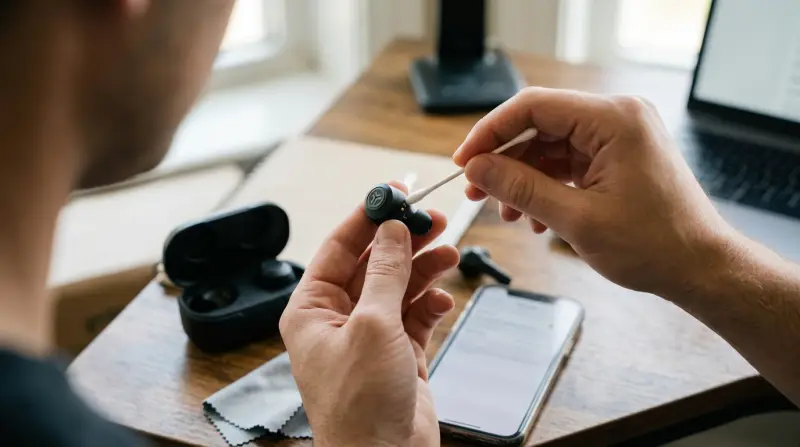
Clean The Earbuds And Charging Case
Dirt, dust, and earwax are common but often missed. Even a small amount can block the charging pins or speaker mesh.
How to clean:
- Use a soft, dry cloth to wipe the earbuds and charging case.
- For the mesh, gently use a dry toothbrush or cotton swab.
- Check the charging contacts (the little metal dots on the earbuds and inside the case). Clean them gently with a dry cotton swab.
- Avoid using water or alcohol.
Non-obvious tip: Even new earbuds can arrive with some factory residue on the contacts. Cleaning them before first use can prevent charging issues.
Reset The Jlab Earbuds
A reset can fix pairing and sync problems between the left and right earbuds.
Reset steps (most JLab models):
- Forget the earbuds from your device’s Bluetooth settings.
- Place both earbuds in the charging case, leave the case open.
- While in the case, tap each earbud 7 times quickly. The lights should blink.
- Remove both earbuds from the case. They should enter pairing mode together.
The reset process may be different for your model. Check the user manual or the official JLab support site if these steps don’t work.
Why this matters: Many users only reset their phone’s Bluetooth, not the earbuds themselves. Resetting the earbuds directly solves many sync problems.
Check The Charging And Battery
If the left earbud isn’t charging, it won’t turn on.
What to do:
- Place both earbuds in the case and check if the left earbud’s LED light turns on.
- If only the right LED lights up, clean the contacts and try again.
- Test with a different charging cable or outlet.
Hidden insight: Some JLab cases have a small plastic sticker on the charging contacts (especially new models). Remove this sticker if present.
Pair The Earbuds Correctly
Sometimes, the left earbud doesn’t pair with the right one, so you only hear sound from one side.
How to pair both earbuds:
- Remove both earbuds from the case at the same time.
- Wait for them to sync (they may flash white/blue).
- Go to your device’s Bluetooth settings and select “JLab JBuds Air” (or your model).
If only the right earbud appears: Reset both earbuds and repeat the process.
Update Firmware (if Available)
Some JLab earbuds can update their firmware through an app or computer connection. An update can fix software bugs that cause one earbud to disconnect.
- Check the JLab website or app for firmware update instructions.
- Follow the steps carefully. Don’t disconnect the earbuds during an update.
Test For Physical Damage
If you dropped your earbuds or they got wet, the left side may be damaged inside.
- Check for cracks or water inside the case.
- Try the left earbud in another case (if possible) to see if it charges.
If you suspect physical damage, contact JLab support for repair or warranty help.
Check Audio Settings On Your Device
Sometimes, the problem is with your phone or computer settings, not the earbuds.
- Go to your device’s audio or accessibility settings.
- Look for “Mono Audio” or “Audio Balance.”
- Make sure the balance is in the middle, not to the right.
Example: On iPhones, go to Settings > Accessibility > Audio/Visual > Balance.
Why this helps: Some apps or updates can accidentally change these settings. Always check before assuming the earbuds are broken.
Comparing Jlab Earbud Issues And Solutions
It’s helpful to see common problems and which solutions usually work. Here’s a simple comparison:
| Issue | Most Effective Fix | Success Rate (est.) |
|---|---|---|
| Connection/sync problem | Reset earbuds | 85% |
| Charging issue | Clean contacts | 80% |
| Physical damage | Contact support | Varies |
| Audio balance setting | Adjust settings | 90% |
Battery Life And Charging Comparison
JLab offers different models, and battery performance may influence charging problems. Here’s a quick look at popular models:
| Model | Battery Life (Earbuds) | Charging Case Adds | Common Charging Problems |
|---|---|---|---|
| JBuds Air | 6 hours | 18 hours | Contact misalignment |
| Epic Air Sport | 15 hours | 55 hours | Case not closing fully |
| Go Air Pop | 8 hours | 24 hours | Loose earbud fit |
If your case isn’t charging the left earbud, check that it’s seated properly and the case is fully closed.
When To Contact Jlab Support
If you’ve tried all the above steps and your left earbud still isn’t working, it may be time to get professional help.
- Check your warranty status. JLab offers a 2-year warranty on most products.
- Contact their support team through the official website.
- Be ready to provide your purchase details, the model, and what you’ve already tried.
Take a short video of the problem to send with your support ticket. This can speed up the process.

How To Prevent Future Earbud Problems
A few simple habits can help keep your JLab earbuds working well:
- Clean the earbuds regularly to prevent dirt from building up.
- Store them in the case when not in use to avoid drops and moisture.
- Avoid overcharging by unplugging the case when fully charged.
- Update firmware when notified by JLab.
- Be gentle when inserting or removing the earbuds.
Extra insight: Many users damage their earbuds by forcing them into the case the wrong way. Make sure you place them gently and correctly.
Are All Wireless Earbuds The Same?
Not all earbuds are built the same. JLab has become popular for making affordable, reliable models, but other brands may have different issues or solutions. Here’s a brief comparison:
| Brand | Typical Problems | Support Quality |
|---|---|---|
| JLab | Charging contacts, sync issues | Good (2-year warranty) |
| Skullcandy | Case battery, pairing | Average |
| Anker Soundcore | App glitches, battery life | Good |
If you’re considering other brands, always check for customer support and warranty length. Some brands offer better after-sales service than others.
For more details on wireless earbud technology and comparisons, you can visit the Wikipedia page on wireless headphones.
Frequently Asked Questions
Why Does Only My Left Jlab Earbud Stop Working?
The left earbud is often the “secondary” earbud. If it loses sync, has a dirty charging contact, or is affected by a software glitch, it may stop working while the right one keeps playing.
How Do I Reset My Jlab Left Earbud?
Place both earbuds in the charging case, then tap each earbud 7 times quickly. The lights should blink. Remove both, and they should pair together. Always check your model’s manual for the exact process.
Can Water Damage Cause Only One Earbud To Fail?
Yes. Even a few drops of water can damage the circuit inside one earbud. Water damage is a common reason for permanent failure, especially if the case or earbuds are not water-resistant.
What Should I Do If Cleaning And Resetting Don’t Fix The Left Earbud?
If you’ve tried cleaning, resetting, and checking all settings, but the left earbud still doesn’t work, contact JLab support. Provide details on what you’ve tried and ask about warranty options.
Is It Possible To Buy A Replacement Left Earbud Only?
JLab sometimes offers replacement single earbuds, but availability depends on the model and region. Check the official JLab site or contact support for options.
If your JLab left earbud is not working, don’t panic. Most issues have simple solutions, and you can often fix them at home with a little patience. Regular cleaning, careful charging, and following the steps above can prevent future problems. But if all else fails, JLab’s support team is there to help. With this knowledge, you can get back to your favorite music or podcasts and enjoy your wireless freedom again.