
If you own a Dyson vacuum, you expect powerful cleaning and smooth operation. But what happens when the beater bar—the spinning brush under the head—suddenly stops working? Whether it stops spinning, makes strange noises, or seems stuck, the beater bar is essential for cleaning carpets and picking up debris. A non-working beater bar can turn your high-end vacuum into a weak dust collector. In this guide, you’ll learn why this problem happens, how to fix it yourself, and when it’s time to call for expert help. If you want to get your Dyson back to peak performance, keep reading.
What Is The Beater Bar And Why Is It Important?
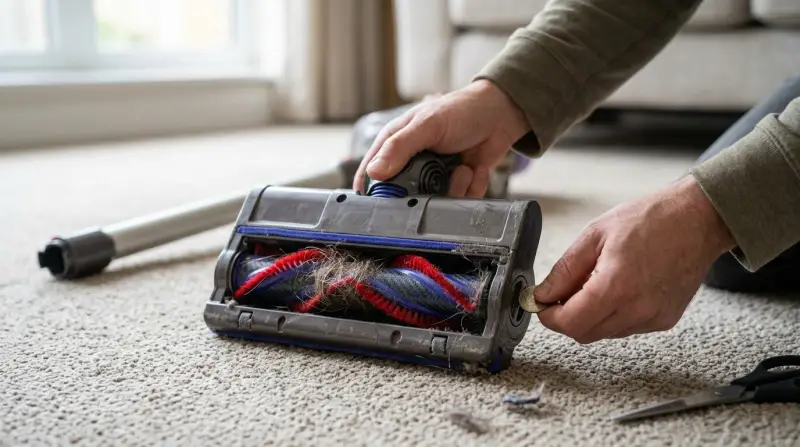
The beater bar, sometimes called a brush roll, is a rotating cylinder with bristles. It sits at the bottom of your vacuum cleaner head. When working correctly, it spins rapidly, beating and brushing the carpet fibers. This action loosens dirt, hair, and dust, making them easy to suck up.
For homes with carpets, the beater bar is critical. Without it, your Dyson may still pick up some surface debris, but most dirt stays deep inside the carpet. That’s why a working beater bar is vital for real cleaning power.
Common Reasons The Dyson Beater Bar Stops Working
Many Dyson owners are surprised when the brush stops spinning. Here are the most frequent causes:
- Obstructions – Hair, thread, or large debris can wrap around the bar, stopping it from turning.
- Clogged Filters – Dirty filters can cause the vacuum to lose suction, putting strain on the brush motor.
- Damaged Belt – The belt drives the beater bar. If it breaks or slips, the bar won’t spin.
- Power Issues – Low battery (for cordless models) or poor electrical connections can stop the bar.
- Brush Bar Settings – Some Dysons let you turn the brush bar on or off for different floors. Wrong settings can keep it from spinning.
- Motor Problems – If the brush bar motor fails, the bar stops completely.
- Automatic Safety Shutoff – Some Dysons have sensors that stop the bar if it overheats or senses a jam.
Understanding these reasons is the first step. Next, let’s see how to diagnose the problem.
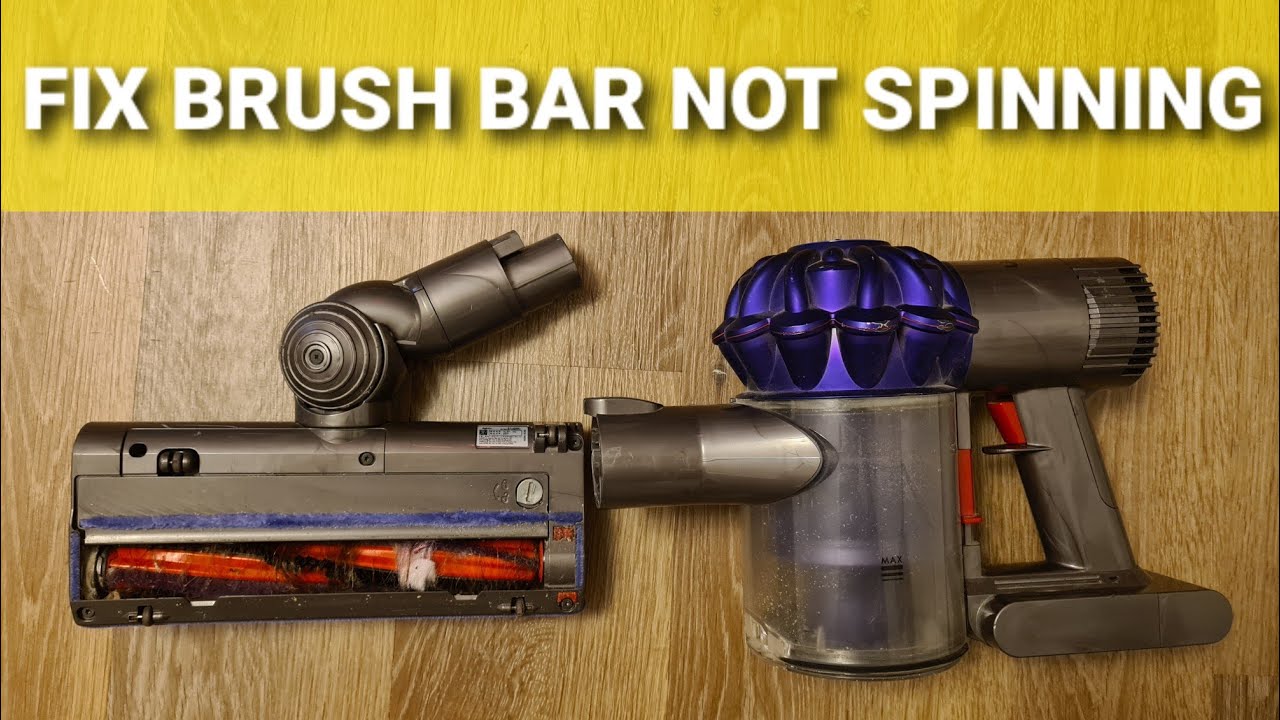
How To Diagnose A Non-spinning Beater Bar
Diagnosing your Dyson’s beater bar issue saves time and money. Follow these steps:
Visual Inspection: Unplug your vacuum or remove the battery (for cordless models). Flip it over and check the beater bar for visible tangles or debris. Try turning the bar by hand. If it doesn’t move, you may have a blockage.
Listen For Unusual Noises: When you turn on the vacuum, does it make grinding, squeaking, or clicking sounds? Strange noises can mean something is caught in the bar or the belt is slipping.
Check The Brush Bar Indicator: Many Dyson models have a brush bar indicator light. If it’s flashing or red, it usually means a jam or motor issue.
Test The Settings: Make sure the brush bar switch is on (if your model has one). Some Dysons automatically stop the bar when using certain floor types.
Battery And Power Check: For cordless models, low battery can stop the beater bar. For corded models, check the plug and outlet.
Step-by-step Guide: How To Fix A Dyson Beater Bar
Once you’ve identified the possible cause, follow these steps to fix your Dyson’s beater bar.
Remove Obstructions
- Power off and unplug your vacuum.
- Lay the vacuum on its back for easy access.
- Use scissors or a seam ripper to cut away hair and threads wrapped around the brush.
- Pull out larger debris by hand.
- Rotate the bar to ensure it spins freely.
Clean Or Replace Filters
- Remove the filters from your Dyson. Most models have at least one pre-motor filter and one post-motor filter.
- Rinse under cold water until the water runs clear.
- Let them dry for at least 24 hours before replacing.
- Dirty filters can overheat the vacuum and stop the beater bar.
Check Or Replace The Belt
Some Dyson vacuums use a belt to spin the beater bar. If the belt breaks or stretches, the bar won’t move.
- Remove the soleplate or bottom cover (usually with a coin or screwdriver).
- Inspect the belt for cracks, stretching, or breaks.
- Replace with a genuine Dyson belt if needed.
Reset The Brush Bar
Many Dyson vacuums have a reset button near the brush head. Press it to reset the bar after clearing jams or overheating.
Check For Motor Issues
If the bar still doesn’t work, the problem might be the brush bar motor. This usually requires professional repair.
Review Vacuum Settings
Double-check the brush bar power switch and floor type settings. Some Dysons automatically stop the bar when you lift the vacuum off the floor or use hard floor mode.
Comparing Dyson Models: Beater Bar Features
Different Dyson models use different brush bar systems. Here’s a comparison of three popular models:
| Model | Brush Bar Type | Reset Button | Belt System |
|---|---|---|---|
| Dyson Ball Animal 2 | Direct-drive motorized | Yes | Yes |
| Dyson V11 Torque Drive | High-torque, digital motor | No (auto shutoff) | No (direct drive) |
| Dyson DC25 | Motorized brush bar | Yes | Yes |
As you can see, newer models use direct-drive motors instead of belts. Older models often need belt replacements, while newer models rarely have belt issues but may need motor or circuit repairs.
When To Call For Professional Help
Sometimes, DIY fixes are not enough. If you notice:
- Burning smells or smoke
- The beater bar still won’t spin after all basic fixes
- The vacuum shuts off suddenly and won’t restart
…it’s time to contact Dyson support or a certified repair shop. Attempting complex repairs yourself can void the warranty or cause more damage.
Common Mistakes When Fixing A Dyson Beater Bar
Many Dyson owners make errors when trying to repair their vacuum. Avoid these pitfalls:
- Forcing the Bar – Forcing the brush to turn can strip gears or break the motor.
- Ignoring the Filters – Forgetting to clean filters can lead to overheating and repeated failures.
- Wrong Belt Size – Using non-genuine or wrong-sized belts can cause poor performance.
- Skipping Drying Time – Installing wet filters can cause mold or damage the motor.
- Overlooking Settings – Not checking the brush bar switch or floor settings can lead to unnecessary repairs.
Preventative Maintenance Tips
Keeping your Dyson running smoothly starts with regular care. Here’s what you should do:
- Clean the beater bar every 2–4 weeks if you have pets or long hair in the home.
- Wash filters monthly (or as recommended in your user manual).
- Check for blockages in the hose and wand regularly.
- Inspect the belt every 6–12 months on belt-driven models.
- Store your vacuum in a dry place to avoid moisture damage.
Real-world Examples: Dyson Beater Bar Problems And Solutions
Let’s look at two common cases:
Case 1: Long Hair Jam
A family with two dogs and a child with long hair found their Dyson DC25’s beater bar would not spin. After unplugging, they discovered a thick bundle of hair tightly wrapped around the bar. Removing the hair and cleaning the filters restored full function.
Case 2: Cordless Model Not Spinning
A Dyson V10 user noticed the brush bar stopped working on carpet but worked on hard floors. After checking the settings, they found the vacuum was set to “hard floor mode,” which disables the bar. Switching modes fixed the problem instantly.
Dyson Beater Bar Repair Costs: What To Expect
If you need professional repair, costs vary by issue and model:
| Repair Type | Estimated Cost (USD) | Time Required |
|---|---|---|
| Belt Replacement | $20–$40 | 15–30 minutes |
| Beater Bar Motor Repair | $60–$120 | 1–2 hours |
| Full Service (clean, filters, belt) | $50–$100 | 1 hour |
Always check if your Dyson is under warranty. Many repairs may be free or discounted if you contact Dyson customer support first.
How Dyson Beater Bars Compare To Other Brands
Dyson’s brush bars are known for strong suction and motorized power. But how do they compare to competitors?
| Brand | Beater Bar Power | Hair Removal | Maintenance Frequency |
|---|---|---|---|
| Dyson | High (motorized) | Excellent | Low–Medium |
| Shark | Medium–High | Good | Medium |
| Bissell | Medium | Average | High |
Dyson stands out for power and easy cleaning, but still needs regular care to avoid beater bar issues.
Non-obvious Insights For Dyson Owners
- Hidden Blockages – Sometimes, debris gets stuck behind the beater bar housing, not just on the bar itself. This can block the bar even if it looks clean. Always check inside the housing with a flashlight.
- Static Charge – In dry environments, static electricity can attract more hair and dust to the bar. Lightly dampening the bar with a microfiber cloth (when powered off) can help reduce static buildup.
Additional Resources
If you need more help, Dyson’s official support page is a good place to find manuals and troubleshooting guides. For in-depth repair videos, YouTube channels like “Vacuum Wars” offer helpful step-by-step visuals. For official spare parts and warranty info, see the Dyson Support site.
Frequently Asked Questions
Why Does My Dyson Beater Bar Stop Spinning On Carpets But Works On Hard Floors?
Most Dyson vacuums have sensors or settings to adjust for different surfaces. If the beater bar works on hard floors but not on carpets, check the floor setting. If the setting is correct, look for carpet fibers tangled in the bar or a stretched belt.
How Often Should I Clean The Dyson Beater Bar?
For homes with pets or long hair, clean the beater bar every 2–4 weeks. For less busy homes, once a month is usually enough. Regular cleaning prevents jams and keeps your vacuum running strong.
Can I Use A Generic Belt Instead Of A Dyson Brand Belt?
It’s best to use genuine Dyson belts. Generic belts may not fit correctly, can slip, or wear out faster. Wrong-sized belts can also damage the motor or bar.
What Should I Do If My Dyson Smells Like Burning When The Beater Bar Runs?
A burning smell often means the belt is slipping, there is a blockage, or the motor is overheating. Turn off and unplug the vacuum immediately. Check for clogs, clean the bar, and inspect the belt. If the smell continues, seek professional repair.
Does The Dyson Warranty Cover Beater Bar Repairs?
Most Dyson warranties cover manufacturing defects, including the beater bar, brush bar motor, and belts. Damage from misuse or lack of maintenance may not be covered. Always check your warranty terms or contact Dyson support for details.
Getting your Dyson beater bar working again is usually simple with the right steps. Pay attention to cleaning, use the correct parts, and don’t hesitate to ask for expert help if needed. With regular care, your Dyson will keep carpets and floors spotless for years.