
If your LG dishwasher suddenly shows the CL code on its display, you might wonder what’s wrong and how to fix it. Many people worry when they see error codes, but the CL code is not a typical error. In fact, it’s a safety feature built into LG dishwashers to help protect you and your kitchen. Understanding the CL code can save you time, stress, and even money by preventing unnecessary service calls or repairs.
This article will guide you through what the CL code means, why it appears, how to resolve it, and ways to prevent it in the future. Whether you are a new LG dishwasher owner or have dealt with dishwashers for years, you’ll find practical tips, clear explanations, and helpful comparisons.
By the end, you’ll feel confident about handling the CL code and keeping your dishwasher running smoothly.
What Does The Cl Code Mean On Lg Dishwashers?
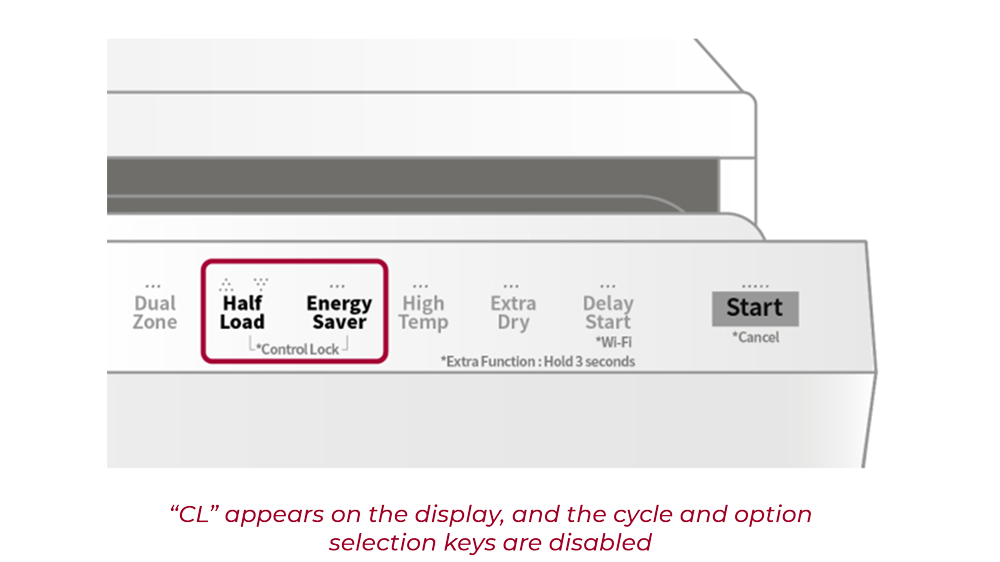
The CL code stands for Child Lock. When you see CL on your LG dishwasher’s screen, it means the child lock feature is active. This function is designed to keep children from accidentally starting or stopping the dishwasher, changing settings, or opening the door during operation.
Unlike other codes that signal a malfunction, the CL code is a protection mode. It ensures that curious hands cannot alter the cycle or cause water spills, which could lead to accidents or damage.
Here’s a quick summary:
- CL = Child Lock activated
- The dishwasher controls are locked
- Normal operation is blocked until you turn off the child lock
Many people mistake the CL code for an error. However, it’s just a reminder that the safety lock is on, not a sign of a technical problem.
Why Does The Child Lock Feature Exist?
Modern dishwashers often sit at floor level. Buttons and touch panels are easily reachable by young children. LG designed the child lock to prevent:
- Accidental cycle starts or stops
- Unintentional changes to washing settings
- Opening the dishwasher mid-cycle (which can cause spills or burns)
Statistics show that over 20,000 children visit emergency rooms in the US each year due to kitchen appliance accidents. The child lock helps reduce these risks by making sure children cannot change the dishwasher’s operation once the feature is active.

How To Activate And Deactivate The Cl Code
Many owners accidentally turn on the child lock, often when cleaning the panel or brushing against the buttons. It’s easy to activate and deactivate, but the process can vary slightly depending on your LG model.
Activating The Child Lock
To turn on the child lock:
- Press and hold the Child Lock or Control Lock button for 3-5 seconds.
- On some models, you may need to press two specific buttons at the same time (like Rinse and Dry).
- The CL code will appear on the display, and the controls will not respond.
Deactivating The Child Lock
To turn off the child lock:
- Press and hold the same button(s) used to activate the lock for 3-5 seconds.
- The CL code will disappear, and you can use the dishwasher as normal.
If you are unsure which buttons to use, check your dishwasher’s manual or look for a small lock symbol near the buttons.
Common Models And Their Child Lock Controls
The process is similar for most LG dishwashers, but some models use different button combinations. Here’s a comparison of typical LG models:
| Model | Child Lock Activation | Child Lock Deactivation |
|---|---|---|
| LG LDF5545ST | Press & hold ‘Rinse’ for 3 sec | Press & hold ‘Rinse’ for 3 sec |
| LG LDP6810SS | Press & hold ‘Dry’ for 3 sec | Press & hold ‘Dry’ for 3 sec |
| LG LDT7808BM | Press & hold ‘Control Lock’ | Press & hold ‘Control Lock’ |
Always refer to your model’s manual for the exact steps.
Troubleshooting: Cl Code Won’t Go Away
Sometimes, the CL code stays on even after you try to turn it off. Here are common reasons and solutions:
- Button Not Responding: Dirt, moisture, or stuck buttons can prevent proper activation/deactivation. Gently clean the panel with a dry cloth.
- Power Cycle: Turn off the dishwasher, unplug it for 1-2 minutes, then plug it back in. This resets the control board.
- Wrong Button: Double-check your manual to ensure you are pressing the correct buttons.
- Panel Malfunction: Rarely, the control panel may be faulty. If none of the above works, contact LG support or a qualified technician.
Comparing Cl Code With Other Common Lg Dishwasher Codes
LG dishwashers display several codes. Here’s a quick comparison:
| Code | Meaning | Action Needed |
|---|---|---|
| CL | Child Lock active | Deactivate lock |
| IE | Water inlet error | Check water supply |
| OE | Drain error | Inspect drain hose |
| FE | Overflow error | Check for leaks |
The CL code is unique because it’s about safety, not a technical fault.
How To Prevent Accidental Child Lock Activation
Accidental activation is common, especially when cleaning or touching the panel. Here are practical tips to avoid it:
- Clean the panel gently: Use a soft, dry cloth. Avoid pressing buttons for long periods.
- Show family members the child lock: Teach everyone which buttons activate the lock to prevent confusion.
- Keep the manual handy: Store your dishwasher manual in a kitchen drawer for quick reference.
- Use panel covers: Some owners use thin covers to protect buttons from accidental touches.
When Should You Use The Child Lock?
The child lock is not just for families with young kids. It can be useful in many situations:
- Pet owners: Pets can accidentally start or stop cycles by stepping on panels.
- Shared homes: In rental homes or apartments, it prevents guests from tampering with settings.
- Elderly care: For seniors with memory loss, child lock prevents accidental changes.
It’s a smart feature for anyone who wants more control and safety.
Cl Code And Dishwasher Maintenance
While the CL code is unrelated to maintenance, sometimes it appears during cleaning or repairs. For example, if you press buttons while wiping the panel, you can accidentally turn on the child lock. Always check for the CL code before and after maintenance.
Here are additional maintenance tips:
- Check panel regularly: Make sure buttons are not sticky or damaged.
- Avoid water on the control panel: Moisture can cause false signals and accidental lock activation.
- Update firmware: Some newer LG dishwashers allow firmware updates to improve features and fix bugs. Check LG’s official website for updates.
Real-life Examples
Many LG dishwasher owners share their experiences online. Here are two examples:
Example 1:
A mother noticed the CL code after her toddler pressed several buttons. She couldn’t start the dishwasher. After reading the manual, she pressed and held the ‘Rinse’ button for 3 seconds. The CL code disappeared, and the dishwasher worked again.
Example 2:
An apartment owner had trouble with guests accidentally activating the child lock. He placed a sticky note near the control panel explaining how to turn the lock off. Since then, he has had fewer calls about dishwasher problems.
These examples show how simple knowledge can solve the CL code issue quickly.
Lg Dishwasher Child Lock Feature Vs Competitors
LG is not the only brand with a child lock. Let’s compare how LG’s child lock feature stacks up against other popular brands.
| Brand | Child Lock Activation | Ease of Use | Unique Features |
|---|---|---|---|
| LG | Press/hold button | Simple, quick | CL code display |
| Samsung | Press ‘Child Lock’ button | Easy, clear | Panel lock icon |
| Bosch | Press two buttons | Less intuitive | Hidden control panel |
| Whirlpool | Press/hold button | Easy | No code, just lock icon |
LG’s system is straightforward. The CL code is easy to spot, and the activation/deactivation process is simple compared to some competitors.
Non-obvious Insights For Handling The Cl Code
- Power interruption resets child lock: If you unplug your LG dishwasher, the child lock may turn off automatically. This is useful if the panel buttons stop working.
- Firmware updates can change child lock behavior: On some newer models, software updates may improve how the child lock works or make it easier to use. Always check for updates if you notice new behaviors.
These tips are not found in most manuals and can help you save time.
What To Do If The Cl Code Keeps Returning
If the CL code keeps appearing after you turn it off, try these steps:
- Check for panel damage: Cracks or worn-out buttons can cause false signals.
- Look for electrical issues: Faulty wiring or power surges may trigger the lock.
- Call LG support: If you’ve tried everything and the code persists, contact LG. They may recommend a technician visit.
For official guidance, visit the LG Support Library.
Frequently Asked Questions
What Is The Cl Code On My Lg Dishwasher?
The CL code means the child lock feature is turned on. It locks the controls to prevent accidental changes or starts, usually activated by pressing and holding a button.
How Do I Turn Off The Cl Code On My Lg Dishwasher?
To turn off the CL code, press and hold the child lock button (or specific button combination) for 3-5 seconds. The display will return to normal and you can use the dishwasher.
Is The Cl Code A Sign Of An Error Or Malfunction?
No, the CL code is not an error. It’s a safety feature to protect children and pets from changing dishwasher settings.
Can The Child Lock Activate By Itself?
Rarely, the child lock may turn on if buttons are pressed accidentally, especially during cleaning or power surges. It’s not a sign of a major problem.
What Should I Do If The Cl Code Won’t Turn Off?
First, try pressing and holding the correct button. If it doesn’t work, unplug the dishwasher for 1-2 minutes. If the code stays, clean the panel and check for stuck buttons. Contact LG support if needed.
Understanding the LG dishwasher CL code helps you avoid unnecessary worries and keeps your kitchen safer. Now you know how the child lock works, how to activate or deactivate it, and what to do if problems arise. With these tips, you can handle the CL code confidently and make your dishwasher work for you—not against you.