
Resetting your Samsung refrigerator control panel can fix many common problems. Maybe your fridge is not cooling well, the display is showing errors, or the ice maker stopped working. Sometimes, after a power outage or a technical glitch, the control panel needs a reset to get things back to normal.
If you’ve never done this before, it can feel confusing. This guide will help you understand when, why, and how to reset your Samsung refrigerator control panel safely. With clear steps, useful tips, and practical examples, you’ll soon feel confident about handling this task.
We’ll cover different models, troubleshooting advice, and answer the most frequent questions so you don’t waste time searching elsewhere.
What Is The Samsung Refrigerator Control Panel?
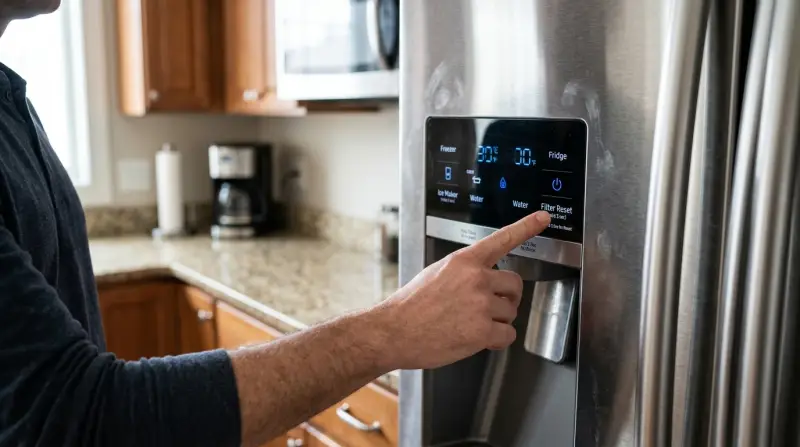
The control panel is the digital interface on your Samsung fridge. It lets you change temperature, turn on features, and see error codes. Usually, it’s on the front, either above the dispenser or inside the fridge, depending on the model. This panel controls the main functions, including cooling, freezing, and sometimes even water and ice settings.
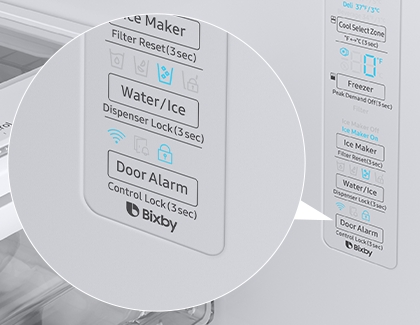
Some Samsung models have touch panels, while others use physical buttons. Knowing the difference is important, because the reset process can vary. For example, older models may require unplugging the fridge, while newer ones have dedicated reset buttons.
Reasons To Reset The Control Panel
Resetting the control panel is not something you need to do every day. But sometimes, it’s necessary. Here are the most common situations:
- Error codes: If you see codes like 1E, 5E, or 88 88 on the display, a reset often clears them.
- Temperature issues: When the fridge or freezer isn’t cold enough, a reset can help.
- Ice maker problems: If ice stops being made, resetting the panel can restore function.
- After a power outage: Sometimes, the panel stops responding after losing power.
- Display glitches: Frozen or unresponsive displays can be fixed by resetting.
Beginners often miss one key insight: resetting can fix software glitches, but it does not repair hardware. If your fridge has a physical problem (like a broken compressor), a reset won’t help.
How Does The Control Panel Work?
The panel communicates with the fridge’s internal computer (the main board). It collects data from sensors, lets you adjust settings, and shows messages. If the panel loses communication with the main board, you might see strange codes or no response at all.
Samsung uses digital displays for newer models, which can sometimes freeze or show wrong information. This is similar to how your phone might need a restart if it stops working correctly.
Preparing To Reset Your Samsung Refrigerator
Before you start, make sure you know your refrigerator’s model number. This information is usually found on a label inside the fridge. Different models may have different reset steps. Also, check your user manual or the Samsung website for model-specific advice.
You’ll need:
- Access to the control panel (either inside or outside the fridge)
- Your fridge plugged in and running
- A few minutes of free time
Another non-obvious tip: Always remove food that could spoil if your reset causes the fridge to turn off temporarily.
Step-by-step Guide: How To Reset The Control Panel
For Most Samsung Refrigerators
Follow these general steps for most Samsung models:
- Locate the panel: Find the display or button interface on your fridge.
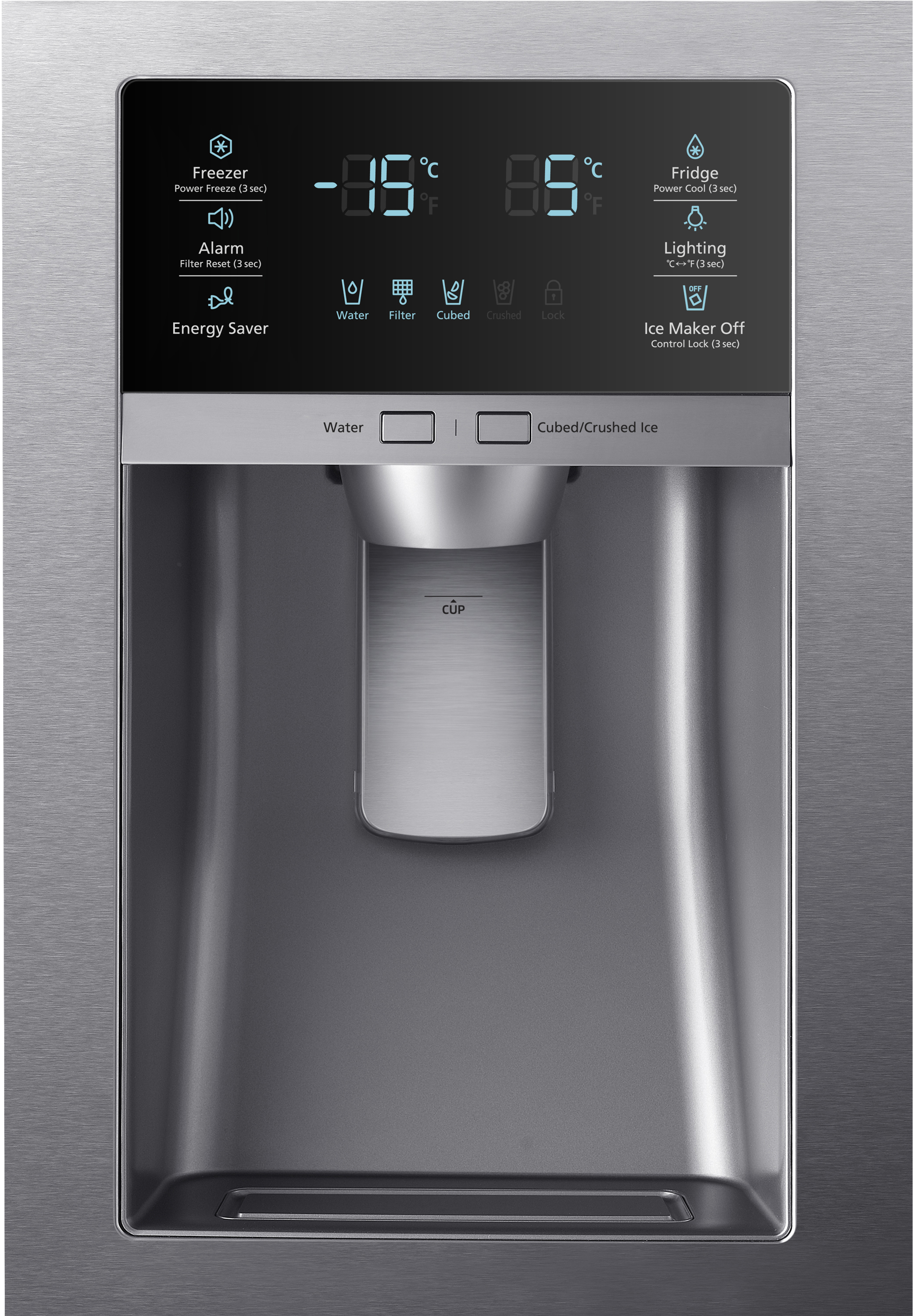
- Press and hold the Power Freeze and Power Cool buttons: Hold both buttons together for 10 seconds. You’ll hear a beep or see the display flash.
- Wait for the panel to restart: The display should turn off and then on again.
- Check settings: Make sure your fridge and freezer temperatures are correct.
For Touch Screen Models
Some newer Samsung fridges use a touch screen. If the screen freezes or shows errors:
- Press and hold the Reset or Alarm button (if available) for 10 seconds.
- If there’s no dedicated reset button, unplug the fridge for 2 minutes, then plug it back in.
For Models Without A Reset Button
If your fridge doesn’t have a reset button or touch screen:
- Unplug the refrigerator from the wall outlet.
- Wait at least 5 minutes. This allows the internal computer to fully shut down.
- Plug the fridge back in.
- The control panel should reset automatically.
Comparing Models And Reset Methods
Here’s a quick comparison of Samsung refrigerator models and their reset methods:
| Model Type | Reset Method | Notes |
|---|---|---|
| Touch Screen | Hold Reset/Alarm button | Usually on front panel |
| Physical Buttons | Hold Power Freeze & Power Cool | Common on older models |
| No Reset Button | Unplug for 5+ minutes | Works for almost any model |
What To Do After Resetting
Once you’ve reset the panel, check these things:
- Temperature settings: Make sure both fridge and freezer are at recommended levels (usually 37°F for fridge, 0°F for freezer).
- Ice maker: Confirm it’s working again.
- Display: Look for any error codes. If you still see codes, note them down.
- Sound and lights: The fridge should beep and the lights should work normally.
Sometimes, you’ll need to wait up to 24 hours for full cooling. Don’t worry if your fridge doesn’t reach the right temperature immediately.
Common Problems And Solutions
Resetting fixes many issues, but sometimes more help is needed. Here are some common problems:
1. Error Codes Still Appearing
If you reset and still see codes like 1E or 5E:
- Check the manual for code meanings.
- Sometimes, a sensor is faulty and needs replacement.
- Contact Samsung support if codes persist.
2. Panel Not Responding
If the panel doesn’t react after a reset:
- Make sure power is connected securely.
- Try unplugging and plugging back in.
- If nothing changes, the main board may be faulty.
3. Ice Maker Not Working
Even after reset, the ice maker may not work:
- Check water supply line.
- Make sure the ice maker is turned on.
- Look for blockages or frozen parts.
4. Cooling Not Restored
If cooling doesn’t return:
- Check that vents are clear.
- Confirm temperature settings.
- Wait 24 hours before worrying.
Data: Typical Error Codes And Their Meanings
Samsung refrigerators show specific error codes. Here’s a summary of common codes:
| Error Code | Meaning | Action |
|---|---|---|
| 1E/IE | Ice Maker error | Reset panel, check ice maker |
| 5E/SE | Fridge Defrost error | Reset, check defrost heater |
| 88 88 | Communication error | Reset, check main board |
| OF OF | Demo mode | Turn off demo mode |
| CF | Communication failure | Reset, check wiring |

Practical Tips For A Successful Reset
- Don’t rush: Wait at least 5 minutes when unplugging the fridge. Some users unplug for only 30 seconds, which isn’t enough.
- Double check buttons: On some models, the Power Freeze and Power Cool buttons may be labeled differently.
- Protect food: If you unplug the fridge, keep the door closed to prevent food spoilage.
- Have model info ready: Customer support will ask for your model number if you need help.
One insight most beginners miss: If you reset often, it could signal a deeper problem. Don’t ignore repeated issues.
When To Call Samsung Support
If you try all steps and your fridge is still not working, it may need professional repair. Samsung support can help diagnose more complex issues, especially with the main board or sensors. You can find their official contact at Samsung Support.
Safety Advice
Resetting is safe if you follow instructions. However, avoid touching wires or opening panels unless you’re qualified. Always unplug the fridge before working on internal parts. If you smell burning or see sparks, stop and call a technician immediately.
Comparing Samsung And Other Brands
How does Samsung’s control panel reset compare to other brands? Let’s look at a quick overview:
| Brand | Reset Method | Ease of Use |
|---|---|---|
| Samsung | Button hold / Unplug | Easy |
| LG | Unplug / Reset button | Moderate |
| Whirlpool | Unplug only | Easy |
| GE | Unplug / Button hold | Moderate |
Samsung makes it easy for users, especially with clear button instructions. Other brands sometimes need more steps or technical knowledge.
Credit: www.samsung.com
Useful Resources
For more technical information, visit the official Samsung website or check out appliance repair forums. Sometimes, YouTube videos can help you see the process step by step. For general refrigerator troubleshooting, you might find Consumer Reports helpful.
Frequently Asked Questions
What Happens If I Reset My Samsung Refrigerator Panel Incorrectly?
If you don’t follow the steps properly, the panel may not reset. In most cases, nothing bad happens. Just try the process again. If you unplug the fridge for too short a time, the internal computer won’t reset fully.
How Often Should I Reset The Control Panel?
You should only reset the panel when there’s a problem, like an error code or a frozen display. Regular resets are not needed and can signal deeper issues.
Will Resetting The Panel Erase My Settings?
Usually, a reset restores default temperature and feature settings. You may need to set your preferred temperatures again. Ice maker and water filter status are usually not erased.
Is There A Way To Reset The Panel Without Unplugging The Fridge?
Yes, on most Samsung models, holding Power Freeze and Power Cool (or Reset/Alarm) buttons for 10 seconds will reset the panel. Only unplug if buttons do not work.
Do I Need A Technician To Reset My Samsung Refrigerator?
No, most resets can be done at home. If you see repeated errors or the panel does not respond, then you should call a technician.
Resetting your Samsung refrigerator control panel is a simple but powerful fix for many common issues. With careful steps, you can solve problems quickly and keep your fridge working well. Remember, a reset is only a solution for software or interface errors.
If you see repeated problems, don’t hesitate to contact Samsung support. With this guide, you now have the knowledge to handle resets confidently and keep your kitchen running smoothly.