
The X Acto School Pro Pencil Sharpener is a favorite in classrooms and offices. It’s known for its strong motor and reliable sharpening. But even the best tools can stop working. When your sharpener fails, it disrupts your workflow and can be frustrating, especially if you rely on it for daily tasks. Before buying a new one, it’s important to understand why it’s not working and how you can fix it. This article explains common problems, troubleshooting steps, repair tips, and maintenance strategies. You’ll also find useful comparison tables and answers to frequent questions, so you can make your sharpener last longer and avoid downtime.
Common Problems With X Acto School Pro Pencil Sharpeners
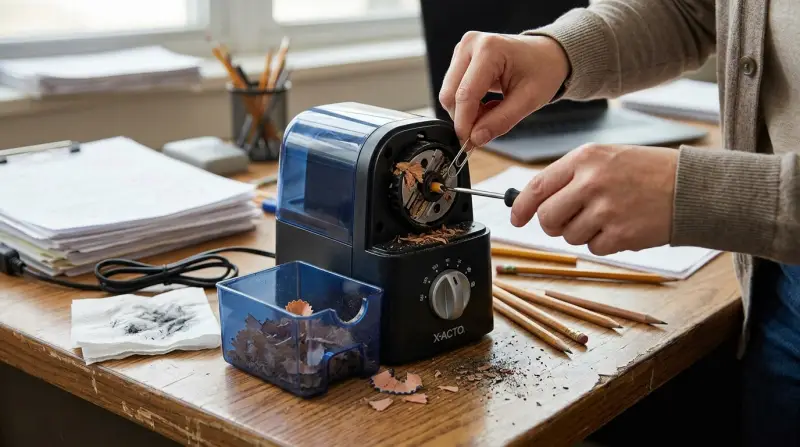
Many users face issues that make their sharpener stop working. Here are the most frequent problems:
- Sharpener won’t turn on: The motor does not start, and there’s no sound or movement.
- Blades do not cut: The pencil goes in, but the tip remains blunt, or the blade fails to rotate.
- Jammed pencil or debris: Bits of pencil or shavings block the sharpening mechanism.
- Overheating: The sharpener gets too hot and shuts off for safety.
- Broken or loose parts: Internal parts, like gears or switches, get damaged or disconnected.
These issues can have simple causes or require deeper fixes. Knowing the signs helps you diagnose the problem quickly.
Troubleshooting Steps
Check Power Source
First, make sure the sharpener is plugged in securely. If it uses batteries, check if they are fresh and installed correctly. Sometimes, outlets or power strips fail, so try another outlet.
Inspect The Blade Mechanism
Remove the shavings tray and look for broken pencil tips or debris inside. Use a flashlight to see if anything is stuck. Gently shake the sharpener upside down to dislodge jammed pieces.
Reset The Sharpener
Some models have a reset button or safety feature. Unplug the sharpener, wait 10–15 minutes, then plug it back in. This can fix overheating or temporary electrical faults.
Test With Different Pencils
Try sharpening a few pencils of varying sizes and hardness. If only certain pencils won’t sharpen, the issue may be with the pencil, not the sharpener.
Examine For Physical Damage
Look for cracks in the casing, loose parts, or visible wear. If you hear grinding noises or see broken gears, internal repairs may be needed.
Repairing Your Sharpener
Most repairs are simple and safe. If you’re comfortable with basic tools, you can fix many problems yourself.
Clearing Jams
Use tweezers or a thin stick to remove stuck pencil tips or debris. Never use metal objects, as they can damage blades. Clean the blade area carefully.
Blade Maintenance
If your sharpener leaves pencils blunt, the blade may be dull. Some models allow blade replacement. Consult the manual or manufacturer’s website for instructions.
Fixing Loose Parts
Tighten any screws on the casing. If the motor or gears have shifted, reposition them gently. For broken gears, replacement kits are available online.
Electrical Fixes
If the motor won’t start but the power light is on, the switch or wiring may be faulty. Unless you have experience with small electronics, it’s best to seek professional help or contact customer support.
When To Replace Your Sharpener
Sometimes repairs won’t fix the problem, or the cost of parts is too high. Here’s how to know when it’s time for a new sharpener:
- The motor is burnt out and won’t run.
- The blade cannot be replaced and is too dull.
- The body is cracked or unsafe.
- Frequent jams or overheating persist.
You can compare repair costs and new sharpener prices easily. Here’s a quick comparison:
| Repair Cost | Replacement Cost | Average Lifespan |
|---|---|---|
| $10–$30 | $25–$60 | 3–5 years |
If your sharpener is older than five years and needs a new motor, buying a new one is often smarter.
Maintenance Tips To Prevent Problems
Taking care of your X Acto School Pro Pencil Sharpener helps avoid breakdowns. Here are practical tips:
- Empty shavings tray often: Full trays can cause jams and block sensors.
- Clean blades monthly: Use a dry brush to remove dust and debris.
- Use quality pencils: Cheap pencils break often and jam the sharpener.
- Avoid overuse: Let the sharpener rest after heavy use to prevent overheating.
- Store in a dry area: Moisture can rust the blades and damage electronics.
These actions keep your sharpener running smoothly and extend its life.
Comparing X Acto School Pro With Other Electric Sharpeners
If you’re thinking about replacing your sharpener, it’s helpful to see how the X Acto School Pro compares to other popular models.
| Model | Motor Power | Blade Type | Noise Level | Average Price |
|---|---|---|---|---|
| X Acto School Pro | Heavy-duty | Helical steel | Moderate | $35 |
| Bostitch QuietSharp | Medium-duty | Helical steel | Low | $40 |
| OfficePro Electric | Light-duty | Rotary | High | $28 |
The X Acto School Pro is strong and reliable, but not the quietest. If noise is a concern, the Bostitch QuietSharp is a good alternative.

Credit: www.youtube.com
Insights Most Beginners Miss
Many new users overlook simple maintenance, leading to problems. For example, they rarely clean the blade area, which can cause jams. Another mistake is ignoring the pencil quality: cheap pencils break more and leave debris inside.
Also, many assume the sharpener will last forever without care. In reality, regular cleaning and checking for loose parts are key. If your sharpener feels slower or makes strange noises, stop using it and check for issues before they get worse.
Safety Concerns And User Mistakes
Sharpener safety is important, especially in schools. Here’s what to watch out for:
- Children inserting fingers: Always supervise young kids.
- Using the wrong voltage: Match the sharpener to your local power supply.
- Trying to sharpen non-pencil objects: Only use pencils—other items can ruin the blades.
- Ignoring overheating warnings: Let the sharpener cool after heavy use.
Carelessness can cause injury or damage. Always follow manufacturer instructions.

Credit: www.ifixit.com
Warranty And Customer Support
X Acto offers limited warranties on its School Pro sharpeners. If your device stops working within the warranty period, you may get free repairs or replacement. Keep the receipt and check the warranty details online or in the manual.
Contact customer support if troubleshooting fails. They often help with common problems or guide you to repair services.
Real-world Example
A teacher in Chicago reported that her X Acto School Pro stopped working after six months. She found that the shavings tray was full and debris had jammed the blade. After cleaning the tray and using a brush to clear the blade, the sharpener worked again. She also switched to higher-quality pencils, which reduced future jams.
This shows that simple maintenance can solve many problems.
Credit: help.xacto.com
Upgrading Vs. Repairing: What’s Best?
If your sharpener is more than three years old and you face frequent issues, upgrading may be smart. Modern sharpeners have better safety features, quieter motors, and longer-lasting blades.
Here’s a quick table to help you decide:
| Situation | Repair | Replace |
|---|---|---|
| Blade jammed | ✔️ | ❌ |
| Motor burnt | ❌ | ✔️ |
| Casing cracked | ❌ | ✔️ |
| Blade dull | ✔️ (if replaceable) | ✔️ |
Make your choice based on the problem and the sharpener’s age.
Frequently Asked Questions
Why Does My X Acto School Pro Sharpener Suddenly Stop Working?
Sudden failure often means overheating or a jammed blade. Let the sharpener cool, check for blockages, and clean out the shavings tray. If it still won’t run, check the power source and reset the device.
How Can I Fix A Jammed Pencil Sharpener?
Remove the shavings tray, use tweezers to pull out any stuck pencil tips, and gently shake the sharpener upside down. Avoid using metal tools that could damage the blade. Clean the blade area monthly for best results.
Is It Safe To Replace The Blade Myself?
If your model allows blade replacement, follow the instructions in the manual. Always unplug the sharpener before opening it. If unsure, contact customer support or visit an official repair center. Some blades are not user-replaceable.
What Is The Average Lifespan Of An X Acto School Pro Sharpener?
With regular maintenance, most sharpeners last 3–5 years. Heavy classroom use may shorten this to 2–3 years. Blade and motor quality affect lifespan. Upgrading can be worth it after several years.
Are There Better Alternatives To The X Acto School Pro?
Yes. Models like the Bostitch QuietSharp offer quieter operation and similar durability. Compare features and prices to find the best fit. Check online reviews and visit X Acto’s official site for more details.
Fixing your X Acto School Pro Pencil Sharpener is often easy with careful checks and basic maintenance. Regular cleaning, using quality pencils, and understanding when to repair or replace will help you get the best value. If you keep your sharpener in good shape, it will serve you well for years. Whether you’re a teacher, student, or office worker, a reliable sharpener makes daily tasks smoother and less stressful.