
If your Optimum remote volume is not working, it can turn a relaxing TV night into a frustrating experience. Many people face this issue, but the good news is, you can usually solve it with a few simple steps. Whether you use Optimum’s Altice remote, a classic silver remote, or a newer model, this guide will help you understand why volume problems happen and how to fix them quickly.
Common Reasons Optimum Remote Volume Fails
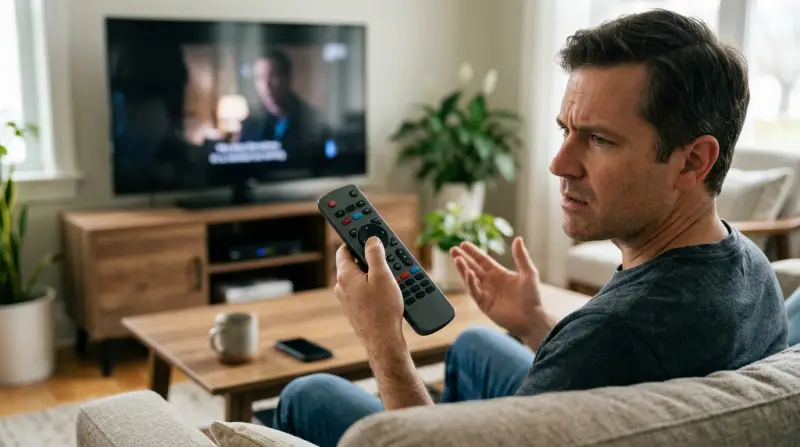
When the volume button on your Optimum remote stops working, it’s usually caused by one of a few simple issues. Understanding these can save you time and stress.
- Dead or weak batteries: Low power can make some buttons stop responding.
- Remote not paired: If your remote isn’t programmed to control your TV, volume won’t change.
- Signal interference: Obstructions or other electronics can block the signal.
- TV/audio settings changed: Sometimes TV settings override remote controls.
- Stuck or damaged buttons: Dirt, dust, or wear can cause problems.
- Firmware/software glitches: Updates or bugs can create temporary issues.
It’s important to test and rule out each reason, one at a time, for an efficient fix.
Basic Troubleshooting Steps
Before you call customer support, try these quick fixes. Most Optimum remote volume problems can be solved in minutes.
1. Check The Batteries
Weak batteries are a surprisingly common cause. Replace both batteries with fresh ones, making sure they are correctly inserted. If the remote works after this, it was a simple fix.
2. Remove Any Obstructions
Make sure there is a clear path between your remote and the cable box or TV. Remove objects like books, decorations, or other electronics that could block the signal.
3. Test The Remote’s Other Buttons
Press other buttons on the remote, like channel up or the power button. If they work, but volume does not, the issue is likely with programming or the button itself. If nothing works, the remote may be faulty.
4. Try Power Cycling
Unplug your cable box and TV from the wall. Wait at least 30 seconds, then plug them back in. This can reset minor software glitches that might block remote signals.
5. Clean The Remote
Sometimes, dirt can build up around the volume button. Carefully clean around the button with a soft, dry cloth. Avoid using water or harsh chemicals.
Reprogramming The Optimum Remote For Volume
If basic steps don’t help, your remote may not be programmed to control your TV’s volume. Optimum remotes can be set to control both the cable box and your TV or audio receiver. Here’s how you can reprogram it:
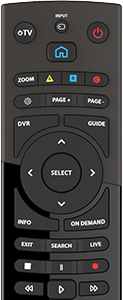
1. Manual Programming (standard Remote)
- Turn on your TV.
- Press and hold the TV and SEL buttons together for three seconds until the O button lights up.
- Point the remote at your TV and enter the remote code for your TV brand (found in your Optimum manual or online).
- Press the Volume Up button. If the TV volume changes, the programming worked. If not, try another code.
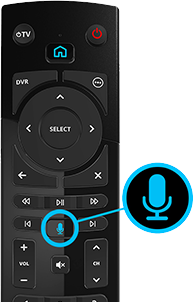
2. Auto-search Programming (altice One Remote)
- Hold the Home and Power buttons at the same time until the LED blinks.
- Press the 1 button, then the TV Power button.
- Keep pressing the Channel Up button until the TV turns off. When it does, press the TV Power again to turn it back on and check the volume.
If you’re not sure which code to use, Optimum has an online tool to help you find the right one for your TV brand. Always follow the programming steps exactly.
Understanding Tv And Audio Settings
Sometimes, the problem is not with the remote, but with how your TV or sound system is set up. Here are a few settings to check:
Tv Speakers On Or Off
If your TV speakers are set to “Off” or “External,” the remote might not control the volume. Go to your TV’s audio menu and make sure the speakers are “On. ”
Hdmi-cec And Audio Receivers
Many modern TVs have HDMI-CEC. This feature lets your remote control connected devices, but sometimes it creates conflicts. Try turning HDMI-CEC off in your TV’s settings to see if that restores volume control.
Audio Receiver Settings
If you use a soundbar or receiver, make sure the remote is set to control the receiver and not just the TV. You may need to reprogram the remote to work with your audio device.

Credit: www.youtube.com
Table: Common Causes And Solutions For Optimum Remote Volume Issues
Here is a quick comparison of typical problems and their solutions:
| Problem | Likely Cause | Recommended Solution |
|---|---|---|
| Volume button does not work | Batteries weak or dead | Replace with new batteries |
| Remote changes channels but not volume | Remote not programmed for TV | Reprogram remote for TV |
| Volume changes only on cable box | TV audio settings incorrect | Check TV speaker settings |
| Volume works, but intermittently | Signal interference or dirty button | Clear path and clean remote |
Advanced Fixes For Persistent Problems
If you’ve tried the basic and programming steps, but the issue continues, try these advanced solutions.
1. Factory Reset The Remote
A factory reset can clear any programming errors. Here’s how to do it (steps may differ by model):
- Hold the A and D buttons together until the light turns green.
- Press 9-8-1. The light will blink to confirm reset.
You will need to reprogram your remote after this step.
2. Update Cable Box Firmware
Sometimes, a software update for your cable box can fix remote issues. Go to the settings menu and look for a system update option. If you can’t find it, unplug the box for 60 seconds and plug it back in.
The device will check for updates automatically.
3. Try A Different Remote
If you have another Optimum remote, try using it with your TV. If the new remote works, your original remote may need to be replaced.
4. Use Optimum’s Remote App
Optimum provides a mobile app that can control your TV and cable box from your smartphone. It’s a good temporary solution if your physical remote is not working.
Credit: www.optimum.net
Table: Optimum Remote Types And Volume Control Features
Here’s how common Optimum remotes handle volume control:
| Remote Model | Controls TV Volume | Controls Audio Receiver | Programming Method |
|---|---|---|---|
| Altice One Remote | Yes | Yes | Auto-Search/Manual |
| Classic Silver Remote | Yes | Limited | Manual Code Entry |
| Mini Remote | Yes | No | Quick Pairing |
When To Call Optimum Support
If none of the solutions work, it might be time to contact Optimum’s customer support. Signs that you need professional help include:
- None of the remote’s buttons respond, even after new batteries and reprogramming.
- The remote works with other TVs, but not your main TV.
- Your cable box is not responding to any remote.
Optimum can provide a replacement remote if yours is faulty. They may also walk you through advanced troubleshooting steps or schedule a technician visit.
Tips To Avoid Future Remote Volume Problems
Prevention is often easier than repair. Here are practical tips to keep your Optimum remote working smoothly:
- Change batteries every 6-12 months, even if the remote still works.
- Clean the remote regularly with a dry cloth to prevent dirt buildup.
- Store remotes away from heat, moisture, and food spills.
- Keep the path clear between the remote and your devices.
- Update your cable box when new software is available.
If you use universal remotes or third-party devices, make sure they’re compatible with your TV and cable box to avoid future headaches.
Table: Signs You Need A New Remote Vs. Fixable Problems
This comparison can help you decide if you should repair or replace your remote:
| Symptom | Usually Fixable | Replacement Needed |
|---|---|---|
| One button not working | Yes (clean or reprogram) | No |
| No buttons work at all | Sometimes (battery or reset) | Maybe (if reset fails) |
| Remote cracked or damaged | No | Yes |
| Works with other TVs, not yours | Usually TV or settings issue | No |
Credit: www.optimum.net
Non-obvious Insights Most Users Miss
Many users don’t realize that firmware updates for TVs or cable boxes can affect remote performance. If you recently updated your TV’s software, check the manufacturer’s website for any known issues with remote compatibility. Also, if you use a soundbar or audio receiver, make sure the remote is programmed to control that device—not just your TV. This is a common mistake that leads to volume problems.
Another often-missed tip: If you have multiple remotes in the same room, signals can sometimes interfere, especially with universal remotes. Try moving other remotes away while troubleshooting.
External Resources
For more detailed help, Optimum offers official troubleshooting guides and remote manuals on their website. You can also find up-to-date programming codes and step-by-step videos. One helpful resource is the Optimum Remote Support page.
Frequently Asked Questions
Why Does My Optimum Remote Only Change Channels But Not Volume?
This usually happens when the remote is programmed to control only the cable box, not your TV. Try reprogramming your remote using your TV’s code, or use the auto-search method to pair it with your TV model.
How Can I Reset My Optimum Remote?
You can reset most Optimum remotes by holding the A and D buttons together until the light turns green, then entering 9-8-1. This will erase any custom programming and restore factory settings.
Can I Use My Smartphone As An Optimum Remote?
Yes, Optimum offers a mobile app that allows you to control your cable box and TV from your smartphone. This can be helpful if your physical remote is lost or not working.
What Should I Do If None Of The Troubleshooting Steps Work?
If you’ve tried new batteries, reprogramming, cleaning, and a factory reset, but the remote still does not control the volume, contact Optimum customer support. They can provide a replacement or help with advanced diagnostics.
Are Universal Remotes Compatible With Optimum Cable Boxes?
Many universal remotes can be programmed to control Optimum cable boxes and TVs. However, not all features (like the guide button or DVR controls) may work. Always check compatibility before buying a universal remote.
Solving an Optimum remote volume not working issue is usually quick if you follow these steps. By checking batteries, programming, and settings, most people can fix the problem themselves. If not, Optimum support is ready to help. Don’t let a stubborn remote spoil your entertainment—most fixes take just a few minutes and a little patience.