
When you’re cleaning and suddenly notice that the Shark vacuum brush roll indicator light is not on, it can be confusing and even stressful. Many Shark vacuums have a small light near the brush roll area. This light is not just for looks—it tells you whether the brush roll is working as it should. If you see the light is off, it usually means there’s a problem that needs fixing. Let’s dive into what this indicator light means, why it might not turn on, and the best steps to solve it. Whether you’re new to Shark vacuums or have used them for years, you’ll find practical advice here to get your vacuum back to full power.
What The Brush Roll Indicator Light Means
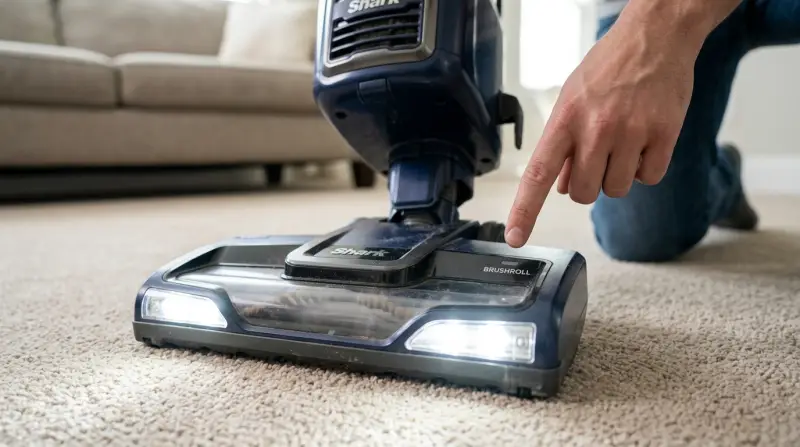
On most Shark upright and stick vacuums, you’ll find an indicator light near the brush roll. This light communicates two things:
- If the brush roll is spinning correctly
- If there is a problem—like a jam or an electrical issue
The color and state of this light is important. Here’s a quick guide:
| Light Color/Status | What It Means |
|---|---|
| Green (Solid) | Brush roll is working normally |
| Red (Flashing/Solid) | Brush roll is jammed or blocked |
| Off/No Light | Brush roll is not receiving power or vacuum is off |
So, if the light is not on at all, it’s a sign that either the vacuum is not powered, or something is stopping the brush roll from working.
Common Reasons The Brush Roll Indicator Light Is Not On
The reasons for a missing light can range from simple to complex. Here are the most common:
- Vacuum is not plugged in or switched on.
- Brush roll switch is off (some models have a separate brush roll control).
- Floor mode setting is wrong (hard floor mode may turn off the brush).
- Vacuum is overheating and has shut off for safety.
- Brush roll is jammed by hair or debris.
- Worn or broken belt (drives the brush roll).
- Loose electrical connections inside the vacuum.
- Defective indicator light or wiring.
- Faulty motor (rare, but possible).
- Incorrect assembly after cleaning or maintenance.
Some of these are easy to fix at home, while others may need professional help.
Credit: www.youtube.com
Step-by-step Troubleshooting Guide
Let’s walk through the best way to find and fix the problem if your Shark vacuum’s brush roll indicator light is not turning on. Follow these steps carefully:
1. Check The Power Source
It sounds simple, but sometimes the vacuum is just not plugged in or the outlet is faulty. Make sure:
- The plug is firmly in the wall outlet.
- The outlet works—try another device in the same outlet.
- The vacuum’s power switch is ON.
2. Inspect The Brush Roll Settings
Some Shark models have two power settings: one for bare floors and one for carpets. The brush roll often only spins in carpet mode.
- Switch the vacuum to “carpet” or “brush roll ON.”
- If the indicator light appears, you’ve solved the problem.
3. Let The Vacuum Cool Down
If you’ve been vacuuming for a long time, the vacuum can overheat. Most Shark vacuums have a thermal protection feature that shuts off power to the brush roll if it’s too hot.
- Turn off and unplug the vacuum.
- Wait at least 45 minutes for it to cool down.
- Plug it back in and check the indicator light.
4. Remove And Clean The Brush Roll
A jammed brush roll can cause the light to stay off.
- Unplug the vacuum before starting.
- Turn it over and check the brush for tangled hair, threads, or debris.
- Remove any blockages carefully (scissors can help).
- Reinstall the brush roll and test the vacuum.
5. Inspect The Belt
The belt connects the motor to the brush roll. If it’s broken or slipped off, the brush roll won’t spin and the light may stay off.
- Open the brush roll compartment (check your user manual for exact steps).
- Look for a snapped or loose belt.
- Replace the belt if needed—most are easy to buy online.
6. Check For Loose Connections
Sometimes, the wires inside the vacuum can loosen after heavy use or a big bump.
- With the vacuum unplugged, gently press on the electrical connectors in the brush roll area.
- If you see a disconnected wire, reconnect it firmly.
- If you’re unsure, consider contacting customer support.
7. Reassemble Correctly
After cleaning or changing filters, it’s easy to miss a step when putting your vacuum back together.
- Double-check that all parts are clicked and locked in place.
- Some models have a safety switch that only lets the brush roll work if everything is assembled right.
8. Test The Indicator Light
If you’ve followed all steps and the light still doesn’t come on:
- The indicator light itself may be defective.
- This usually means professional repair is needed.
Shark Vacuum Models And Brush Roll Light Differences
Not all Shark vacuums use the same system. Here’s a look at how popular models compare:
| Model Series | Indicator Light Location | Common Issues |
|---|---|---|
| Ninja Lift-Away | Near floor nozzle | Jammed brush, belt wear |
| Navigator | On handle or nozzle | Loose connections |
| Rocket | On brush head | Mode setting confusion |
| Rotator | Near power switch | Overheating, jammed brush |
Always check your vacuum’s manual for specific instructions about the indicator light.
When To Replace Parts Or Call For Help
Sometimes, home fixes are not enough. Here are clear signs you need new parts or expert help:
- Brush roll is damaged, bent, or missing bristles.
- Belt is cracked, melted, or missing.
- Indicator light does not work even after all troubleshooting.
- Burning smell or strange noises from the vacuum.
- No power to the vacuum at all.
Replacement parts are widely available online. If you’re not comfortable opening your vacuum or suspect a deeper electrical issue, contact Shark customer support or a local repair shop.
Maintenance Tips To Prevent Future Problems
Regular care keeps your vacuum in top shape and reduces brush roll light issues. Here’s what you should do:
- Clean the brush roll after every few uses.
- Check and replace belts every 6-12 months, or sooner if worn.
- Empty the dust cup before it’s completely full.
- Clean filters monthly to avoid clogging.
- Inspect for blockages in hoses and nozzles.
- Store the vacuum in a dry, cool place.
One insight many users miss: Even a small amount of tangled hair can trigger the brush roll’s safety shutoff. Also, keeping the filters clean not only helps suction but keeps the motor from overheating, which can cause the indicator light to turn off.
Real-world Example: Fixing A Dead Brush Roll Light
Let’s look at a real example. Sarah has a Shark Navigator Lift-Away. One day, the brush roll stopped spinning, and the indicator light would not turn on. She checked the plug and settings—no luck. After letting it cool for an hour, she cleaned a massive hairball from the brush roll and found the belt had snapped. After buying a replacement belt and installing it, the indicator light turned green again and the vacuum worked like new.
This shows how a hidden jam or worn belt can be the only thing standing between you and a working vacuum.
Comparing Shark Brush Roll Indicator Light To Other Brands
It’s useful to see how Shark’s system compares to other vacuum brands:
| Brand | Brush Roll Light? | Common Troubleshooting |
|---|---|---|
| Shark | Yes (most models) | Settings, jams, belts |
| Dyson | No (most models) | Power, blockages |
| Bissell | Some models | Filter cleaning, belts |
| Hoover | Some models | Brush roll switch, belts |
Shark’s dedicated brush roll indicator light makes it easier for users to diagnose problems, compared to brands that don’t have a visible light.
How To Find The Right Replacement Parts
If you need a new belt, brush roll, or indicator light, here’s how to choose the right parts:
- Check your vacuum model number (usually found on a label under the vacuum).
- Search for “Shark [Model] replacement belt/brush roll.”
- Buy only from trusted sellers or the official Shark website.
- Avoid generic, “fits all” parts unless they’re clearly compatible.
For more details, the official Shark support page lists parts and manuals for every model.
Frequently Asked Questions
Why Is My Shark Vacuum Brush Roll Light Off But The Vacuum Still Has Suction?
The brush roll and suction are powered by different systems. If the light is off, the brush roll may not be spinning, but the vacuum can still pick up dirt using suction alone. Check for jams, worn belts, or incorrect mode settings.
How Do I Reset My Shark Vacuum If The Brush Roll Stops Working?
Turn off and unplug the vacuum. Let it cool for at least 45 minutes. Plug it back in and switch to carpet mode. This resets the thermal protection. If the brush roll still does not work, check for jams or belt problems.
Can A Dirty Filter Cause The Brush Roll Light To Turn Off?
Yes. If the filter is clogged, the vacuum may overheat or lose suction, triggering the safety shutoff that turns off the brush roll and its indicator light. Clean or replace filters regularly.
Is It Safe To Keep Using The Vacuum If The Brush Roll Indicator Light Is Off?
It’s not recommended. Without the brush roll spinning, the vacuum is less effective on carpets. Also, a non-working light can mean there is a deeper issue that could damage your vacuum if ignored.
Where Can I Buy Authentic Shark Replacement Parts?
You can buy genuine parts from the official Shark website or trusted online retailers. Always check the model number to ensure compatibility.
If your Shark vacuum brush roll indicator light is not on, don’t panic. Follow these troubleshooting steps, keep up with regular maintenance, and know when to ask for help. With a little attention, your vacuum should be cleaning your floors at full power again soon.