
Bosch refrigerators are known for their reliability, modern design, and advanced technology. Many models offer water dispensers and ice makers, which require filters to keep water clean and fresh. One small but important task for owners is resetting the refrigerator filter after changing it. Without a proper reset, your Bosch fridge may show warning lights, block water flow, or give inaccurate filter status updates. In this guide, you’ll learn how to reset the filter in Bosch refrigerators, why this matters, and how to avoid common mistakes. Whether you’re a new owner or have used Bosch appliances for years, this article will help you get the best performance from your fridge.
Why Bosch Refrigerator Filter Reset Matters
Changing your water filter is not enough by itself. Bosch refrigerators have an internal system that tracks filter usage, usually with a filter indicator light on the control panel. When the filter is replaced, you must reset this system. If you skip this step:
- The indicator may keep flashing, saying the filter needs replacement even after you changed it.
- The fridge may restrict water flow or ice production.
- You can lose track of the filter’s real lifespan.
A reset tells your fridge that the filter is new, so it starts counting usage from zero. This helps you avoid unnecessary replacements and ensures your water stays clean.
How Bosch Refrigerator Filter Systems Work
Bosch uses smart filter tracking in most recent models. This system counts either time or water flow, depending on the model:
- Time-based tracking: Counts days since last reset (usually 6 months).
- Flow-based tracking: Measures how much water passes through the filter.
Both methods help remind owners when it’s time to change the filter. Some models use sensors, while others rely on software timers. If you want to check your filter’s status, look for a filter light or message on your fridge’s display panel.
Typical Filter Lifespan
Most Bosch filters last about six months or 300 gallons of water. However, if your home uses a lot of water, or your area has hard water, you may need to replace it sooner.

Step-by-step: Bosch Refrigerator Filter Reset
Resetting your Bosch refrigerator filter is not complicated, but the process differs by model. Here are clear steps for the most common types:
Resetting Filter On Bosch French Door Models
- Locate the filter indicator button on the control panel (usually labeled “Reset” or “Filter”).
- Press and hold the button for 3–5 seconds.
- The filter indicator light should turn off or change color (from red to green).
- If nothing happens, check your owner’s manual for special instructions.
Resetting Filter On Bosch Side-by-side Models
- Find the filter reset area on the control panel.
- Press the “Reset” or “Ice & Water” button for 5 seconds.
- The filter warning will disappear, and the system starts a new cycle.
Resetting Filter On Older Bosch Models
Some older models do not have a dedicated reset button. Instead:
- Remove and reinstall the filter.
- Open and close the refrigerator door.
- Wait for the indicator to reset automatically (usually takes a few minutes).
Using Touchscreen Control Panels
If your Bosch fridge has a touchscreen:
- Tap the “Menu” or “Settings” icon.
- Select “Filter” or “Water Filter.”
- Choose “Reset Filter.”
- Confirm when prompted.
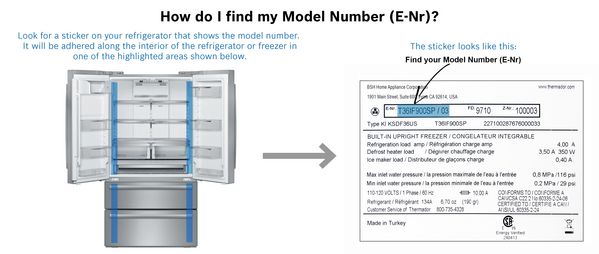
Always use your model number to check the exact reset steps in your owner’s manual.
Comparison Of Bosch Filter Reset Methods
Here is a quick overview of how different Bosch models handle filter resets:
| Model Type | Reset Method | Indicator Light Behavior |
|---|---|---|
| French Door | Press & hold button 3–5 sec | Turns from red to green |
| Side-by-Side | Press “Ice & Water” 5 sec | Warning disappears |
| Older Models | Remove/reinstall filter | Resets after door closed |
| Touchscreen | Tap Menu & select Reset | Shows confirmation message |
Common Mistakes When Resetting Bosch Refrigerator Filter
Many users make simple errors that can lead to frustration or wasted filters. Here are mistakes to watch for:
- Not pressing the reset button long enough. Some buttons must be held for several seconds.
- Trying to reset before installing a new filter. Always change the filter first.
- Ignoring blinking lights or error codes. These signals mean the reset was not successful.
- Using non-Bosch filters. Generic filters can sometimes cause reset failures or leaks.
- Forgetting to check the owner’s manual. Each model may have unique steps.
If you see persistent warning lights or error codes, double-check you followed the steps in the correct order.
Troubleshooting Bosch Refrigerator Filter Reset Problems
If your filter indicator won’t reset, try these solutions:
- Check Filter Installation: Make sure the filter is fully inserted and locked. If it’s loose, the fridge may not recognize it.
- Power Cycle The Refrigerator: Unplug the fridge for 30 seconds, then plug it back in. This can clear minor software glitches.
- Clean The Filter Compartment: Dust or debris can block the filter sensors. Wipe the compartment with a dry cloth before installation.
- Use Only Bosch-approved Filters: Third-party filters sometimes trigger error messages. Use genuine Bosch filters for best results.
- Contact Bosch Support: If all else fails, call Bosch customer service or visit their website. Some advanced models require a technician’s help.
Bosch Refrigerator Filter Reset: Real-life Example
Consider the Bosch B36CT80SNS, a popular French door model. Its filter reset steps are:
- Open the left refrigerator door.
- Press and hold the “Water Filter” button for 3 seconds.
- Watch the filter light change from red to green.
If the light stays red, check the filter installation. If the reset fails twice, unplug the fridge for 30 seconds and try again. This model also warns owners about filter expiration, so following the reset process helps keep your water fresh.
Benefits Of Regular Filter Reset
Resetting the filter is not just about clearing warning lights. There are real advantages:
- Better water taste: Fresh filters remove chlorine and other contaminants.
- Safe ice: Clean water means safer ice for drinks.
- Accurate reminders: Your fridge can track when you need the next change.
- Longer appliance life: Clean water prevents mineral buildup in pipes and dispensers.
Skipping the reset can cause confusion and lead to premature filter changes, costing extra money.

Data: Bosch Filter Lifespan Vs. Other Brands
How does Bosch compare to other popular refrigerator brands? Here’s a simple table:
| Brand | Average Filter Lifespan | Reset Method |
|---|---|---|
| Bosch | 6 months / 300 gallons | Button or menu |
| Samsung | 6 months / 250 gallons | Button or menu |
| LG | 6 months / 200 gallons | Button or menu |
| Whirlpool | 6 months / 200 gallons | Button or menu |
Bosch filters generally last longer, and their reset system is simple for most owners.
Expert Tips For Smooth Filter Reset
Here are some less obvious tips that can help:
- Set a calendar reminder for your next filter change. Relying on the fridge alone can sometimes miss resets if power is lost.
- Keep the filter compartment dry. Moisture can cause sensors to malfunction.
- Record your filter change date. If your fridge loses power, you’ll know when to reset manually.
- Avoid using force when installing the filter. Too much pressure can damage the compartment.
Most Bosch owners forget to clean the compartment when changing filters. Dust can build up and cause issues over time.
When To Replace Vs. Reset
It’s important to know that resetting should only be done after a filter change. Don’t reset the system just to clear the warning if you haven’t installed a new filter. This can trick the fridge into thinking the filter is clean, even if it’s not. Always check:
- Water taste or smell changes
- Slow water flow
- Six months have passed since last change
Resetting too often without replacement can risk your health.
Environmental Impact: Proper Filter Management
Bosch encourages users to dispose of old filters responsibly. Filters contain plastic and carbon, which can be recycled in many areas. Some cities offer recycling programs for appliance parts. Proper reset and replacement ensure you’re not throwing away filters too early, reducing waste.
Key Features Of Bosch Refrigerator Filter System
Bosch refrigerators offer several user-friendly features:
- Automatic filter tracking: Reminds you when to change.
- Easy reset button: No need for tools.
- Clear indicator lights: Simple color codes.
- Touchscreen controls: Available in newer models.
These features make maintenance easy for all users, including beginners.
Bosch Refrigerator Filter Reset: Quick Reference
Here’s a summary of the main steps for most Bosch refrigerators:
- Install a new filter.
- Locate and press the reset button (or menu option).
- Hold for 3–5 seconds.
- Confirm the indicator light changes.
- If needed, unplug and restart the fridge.
This routine keeps your fridge running smoothly.
Frequently Asked Questions
How Often Should I Reset My Bosch Refrigerator Filter?
You should reset the filter every time you install a new filter. Usually, this is every six months or after 300 gallons of water use.
What Happens If I Don’t Reset The Filter After Replacement?
The filter indicator will keep warning you, and your fridge may restrict water or ice. You may also lose track of real filter lifespan.
Can I Use Generic Filters In My Bosch Refrigerator?
It’s possible, but not recommended. Generic filters may not fit properly or trigger error messages. Always use Bosch-approved filters for best performance.
Where Can I Find Bosch Refrigerator Filter Reset Instructions?
Check your owner’s manual or visit the official Bosch website. For a trusted resource, see Bosch Home Support.
Does Resetting The Filter Affect The Refrigerator Warranty?
No, resetting the filter is part of normal maintenance and does not affect warranty. Using non-approved filters, however, may void some parts of your warranty.
Changing and resetting your Bosch refrigerator filter is a simple but essential task. It keeps your water clean, your fridge running well, and your reminders accurate. With clear steps, smart tips, and a little attention, you can enjoy fresh water every day.
If you ever have trouble, Bosch’s support team is there to help. Remember, regular filter maintenance saves money, protects your appliance, and gives you peace of mind.