
When your DirecTV Gemini remote stops working, it can feel frustrating. You press the buttons, but nothing happens. Maybe your TV won’t turn on, or you can’t change channels. Many people face this problem, but don’t worry—most issues can be fixed at home. In this guide, you’ll learn simple solutions, common mistakes, and some tricks that aren’t obvious to beginners. By the end, you’ll know how to get your Gemini remote working again, and you’ll understand why these problems happen in the first place.
Understanding The Directv Gemini Remote
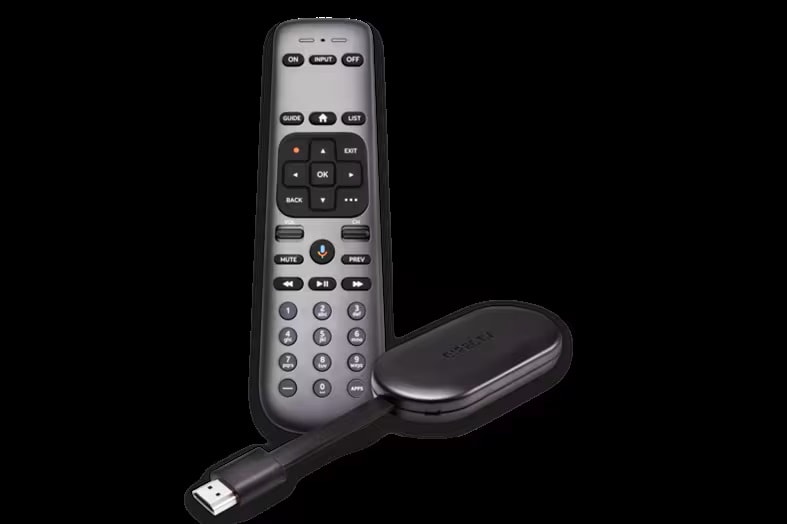
The Gemini remote is designed for DirecTV’s latest streaming devices. It connects using Bluetooth and can also control your TV with infrared. This makes it more advanced than older remotes. It has voice control, quick access buttons, and can control both your DirecTV box and your TV. But the technology means more can go wrong.
Key Features
- Bluetooth pairing for direct control
- Infrared signals for traditional TV controls
- Voice search button
- Streaming app shortcuts
- Universal TV compatibility
Knowing these features helps you troubleshoot. For example, Bluetooth must be paired, and infrared needs a clear line of sight.
Common Reasons Why Your Gemini Remote Stops Working
Understanding the root cause saves time. Here are the most frequent issues:
- Dead batteries: Most remotes stop working because the batteries are empty.
- Bluetooth not paired: The remote loses connection with the DirecTV box.
- Infrared blocked: Something is in front of your TV’s sensor.
- Device needs a reset: Sometimes the DirecTV box or remote needs rebooting.
- Physical damage: Drops or spills can break internal parts.
- Software updates: Updates may cause temporary connection loss.
- Interference: Other electronics can disrupt Bluetooth signals.
Beginners often miss that Bluetooth and infrared are separate. If voice commands work but channel buttons don’t, it’s likely an infrared issue.

Step-by-step Troubleshooting Guide
Let’s fix the problem, starting with the simplest solution and moving to advanced ones.
Check And Replace Batteries
- Remove the battery cover.
- Take out old batteries.
- Insert new AA batteries, making sure the positive and negative ends are correct.
- Test the remote again.
Even if the remote lights blink, batteries can be weak. Always start with fresh ones.
Reboot Your Directv Gemini Device
- Unplug the device from power.
- Wait at least 30 seconds.
- Plug it back in and wait for it to restart.
This simple step often solves glitches.
Re-pair The Remote
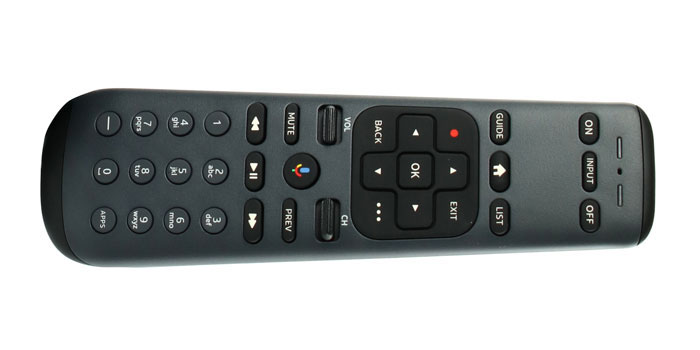
- Press and hold the Fast Forward and Rewind buttons together for five seconds.
- Wait for the light to blink or for pairing instructions on the screen.
- Follow prompts to complete pairing.
If Bluetooth pairing fails, try resetting both the remote and the device.
Remove Infrared Obstructions
- Make sure nothing blocks the front of your TV or DirecTV box.
- Clean the sensor area gently.
Infrared needs a clear path. Even small objects or dust can block the signal.
Reset The Remote
- Press and hold the Mute and Select buttons together until the light flashes.
- Release the buttons.
- The remote resets to factory settings.
After resetting, you may need to pair it again.
Update Device Software
- Go to Settings on your DirecTV Gemini device.
- Select System > Software Update.
- Check for updates and install if needed.
Updates fix bugs but sometimes cause temporary issues. Restarting after an update helps.
Check For Interference
- Keep other Bluetooth devices away from the Gemini box.
- Move wireless routers if possible.
- Avoid placing the box near microwaves or cordless phones.
Bluetooth interference can cause random dropouts. Beginners rarely suspect this.
Inspect For Physical Damage
- Look for cracks, sticky buttons, or signs of water damage.
- If damaged, replacement may be needed.
Sometimes, a remote looks fine but internal parts are broken. If none of the fixes work, physical damage is likely.
Comparing Gemini Remote Issues To Other Directv Remotes
Understanding how the Gemini remote differs from older models helps you troubleshoot smarter. Here’s a comparison:
| Feature | Gemini Remote | Classic DirecTV Remote |
|---|---|---|
| Bluetooth Pairing | Yes | No |
| Infrared Control | Yes | Yes |
| Voice Control | Yes | No |
| Universal TV Control | Yes | Limited |
| Common Problems | Pairing, interference | Battery, line of sight |
Gemini remotes have more features but also more things that can go wrong.
Diagnosing Remote Problems: Signs And Symptoms
Different problems show up in different ways. Here’s a quick guide:
| Symptom | Likely Cause | Fix |
|---|---|---|
| No lights when pressing buttons | Dead batteries | Replace batteries |
| Voice search not working | Bluetooth lost | Re-pair remote |
| TV power button not working | Infrared issue | Clear sensor area |
| Random disconnects | Interference | Move devices |
| Buttons sticky or unresponsive | Physical damage | Inspect or replace |
Notice how each symptom points to a different problem. Don’t assume all issues are battery-related.
Advanced Tips Most Beginners Miss
Some solutions aren’t obvious:
- Factory reset the Gemini box: If nothing else works, reset the streaming device. Go to Settings > System > Factory Reset. This erases everything, so use only as a last resort.
- Use the DirecTV app: If your remote is dead, download the DirecTV app on your smartphone. It can control your device until you fix or replace the remote.
- Check for hidden updates: Sometimes updates run silently. If your remote suddenly stops after an update, restart everything.
Many beginners overlook the app option, which can save you during emergencies.
When To Replace Your Gemini Remote
Sometimes, repair isn’t possible. Here are signs you need a new remote:
- Remote is cracked or broken
- Buttons do not press
- Battery contacts are rusty
- Remote was submerged in water
- Factory reset does not fix issues
DirecTV offers replacement remotes, and third-party options are available. Make sure to buy a remote labeled for “Gemini” compatibility.
Preventing Future Remote Problems
You can avoid many issues with simple habits:
- Change batteries every 6 months even if the remote works.
- Keep the remote clean; wipe with a soft cloth.
- Avoid dropping the remote or spilling drinks nearby.
- Update your device regularly for best performance.
- Store spare batteries in a safe place.
Most people only think about their remote when it stops working. Regular care extends its life.
Real-world Example
Maria, a DirecTV user in Texas, noticed her Gemini remote stopped controlling her TV’s volume but could still change channels. She tried replacing batteries, but nothing changed. She discovered her soundbar was blocking the TV’s infrared sensor. After moving the soundbar, everything worked again.
This story shows how simple obstacles can cause confusing problems. Sometimes, the solution is not obvious.
Directv Support And Warranty
If you’ve tried all fixes and nothing works, contact DirecTV support. Gemini remotes usually have a one-year warranty. Support can guide you through advanced troubleshooting or send a replacement if needed.
For official help, visit the DirecTV support site: DirecTV Support.
Cost Comparison: Replacement Vs. Repair
If you need a new remote, here’s a quick cost comparison:
| Option | Typical Price | Warranty |
|---|---|---|
| DirecTV Gemini Remote (official) | $15–$25 | 1 year |
| Third-party Gemini remote | $10–$20 | 6 months |
| Repair service | $30–$50 | Varies |
Buying a new remote is often faster and cheaper than repair.
Frequently Asked Questions
What Should I Do If My Directv Gemini Remote Won’t Pair?
First, restart your DirecTV Gemini device. Then, press and hold the Fast Forward and Rewind buttons for five seconds to start pairing. If pairing fails, reset the remote by holding Mute and Select. Try pairing again. Make sure there are no other Bluetooth devices nearby that could interfere.
Can I Use A Universal Remote With Directv Gemini?
Some universal remotes work with Gemini devices, but not all. Gemini remotes use both Bluetooth and infrared. Most universal remotes only use infrared, so features like voice control won’t work. Always check the compatibility list before buying.
How Long Do Gemini Remote Batteries Last?
With regular use, AA batteries last about six months. If you use voice commands or streaming shortcuts often, battery life may be shorter. Replace batteries as soon as performance drops, even if the lights still blink.
Is There A Way To Fix Sticky Buttons On My Gemini Remote?
Clean the buttons gently with a soft cloth. For tougher cases, use a cotton swab with a little rubbing alcohol. Avoid soaking the remote. If buttons stay sticky or don’t press, internal damage may be present and replacement is usually needed.
Where Can I Find Official Troubleshooting Guides?
Official guides are available on DirecTV’s support site. Visit DirecTV Support for step-by-step help, warranty details, and contact options.
Getting your DirecTV Gemini remote working again is usually possible with simple steps. From battery changes to pairing tricks, most problems can be fixed at home. Just remember: check both Bluetooth and infrared, look for physical obstructions, and try the DirecTV app if all else fails. With a little patience, you can avoid costly repairs and keep your TV experience smooth.