
When your Whirlpool washer flashes the F6E3 error code, laundry day can quickly turn stressful. This code means your machine has a communication problem between two important parts: the main control board and the user interface board. If you’re not familiar with how washers work, the fix might seem technical or expensive. But with a little patience and the right steps, you can often solve this issue yourself saving both time and repair costs.
This guide will walk you through everything you need to know about fixing the F6E3 error on a Whirlpool washer. You’ll learn what the code means, why it happens, how to troubleshoot each likely cause, and when to call for help.
With clear explanations, practical advice, and real examples, you’ll feel confident to get your washer working again.
Understanding The F6e3 Whirlpool Washer Error
The F6E3 error code is Whirlpool’s way of telling you there’s a serious communication issue. This fault usually appears on front-load models, especially those with digital displays and modern control panels. The error is a warning that the central control unit (CCU) and the user interface (UI) console aren’t “talking” to each other.
Why is this a problem? The control unit sends instructions to the UI, and the UI tells the washer what you want it to do (like which cycle to run). If they can’t connect, the washer can’t run correctly—or at all.
You’ll often notice the machine won’t start, the panel is unresponsive, or cycles end suddenly.
Main Causes Of The F6e3 Error
There are three main reasons this error appears:
- Loose or damaged wiring between the CCU and UI board
- Faulty user interface board (the buttons and display you use)
- Defective main control board (the washer’s “brain”)
Each cause has its own symptoms and solutions. Let’s look closer at each one.
Loose Or Damaged Wiring
The wiring harness is a group of wires that connects the CCU and the UI board. Over time, these wires can become loose, corroded, or even break. This is the most common cause of the F6E3 error, especially in homes with high humidity or after a recent move.
How To Check Wiring Connections
- Unplug the Washer: Safety comes first. Always disconnect the power before opening your washer.
- Remove the Top or Back Panel: Most Whirlpool models have screws at the back. Remove these and lift off the panel to access the control boards.
- Inspect Wiring Harnesses: Find the wires that connect the UI to the main control board. Look for:
- Loose plugs
- Frayed or burnt wires
- Signs of corrosion or moisture
- Reconnect and Secure: Firmly push all connections in place. If you see corrosion, clean the contacts gently with a dry toothbrush.
- Test the Washer: Plug it back in and see if the error clears.
Why Wiring Fails
- Vibration: Washers shake during spin cycles, which can loosen connections.
- Moisture: Leaks or condensation can cause corrosion.
- Aging: Wires can become brittle over many years.
Take a photo of the wiring before unplugging anything. This makes it easier to reconnect everything correctly.
Wiring Vs. Board Failure
Sometimes it’s hard to tell if wiring or a board is at fault. Here’s a quick comparison:
| Problem | Wiring Issue | Board Failure |
|---|---|---|
| Washer sometimes works | Yes | Rarely |
| Visible wire damage | Yes | No |
| Burnt smell | Possible | Possible |
| Error after moving washer | Very likely | Unlikely |
Faulty User Interface Board
The user interface board is the part you touch: the display, buttons, and dials. If this board fails, it can’t send signals to the main control unit. Sometimes, the error appears after a power surge, or when the washer gets wet (like from a spill or leak).
Symptoms Of A Bad Ui Board
- Display lights up, but buttons do nothing
- Display is blank or flickers
- Washer powers on, but won’t start a cycle
How To Test The Ui Board
- Try a Different Cycle: Sometimes only one button or function fails. If none work, it’s likely the UI board.
- Check for Water Damage: Open the control panel and look for moisture, corrosion, or white mineral deposits.
- Use Diagnostic Mode: Many Whirlpool washers have a test mode. Press and hold three buttons in sequence (see your manual). If the UI board doesn’t respond, it’s likely faulty.
Replacing The Ui Board
- Order the Right Part: Use your washer’s model number to find the correct UI board.
- Unplug and Remove Panel: Safety first—disconnect power and remove the top or front panel.
- Disconnect and Replace: Unplug the old board, plug in the new one, and reassemble.
- Test the Machine: Run a cycle to see if the error is gone.
Non-obvious insight: Sometimes, a weak UI board will work if you unplug the washer for 10+ minutes (power cycling). But if the error comes back, replacement is the long-term fix.

Defective Main Control Board
The main control board (CCU) is the washer’s command center. If it fails, you might see random error codes, the washer may not respond at all, or it could stop mid-cycle. Unlike wiring or UI issues, control board failures are usually permanent and can affect several functions at once.
Signs Your Main Control Board Is Bad
- F6E3 error appears right after power-up
- No lights, no response, even if the UI is working
- Other errors (like F01, F02) appear randomly
How To Check The Control Board
- Visual Inspection: Look for burnt marks, damaged chips, or bulging capacitors.
- Smell Test: A burnt odor often means a fried board.
- Swap Test: If possible, swap with a known-good board from the same model.
Replacing The Main Board
- Get the Right Board: Use the model and serial number to match parts.
- Take Safety Precautions: Always unplug the washer before replacing any electronic part.
- Carefully Remove and Replace: The main board usually has several connectors. Label wires if needed.
- Reassemble and Test: Once installed, run a cycle to confirm the fix.
Practical tip: Main boards can be expensive. If your washer is over 10 years old, compare the cost of repair versus buying a new machine.
Comparing The Three Main Causes
Here’s a quick look at the three possible causes for the F6E3 error, to help you decide where to start:
| Cause | Difficulty to Fix | Cost | Success Rate |
|---|---|---|---|
| Wiring issue | Easy | Low (usually $0) | High |
| User interface board | Medium | Moderate ($50–$200) | High |
| Main control board | Hard | High ($150–$350) | Medium |
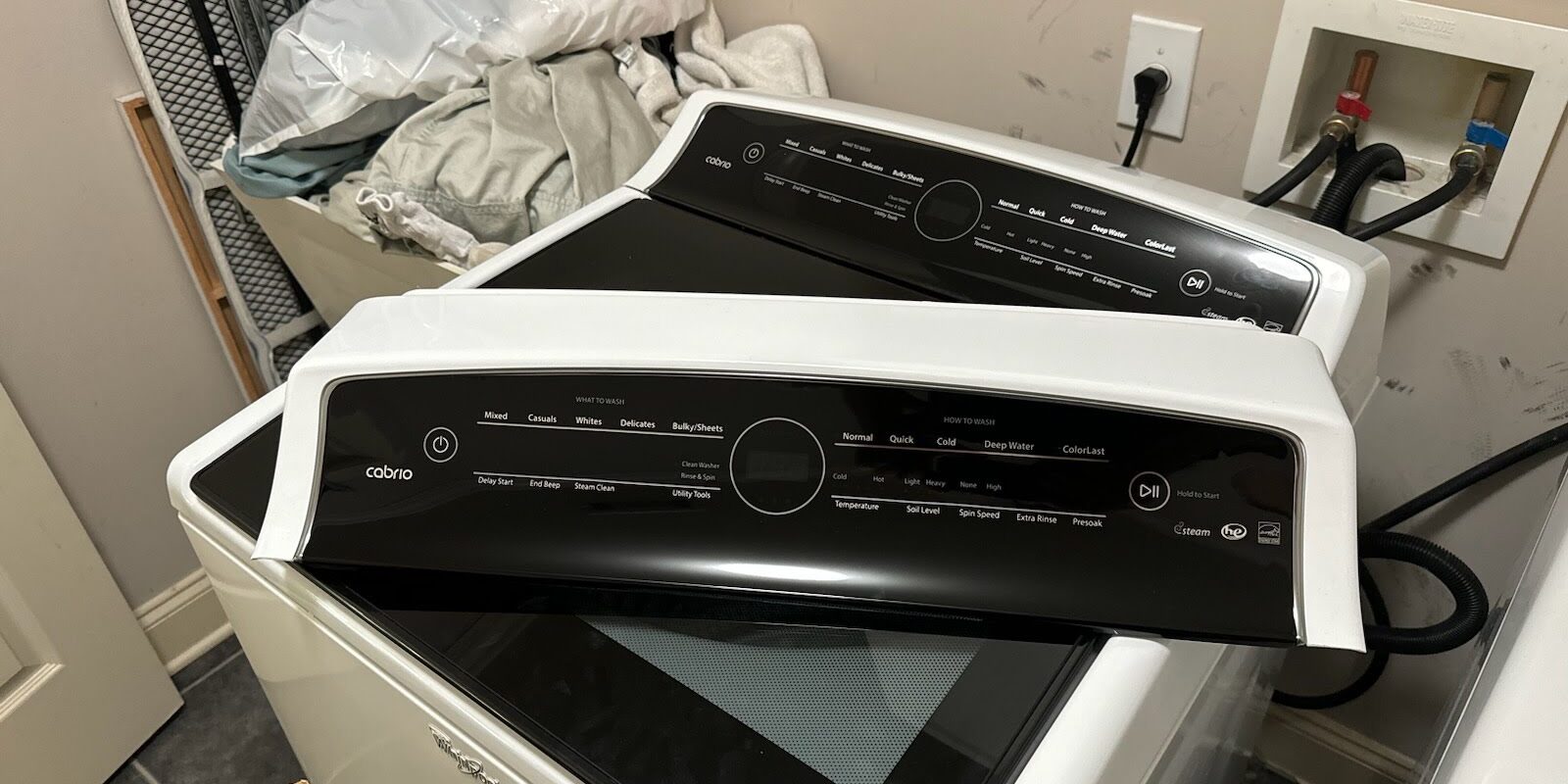
Step-by-step Fix For F6e3 Error
To help you troubleshoot efficiently, here’s a summary of steps you can follow:
- Unplug the washer and wait 5 minutes. Sometimes, the error clears after a reset.
- Check all wiring connections between the UI board and main control board.
- Inspect the UI board for damage, corrosion, or unresponsive buttons.
- Test the main control board for visible damage or burnt smell.
- Replace faulty parts as needed, starting with wiring, then UI, then main board.
- Test the washer after each step to see if the problem is fixed.
Non-obvious insight: Sometimes, the F6E3 error is triggered by an electrical storm or sudden power outage. If this happens, unplugging the washer for 15–20 minutes and then plugging it back in may reset the electronics.
Common Mistakes To Avoid
- Skipping wire checks: People often replace boards when a loose wire is the real problem.
- Not matching model numbers: Using the wrong part can cause new errors.
- Rushing through steps: Always check each part carefully before moving to the next.
- Ignoring safety: Always unplug your washer before opening it.
When To Call A Professional
If you have checked all wiring, replaced the UI board, and still see the error, it may be time to call a technician. Whirlpool washers have complex electronics, and a trained professional can test circuit boards with special tools. If your machine is under warranty, attempting DIY repairs may void coverage—check your warranty first.
Example: One user reported replacing the UI board themselves, only to find the error kept returning. After a technician visit, the issue was traced to a cracked main control board from a previous power surge—a problem not visible to the naked eye.
How To Prevent Future F6e3 Errors
- Secure connections: After repair, make sure all wires are tightly plugged in.
- Keep washer dry: Avoid spills and leaks near the control panel.
- Use surge protectors: Power surges can damage sensitive boards.
- Don’t overload cycles: Extra weight can cause vibration and loosen wires.
- Schedule regular checks: Inspect wiring every 1–2 years, especially if you move the washer.

Useful Resources
For official wiring diagrams, part numbers, and DIY guides, Whirlpool’s official support page is a reliable resource. You can find more technical details and model-specific manuals on the Whirlpool official site.
Frequently Asked Questions
What Does F6e3 Mean On A Whirlpool Washer?
The F6E3 error code means there is a communication problem between the washer’s main control board and the user interface. This stops the machine from running until the problem is fixed.
Can I Fix The F6e3 Error Myself?
Yes, many people can fix this error at home by checking and securing wiring connections. If a part is faulty, replacing the UI board or main control board is possible for those comfortable with basic tools.
How Much Does It Cost To Repair The F6e3 Error?
Costs vary:
- Wiring repair: Usually free if you do it yourself
- UI board: $50–$200 for the part
- Main control board: $150–$350 for the part
A technician may charge extra for labor.
Will Unplugging The Washer Reset The F6e3 Error?
Sometimes. Unplugging for 5–20 minutes can reset the control boards if the problem was a glitch. If wiring or a board is faulty, the error will return.
Is The F6e3 Error Dangerous?
No, it’s not dangerous, but it does mean your washer can’t run. Always unplug the washer before opening or repairing it to avoid electric shock.
Getting an F6E3 error on your Whirlpool washer can feel overwhelming, but with a systematic approach, you can often find and fix the problem yourself. Start with wiring checks, then move to the UI and main control boards. Don’t rush careful steps can save money and frustration.
And if you’re unsure, a skilled appliance technician is always a wise choice. With proper care, your Whirlpool washer will be back to cleaning clothes reliably for years to come.