
You can resolve most loud fan noises by cleaning out trapped crumbs or debris from the rear vents, as this is how to troubleshoot loud breville toaster oven fan noises without needing specialized tools. The most common cause is a small piece of food or foil getting stuck near the convection blades, which creates a rattling or grinding sound as the fan spins.
Troubleshoot loud Breville fan noises
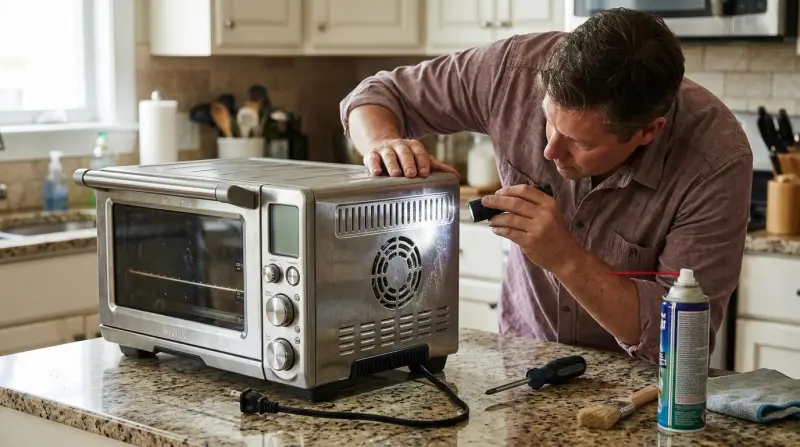
Loud noises from your toaster oven usually result from physical interference with the fan blades. Because these ovens use a high-speed convection fan to circulate hot air, even a tiny piece of aluminum foil or a dried-out crumb can cause a loud flapping or clicking sound. When debris enters the fan housing, it hits the metal blades thousands of times per minute.
Over time, these sticky deposits can dry out and harden, creating friction that leads to a high-pitched whine or a rhythmic thumping noise. This often happens if the oven is frequently used for fatty foods without a proper drip tray or cover.
Finally, the fan motor itself may experience internal wear. If the bearings inside the motor lose their lubrication, they will start to make a grinding or screeching sound. This isn’t a user-serviceable part. If the noise persists after you have cleaned the exterior vents and ensured no loose debris is present, the motor may be reaching the end of its functional life. If you hear a loud, abnormal grinding noise that sounds like metal-on-metal contact, you should stop using the unit immediately to avoid further damage to the motor.
Clear the vents and exterior
This fix is for anyone who hears a rattling or flapping sound coming from the back of their unit. First, unplug the oven from the wall outlet and allow it to cool completely for at least one hour. Once cold, use a vacuum with a soft brush attachment to gently clear the rear air intake vents. Many users make the mistake of using a compressed air canister to blow debris deeper into the fan housing, which can permanently jam the blades. Instead, use a vacuum to pull dust and crumbs outward.
If you see a piece of foil or a large crumb protruding from the vent, use a pair of long, non-metallic tweezers to gently pull it out. Never force any object deep into the vent, as this can bend the delicate metal blades. After clearing the visible debris, plug the oven back in and run it on a low-heat convection setting for five minutes to see if the noise has stopped. If the sound persists, the debris may be caught inside the housing where you can’t reach it safely. If you aren’t comfortable performing this simple exterior cleaning, or if you feel resistance when trying to remove an item, stop immediately. Attempting to force an object through the metal grate is a mistake that often leads to a bent fan blade, which will cause the unit to vibrate violently during use.
Adjust the oven placement
This fix is for owners who notice a loud humming or buzzing that changes when they touch or move the oven. Often, the noise isn’t the fan itself, but the vibration of the unit against a countertop or a loose metal panel on the oven exterior. Ensure the toaster oven is on a perfectly flat, level surface. If the feet are uneven, the entire chassis can vibrate against the counter during high-speed fan operation, amplifying the sound of the motor.
Check that the oven isn’t touching backsplashes, walls, or other appliances. A gap of at least four inches on all sides is recommended for proper airflow and to prevent vibrations from transferring to your cabinetry. If the unit sits on a hollow surface like a thin metal tray or a loose cutting board, these items can act as a sounding board, making a quiet fan sound very loud. Place the oven on a stable, heat-resistant surface like a granite or wooden countertop. If the noise stops when you place a firm hand on the top of the oven, the issue is likely vibration rather than a failed internal part. This varies by model—check the label on the bottom of your oven for the manufacturer’s specific clearance requirements. If the unit continues to vibrate after you have leveled it and cleared the surrounding area, the internal fan mounting may be loose.
Inspect the fan housing
This fix is for cases where the noise is consistently loud, grinding, or metallic, regardless of the oven’s position. It’s worth the time to perform a final inspection of the interior fan guard. Look inside the oven cavity to see if the metal screen covering the fan has become loose or dented. If the screen is pushed inward, it may be touching the fan blades, causing a constant scraping sound.
If you find a dented or loose guard, you can sometimes gently press the screen back into its original shape with a dry, clean wooden spoon. Don’t use metal tools, as you risk damaging the heating elements or scratching the interior coating. If the fan guard is intact and the noise is still a deep grinding sound, the issue is likely a failed motor bearing. This is a limit: you can’t repair a sealed motor bearing yourself. If the noise is coming from inside the motor, you must contact the manufacturer for a repair or replacement. Attempting to open the outer shell of the oven is dangerous, as a capacitor can hold a lethal charge even when the unit is unplugged. If you’re still within the warranty period, don’t attempt any further physical adjustments. Contact the manufacturer’s support team to verify your coverage and arrange for professional service.
What not to do
- Never insert metal tools or wire into the fan vents. This can cause an electrical short or damage the fan blades, which will lead to a costly repair or a total loss of the appliance.
- Don’t attempt to oil the fan motor. Many people try to spray lubricant into the vents, but this is a fire hazard and will cause the motor to collect dust and eventually seize up completely.
- Never operate the oven with the back panel removed. Opening the casing exposes you to high-voltage components, including capacitors that can cause severe injury even when the power cord is disconnected.
- Don’t ignore a grinding or screeching noise. If you continue to use a toaster oven that makes metal-on-metal sounds, you’ll likely destroy the motor and potentially cause the unit to overheat or stop working mid-cycle.
How to stop it happening again
Regular maintenance is the most effective way to prevent fan noise. By keeping the cooking area clean and ensuring the oven has enough space to breathe, you reduce the strain on the motor and prevent debris from entering the housing.
| If you’re doing this | Do this instead | Why |
|---|---|---|
| Leaving the oven near a wall | Keep a 4-inch gap | Prevents vibration and heat buildup |
| Cooking fatty foods uncovered | Use a deep drip tray | Keeps grease away from the fan |
| Cleaning with a wet cloth | Use a dry brush/vacuum | Prevents moisture from damaging electronics |
| Ignoring small rattling sounds | Clean the vents immediately | Stops debris from bending fan blades |
Most owners mistake a minor rattle for a simple loose screw. If the noise persists after clearing the vents, check the fan blade alignment.
To determine if the issue is mechanical or electrical, listen for the sound at startup. If the noise is present the moment the fan engages, it’s a physical obstruction. If the noise develops only after the oven reaches high temperatures, the issue is likely thermal expansion causing a component to rub against the spinning assembly.
Frequently asked questions
Can I fix a noisy fan myself?
You can fix many fan noises by clearing trapped debris or stabilizing the oven. Vacuuming external vents often resolves vibration issues. However, grinding sounds indicate mechanical failure, which requires professional repair.
Why does my toaster oven make a loud flapping noise?
A flapping noise is usually caused by debris like aluminum foil caught in the convection fan blades. Unplug the unit and use non-metallic tweezers to remove any visible material. Don’t force objects into the vent, as this may damage internal components.
Is it safe to use a toaster oven that makes noise?
It isn’t safe to use a toaster oven that makes a loud, abnormal grinding noise. This sound typically indicates failing motor bearings or blades hitting internal components. Stop using the unit immediately to prevent overheating or electrical faults.
How long should a toaster oven fan last?
A toaster oven fan should last for the entire lifespan of the appliance with proper cleaning. Motor longevity depends on usage patterns and grease buildup. If noise starts suddenly, it’s usually a sign of debris rather than a worn-out motor.
What happens if I ignore the fan noise?
Ignoring fan noise risks permanent motor damage or dangerous overheating. A struggling fan causes uneven cooking and places excessive stress on heating elements. If the noise is caused by debris, it could eventually ignite if it contacts hot components.
Final Thoughts
If the rattling persists after a thorough cleaning, it’s likely that the internal motor bearings are wearing out. You shouldn’t try to force the casing open yourself, as that’s dangerous. Instead, reach out to the manufacturer’s support team to see if your appliance is still covered under its original warranty.
Related guides
- LG Refrigerator Makes Loud Humming Noise: Causes and Quick Fixes
- Dyson Fan Noise: How to Reduce and Fix Common Problems
- Fridge Making Grinding Noise: Causes and Easy Fixes