
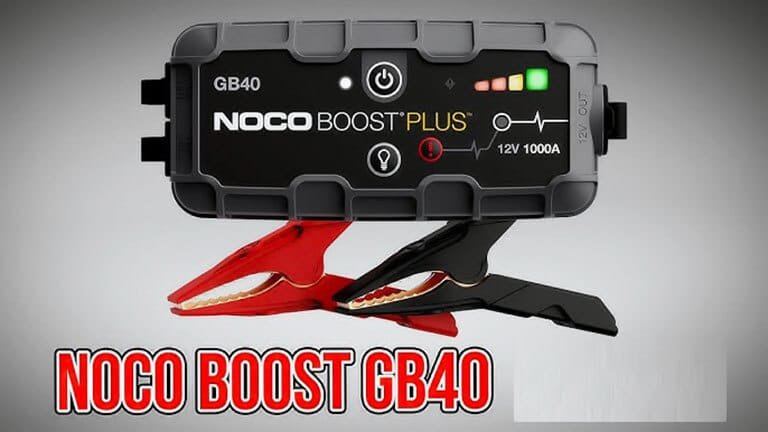
If you own a Noco GB40 jump starter, you probably appreciate its compact size and strong performance. But, like any electronic device, it can sometimes have issues. Understanding these problems can help you fix them faster and avoid unnecessary stress. This article explores 40 common Noco GB40 problems, their causes, and practical solutions. Whether you’re a beginner or have used jump starters before, you’ll find helpful advice, real examples, and clear explanations to keep your device working well.
Won’t Turn On
Many users report their GB40 does not power up. Usually, this happens when the internal battery is fully drained or the device is not charged correctly. Plug the unit into a reliable charger and wait for at least 2 hours.
If it still won’t turn on, the battery may be faulty.
Doesn’t Hold Charge
If your GB40 loses charge quickly, the battery might be aging or damaged. Keep the device away from extreme temperatures and avoid leaving it unused for long periods. Charging monthly helps maintain battery health.
Charge Indicator Not Working
The charge indicator lights should show battery status. If they stay off or flicker, check the charging cable and port. Sometimes, dust or moisture affects the connectors.
Usb Charging Problems
The GB40 can charge devices via USB. If this feature fails, try a different USB cable or device. If none work, the USB port may be damaged.
Won’t Jump Start
If the GB40 doesn’t jump start your car, check that clamps are attached correctly and the battery is not deeply discharged. Weak connections or low voltage can prevent jump starting.
Low Peak Amps
The GB40 should deliver high peak amps. If it’s weak, the internal battery may be degraded. This often happens after years of use or frequent deep discharges.
Device Overheating
Some users notice the GB40 gets hot during use. Avoid using it in direct sunlight and let it cool between uses. Overheating can damage internal components.
Clamps Not Making Contact
If clamps don’t make a secure connection, clean battery terminals and check clamp alignment. Weak contact can result in failed jump starts.
Error Lights Flashing
Flashing error lights often signal incorrect connections or a battery fault. Check the manual for specific light codes and follow troubleshooting steps.
Won’t Charge From Wall Adapter
Sometimes the GB40 doesn’t charge from a wall adapter. Try a different adapter or cable. If the problem continues, the charging circuit may be faulty.
Won’t Charge From Car Outlet
If charging from a car outlet fails, ensure the car outlet is working and the GB40 cable is undamaged. Some vehicles only power outlets when the ignition is on.
Battery Swelling
Swelling inside the GB40 can occur due to overheating or internal failure. Stop using the device immediately and contact support.
No Output From 12v Port
If the 12V output does not work, check the port for dirt or damage. Some devices draw too much power, causing the port to shut off.
1Reverse Polarity Protection Not Working
The GB40 has reverse polarity protection. If this fails, you risk damaging your car’s electronics. Always double-check clamp connections.
Slow Charging
Charging can be slow if you use a low-power adapter. For faster charging, use a 2A adapter and a high-quality cable.
Power Button Stuck
Sometimes the power button sticks. Clean around the button and gently press it. If it remains stuck, the internal mechanism may be broken.
Unresponsive After Long Storage
Devices stored for months may not respond. Charge the GB40 fully before use, and store it in a cool, dry place.
Faulty Led Flashlight
The built-in flashlight may flicker or not turn on. Check the button, and if it still fails, the LED or wiring may be damaged.
Device Shuts Down Mid-use
If the GB40 shuts down during operation, it could be overheating or the battery is too weak. Allow the device to cool and recharge fully.
Can’t Jump Start Larger Engines
The GB40 is rated for engines up to 6 liters (gas) or 3 liters (diesel). Trying to start larger engines can overload the device.
Internal Fuse Blown
A blown fuse inside can stop all functions. Fuses protect against surges. Contact Noco for repair; don’t try to replace it yourself.
Unexpected Alarm Sound
Some GB40 units sound an alarm for improper connections or low battery. If it’s constant, check cables and connections.
Moisture Damage
Exposure to rain or humidity can cause malfunctions. Dry the device thoroughly before use and keep it away from wet environments.
Battery Not Charging Fully
If the battery never reaches full charge, calibrate by charging and discharging several times. If still low, the battery may need replacement.
Clamps Wear Out
Over time, clamps can lose spring tension or become corroded. Replace clamps if they do not grip securely.
Usb Port Loose
Frequent use can loosen the USB port. Avoid pulling cables roughly. If loose, professional repair is needed.
Error Codes Not Clearing
Sometimes error codes stay even after fixing issues. Unplug and reset the device. If codes persist, contact support.
No Response To Reset
Resetting the GB40 should clear errors. If it does not respond, the internal circuit may have failed.
Software Glitches
Rarely, firmware bugs can cause odd behavior. Updating firmware is not user-accessible, so contact Noco if you suspect a software problem.
Battery Memory Effect
Repeated partial charges can cause “memory effect,” lowering capacity. Occasionally run the battery down fully before recharging.
Charging Light Always On
If the charging light stays on after unplugging, it may be a sensor error. This does not usually affect performance but can confuse users.
Noisy Operation
Buzzing or clicking sounds may indicate internal faults. If noises persist, stop using the device and get it checked.
Display Flickering
The indicator display may flicker due to loose connections or battery issues. Check cables and recharge the unit.
Weak Jump Start In Cold Weather
Cold temperatures reduce battery power. Warm the GB40 indoors before use for better performance.
Poor Performance After Multiple Uses
Heavy, frequent use can degrade battery life. Consider replacing the device if jump starts become unreliable.
Inaccurate Battery Level
Battery level indicators can be imprecise. If you notice sudden drops, recalibrate by fully charging and discharging the device.
Device Not Recognized By Charger
If the charger doesn’t recognize the GB40, try a different cable or adapter. Damaged ports can cause this issue.
Faulty Charging Cable
A damaged cable can cause many charging problems. Inspect for fraying or broken connectors and replace if needed.
Incorrect Charging Voltage
Use only recommended voltage chargers. Too high or too low voltage can damage the GB40 or cause it to malfunction.
Warranty Not Honored
Some users struggle to get warranty service due to missing receipts or unclear terms. Keep your purchase proof and check warranty details before contacting support.
Gb40 Problem Comparison
Here’s a quick comparison of the most common GB40 issues:
| Problem | Frequency | Potential Fix |
|---|---|---|
| Won’t Turn On | High | Recharge, check battery |
| Doesn’t Hold Charge | Medium | Monthly charging, avoid heat |
| USB Charging Problems | Medium | Try new cable/device |
| Device Overheating | Low | Cool device, avoid sun |
Practical Tips To Prevent Gb40 Problems
- Charge the device at least once a month, even if not used.
- Store in a cool, dry place away from direct sunlight.
- Use only recommended chargers and cables.
- Clean clamps and terminals before every use.
- Handle the USB and charging ports gently.
Gb40 Vs Other Jump Starters
How does the GB40 compare to other popular jump starters? This table shows some differences:
| Model | Peak Amps | Engine Size Supported | USB Charging |
|---|---|---|---|
| Noco GB40 | 1000 | Up to 6L Gas/3L Diesel | Yes |
| DBPOWER 800A | 800 | Up to 5.5L Gas/4L Diesel | Yes |
| Clore Automotive JNC660 | 1700 | Up to 7L Gas/5L Diesel | No |
Troubleshooting Steps For Beginners
If you’re new to jump starters, here are some clear steps to solve the most common GB40 problems:
- Check connections: Make sure clamps are on clean battery terminals.
- Charge fully: Use a reliable charger and cable; wait until all indicator lights show full.
- Inspect cables and ports: Look for damage, dirt, or moisture.
- Read error codes: Use the manual to understand indicator lights.
- Reset device: Unplug and hold the power button for 10 seconds.
Two Insights Beginners Often Miss
- The GB40’s battery can degrade quickly if it’s left unused for long periods. Regular charging helps avoid this.
- Many jump start failures are not caused by the GB40 itself, but by poor clamp connection or dirty battery terminals. Always check these first.
Warranty And Support
Noco offers a warranty, but you must keep your receipt and register the product. If your device fails, contact Noco through their official support page. Understand what is covered before making a claim. For more details, visit Noco Support.

Frequently Asked Questions
What Engine Sizes Can The Gb40 Jump Start?
The GB40 is designed for engines up to 6 liters (gas) and 3 liters (diesel). Larger engines may require a more powerful unit.
How Often Should I Charge My Gb40?
Charge your GB40 at least once per month. This keeps the battery healthy, even if you don’t use it often.
Can I Replace The Gb40 Battery?
The GB40 battery is not user-replaceable. If the battery fails, contact Noco for professional service.
What Does The Flashing Red Light Mean?
A flashing red light usually signals reverse polarity or a connection error. Check the clamps and battery terminals.
Is The Gb40 Waterproof?
The GB40 is not waterproof. Keep it dry and avoid using it in heavy rain.
Taking care of your Noco GB40 and understanding its problems will help you get reliable performance for years. With the advice above, you can solve most issues yourself, avoid common mistakes, and use your jump starter with confidence. If serious problems occur, professional support is always available.