
If your Samsung fridge is not cooling, it can feel like a crisis. Food can spoil quickly, and it is frustrating to figure out what’s wrong. Many people believe a quick reset will fix everything, but the truth is more complex. In this article, you’ll discover how to reset your Samsung fridge, why it’s not cooling, and what steps actually solve the problem. Whether you’re a homeowner or a renter, this guide will help you avoid mistakes, save money, and keep your fridge running smoothly.
Why Samsung Fridges Stop Cooling
Understanding why your fridge isn’t cooling is the first step. Sometimes, a reset can help, but not always. Here are the most common reasons:
- Power issues – A loose plug or damaged outlet can stop the fridge from working.
- Dirty condenser coils – Dust and dirt make the coils less effective.
- Faulty temperature settings – If the thermostat is set too high, cooling stops.
- Blocked vents – Items inside the fridge can block airflow.
- Broken compressor – This is the heart of the fridge’s cooling system.
- Defrost problems – Ice buildup can prevent cooling.
- Door seal problems – Warm air leaks in if the seal is damaged.
- Control board errors – Sometimes, the fridge’s computer needs a reset.
Many beginners think resetting the fridge solves everything. In fact, a reset is only helpful for control board errors, minor glitches, or after a power outage.
How To Reset Your Samsung Fridge
Resetting your fridge is simple, but you must do it correctly. Here’s a step-by-step guide:
Unplug The Fridge
- Find the power cord at the back.
- Pull it out from the outlet.
- Wait at least 5 minutes. This gives the fridge time to reset its system.
Plug It Back In
- After 5 minutes, plug the fridge back in.
- The fridge will restart. Check if it begins cooling.
Use The Reset Button (if Available)
Some Samsung models have a reset button inside.
- Look for a small button near the control panel or under the ice maker.
- Press and hold for 10 seconds.
- Wait for the fridge to beep or restart.
Reset The Control Panel
If your fridge has a digital display:
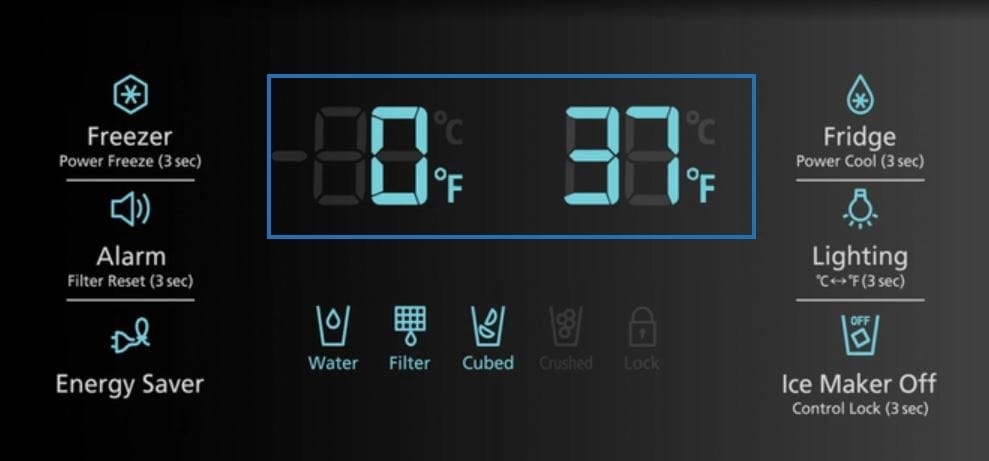
- Press Power Freeze and Power Cool buttons together.
- Hold for 10 seconds.
- The panel should turn off, then back on.
Factory Reset (advanced)
Only use this if the fridge has a major error:
- Locate the reset button inside.
- Press and hold for 10 seconds.
- The fridge will return to factory settings.
Always check your user manual for model-specific instructions.
Common Mistakes
- Forgetting to unplug the fridge before resetting.
- Not waiting long enough before plugging back in.
- Using force on the reset button (it’s delicate).
- Resetting when there is a hardware issue (like a broken compressor).
Troubleshooting: What If Reset Doesn’t Work?
A reset sometimes solves minor software glitches, but not physical problems. If your fridge still isn’t cooling, follow these steps:
Check Power Supply
- Plug another device into the same outlet. If it works, the outlet is fine.
- Inspect the power cord for damage.
Inspect Temperature Settings
- Check the fridge display.
- Recommended settings: Fridge 37°F (3°C), Freezer 0°F (-18°C).
Clean The Condenser Coils
- Unplug the fridge.
- Locate the coils at the back or bottom.
- Use a vacuum or brush to remove dust.
Look For Blocked Vents
- Move food away from vents inside the fridge.
- Air should flow freely.
Examine Door Seals
- Close the door and run your hand along the edge.
- If you feel cool air escaping, the seal needs repair.
Defrost System Check
- Ice buildup means the defrost system isn’t working.
- Manually defrost by unplugging for 12 hours.
- If ice returns, call a technician.
Compressor Health
If the compressor is silent or very hot, it could be broken. Only a professional should repair this part.
Comparing Samsung Fridge Reset Methods
Here’s a quick comparison of common reset options:
| Reset Method | Difficulty | When to Use | Effectiveness |
|---|---|---|---|
| Unplug & Plug In | Easy | Minor glitches, power outage | High |
| Reset Button | Moderate | Control board errors | Medium |
| Control Panel Reset | Easy | Display errors | Medium |
| Factory Reset | Hard | Major software errors | High |

How Often Should You Reset Your Samsung Fridge?
You should only reset your fridge when:
- There’s a software or control panel error.
- After a power outage.
- When the fridge doesn’t respond to normal commands.
Frequent resets can harm the electronics. Never reset your fridge as a routine fix. This is a mistake many beginners make. If you notice repeated cooling problems, address the root cause instead.
Samsung Fridge Cooling Statistics
Samsung is one of the top refrigerator brands in the US, with over 20% market share. Most Samsung fridges last 10–15 years with proper care. Cooling problems usually happen after 5–7 years due to dust, aging parts, or door seal wear.
Here’s a table comparing Samsung fridge cooling issues with other brands:
| Brand | Average Cooling Failures/Year (per 100 units) | Common Causes |
|---|---|---|
| Samsung | 6 | Control board, coils, seals |
| LG | 7 | Compressor, seals |
| Whirlpool | 5 | Coils, thermostat |
| GE | 8 | Compressor, defrost |
When To Call A Professional
Not all cooling problems can be fixed at home. You should call a technician if:
- The reset does not work after two tries.
- The compressor is silent or making strange noises.
- There is ice buildup even after manual defrosting.
- The control panel is blank or flashing error codes.
- The door seals are torn or damaged.
Professional repairs can cost $150–$500, depending on the issue. Sometimes, replacing a compressor costs as much as a new fridge. Always ask for an estimate before approving repairs.
Samsung Fridge Reset Examples
Let’s look at two real-life situations:
- After a power outage: Maria’s Samsung fridge stopped cooling. She unplugged it, waited 10 minutes, and plugged back in. The fridge started cooling again. The problem was a temporary power glitch.
- Control panel error: John’s fridge showed “88 8E” error. He pressed Power Freeze and Power Cool together for 10 seconds. The error disappeared, and normal cooling resumed.
These examples show that sometimes a simple reset solves the problem. Other times, a deeper issue exists.
Extra Tips To Prevent Cooling Problems
Here are some insights many beginners miss:
- Clean condenser coils every 6 months.
- Don’t overload the fridge; too much food blocks airflow.
- Always keep the door seals clean and free from sticky residue.
- If the fridge makes loud noises, check the compressor right away.
- Update the fridge firmware if your model supports it.
Comparing Reset Vs. Repair Costs
Repairing a Samsung fridge is expensive. Here is a quick comparison:
| Solution | Average Cost | Time Required | Success Rate |
|---|---|---|---|
| Reset | $0 | 10 minutes | 60% |
| Professional Repair | $200 | 2–4 hours | 90% |
| New Fridge | $1,200 | 1 day | 100% |
Resetting is free and fast, but only works for software glitches. Repairs are costly but fix hardware issues. Replacing the fridge is expensive and only needed for very old units.
If you want more technical details, visit the official Samsung website for troubleshooting and user manuals: Samsung Support.
Frequently Asked Questions
How Do I Know If My Samsung Fridge Needs A Reset?
If your fridge stops cooling after a power outage or shows a control panel error, a reset can help. If there are physical problems (like strange noises or ice buildup), a reset will not fix it.
What Is The Best Way To Reset A Samsung Fridge?
The easiest method is to unplug the fridge, wait 5–10 minutes, and plug it back in. For digital models, use the Power Freeze and Power Cool buttons together.
Can I Reset My Fridge Too Often?
Frequent resets can harm the fridge’s electronics. Only reset when there is a specific error or after a power glitch.
What If My Fridge Still Doesn’t Cool After Resetting?
Check the power supply, temperature settings, condenser coils, vents, and door seals. If these are fine, call a technician for help.
How Much Does It Cost To Fix A Samsung Fridge Not Cooling?
Basic repairs cost $150–$500. Compressor or control board replacements are more expensive. Always get a quote before starting repairs.
Keeping your Samsung fridge cooling is not just about pressing a reset button. It’s about understanding the real cause, following the right steps, and knowing when to ask for professional help. Many people waste money on unnecessary repairs because they skip simple checks. With this guide, you can troubleshoot confidently and protect your food and your fridge for years to come.