
A blinking temperature display on a Samsung fridge can be confusing and worrying. You may wonder if your fridge is broken, if your food is safe, or what you should do next. Many people see this blinking for the first time and think there is a big problem, but the real cause is often simple and easy to fix. Understanding why the temperature display blinks and how to solve it will help you avoid wasting time and money. This article explains everything you need to know about Samsung fridge temperature blinking, including reasons, solutions, and practical advice for keeping your fridge running smoothly.
What Does The Blinking Temperature Mean?
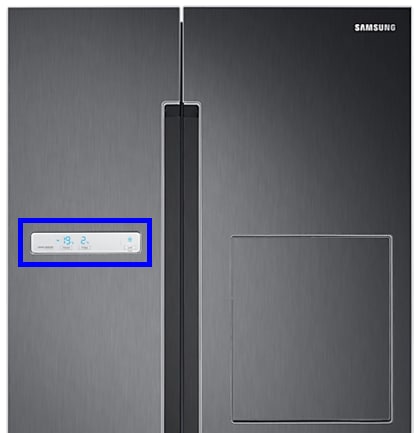
On most Samsung refrigerators, the temperature display shows the current temperature inside the fridge or freezer. If the display starts blinking, it usually means the fridge is trying to tell you something. Blinking temperature is a warning sign, not just a cosmetic issue.
Here are some typical meanings:
- The fridge or freezer temperature is too high or too low.
- There is a problem with the cooling system.
- The door has been left open for too long.
- There is a power interruption or reset.
Blinking is Samsung’s way of alerting you to check the fridge and take action. It does not always mean a major fault, but ignoring it can cause food spoilage or bigger issues.
Common Reasons For Temperature Blinking
Most Samsung fridge owners see the blinking display for one of these reasons:
- Power Outage Or Reset: If your fridge loses power and then turns back on, the temperature display may blink. The fridge needs time to cool back to the set temperature. Usually, blinking stops after a few hours.
- Door Left Open: When the fridge or freezer door is open for too long, warm air enters, and the temperature rises. The display blinks to warn you. Closing the door usually stops the blinking after some time.
- Temperature Sensor Issue: If the sensor inside the fridge is faulty or not working, it cannot read the correct temperature. This causes the display to blink.
- Cooling System Problems: Problems with the compressor, fan, or refrigerant can prevent the fridge from cooling properly. If the fridge cannot cool, the temperature display will blink.
- Control Board Faults: If the electronic control board has an issue, it may cause false blinking or fail to control the cooling system.
- Overloaded Fridge: Packing too much food or blocking air vents can stop air from circulating. This makes cooling harder and can trigger blinking.
- New Installation: After installing a new Samsung fridge, blinking may happen while it cools down for the first time. This is normal and should stop within 24 hours.
How To Fix Samsung Fridge Temperature Blinking
You can often fix temperature blinking yourself. Try these steps before calling a technician:
- Check The Doors: Make sure all doors are fully closed. Look for items blocking the seal or causing gaps.
- Wait After Power Loss: After a power outage, the fridge needs time to reach the set temperature. Wait 2–4 hours. If blinking continues, move to the next steps.
- Adjust Food Placement: Avoid blocking air vents. Do not overfill the fridge. Leave space for air to move.
- Reset The Fridge: Unplug the fridge for 1–5 minutes, then plug it in again. This can clear errors.
- Check Temperature Settings: Make sure the temperature is set correctly. For most Samsung fridges, set the fridge at 37°F (3°C) and the freezer at 0°F (-18°C).
- Inspect For Sensor Issues:If blinking continues, the temperature sensor may be faulty. Look for error codes on the display. If you see codes like 5E, 1E, or 2E, you may need a sensor replacement.
- Call Support If Needed: If all steps fail, contact Samsung support or a trusted technician.
How Long Should Blinking Last?
The blinking temperature display should not last forever. In normal cases:
- After power loss: Blinking stops within 2–4 hours as cooling returns.
- After door left open: Blinking stops within 30–60 minutes once the door is closed.
- New installation: Blinking stops within 24 hours.
- Sensor or cooling issues: Blinking continues until the problem is fixed.
If blinking lasts longer than these times, there is likely a deeper issue.
Real-life Examples
Let’s look at some real-life cases:
- Case 1: A family left their freezer door open overnight. The next morning, the temperature was blinking. After closing the door and waiting two hours, the blinking stopped and the freezer returned to normal.
- Case 2: After a power outage, a Samsung fridge started blinking. The owner waited four hours, but blinking continued. A technician found the temperature sensor was damaged by a surge. Replacing the sensor fixed the problem.
- Case 3: A new Samsung fridge was installed in a hot kitchen. The temperature display blinked for almost a day. The technician explained that new fridges need more time to cool in warm rooms. The blinking stopped after 20 hours.
Comparison: Samsung Vs Other Brands
How Does Samsung’s Blinking Temperature Warning Compare To Other Brands?
| Brand | Temperature Warning Method | Common Causes | Reset Time |
|---|---|---|---|
| Samsung | Blinking display | Door open, power loss, sensor fault | 2–24 hours |
| LG | Beeping + error code | Door open, cooling issue | 1–12 hours |
| Whirlpool | Steady light + code | Door open, filter issue | 1–8 hours |
| GE | Blinking or steady light | Power loss, cooling issue | 2–24 hours |
Samsung’s blinking display is clear and easy to notice. Other brands use sounds or codes, which may confuse some users.

Samsung Fridge Error Codes Related To Blinking
If your Samsung fridge shows error codes with blinking, each code has a meaning:
| Error Code | Meaning | Action Needed |
|---|---|---|
| 1E | Fridge sensor error | Check sensor or call technician |
| 2E | Freezer sensor error | Check sensor or call technician |
| 5E | Defrost sensor error | Inspect defrost system |
| 88 88 | Communication error | Reset fridge |
| tC | Cooling issue | Check cooling system |
Always check your model’s manual for specific codes.
How To Prevent Temperature Blinking
You can avoid most blinking issues with good habits:
- Close doors quickly. Avoid leaving doors open while loading or unloading food.
- Do not overfill. Leave space for air to circulate.
- Clean vents. Dust and food particles can block air vents.
- Check seals. Door seals should be clean and undamaged.
- Set correct temperature. Use recommended settings for fridge and freezer.
- Regular maintenance. Clean the fridge and freezer every 3–6 months.
These simple steps will prevent most blinking problems and help your fridge last longer.

When To Call A Professional
Some blinking issues need expert help:
- Sensor replacement. If error codes show sensor faults, call a technician.
- Cooling system repair. Compressor or refrigerant issues require professional service.
- Control board faults. Electronic board problems are best fixed by specialists.
Trying to fix these yourself can cause more damage or void your warranty.
Practical Tips For Samsung Fridge Owners
Here are some extra tips to keep your fridge working well:
- Keep a thermometer inside your fridge and freezer. This helps you track real temperatures and spot problems early.
- If you move your fridge, let it stand for 2–4 hours before plugging it in. This allows the cooling system fluids to settle.
- During storms or power outages, unplug your fridge if possible. Power surges can damage sensors and boards.
- Read your manual for model-specific advice. Samsung has many fridge models, and some have extra features or settings.
Data: Samsung Fridge Reliability
According to a 2023 consumer report, Samsung refrigerators have a reliability rating of 4.2 out of 5, with less than 7% of owners reporting major faults in the first five years. Most blinking temperature issues are solved without expensive repairs. Only about 2% of cases need sensor or board replacement.
Non-obvious Insights Beginners Miss
- Resetting the fridge often solves blinking. Many owners panic and call for help, but simply unplugging the fridge for a few minutes can clear most errors.
- Room temperature affects cooling speed. If your kitchen is hot, the fridge will take longer to cool and may blink for hours after power loss or door opening.
- Error codes are your friend. Instead of ignoring the blinking, check for error codes. They guide you to the exact problem, saving time and money.
- Samsung support has online tools. You can use Samsung’s website to diagnose issues before calling a technician.
Frequently Asked Questions
Why Is My Samsung Fridge Temperature Blinking After A Power Outage?
When power returns, the fridge needs time to cool back to the set temperature. The blinking display tells you cooling is in progress. Wait 2–4 hours. If blinking continues, check temperature settings and air vents.
Can Blinking Mean My Food Is Spoiled?
Not always. Blinking usually means the temperature is too high or low. If the fridge or freezer has been warm for more than 4 hours, check your food. Meat, dairy, and frozen items can spoil quickly.
How Do I Reset My Samsung Fridge When The Temperature Blinks?
Unplug the fridge for 1–5 minutes, then plug it back in. This resets the control board and clears most blinking errors. Make sure doors are closed and settings are correct.
What Error Codes Should I Look For With Blinking?
Common error codes include 1E (fridge sensor), 2E (freezer sensor), and 5E (defrost sensor). Each code points to a specific problem. Check your manual or Samsung’s website for details.
Where Can I Get Official Help For My Samsung Fridge?
You can contact Samsung support or use the online diagnostic tools at Samsung Support. They provide guides, troubleshooting steps, and technician booking.
A blinking temperature display on a Samsung fridge is usually a warning, not a disaster. Most causes are simple, like a door left open or a power interruption. With the right steps, you can fix most blinking issues yourself and keep your food safe.
Always check for error codes and follow basic maintenance. If blinking persists, do not hesitate to call a professional. Understanding these signs will help you prevent problems and keep your Samsung fridge working for years.