
Sometimes, you press the power button on your Samsung TV and hear the startup sound, but the screen stays black. This can feel frustrating, especially if the TV was working fine yesterday. Many people worry their TV is broken, but a black screen does not always mean your TV is dead. In most cases, you can fix the problem yourself with some simple steps.
This article explains why your Samsung TV turns on but the screen is black, how to diagnose the issue, and what you can do to solve it. We’ll cover both basic and advanced troubleshooting, common mistakes, and some extra tips.
By the end, you’ll know exactly what to try before calling for repair.
Why Does A Samsung Tv Screen Go Black?
A black screen on a Samsung TV that turns on usually means something is stopping the picture from showing. Here are the main causes:
- Loose cables: HDMI, power, or other connections might be faulty or not plugged in fully.
- Input/source problems: The TV is set to the wrong input, or the connected device (like a cable box) is off or broken.
- Backlight failure: The TV’s backlight might be damaged, so you hear sound but see no picture.
- Firmware/software glitches: Bugs or outdated software can cause display problems.
- Hardware faults: Broken components, like the mainboard or display panel.
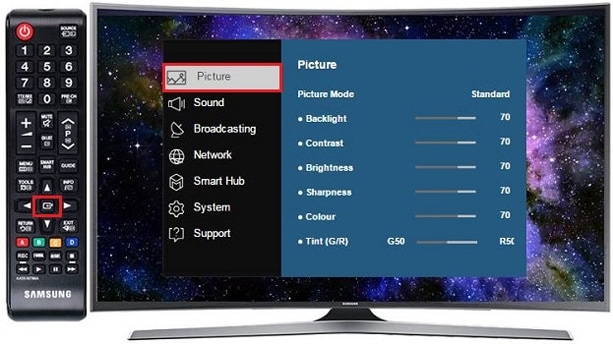
- Settings errors: Picture settings may cause the screen to appear black.
Knowing the cause helps you fix the problem faster. Many times, it’s something simple you can handle at home.
Quick Checks To Start With
Before deep troubleshooting, do these basic checks. They solve the issue for most people.
- Power Cycle: Turn off the TV, unplug it from the wall, wait for 60 seconds, then plug it in and turn it back on.
- Check All Cables: Make sure the HDMI, power, and other cables are fully plugged in and not damaged.
- Try Another Input: Use a different HDMI port, or switch to another device like a DVD player or game console.
- Test with a Flashlight: Shine a flashlight on the screen. If you see faint images, the backlight is likely broken.
If your TV shows a picture after any of these steps, you’ve solved the problem. If not, continue with deeper troubleshooting.
Diagnosing The Black Screen
Samsung TVs have several features to help you figure out what’s wrong. Here’s how to use them:
Check The Tv’s Status Light
Most Samsung TVs have a small standby light. When you press power, it should blink and then turn off. If it stays on, the TV isn’t starting up properly.
Listen For Sound
If you hear sound (from a streaming device, cable box, or menu noises) but see no picture, your TV is turned on but the screen is not displaying. This usually points to a backlight issue or display problem.
Test Different Inputs
Change the input using the remote (press “Source” or “Input”). If the screen stays black on all sources, the issue is with the TV itself, not your devices.
Run A Picture Test
Samsung TVs have a built-in Picture Test. Here’s how to use it:
- Press the Home button on the remote.
- Go to Settings > Support > Self Diagnosis.
- Select “Picture Test”.
If you see test images, the TV’s display works and the problem is with your connected devices or cables.
Common Solutions For A Black Screen
Let’s look at the best ways to fix a Samsung TV that turns on but shows a black screen.
Check And Replace Cables
Damaged or loose cables are the most common cause. Try these steps:
- Unplug all HDMI cables and plug them back in firmly.
- Inspect cables for cuts or bends.
- Use a new cable if possible.
A surprising number of black screens are caused by a faulty HDMI cable, especially after moving the TV.
Change The Input Source
Sometimes, the TV is set to an input with nothing connected. Use the remote to switch to different HDMI ports or AV inputs.
If the TV displays a picture on another input, the original device (like your cable box) may be off or broken.
Update Tv Firmware
Samsung TVs need regular software updates. Outdated firmware can cause display issues.
- Go to Settings > Support > Software Update.
- Select “Update Now”.
If you can’t see the menu because the screen is black, try using the Samsung SmartThings app to update.
Reset The Tv To Factory Settings
A factory reset can fix software bugs. Here’s how:
- Press Home on the remote.
- Go to Settings > General > Reset.
- Enter your PIN (default is 0000).
This erases all settings, so use it only if other steps fail.
Fix Backlight Problems
If shining a flashlight on the screen shows faint images, the backlight is broken. You can’t fix this at home unless you know electronics. If your TV is under warranty, contact Samsung support.
Check External Devices
Sometimes, the connected device is the problem, not the TV. Try these tips:
- Turn off and unplug devices like streaming boxes, then restart them.
- Connect another device to the same HDMI port.
- If another device works, replace the original one.
Advanced Troubleshooting
If basic fixes fail, try these advanced steps. They require more time and care.
Inspect The Tv’s Power Board
The power board supplies electricity to the screen. If it’s broken, the screen won’t light up. Signs of a bad power board include:
- No standby light
- No sound
- Screen stays black even after power cycling
If you have experience, you can open the TV’s back panel and check for burnt components or loose connections. Otherwise, seek professional help.
Look For Mainboard Issues
The mainboard controls the TV’s functions. Faults here can cause a black screen. Symptoms are similar to a power board failure.
Compare Tv Symptoms
Here’s a quick comparison of common black screen causes:
| Cause | Sound | Standby Light | Picture |
|---|---|---|---|
| Backlight failure | Yes | Normal | Faint image (with flashlight) |
| Power board issue | No | Off or blinking | Black |
| Loose cable | Yes | Normal | Black |
| Wrong input | No | Normal | Black |
This table helps you quickly identify the likely cause.
Use Samsung Diagnostic Tools
Modern Samsung TVs have more diagnostic features. For example, you can use the SmartThings app to run tests and update firmware remotely. This is especially useful if your remote isn’t working or the TV menu won’t appear.
Data: How Common Is The Black Screen Issue?
Samsung TVs are popular worldwide. In 2023, Samsung sold over 40 million TVs globally. Based on user reports and forums, about 7% of Samsung TV owners experience a black screen issue at least once in the first three years. Most problems are fixed with basic steps, but about 2% need professional repair.
Here’s a comparison of black screen issues across brands:
| Brand | Black Screen Issue Rate | Common Cause |
|---|---|---|
| Samsung | 7% | Loose HDMI, backlight |
| LG | 6% | Firmware bug |
| Sony | 4% | Power board |
| TCL | 8% | HDMI cable |
Samsung TVs are reliable, but black screen problems do happen.

Practical Tips And Extra Insights
Here are some tips that most beginners miss:
- Use surge protectors: Power surges can damage the TV’s backlight or power board. Always use a surge protector.
- Clean HDMI ports: Dust can block connections. Use compressed air to clean ports carefully.
- Don’t ignore software updates: Updates fix hidden bugs that can cause display issues.
- Check TV placement: TVs placed near heat sources (like radiators) can develop backlight failures more often.
Many people overlook these small details, but they make a big difference in TV reliability.
When To Call For Professional Repair
If you’ve tried all the steps and your screen is still black, it’s time to get help. Here’s when to call a repair expert:
- Faint images appear with a flashlight (backlight failure).
- No sound or standby light.
- TV is under warranty.
- You don’t feel comfortable opening the TV.
Professional repair costs vary. On average, fixing a backlight costs $100–$250. Replacing a mainboard is $120–$300. If your TV is over 5 years old, it may be better to buy a new one.
For official guidance and warranty information, you can visit the Samsung Support website.
Frequently Asked Questions
Why Is My Samsung Tv Screen Black But I Hear Sound?
This usually means the backlight is broken. You can check by shining a flashlight on the screen and looking for faint images. If you see them, the backlight needs repair.
Can A Software Update Fix A Black Screen?
Yes, sometimes a firmware update solves display problems caused by software glitches. If you can access the menu, update the software. If not, use the SmartThings app or contact support.
Should I Replace My Tv If The Screen Is Black?
If your TV is old (over 5–7 years), repair costs may be high. For newer TVs with warranty, repair is often worth it. Compare repair costs to buying a new TV before deciding.
Is A Black Screen Always A Hardware Problem?
No. Many black screens are caused by loose cables or wrong input settings. Always check cables and inputs before assuming the hardware is broken.
How Can I Avoid Black Screen Issues In The Future?
Use surge protectors, update firmware regularly, clean HDMI ports, and keep your TV away from heat and moisture. These steps reduce the risk of black screen problems.
Fixing a Samsung TV with a black screen can feel confusing, but most issues are easy to solve. Start with simple checks, follow the troubleshooting steps, and only call for repair if needed. With these tips, you can get your TV working again and enjoy your favorite shows without stress.