
If you own a Zephyr range hood, you expect it to work quietly and efficiently, pulling smoke and odors out of your kitchen. So when you see the hood lights blinking, it’s natural to worry. Are the lights signaling a simple reminder or a serious technical issue? Understanding why your Zephyr hood lights are blinking—and how to respond—can save you time, money, and stress. This guide covers the top reasons for blinking lights, how to diagnose problems, and when to call for expert help.
What Does Blinking Mean On Zephyr Hood Lights?
Many Zephyr range hoods use blinking lights as a way to communicate with you. These signals aren’t random—they usually have a specific meaning. Most often, blinking lights indicate:
- Filter maintenance reminders
- Error codes or malfunctions
- Electrical issues
- User settings or controls
Each pattern (fast, slow, certain number of blinks) can represent a different message. The user manual will describe what the light patterns mean for your specific model, but even without it, you can often narrow down the cause.
Most Common Causes For Zephyr Hood Lights Blinking
Filter Cleaning Or Replacement Needed
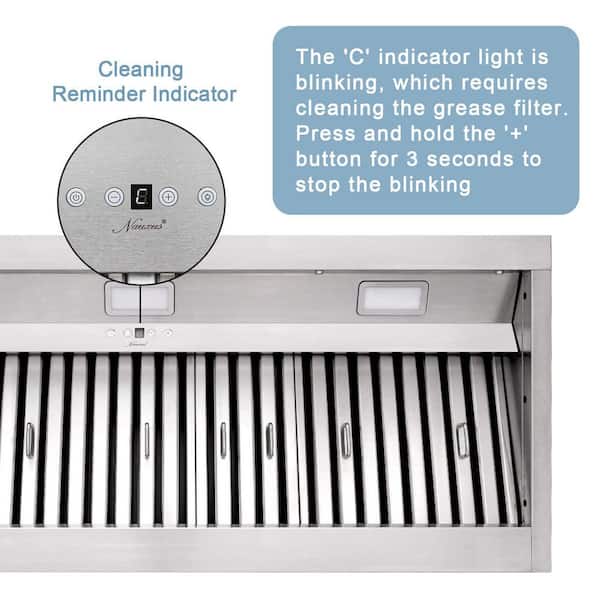
Zephyr range hoods come with metal mesh or baffle filters that trap grease and particles. Over time, these filters fill up and need to be cleaned or replaced. Most Zephyr models have a filter indicator that blinks after a set number of hours. This reminder is not an emergency, but it’s important for keeping your hood efficient.
Example: On many Zephyr models, the filter reminder light blinks after 30-40 hours of use. Cleaning the filters and resetting the indicator usually stops the blinking.
Electrical Or Power Supply Issues
If the hood is not getting enough power, or if there’s an electrical fault, the lights may start blinking. This could be caused by:
- A loose power connection
- Tripped breaker
- Faulty outlet
- Power surge
Non-obvious insight: Sometimes, blinking lights appear after a power outage or electrical storm, even if the hood works normally otherwise.
Control Board Or Sensor Malfunctions
The control board acts like the brain of your Zephyr hood. If it’s damaged or malfunctioning, the lights may blink in unusual ways. Sensors for temperature, fan speed, or lighting can also trigger blinking if they detect a fault.
Installation Or Wiring Errors
If the hood was recently installed or serviced, incorrect wiring can cause blinking lights. Even a small mistake, like connecting the wrong wire or missing a ground connection, may cause error signals.
User Settings Or Mode Changes
Some Zephyr hoods let you adjust features like auto shut-off, delay start, or lighting modes. Accidentally activating a special mode can make the lights blink to show the setting is active.
Overheating Or Overload
If the fan motor is working too hard, or if the hood’s electronics get too hot, the system may flash the lights as a warning. This protects the hood from damage.
Interpreting Zephyr Hood Light Blink Patterns
Not all blinking is the same. The number, speed, and color of the blinks can point to specific problems. Here’s a quick reference for typical Zephyr hood light patterns:
| Blink Pattern | Common Meaning | Action Needed |
|---|---|---|
| Slow, steady blink | Filter cleaning/reminder | Clean or replace filters, reset indicator |
| Fast, repeated blinking | Electrical or sensor fault | Check power, call technician if needed |
| Three blinks, pause, repeat | Installation/wiring error | Re-check wiring, consult installer |
| Alternating colors | Mode change or special setting | Review user manual, adjust settings |
Always check your specific Zephyr hood model’s user guide, as the signals can be unique.
Step-by-step Troubleshooting For Zephyr Hood Lights Blinking
Fixing blinking lights depends on the cause. Use these steps to quickly identify and solve the problem.
Step 1: Identify The Blink Pattern
Watch the lights closely. Note if they blink slow or fast, the color, and how many times they blink before pausing. Write this down—it’s your main clue.
Step 2: Check The Filters
If the blink pattern matches a filter reminder, remove the filters for cleaning. Most Zephyr filters are dishwasher-safe. After washing, allow them to dry fully before reinstalling.
Reset the filter indicator: Usually, you need to press and hold a button (often labeled “Filter Reset” or similar) for 3-5 seconds after reinstalling.
Step 3: Inspect Power Connections
Make sure the hood is plugged in tightly. Check your circuit breaker or fuse box. Try plugging another device into the same outlet to see if it works.
Non-obvious insight: Sometimes, the hood’s own power cable can become loose inside the wall or behind cabinetry, especially after renovations.
Step 4: Test Basic Functions
Turn the fan and lights on and off. Try different speeds and settings. If only the lights are blinking but other functions work, the issue is likely minor. If nothing works, suspect a bigger electrical or control board problem.
Step 5: Review User Settings
Look at the controls for any special features that may be active. Many Zephyr hoods have “auto-off,” “sleep,” or “delay” modes that might cause blinking.
Step 6: Reset The Hood
Unplug the hood (or turn off the circuit breaker) for 1-2 minutes, then restore power. This can clear minor software glitches.
Step 7: Call For Professional Help
If the blinking continues, or you see burning smells, sparks, or hear odd noises, contact a certified technician. Electrical and control board repairs can be dangerous without the right skills.
Zephyr Hood Models And Light Behavior
Different Zephyr models may use different signals. Below is a comparison of how some popular models handle blinking lights:
| Model Name | Blinking Light Usage | Special Features |
|---|---|---|
| Zephyr AK2100 | Slow blink for filter, fast for error | Delay-off, auto reminders |
| Zephyr AK7136 | Color-coded blinks for modes | Touch controls, mood lighting |
| Zephyr ZSA-E30DS | Multi-speed blink for faults | Remote control, filter alert |
| Zephyr AK2500 | Single light blinks for filter only | Simple switch, no advanced codes |
It’s important to check your user manual or the Zephyr support site for your exact model, as features and signals can change.
Preventing Future Blinking Light Issues
Regular care can stop most blinking light problems before they start. Here’s how to keep your Zephyr hood running smoothly:
- Clean filters every 1-2 months if you cook often. Dirty filters cause most light alerts.
- Inspect wiring and power connections yearly, especially if you notice flickering or power drops.
- Don’t ignore reminders. The filter light is a warning your hood is working harder than it should.
- Keep electronics dry. Moisture inside the hood can cause shorts, leading to blinking lights.
- Avoid overloading outlets. Using too many appliances on the same circuit can trigger errors.
Over time, small problems can lead to bigger issues with the control board or fan. Preventive care is always easier and cheaper than major repairs.
When To Call A Technician
Some blinking light issues are simple reminders you can fix yourself. But certain situations mean you should call an expert:
- The hood won’t turn on, or keeps shutting off.
- You smell burning or see smoke from the hood.
- The blinking pattern doesn’t match anything in the manual.
- Resetting the hood doesn’t stop the blinking.
- You recently had electrical work done and the problem started soon after.
When calling for service, tell the technician the exact blink pattern and any steps you’ve already tried. This speeds up diagnosis and repair.
Zephyr Hood Lights Blinking: Real-world Examples
Many Zephyr owners share their experiences online. Here are a few scenarios:
- Filter reset confusion: A homeowner cleaned their filters, but the lights kept blinking. They missed the reset step—holding the power button for 5 seconds fixed it.
- Post-storm blinking: After a thunderstorm, the hood lights blinked rapidly, but the fan still worked. Unplugging the hood for two minutes reset the electronics.
- Wiring error after remodel: New cabinets were installed, and the hood lights began blinking in a pattern not shown in the manual. An electrician found a loose ground wire in the wall.
These examples show how both simple and complex issues can cause blinking lights. Careful troubleshooting makes a big difference.

Zephyr Hood Lights Vs Other Brands
How does Zephyr compare to other popular kitchen hood brands when it comes to blinking lights and alerts?
| Brand | Blinking Light Usage | Common Issues |
|---|---|---|
| Zephyr | Filter reminders, error codes | Missed resets, power issues |
| Broan | Mostly filter reminders | Less advanced error alerts |
| Whirlpool | Filter and fan error codes | Fan motor faults |
| GE | Simple filter lights | Rare blinking for errors |
Zephyr stands out for using more detailed blinking codes, which can help owners identify issues more precisely—if they know what the patterns mean.

Frequently Asked Questions
Why Do The Lights On My Zephyr Hood Keep Blinking After I Clean The Filters?
Even after cleaning, you need to reset the filter indicator. Usually, this means holding a button (like “Power” or “Filter Reset”) for several seconds. Check your manual for the exact steps.
What Does Rapid Blinking On My Zephyr Hood Lights Mean?
Rapid blinking often means an electrical fault or a sensor issue. Check your power supply and try resetting the hood. If the problem continues, contact a technician.
Can I Use My Zephyr Hood If The Lights Are Blinking?
If the hood works normally and the lights are only blinking for a filter reminder, it’s safe to use. But if other functions don’t work, or you see error patterns, stop using it until you solve the issue.
How Do I Reset My Zephyr Hood Light Indicator?
For most models, turn off the hood, then press and hold the “Power” or “Filter Reset” button for 3-5 seconds. The blinking should stop. Your model’s manual will have the exact reset steps.
Where Can I Find More Help With Zephyr Hood Blinking Lights?
Visit the Zephyr support center for manuals, troubleshooting guides, and customer service.
Taking quick action when your Zephyr hood lights start blinking can keep your kitchen running smoothly. With the right steps, most issues are easy to fix—and you’ll get back to clean, fresh air in no time.