
If your Spectrum remote is not working and the Input button is glowing red, it can be frustrating—especially when you just want to switch sources on your TV or set-top box. Many users face this issue, but the good news is that in most cases, you can fix it yourself without special tools or technical knowledge. Let’s dive into why this happens, what it means, and how you can get your remote and TV working together smoothly again.
Understanding The Spectrum Remote Input Button Red Issue
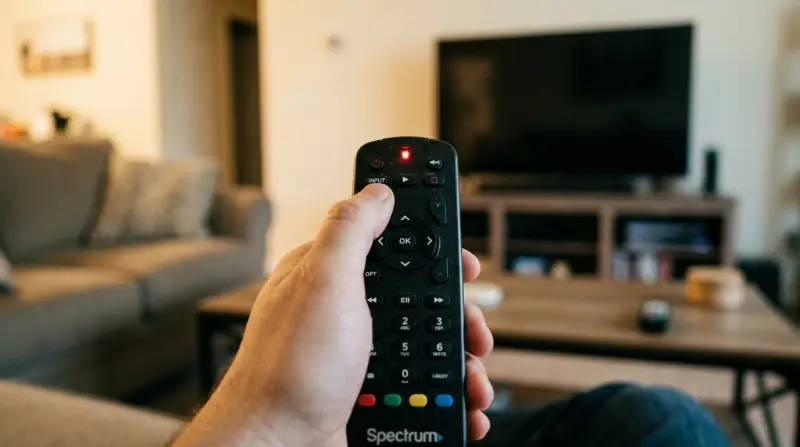
When the Input button on your Spectrum remote lights up in red, it’s a signal that something isn’t right. Usually, Spectrum remotes use different colors to indicate various states. A red light often means the remote is not communicating with your TV or the Spectrum receiver as expected. Sometimes, it may also point to a hardware problem or a setup mistake.
The Input button is essential for changing the TV’s input source—like switching from HDMI 1 to HDMI 2. If this button is stuck on red, you can’t change the source, which can make your streaming devices, gaming consoles, or Blu-ray player inaccessible.
It’s important to address the root cause, not just the symptom.
Common Reasons For The Red Input Button
Several problems can make the Input button stay red on your Spectrum remote:
- Low or Dead Batteries: Weak batteries often cause unpredictable remote behavior.
- Remote Not Paired: If the remote is not correctly paired with your TV or receiver, signals won’t reach the right device.
- Signal Obstruction: Objects between the remote and the receiver can block signals.
- Stuck or Faulty Button: Dirt, dust, or damage can cause the Input button to get stuck or malfunction.
- Firmware Glitch: Sometimes, a software issue in the receiver or remote can cause the red light.
- Wrong Mode: The remote may be in TV mode when it needs to control the cable box, or vice versa.
- IR Interference: Other devices emitting infrared signals can confuse the remote.
Let’s look at how to troubleshoot each of these issues.
Step-by-step Troubleshooting Guide
Fixing a Spectrum remote with a red Input button is usually simple if you follow the right steps. Here’s what to do:
Check And Replace Batteries
Low power is one of the most common causes of remote problems.
- Remove the battery cover on the back of your remote.
- Take out the old batteries.
- Insert two new AA or AAA batteries (check your model).
- Make sure the batteries are inserted in the correct direction.
- Replace the cover and test the Input button.
Even if the batteries are not completely dead, low voltage can cause glitches, so fresh batteries are always a good first step.
Remove Obstructions
For the remote to work, it needs a clear line of sight to the device.
- Make sure there are no objects between the remote and the TV/receiver.
- Move any decorations, books, or electronics that might block the signal.
- Try using the remote closer to the device.
Clean The Remote
A sticky or dirty button can cause the Input button to stay red.
- Turn the remote upside down and tap it gently to remove dust.
- Use a cotton swab lightly dampened with rubbing alcohol to clean around the Input button.
- Press the Input button several times to free any debris.
Avoid using too much liquid, as moisture can damage the remote.
Re-pair The Remote
If the remote is not paired, it may not control your TV or receiver.
- Press and hold the Menu and OK buttons together until the Input button blinks twice.
- Enter the pairing code for your TV brand (find this in your remote’s manual or Spectrum’s website).
- Test the Input button again.
If you don’t know your code, try using the auto-search function by holding the TV button and the Input button until the Input light blinks.
Power Cycle Devices
Sometimes, both the remote and the receiver need a reset.
- Turn off your TV and Spectrum receiver.
- Unplug them from the power outlet.
- Wait 60 seconds.
- Plug them back in and turn them on.
- Test the remote again.
This can clear minor software glitches.
Reset The Remote
If nothing else works, a factory reset may fix the issue.
- Hold the TV button and OK button together for 3 seconds.
- When the Input button blinks twice, enter 9-8-1.
- The Input light should blink 4 times, signaling the remote is reset.
- Reprogram the remote to your devices.
Be aware: this will erase all settings and customizations.
Spectrum Remote Models And Compatibility
There are several models of Spectrum remotes. Some have more advanced features, while others are basic. It’s important to know which model you have.
Here’s a quick comparison of popular Spectrum remote models:
| Model | Main Features | Input Button Color | Programming Method |
|---|---|---|---|
| URC1160 | Backlit, controls TV & receiver | Red | Manual or auto search |
| SR-002 | Simple design, fewer buttons | Red | Manual code entry |
| RC122 | Universal, supports multiple devices | Red | Manual code entry |
| UR5U-8780L | Backlit, learning function | Red | Manual or learning |
If your remote is not listed, check the model number (usually on the back or inside the battery cover) and consult Spectrum’s support site.
When To Replace The Remote
Sometimes, remotes simply wear out. If you’ve tried all troubleshooting steps and the red Input button persists, consider these signs:
- Multiple buttons do not work
- Remote feels loose or rattles
- Obvious physical damage (cracks, missing pieces)
- Input button is physically stuck
If your remote is under warranty, contact Spectrum for a replacement. Out-of-warranty remotes can be replaced cheaply at electronics stores or online.
Advanced Tips Most Users Miss
Even experienced users overlook a few important details:
- Signal Interference from Other DevicesLED lights, some Wi-Fi routers, and even sunlight can interfere with infrared signals. If your remote works in one room but not another, check for new electronics or strong light sources near the receiver.
- Software Updates on the ReceiverSometimes, the Spectrum receiver needs a software update to work correctly with your remote. You can force an update by unplugging the receiver for several minutes, then plugging it back in. Wait for the receiver to reboot fully before testing the remote.
Comparing Spectrum Remote To Universal Remotes
Many users wonder if a universal remote is a better choice. Here’s a quick look:
| Feature | Spectrum Remote | Universal Remote |
|---|---|---|
| Works out of the box | Yes (with Spectrum devices) | No (requires programming) |
| Controls multiple brands | Limited | Yes |
| Button layout | Optimized for Spectrum | Varies |
| Input button issues | Common | Rare (if programmed correctly) |
Universal remotes can reduce button issues, but they require more setup. For most users, fixing the Spectrum remote is faster and easier.
How To Prevent Future Remote Problems
Once you solve the Input button red light issue, you can take simple steps to avoid it happening again:
- Use high-quality, fresh batteries and change them every 6–12 months.
- Keep the remote clean and dry.
- Avoid dropping the remote or exposing it to extreme temperatures.
- Store the remote away from direct sunlight or heat sources.
- Re-pair the remote after major changes to your TV or home setup.

Real-world Example
Mark, a Spectrum subscriber in Texas, found his remote’s Input button stuck on red after moving his TV to a new room. He tried new batteries but nothing changed. Mark discovered the receiver was now behind a heavy bookshelf, blocking the signal.
After moving the receiver to the front and cleaning the remote, the Input button returned to normal. This shows that sometimes, the problem is not the remote, but the environment.
When To Contact Spectrum Support
If all troubleshooting fails, it’s time to reach out for help. Spectrum customer service can walk you through advanced diagnostics or provide a replacement remote. Before calling, have your account information and remote model number ready.
Spectrum Support Page: spectrum Remote Support
Frequently Asked Questions
Why Does The Input Button Flash Red But Nothing Happens?
The red flash usually means the remote tried to send a signal but failed. This can be due to weak batteries, signal blockage, or the remote being in the wrong mode. Try changing batteries and make sure nothing blocks the receiver.
Can I Use My Spectrum Remote With Any Tv Brand?
Most Spectrum remotes can be programmed to control popular TV brands. However, some advanced functions may not work with all TVs. Use the correct code for your brand, found in your remote’s manual or Spectrum’s website.
What If The Input Button Is Stuck Physically?
If the button is physically stuck, clean around it with a cotton swab and press it repeatedly. If it doesn’t loosen, the remote may need replacement.
Will A Universal Remote Solve This Problem?
A universal remote can avoid some button issues if programmed correctly. However, setting up a universal remote takes more time. For most users, fixing or replacing the Spectrum remote is simpler.
How Do I Know If My Remote Is Broken Or Just Needs Reprogramming?
If some buttons work but not others, or if the remote works with one device but not another, try reprogramming first. If no buttons work or the remote is physically damaged, it’s likely broken.
Fixing a Spectrum remote with a red Input button is usually quick if you follow these steps. With a little patience, you can get back to enjoying your favorite shows without missing a beat.