
Every modern home wants laundry to be quick, easy, and problem-free. When your LG washer flashes a strange code during a cycle, it can quickly turn a normal day into a frustrating one. The CL code is a common message on LG washing machines. If you have seen this code and wondered what it means or how to fix it, you are not alone. Many users worry that it signals a serious problem, but the truth is more reassuring. This guide will help you understand the LG washer CL code, why it appears, and how to deal with it so your laundry routine is smooth again.
What Does The Lg Washer Cl Code Mean?
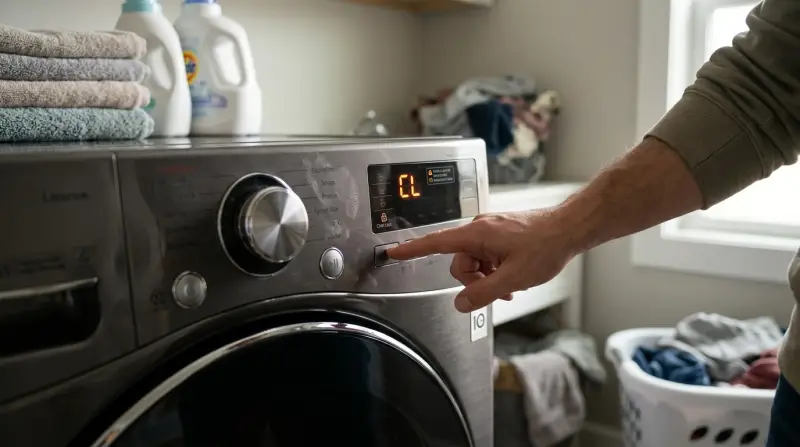
The CL code stands for Child Lock. It is not an error or a warning that something is broken. Instead, it is a safety feature designed to protect children from accidentally changing the washer’s settings or starting it while playing nearby. When the Child Lock is active, most buttons on the control panel stop working. This prevents unwanted changes or interruptions to the wash cycle.
Many users mistake the CL code for a malfunction. However, seeing “CL” simply means the washer is in child-proof mode. You can still open the door (if the cycle is finished and the door is unlocked), but you cannot change settings or start new cycles until you turn off the Child Lock.
How To Turn Off The Cl Code On Lg Washers
Removing the CL code is usually simple and does not require special tools or technical knowledge. The process may differ slightly depending on your LG washer model, but the steps are similar for most front-load and top-load machines.
- Find the Child Lock button(s): Look for a button or a button combination with a small lock icon, or “Child Lock” label, usually on the control panel.
- Press and Hold: Press and hold this button or button combination for 3 to 5 seconds. The display should beep or blink, and the “CL” code will disappear.
- Resume Normal Use: Once deactivated, all control buttons will work as usual.
If you are unsure which button controls Child Lock, check your washer’s user manual. If you lost the manual, you can usually find a digital copy on the official LG website.
Common Lg Washer Models And Child Lock Controls
Here is a comparison of where to find and how to activate/deactivate the Child Lock on some popular LG models:
| Model | Child Lock Button(s) | Activation/Deactivation |
|---|---|---|
| LG WM4000HWA | Press & hold “Pre Wash” + “Rinse” | 3 seconds |
| LG WT7300CW | Press & hold “Child Lock” | 3 seconds |
| LG WM3400CW | Press & hold “Soil” button | 5 seconds |
Sometimes, the Child Lock can turn on if someone accidentally presses the right button combination—this happens often with curious children or during cleaning.
Why Use The Child Lock Feature?
Many parents and caregivers appreciate the Child Lock because it makes the laundry area safer for families with young children. Here are the main reasons to use it:
- Safety: Prevents children from starting the washer or changing cycle settings.
- Avoids Interruptions: Keeps the cycle running smoothly by stopping accidental button presses.
- Peace of Mind: Lets you focus on other tasks, knowing the washer controls are secure.
If you do not have children at home, you might never need this feature. However, it can also stop pets or adults from pressing buttons by mistake.
Differences Between The Cl Code And Error Codes
It is easy to confuse the CL code with other error codes on your LG washer. However, the CL code is not the same as error messages like “OE,” “LE,” or “UE,” which indicate real problems with the machine.
Here’s a quick comparison to help you understand the difference:
| Code | Meaning | Action Needed |
|---|---|---|
| CL | Child Lock is active | Deactivate to use controls |
| OE | Drain error (water not draining) | Check drain hose/pump |
| LE | Motor error | Check for overloading/obstructions |
| UE | Unbalanced load | Redistribute clothes |
This table shows that only the CL code is a feature, not a fault.

Troubleshooting When The Cl Code Won’t Turn Off
In most cases, holding the right button turns off the Child Lock feature. However, sometimes the code stays on even after trying the normal steps. Here’s what to do if that happens:
- Check the Power: Unplug the washer, wait 60 seconds, and plug it back in. This can reset the control board.
- Try Different Buttons: Some models use a different button combination. Double-check the user manual or look online for your model.
- Look for Stuck Buttons: Sometimes, a button may be stuck due to dirt or a spill. Clean the control panel gently with a soft, damp cloth.
- Check for Software Glitches: Rarely, a software error can lock the panel. Restarting the machine can help.
- Contact LG Support: If none of these steps work, your control board may be faulty. Contact LG customer service for help.
Example: When The Cl Code Stays On
A user with the LG WM3400CW reported the CL code stayed on after multiple tries. After unplugging the washer and holding the “Soil” button for 5 seconds when turning it back on, the Child Lock finally deactivated. Sometimes, timing matters—try pressing the button before or after powering up the machine.
How To Prevent Accidental Activation Of The Cl Code
Many users find the Child Lock gets turned on by accident. Here are ways to avoid this:
- Educate Family Members: Teach everyone which buttons activate Child Lock.
- Place a Note: Stick a small reminder near the control panel.
- Clean Carefully: Avoid pressing multiple buttons while cleaning the panel.
- Supervise Young Kids: Keep children away from the washer during cycles.
While these tips sound simple, they can save you time and worry.
When Is The Cl Code Useful For Adults?
It’s easy to think the Child Lock is just for homes with kids, but adults can benefit too. Here are some situations where activating the CL code is helpful:
- Cleaning the Control Panel: Lock the controls so you don’t change settings while wiping down the washer.
- Busy Homes: In shared laundry rooms or busy households, it stops accidental changes.
- Pet Owners: Some pets like to jump on appliances. Child Lock keeps your cycles safe from curious paws.
What If The Cl Code Appears During A Cycle?
If you see the CL code while the washer is running, don’t worry. It just means the controls are locked; the cycle will complete as normal. You cannot change settings until the cycle ends or you turn off the Child Lock.
For safety, most LG washers let you pause or stop a cycle even when Child Lock is on, but you may need to deactivate it first. Always check your model’s manual.
Lg Washer Cl Code Vs. Other Brands
LG is not the only brand with a Child Lock feature. However, the way it appears and is controlled can vary.
| Brand | Code/Label | Activation Method |
|---|---|---|
| LG | CL | Press & hold specific button(s) |
| Samsung | Child Lock icon | Press & hold 2 buttons |
| Whirlpool | LOC/Control Lock | Press & hold “Control Lock” |
| GE | Child Lock | Press & hold “Lock” button |
Knowing these differences is helpful if you use more than one brand or move to a new home.
Two Insights Most Beginners Miss
- CL Code Can Stay After Power Outages: Sometimes, if there’s a power cut during a cycle, the washer may restart with Child Lock still active. If you can’t use the controls after an outage, try deactivating Child Lock as described earlier.
- Not All Controls Are Locked: On many LG washers, the power button still works even when Child Lock is on. This means you can turn the machine off, but you can’t start a new cycle or change settings without turning off Child Lock. If you’re stuck, always try the power button first.
When To Call For Professional Help
In rare cases, the CL code will not disappear even after all troubleshooting steps. This could mean there is an issue with the control panel or internal wiring. If you notice:
- The display is frozen or unresponsive
- Buttons do not work even after turning off Child Lock
- The CL code appears with other error codes
It’s time to call LG service or a certified technician. Do not attempt to open the washer or repair the control board yourself, as this can void your warranty or cause further damage.
Where To Find More Help
For more detailed guides, user manuals, and troubleshooting, you can visit the official LG Support Center. They offer model-specific instructions and customer service chat.
Frequently Asked Questions
How Do I Know If Child Lock Is On?
You will see the CL code on the display, and most buttons will not respond when pressed. Only the power button or the Child Lock button will work.
Can I Wash Clothes While The Cl Code Is Active?
Yes, your washer will continue its current cycle. The CL code only stops you from changing settings or starting a new cycle. You need to turn off Child Lock to adjust any options.
Why Does The Cl Code Keep Coming Back?
If you keep seeing the CL code, someone may be pressing the Child Lock button by mistake, or there could be a sticky button. Clean the control panel and make sure no one else is activating it accidentally.
What Should I Do If The Cl Code Won’t Turn Off?
Try unplugging the washer and plugging it back in after 60 seconds. Press and hold the correct button(s) again. If it still does not turn off, check the user manual or contact LG support.
Is The Cl Code Dangerous For My Washer?
No, the CL code is a safety feature, not an error. It will not damage your washer or affect its lifespan.
Getting the CL code on your LG washer is not a cause for panic. It simply means the Child Lock feature is active, which is there for safety and peace of mind. Turning it off is quick and easy once you know the right steps. If you ever have trouble, refer to your manual, try the troubleshooting steps above, or reach out to LG support. With this knowledge, you can keep your laundry routine running smoothly and safely—no more surprises from the display panel.