
If you own an LG washer and it’s not draining, you know how frustrating this problem can be. Wet clothes left inside the drum, error codes flashing, and water pooling at the bottom—these issues can turn laundry day into a headache. This guide will help you understand why your LG washer isn’t draining and what you can do about it. Whether you’re a beginner or a homeowner with some repair experience, you’ll learn practical solutions, common mistakes, and expert tips that save time and money.
Why Your Lg Washer Isn’t Draining
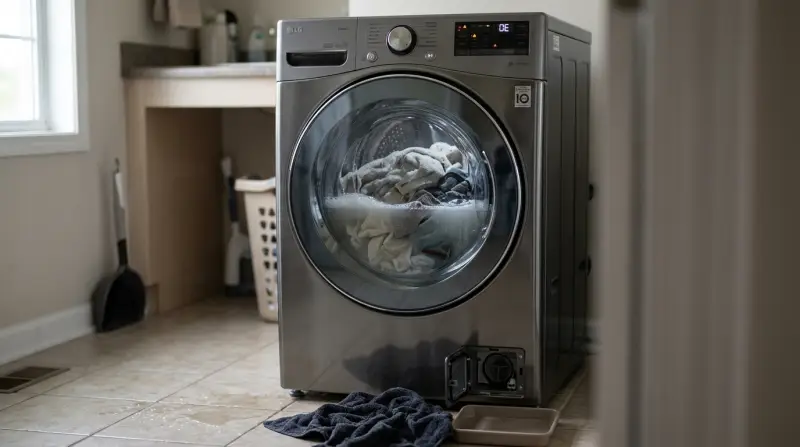
When your washer doesn’t drain, it’s usually because something is blocking the water flow or a part is failing. Let’s break down the most common reasons and explain what happens inside the machine.
Clogged Drain Pump Filter
Most LG washers have a drain pump filter that catches debris, lint, and small objects. If this filter is blocked, water cannot pass through, causing drainage problems. The filter is often located behind a small door near the bottom front of the washer.
Blocked Drain Hose
The drain hose moves water from the washer to the plumbing. If it’s kinked, bent, or clogged with lint, water backs up inside the drum. Sometimes, the hose is blocked inside the wall connection, which is harder to spot.
Faulty Drain Pump
The drain pump pushes water out of the washer. Over time, it can wear out or get stuck from debris. A broken pump makes strange noises or doesn’t turn on at all.
Improper Installation
If the drain hose is installed incorrectly—too high, too low, or not secured—it can cause drainage issues. The hose should be at the correct height and slope as shown in your washer’s manual.
Door Lock Problems
LG washers have safety features that stop the machine if the door isn’t locked properly. If the door lock or sensor fails, the washer may not drain.
Error Codes
Many LG washers display error codes such as OE (Drain Error) or E1. These codes point to specific problems and help with troubleshooting.
Diagnosing The Drainage Problem
Before fixing your washer, you need to find out what’s wrong. Follow these steps to diagnose the issue:
- Check For Error Codes: Turn on your washer and look for error codes. OE is the most common for draining issues.
- Inspect The Drum: Open the door and check if water is sitting inside. If the drum is still full, drainage definitely failed.
- Listen For Pump Noise: When the washer tries to drain, listen for the pump. If you hear a humming or buzzing, the pump may be stuck. If you hear nothing, it could be dead.
- Look At The Drain Hose: Check the hose behind the washer. Make sure it’s not kinked, bent, or crushed.
- Examine The Filter Area: Find the filter access door at the bottom front. If water leaks here, the filter may be blocked.

How To Fix An Lg Washer That’s Not Draining
Once you’ve found the likely cause, try these fixes. Most steps can be done at home with basic tools. Always unplug your washer before working on it.
Cleaning The Drain Pump Filter
This is the most common fix and works for many LG washer models.
- Open the filter access door at the lower front.
- Place a towel or shallow pan under the filter area (some water will leak out).
- Unscrew the filter cap and pull it out slowly.
- Clean off lint, coins, hair, and debris.
- Rinse the filter under running water, then put it back.
- Screw the cap tightly and close the door.
If your washer drains after this, you’ve solved the problem.
Checking And Clearing The Drain Hose
- Move the washer away from the wall.
- Inspect the drain hose for bends or kinks.
- Remove the hose from the wall or sink connection.
- Flush the hose with warm water or use a long brush to clear blockages.
- Reconnect the hose, making sure it’s not too high or low (follow manual guidelines).
Testing The Drain Pump
If the filter and hose are clear, but the washer still doesn’t drain, the pump may be faulty.
- Listen for the pump during the drain cycle.
- If you hear buzzing but no water moves, the pump might be jammed or burned out.
- If you’re comfortable, remove the back panel to access the pump and check for stuck objects.
- If the pump doesn’t work at all, it may need replacement.
This repair is more advanced. If you’re unsure, call a professional.
Fixing Installation Problems
Check the installation height for the drain hose:
| Installation Type | Correct Height (inches) | Result if Incorrect |
|---|---|---|
| Washer Standpipe | 24–35 | Draining fails or water backflows |
| Sink Connection | 24–35 | Leaks, slow draining |
If the hose is outside these ranges, adjust it. Always follow the LG installation manual.
Addressing Door Lock And Sensor Issues
If your washer shows a door error or won’t start draining:
- Clean the door lock area.
- Try closing the door firmly and restarting the cycle.
- If the problem continues, the lock mechanism may need replacement.
Handling Error Codes
Most LG washers use codes to help you identify the problem:
| Error Code | Meaning | Action Needed |
|---|---|---|
| OE | Drain Error | Check filter, hose, pump |
| E1 | Water Leakage | Inspect filter area and hose |
| PE | Pressure Sensor | Call technician |
If you see these codes, follow the recommended actions.
Common Mistakes When Fixing Lg Washer Drain Problems
Many users make simple mistakes that delay the fix or cause more damage.
- Skipping The Filter Cleaning: People often ignore the filter, thinking it’s too simple. But it’s the top cause of drainage issues.
- Forcing The Drain Hose: Never force the hose into a small space. This causes bends and blockages.
- Not Unplugging The Washer: Always unplug before opening panels or touching electrical parts.
- Ignoring Error Codes: Error codes are there for a reason. Always check them first.
- Using Wrong Tools: Don’t use sharp objects to clean the filter or hose they can damage the parts.
When To Call A Professional
Some drainage issues are too complex for DIY fixes. Call a technician if:
- The drain pump is broken and needs replacement.
- Electronic sensors or control boards fail.
- You see multiple error codes and the washer won’t start.
- There’s water leaking from the bottom or inside the panels.
A professional has the tools and experience to solve advanced problems safely.
Preventing Drainage Issues In Lg Washers
Good habits can keep your washer running smoothly and help avoid future drainage problems.
- Clean The Filter Regularly: Check the filter every 1–2 months, especially if you wash pet bedding or heavy fabrics.
- Use The Right Detergent: Too much detergent creates extra suds, which block the hose and pump.
- Check Pockets Before Washing: Small objects like coins, pins, and hair ties often clog the filter.
- Install The Drain Hose Correctly: After moving your washer, always check the hose for kinks and the height.
- Keep The Drum Clean: Run a cleaning cycle monthly to prevent buildup.
Lg Washer Drain Performance Vs. Other Brands
How Does Lg Compare To Other Brands On Drainage?
| Brand | Filter Access | Pump Reliability | User Maintenance Ease |
|---|---|---|---|
| LG | Easy front access | High | Simple |
| Samsung | Front or back access | Medium | Moderate |
| Whirlpool | Back access | Medium | Advanced |
LG washers are known for easy filter access and reliable pumps, making DIY maintenance simpler.

Non-obvious Insights Most Owners Miss
Hidden Filter Door
Many owners don’t realize there’s a filter access door at the bottom front. It’s often covered by a panel or hard to see. Cleaning this filter solves most drainage issues.
Drain Hose Height Matters More Than You Think
Even a small change in hose height can cause draining to fail. Always measure and follow the manual’s guidance.
Practical Tips For Lasting Results
- Use a mesh laundry bag for small items to stop them from entering the filter.
- After cleaning the filter, run an empty rinse cycle to check for leaks.
- If your washer sits unused for weeks, clean the filter before restarting.
Frequently Asked Questions
Why Does My Lg Washer Show The Oe Error?
The OE error means your washer isn’t draining properly. It usually happens because the drain pump filter is blocked or the drain hose is kinked. Clean the filter and check the hose first.
Can I Fix Draining Problems Myself?
Yes, most draining problems can be fixed at home. Cleaning the filter and checking the hose are easy steps. If the pump is broken or error codes don’t clear, call a professional.
How Often Should I Clean The Drain Pump Filter?
For best results, clean the filter every 1–2 months. If you wash heavy fabrics or have pets, check it more often.
Is It Safe To Use The Washer If It’s Not Draining Fully?
No, using the washer when water is stuck inside can damage the machine and cause leaks. Always fix the problem first.
Where Can I Find The Lg Washer Manual For Troubleshooting?
You can download manuals and guides from the official LG website. For more details, visit LG Official Support.
A draining problem in your LG washer is annoying, but it’s often easy to solve. By understanding the causes, following clear steps, and avoiding common mistakes, you can get your washer back to working condition. Regular maintenance, proper installation, and careful use will help prevent future issues.
If you ever feel uncertain, calling a professional is always a safe choice. Your laundry days will be stress-free again.