
If you own a Breville espresso machine, you expect great coffee at home. But what do you do when the machine’s lights start flashing? Those blinking lights can be confusing and stressful, especially if you are in a hurry for your morning cup.
Understanding what these lights mean—and how to respond—can save you time, prevent damage, and keep your espresso tasting perfect. This guide explains the most common reasons Breville espresso machine lights flash, what each pattern means, and practical steps to solve them.
You’ll also learn tips that many beginners overlook, so you can handle issues quickly and confidently.
Why Do Breville Espresso Machine Lights Flash?
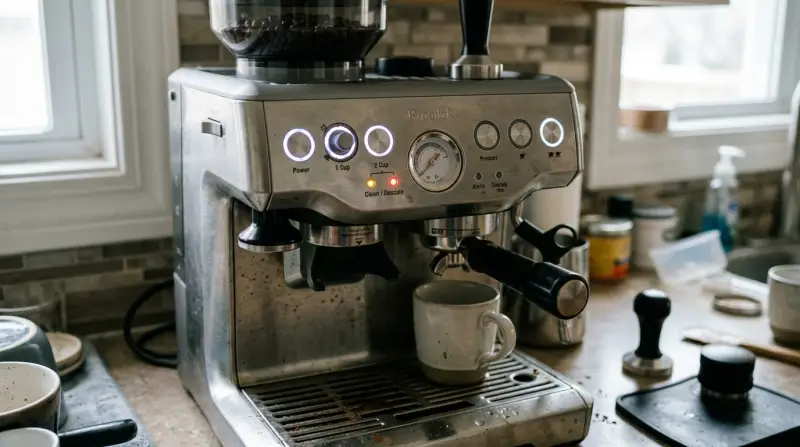
Breville uses flashing lights as a way to communicate with users. Instead of a long list of error codes, your machine gives you quick visual signals. Each pattern or color tells you something specific: maybe it needs cleaning, it’s heating up, there’s a water problem, or something is wrong. These signals help you spot problems early—often before they become serious.
Not all flashes mean trouble. Sometimes, flashing lights are normal during warm-up or cleaning. The key is to know which patterns are routine and which need your attention.
Common Breville Espresso Machine Models And Their Lights
Breville has several espresso machine lines. While the logic behind the lights is similar, the exact patterns can vary a little. Here’s a look at the most popular models and their typical light signals:
| Model | Main Light Colors | Typical Flash Patterns |
|---|---|---|
| Barista Express (BES870XL) | White, Red, Orange | Single blink, double blink, all lights on/off |
| Barista Pro (BES878BSS) | White, Blue, Red | Lights circle, pulse, or blink together |
| Bambino Plus (BES500) | White, Red | Button flashes, group head ring flashes |
| Duo-Temp Pro (BES810BSS) | White, Red | Power button flashes, all lights blink |
If you’re not sure about your model, check the user manual. Breville’s website also has guides for each machine.
What Each Flashing Pattern Means
Understanding the meaning behind each flashing light helps you fix problems faster. Here are the most frequent light behaviors and their meanings:
1. Power Light Flashing
If the power light flashes, it usually means the machine is either heating up or there’s a power issue.
- Normal: Flashes when turning on, then stays solid when ready.
- Problem: Keeps flashing for a long time, which can mean a heating element problem or faulty temperature sensor.
2. Clean/descale Light Flashing
A clean or descale light tells you it’s time for maintenance.
- Clean: Flashes when the machine detects a buildup of coffee oils. Run a cleaning cycle using a cleaning tablet.
- Descale: Flashes when mineral buildup is detected. Use the descaling program with a descaling solution.
3. All Lights Flashing Simultaneously
When all lights flash together, it often means a more serious issue.
- Possible causes: Blocked group head, pump failure, or a sensor error.
- Action: Turn off, unplug, clean the group head, and check the water reservoir.
4. Steam Or Hot Water Light Flashing
A steam or hot water light that blinks typically means the temperature is not right for steaming or hot water.
- During warm-up: Normal to blink.
- If it keeps blinking: There may be a blockage or the thermoblock is not heating.
5. Single Or Double Cup Lights Flashing
If the single or double cup buttons flash, your machine might have a problem with water flow or pressure.
- Common causes: Blocked filter basket, low water, or grind too fine.
6. Water Tank Light Flashing
Some Breville machines have a dedicated water tank light. If it flashes, the tank might be empty or not seated correctly.
- Check: Fill the tank and make sure it’s pushed in all the way.
Troubleshooting Steps For Flashing Lights
When your Breville machine’s lights start flashing, it’s important to stay calm and follow a logical process. Here’s a step-by-step method to troubleshoot:
- Check the Water Tank
- Make sure it’s full and properly placed. Many errors are simply due to a misplaced tank.
- Look for Blockages
- Remove the portafilter and check for coffee grounds blocking the group head. Clean as needed.
- Inspect the Drip Tray
- Some models have a float indicator. If the tray is full, the lights may flash.
- Run a Cleaning or Descale Cycle
- If the cleaning light is flashing, follow the instructions in your manual. Use the correct cleaning tablets or descaler.
- Check for Overheating
- If the machine feels very hot or the steam light won’t stop blinking, let it cool for 15–30 minutes before restarting.
- Reset the Machine
- Unplug for 2–5 minutes, then plug back in. This often clears minor electronic glitches.
- Review the User Manual
- Each model has unique signals. The manual often gives specific advice for your situation.
Here’s a quick reference for the most common flashing light causes and fixes:
| Light Pattern | Possible Cause | Recommended Fix |
|---|---|---|
| Power light flashes only | Heating up or sensor fault | Wait, then check for error if continues |
| Clean light flashes | Needs cleaning | Run cleaning cycle with tablet |
| All lights flashing | Serious error or blockage | Turn off, check group head, reset |
| Steam/hot water light blinks | Temperature not correct | Wait for ready, check for blockages |
| Single/double shot lights blink | Low water, blocked basket | Refill tank, clean basket |
When To Call For Professional Help
While most flashing lights can be fixed at home, some situations need an expert. If you notice:
- Burning smell or smoke from the machine
- Water leaking from the base
- Lights flash in odd, random patterns even after resetting
- Machine stays dead after troubleshooting
These signs point to electrical or mechanical problems that need a technician. Do not try to open the machine yourself—this can void the warranty and may be dangerous.
Common Mistakes People Make
Many Breville owners try to solve flashing lights on their own but fall into some common traps. Here are mistakes to avoid:
- Ignoring the Manual: The user manual is your best friend. It often has a troubleshooting chart for each light pattern.
- Using the Wrong Cleaning Products: Only use Breville-approved tablets and descalers. Other chemicals might damage the machine.
- Skipping Regular Cleaning: Even if the clean light isn’t on, regular cleaning prevents many problems.
- Not Checking the Water Tank Properly: Sometimes the tank looks full but isn’t seated right, causing flashing errors.
- Forgetting About the Drip Tray: If the tray overflows, some machines flash all lights as a warning.
One insight that beginners often miss: Flashing lights can also signal power supply issues. If you are using the machine with an extension cord or in an area with unstable voltage, try plugging it directly into a main wall outlet. This simple step can fix strange error lights.
Another less obvious tip: Water quality matters. Hard water causes scale buildup, which leads to more frequent descaling warnings. If you use filtered or bottled water, you’ll see fewer flashing lights related to maintenance.

Credit: www.youtube.com
Preventing Future Flashing Light Issues
Prevention is easier than repair. Here’s how to keep your Breville machine running smoothly:
- Clean weekly: Even if the clean light isn’t on, run a cleaning cycle every week if you use your machine daily.
- Descale every 2–3 months: Use the official descaler, especially if you live in a hard water area.
- Empty and dry the drip tray daily: Prevents sensor errors and keeps the machine hygienic.
- Use filtered water: Reduces mineral buildup and extends the machine’s life.
- Check for software updates: Some newer Breville models can receive firmware updates. Visit the Breville website for details.

Are Breville Espresso Machine Flashing Lights Covered By Warranty?
Yes, most Breville espresso machines come with a one- or two-year warranty. If the lights indicate a fault that isn’t caused by user error (like using the wrong cleaner), repairs are usually covered. Always keep your purchase receipt and register the machine on Breville’s website for faster service.
If your machine is out of warranty, contact Breville support anyway. Sometimes they offer repair tips or discounted service for loyal customers.
Frequently Asked Questions
What Does It Mean If All Lights Are Flashing On My Breville Espresso Machine?
When all lights flash together, it usually means the machine has detected a serious problem. Common causes are a blocked group head, pump failure, or a sensor error. Turn off the machine, unplug it, and let it cool. Clean the group head and check the water tank. If the problem continues, contact Breville support.
Why Does My Breville Machine Ask For Cleaning So Often?
If the clean light flashes frequently, you may be using oily coffee beans or not rinsing the portafilter well. Regularly cleaning after every use, using less oily beans, and following the cleaning cycle can reduce these warnings.
Can Flashing Lights Mean My Breville Machine Is Overheating?
Yes, sometimes a flashing steam or hot water light means the machine is too hot. Let it cool for 15–30 minutes and try again. If the light keeps flashing after cooling, there might be a problem with the heating element.
What Should I Do If The Water Tank Light Keeps Flashing Even When The Tank Is Full?
Check if the water tank is properly seated. Some machines have sensors that won’t register the tank if it’s not pushed in all the way. Also, make sure the float inside the tank isn’t stuck.
Where Can I Find Official Cleaning And Troubleshooting Information For My Breville Model?
You can find detailed guides, troubleshooting charts, and cleaning instructions on the official Breville website. Visit Breville Support for help specific to your model.
Breville espresso machines are designed to be user-friendly, but flashing lights can be intimidating. By learning what these signals mean and following the right steps, you can fix most problems quickly and avoid bigger issues. With regular care and a little know-how, your Breville will keep making great coffee for years.