
A Roomba can feel like magic—set it, forget it, and your floors stay clean. But nothing is more frustrating than pressing the power button and… nothing happens. If your Roomba is not turning on, you’re not alone. Many users run into this problem, and the fix is often simple. Understanding why your robot vacuum won’t wake up is key to solving the issue quickly. Whether you rely on Roomba for daily cleaning or occasional help, a non-starting unit can disrupt your whole routine. This guide explores the most common reasons and solutions, helping you get your floors back to clean with minimal stress.
Common Reasons Why Your Roomba Won’t Turn On
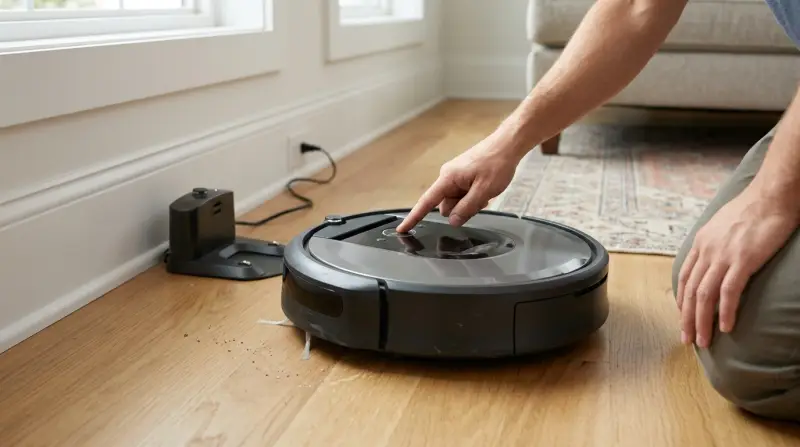
A Roomba not powering on can be caused by multiple factors. Knowing where to start will save you time and frustration.
Battery Issues
The most frequent cause is a dead or faulty battery. Roomba uses rechargeable lithium-ion batteries, which can wear out or fail to hold a charge over time. If your Roomba is old or hasn’t been used for a while, the battery might be drained or need replacement.
Charging Problems
If the charging contacts are dirty or blocked, your Roomba may not charge correctly. Sometimes, even a new battery won’t help if the robot can’t receive power from the charging base. Dust, hair, or residue can interrupt the connection.
Power Adapter Or Dock Issues
A faulty power adapter or broken charging dock will prevent your Roomba from getting the electricity it needs. Even small power surges can damage these components. Check the dock’s indicator lights—no light usually means no power.
Internal Errors
Roombas have internal electronics that can sometimes malfunction. Firmware glitches, hardware faults, or moisture inside the unit might stop it from turning on. Unusual beeps, blinking lights, or error codes are clues.
Physical Damage
Dropping the Roomba, exposure to water, or a hard bump might cause internal damage. Even if the outside looks fine, internal parts may have disconnected or broken.
Quick Troubleshooting Steps
Before you worry about expensive repairs, try these practical steps to identify and possibly fix the problem.
Check The Power Source
Make sure your charging dock is plugged into a working outlet. Try plugging another device into the same outlet to confirm it has power.
Inspect The Charging Contacts
Look at the metal pads on both the Roomba and the dock. If you see dust, dirt, or corrosion, use a dry cloth or a cotton swab with a little rubbing alcohol to clean them.
Reset The Roomba
Sometimes, a simple reset can clear software glitches. For most Roomba models, press and hold the CLEAN button for 10-20 seconds until the lights flash.
Test The Battery
Remove the battery (check your manual for instructions) and reinsert it, ensuring it’s properly seated. For older models, you can try a different battery if you have one available.
Examine The Dock And Adapter
Look for any signs of damage, loose wires, or burn marks. If possible, use another compatible adapter to see if the problem is with the dock or the robot.
Listen And Watch For Error Codes
Roombas often beep or show blinking lights when something is wrong. Take note of any patterns and check your model’s manual or the iRobot website for specific meanings.
How To Identify Specific Roomba Problems
Different Roomba models have unique features and error signals. Understanding these can make troubleshooting faster.
Model Comparison Table
Below is a comparison of common Roomba models and how they show power and charging issues:
| Model | Power Light Behavior | Error Beeps | Battery Indicator |
|---|---|---|---|
| Roomba 600 Series | Solid green/amber | Beep codes | Flashing amber = charging |
| Roomba e5/i3/i7 | White ring | Voice + beeps | Red pulsing = charging |
| Roomba s9+ | Lighted buttons | Voice + beeps | Red solid = low battery |
Different models may need slightly different troubleshooting steps, but the general process is similar.
Dealing With Battery And Charging Problems
Batteries are often the culprit when a Roomba won’t turn on. Here’s how to handle battery-related issues.
How To Test And Replace A Roomba Battery
- Remove the battery: Turn the Roomba upside down and use a screwdriver to open the battery compartment.
- Check for corrosion or swelling: If the battery looks damaged, it needs replacement.
- Test with a multimeter: A healthy Roomba battery should show a voltage close to its rated value (often 14.4V for most models).
- Install a new battery: Only use genuine or high-quality compatible batteries. Cheap batteries may not last or can damage your Roomba.
Battery Lifespan Table
How long should a Roomba battery last? See the table below for typical battery lifespans:
| Battery Type | Average Lifespan | Signs of Failure |
|---|---|---|
| NiMH (older models) | 1-2 years | Short runtime, won’t charge |
| Lithium-ion | 2-4 years | Sudden shutdowns |
A non-obvious tip: Roomba batteries need to be used regularly to stay healthy. Leaving your robot unused for months can kill the battery—even if it was fully charged before.
When The Problem Is The Charging Dock Or Adapter
A malfunctioning dock is less obvious, but it can easily stop your Roomba from turning on.
Signs Your Charging Dock Is Bad
- No lights on the dock when plugged in
- The dock feels cold even after hours of use (it should be slightly warm)
- Roomba does not recognize the dock (no sound or light when docking)
What To Do
- Try plugging the dock into another outlet
- Check for bent or missing contact pins
- If you have another compatible dock, test with it
If the dock is faulty, order a replacement from iRobot or a trusted retailer. Using a poor-quality third-party dock can harm your Roomba.
Software And Internal Errors
Sometimes, the problem is inside the Roomba’s software or hardware.
Firmware Glitches
Firmware is the software that runs your Roomba. If it glitches, the robot may not start. Keeping your Roomba’s firmware updated helps prevent this.
- For Wi-Fi models, use the iRobot Home app to check for updates.
- If your Roomba is stuck, a hard reset can sometimes clear the issue.
Internal Hardware Faults
If you have tried everything and your Roomba still won’t turn on, there may be a serious internal problem. Common causes:
- Damaged circuit board from power surges
- Moisture inside the robot (from cleaning too close to wet areas)
- Disconnected internal cables
At this point, it’s best to contact iRobot support or a professional repair service.
How To Prevent Roomba Power Issues
Prevention saves time, money, and hassle. Here are practical tips to keep your Roomba running reliably.
Use The Roomba Regularly
Running your Roomba at least once a week keeps the battery healthy. Long periods without use reduce battery life.
Clean Charging Contacts Monthly
A quick wipe with a dry cloth can prevent most charging issues. Don’t wait until you see a problem.
Avoid Water Exposure
Never let your Roomba run on wet floors or in humid environments. Even small amounts of moisture can damage electronics.
Store Properly
If you won’t use your Roomba for a long time, store it with a half-charged battery in a cool, dry place. Don’t leave it plugged in for months without use.
Use Genuine Accessories
Batteries and docks from official sources are more reliable and safer than cheap knock-offs.
When To Contact Professional Support
You’ve tried every fix, and your Roomba still won’t turn on. When is it time to call for help?
- The robot shows unusual lights or error codes not in the manual
- You smell burning or see smoke
- Visible water inside the robot
- You tried a new battery and dock, but nothing works
Contact iRobot customer service, or find an authorized service center. Attempting to repair advanced electronics yourself can make things worse.
Real User Experiences: What Usually Goes Wrong?
Many Roomba owners report the same root causes for power failures. Based on user forums and repair data, here are a few real-world examples:
- A Roomba wouldn’t turn on after sitting unused for 6 months—the battery had fully discharged and could not be revived.
- Multiple users found that cleaning the charging contacts immediately solved the issue.
- One user discovered a power surge had fried both the dock and the Roomba’s charging circuit; both needed replacement.
- Some users accidentally blocked the charging contacts with stickers or tape during cleaning.
The lesson: most power issues are simple, but a few require expert help.

Frequently Asked Questions
Why Does My Roomba Show No Lights Or Sound When I Press The Power Button?
If there are no lights or sound, the most likely cause is a dead battery, a faulty power connection, or internal damage. Try charging the Roomba for at least 2 hours, check the charging contacts, and reset the unit. If it still won’t turn on, the battery or mainboard might need replacement.
How Do I Reset My Roomba If It Won’t Turn On?
Press and hold the CLEAN button for 10–20 seconds (model-dependent). If the lights flash or you hear a beep, the reset was successful. If nothing happens, the battery or electronics may be dead.
Is It Safe To Use Third-party Batteries In My Roomba?
While some third-party batteries are safe, many are low quality. Poor batteries can damage your Roomba or fail quickly. Use official iRobot batteries or trusted brands. For more information, see Wikipedia’s Roomba page.
Can I Repair A Dead Roomba Myself?
You can replace the battery, clean contacts, and reset the robot yourself. More complex repairs, like fixing the mainboard or charging circuit, should be done by professionals. Opening your Roomba may void the warranty.
How Long Does A Roomba Battery Last Before Needing Replacement?
A typical lithium-ion battery lasts 2–4 years with regular use. If your Roomba suddenly won’t turn on, and it’s older than this, the battery is likely the cause.
When your Roomba is not turning on, it’s easy to feel frustrated. But most problems come down to the battery, charging system, or simple maintenance. With these tips, you can often fix the issue yourself and avoid expensive repairs. If you’ve tried everything and your Roomba still won’t wake up, professional help is the next step. Regular use, cleaning, and using quality parts will keep your robot cleaning for years to come.