
If you own a Proform treadmill, you’ll know how important it is to have your model number at hand. Whether you need to order replacement parts, troubleshoot a problem, or register your warranty, the model number is your key to the right information and support. However, many treadmill owners struggle to find this crucial detail. The good news? Locating the model number is simple when you know where to look—and this guide will walk you through each step, clearing up confusion and sharing tips that even experienced users sometimes miss.
Why The Model Number Matters
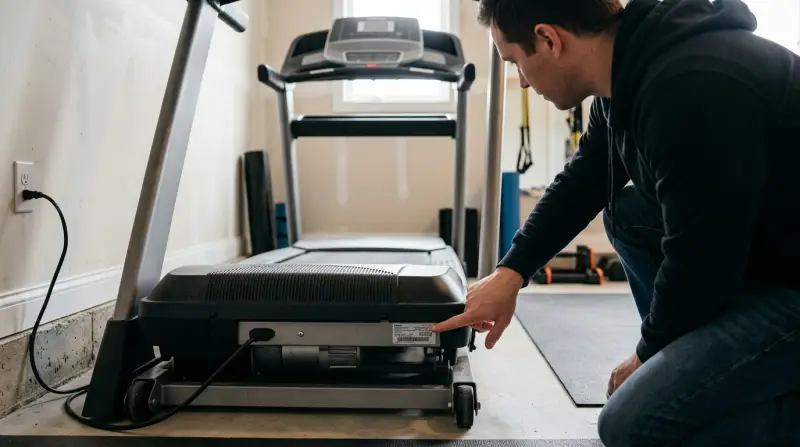
Every Proform treadmill has a unique model number. This number does much more than identify your machine—it unlocks the correct owner’s manual, parts diagrams, and technical support. Using the wrong model number can lead to ordering mismatched parts or getting incorrect instructions, which can cause frustration and even damage your treadmill.
For example, two Proform treadmills might look almost identical but use different belts or electronics. The model number ensures you get exactly what you need for your specific treadmill, especially since Proform releases updates and new models frequently.
Where To Find The Model Number On A Proform Treadmill
Proform places the model number label in several common locations. The exact spot can depend on the treadmill’s age and style. Here’s where to check:
1. Frame Near The Power Cord
One of the most common places is on the frame at the base, close to where the power cord connects. You might need to crouch down or use a flashlight, as this area can be hard to see, especially in home gyms with limited lighting.
2. Inside The Upright Supports
Look at the inside surface of the upright supports—the vertical bars that hold the console. The label can be on the inner side, which means you may need to kneel down or use a mirror to read it clearly.
3. Beneath The Treadmill Deck
Some Proform models hide the label under the walking belt deck. Carefully lift the deck, or slide your hand under the edge to feel for a sticker. Be careful not to pinch your fingers or damage any wires.
4. On The Console’s Back Or Side
The console (where the controls and display are) sometimes has the model number label on its back or side. You may need to move the treadmill away from the wall or tilt the console slightly.
5. Under The Motor Hood
If you’re comfortable with a screwdriver, you can check under the motor hood. This area is typically at the front of the treadmill, just below the console. Only open the motor hood if the treadmill is unplugged, and be gentle to avoid damaging parts.
| Location | Ease of Access | Tools Needed |
|---|---|---|
| Frame near power cord | Easy | None |
| Inside upright supports | Moderate | None |
| Beneath treadmill deck | Challenging | Flashlight |
| Console’s back or side | Easy | None |
| Under motor hood | Moderate | Screwdriver |
What Does The Model Number Look Like?
A Proform treadmill model number is usually a combination of letters and numbers. For example, you might see numbers like “PFTL59515” or “PFTL79520.” Sometimes, the label includes both a model and a serial number. The model number is what you need for most support and parts questions.
Example Model Number Label
The label may read something like:
Model No. PFTL59515
Serial No. SF123C45678901
Write down the model number exactly as it appears, including all letters and numbers. Avoid confusing the serial number with the model number; they serve different purposes.
Other Places To Find The Model Number
If you can’t find the label on your treadmill, don’t worry—there are backup options.
1. Owner’s Manual
Your original owner’s manual will list the model number on the cover or the first few pages. If you have a PDF manual or a printed copy, check there first.
2. Purchase Receipt Or Order Confirmation
Retailers and online stores usually include the model number on your purchase receipt, order confirmation email, or invoice. Search your email or account history for “Proform treadmill” to find these details.
3. Proform Website Account
If you registered your product on the Proform website, log into your account to see the registered model number. This method also confirms warranty status and support eligibility.
4. Support Chat Or Phone
If all else fails, contact Proform customer service. They may ask for photos or details about your treadmill’s features to help identify your model.
Step-by-step Guide: Finding Your Proform Model Number
Let’s break down the process into simple steps, so you don’t miss any likely spots.
- Unplug the treadmill for safety before moving or inspecting it.
- Check the frame near the power cord. Use a flashlight if needed.
- Look inside the upright supports by kneeling down and peering along the inner sides.
- Slide your hand or a flashlight under the treadmill deck to search for a label.
- Move the console gently to check the back and sides for any stickers.
- If you’re comfortable and have a screwdriver, remove the motor hood and look for a label.
- Still not found? Review your owner’s manual and purchase documents.
- Log in to your Proform account online to check for registered model info.
- As a last resort, contact Proform support with photos and details.
| Step | Details | Tips |
|---|---|---|
| Unplug treadmill | Ensure safety before checking | Always unplug to avoid shocks |
| Check frame near cord | Look for sticker/label | Use a flashlight for dark areas |
| Inspect upright supports | Examine inner sides | Bend down for better view |
| Look under deck | Feel for label under belt | Be careful of moving parts |
| Check console | Inspect back and sides | Move treadmill if needed |
| Open motor hood (optional) | Look for internal labels | Use only if comfortable |
| Review documents | Check manual/receipts | Search emails for records |
| Check Proform website | Find info in registered account | See warranty details too |
| Contact support | Send photos/details | Have treadmill info ready |
Common Mistakes To Avoid
Many treadmill owners make simple errors that slow down the process or lead to confusion. Here’s what to watch out for:
- Looking for the model number on the running belt: The belt itself will not have this info.
- Mixing up the serial number and model number: They are not the same; always use the model number for parts and support.
- Forgetting to unplug the treadmill: Safety first—never inspect electrical parts while plugged in.
- Using the box or packaging: Sometimes the box lists a family of models, not your exact one. Always check your treadmill or documents.
- Assuming the location is always the same: Proform changes label locations by model and year.
What If Your Label Is Worn Or Missing?
Over time, the model number label may fade, peel, or become unreadable. If this happens:
- Try gently cleaning the area with a soft cloth to reveal any remaining characters.
- Use a smartphone camera with flash; sometimes, the number is clearer in a photo.
- Compare your treadmill’s features to Proform’s website to narrow down possible models.
- Reach out to Proform support—send photos of your treadmill and describe unique features (like button layout, display type, or special functions).
Practical Tips For Treadmill Owners
- Take a photo of your model number label and save it in your phone or computer for future reference.
- Write down the model and serial number in your owner’s manual or on a note taped to the treadmill.
- When ordering parts, double-check the model number with the parts supplier to avoid mistakes.
- If selling or moving your treadmill, include the model number for the new owner.
Differences Between Model Number And Serial Number
Many people confuse the model number with the serial number. Here’s a quick comparison to clear things up:
| Model Number | Serial Number |
|---|---|
| Identifies product type | Unique to your treadmill |
| Used for manuals, parts, support | Used for warranty, tracking |
| Same for all treadmills of that model | Different on every unit |
| Example: PFTL59515 | Example: SF123C45678901 |
What To Do After You Find The Model Number
Once you have the model number, you’re equipped for:
- Ordering replacement parts that fit your specific treadmill.
- Downloading the correct owner’s manual from the Proform website.
- Registering your product for warranty.
- Contacting technical support with the right information, speeding up the process.
If you need to find parts or service, always provide the exact model number. This avoids delays and helps you get the right support.

When To Contact Proform Support
Sometimes, even after searching, you might not find the label or you’re unsure about the number. If this happens, Proform support can still help. Have these details ready:
- Photos of the treadmill (front, side, console)
- Description of features (folding, Bluetooth, type of display, incline levels)
- Approximate year of purchase
Providing as much detail as possible helps support staff quickly identify your treadmill and assist you better. For more on model numbers and identifying fitness equipment, you can also visit the ICON Health & Fitness FAQ.
Frequently Asked Questions
How Do I Know If I Have The Correct Model Number?
Double-check the label for “Model No. ” or “Model Number. ” If you see a mix of letters and numbers (like PFTL59515), that’s the right code. Compare it to your manual or online listings for confirmation.
Can I Use The Serial Number To Order Parts?
No. Always use the model number for parts, manuals, and support. The serial number is for warranty and manufacturing records, not for identifying part compatibility.
Where Can I Download The Proform Treadmill Manual?
Visit the official Proform website and use your model number to search for the correct manual. Manuals are free to download and include setup, maintenance, and troubleshooting instructions.
What If My Model Number Label Is Unreadable?
Try cleaning the label or taking a photo with your phone’s flash. If it’s still unreadable, check your manual, receipts, or Proform account. As a last step, contact Proform support with photos and treadmill details.
Is The Model Number The Same As The Product Name?
No. The model number is a specific code, while the product name is a marketing term (like “Proform Carbon T7”). Always use the model number for technical or support questions.
Finding the model number on your Proform treadmill is key to getting the right help, parts, and instructions. With the steps above, you’ll never be left guessing—just confident and ready for smooth workouts.