
A refrigerator is one of the most important appliances in any home, and LG refrigerators are known for their reliability and modern features. But even the best appliances can run into problems. One common issue that many LG refrigerator owners face is the Error Code FF. Seeing this code on your fridge’s display can be confusing and stressful, especially if you don’t know what it means or how to fix it. This article will guide you through everything you need to know about the LG refrigerator error code FF, including what it means, why it happens, how to troubleshoot, and when to call for professional help. By the end, you’ll have the confidence to handle this error and keep your fridge running smoothly.
What Does Lg Refrigerator Error Code Ff Mean?
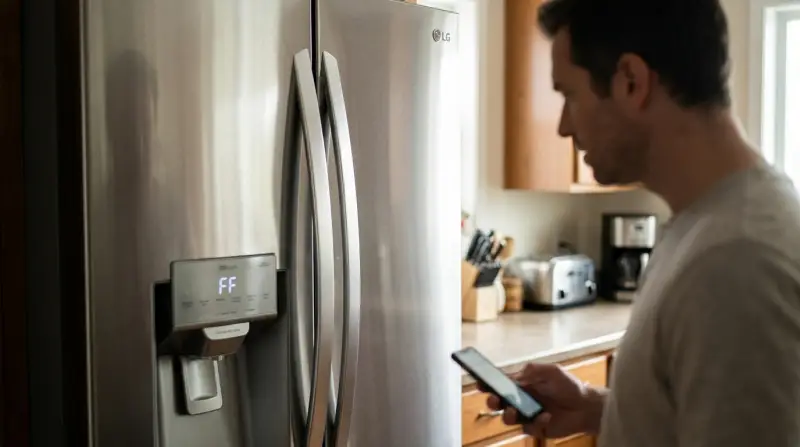
When your LG refrigerator shows the FF error code, it’s trying to tell you something specific. The “FF” stands for Freezer Fan. This means the refrigerator’s control board has detected a problem with the fan that circulates cold air in the freezer section. Without this fan, your freezer may not get cold enough, and you risk losing your frozen food.
Most LG refrigerators are designed to run self-diagnostics. When the freezer fan isn’t working correctly for a set period (usually about 5-7 hours), the system stops normal operation and displays the FF code. This is a safety step to prevent further damage.
Why Does The Freezer Fan Matter?
The freezer fan is a small but essential part inside your LG refrigerator. Its main job is to move cold air from the evaporator coils throughout the freezer compartment. Without this airflow:
- The freezer can’t reach or maintain the right temperature.
- Ice cream, meat, and other frozen items may start to thaw.
- Frost may build up on the coils, causing more problems.
- The refrigerator section may also get too warm.
If the freezer fan stops, the entire cooling process is affected. That’s why LG built the error code system to alert you early.
Common Causes Of The Ff Error Code
Understanding what triggers the FF error code can help you solve the problem faster. Here are the main reasons:
- Fan Motor Failure: The motor that turns the freezer fan may have burned out or developed a mechanical problem.
- Ice Buildup: Frost or ice can build up around the fan blades, stopping them from turning.
- Obstructions: Sometimes, packaging or food items are pushed against the fan, blocking its movement.
- Wiring Issues: Loose, disconnected, or damaged wires can interrupt the fan’s power supply.
- Faulty Control Board: Rarely, the main circuit board controlling the fan can fail, sending wrong signals or no signals at all.
- Blocked Air Vents: Poor airflow due to blocked vents can cause the fan to overwork and shut down.
Many people overlook small details, such as an ice tray out of place or a plastic bag touching the fan cover, which can trigger the error.
Signs Your Lg Refrigerator Freezer Fan Has A Problem
Besides the FF error code, you might notice other signs indicating the freezer fan is in trouble:
- The freezer is not as cold as usual, or the temperature is rising.
- You hear unusual noises, such as buzzing, clicking, or silence where there was once a soft hum.
- Frost builds up inside the freezer or on the back wall.
- The refrigerator section feels warmer than normal.
Don’t ignore these warning signs. Acting early can save you money and prevent food spoilage.
How To Troubleshoot And Fix Ff Error Code
When you see the FF error code, don’t panic. Many problems can be solved without calling a technician. Follow these steps:
1. Unplug And Restart
Start with the basics:
- Unplug the refrigerator from the wall.
- Wait for 5-10 minutes.
- Plug it back in.
Sometimes, this simple reset will clear temporary glitches in the control board.
2. Check For Obstructions
Open your freezer and look near the back wall or ceiling. The fan is usually behind a vent cover.
- Move food away from the vents.
- Make sure nothing is touching or blocking the fan cover.
Sometimes, plastic bags or large boxes shift and block airflow.
3. Listen To The Fan
Close the freezer door for a minute, then open it. Normally, you should hear the fan running—a soft whirring sound.
- If you hear nothing, the fan may be stuck or dead.
- If you hear a clicking or grinding noise, something may be caught in the blades.
4. Look For Ice Buildup
Ice can freeze around the fan, stopping it from turning.
- Check for visible frost or ice near the fan area.
- If you see ice, you’ll need to defrost the freezer. Unplug the fridge, open the doors, and let it sit for several hours. Place towels to soak up water.
5. Test The Door Switch
The fan only runs when the freezer door is closed. Press and hold the door switch (a small button along the edge). This tricks the fridge into thinking the door is closed.
- While holding the switch, listen for the fan.
- No sound? The fan or wiring may be faulty.
6. Inspect Wiring And Connections
If you’re comfortable with basic repairs:
- Remove the vent cover (usually a few screws).
- Inspect wires connected to the fan for looseness or damage.
- If you see burnt wires or loose connectors, these need repair.
7. Replace The Freezer Fan Motor
If the fan motor is bad, you’ll need a replacement. LG fan motors cost between $30–$100 and are available online.
- Turn off and unplug the fridge.
- Remove shelves and the back panel to access the fan.
- Disconnect the old motor, install the new one, and reassemble.
This is a moderate DIY repair. If you’re unsure, call a professional.
8. Reset The Error Code
After fixing the problem, you may need to reset the refrigerator to clear the error:
- Press and hold the refrigerator and freezer temperature buttons at the same time for 5 seconds (model-dependent).
- Or, unplug for a few minutes and restart.
If the code returns, the problem isn’t fully solved.
Data Comparison: Common Lg Refrigerator Error Codes
To help you understand where FF stands among other error codes, here’s a simple comparison.
| Error Code | Meaning | Typical Cause |
|---|---|---|
| FF | Freezer Fan Error | Fan motor failure, ice blockage |
| ER DH | Defrost Heater Error | Heater or sensor issue |
| ER IF | Ice Maker Fan Error | Ice buildup or fan issue |
| ER CF | Condenser Fan Error | Fan or wiring issue |
Knowing the codes helps you diagnose faster, and avoid unnecessary service calls.

Professional Repair Vs. Diy: Which Is Right For Ff Error?
Deciding whether to fix the FF error yourself or call a technician depends on your skills and comfort level.
| DIY Fix | Professional Repair |
|---|---|
| Clearing ice, checking blockages, replacing easy parts | Replacing motor, fixing wiring, control board issues |
| Costs less, quicker if you’re handy | Costs more, but safer and guaranteed |
| Risk of missing hidden problems | Expert diagnosis, warranty on repair |
If your refrigerator is under warranty, professional service is usually best. Attempting complicated repairs yourself can void your warranty or cause further damage.
When To Call For Professional Help
Some freezer fan issues are simple, but others can be complex. Here are situations where expert help is strongly recommended:
- The fan motor needs replacement, and you lack tools or experience.
- There are signs of burnt wires or electrical burning smells.
- The error code returns after basic troubleshooting.
- The control board may be faulty, which requires special tools to diagnose.
Professional technicians also have access to LG’s official diagnostic tools and parts, ensuring a proper fix.
Preventing Ff Error: Maintenance Tips
Prevention is the best way to avoid the stress of error codes. Simple actions can keep your LG refrigerator running well:
- Don’t overfill the freezer: Too many items block airflow.
- Keep vents clear: Arrange food so air can move freely.
- Check for frost: Defrost regularly if frost builds up.
- Clean the fan area: Wipe dust from vents during deep cleaning.
- Avoid slamming the door: This can jar the fan or loosen wires.
- Annual inspection: Have a technician check moving parts, especially if your fridge is more than five years old.
Many owners forget that even modern, smart refrigerators need regular care. Small problems, if ignored, can become big repairs.
Real-world Example: Ff Error In Action
Let’s look at a common scenario. Maria, a homeowner in Texas, noticed her LG refrigerator was not keeping ice cream frozen. She checked the display and saw the FF error code. After searching online, she tried unplugging the fridge and moved food away from the back vents.
She found a bag of frozen peas lodged against the fan cover.
Maria removed the bag, closed the freezer, and reset the fridge. The error code disappeared, and the freezer returned to normal cooling within a few hours. By acting quickly and checking for simple blockages, Maria avoided a costly service visit.

Credit: smartapplianceservices.com
Lg Refrigerator Reliability And Error Codes
LG refrigerators are among the most popular in the US, with an estimated 20% market share according to industry data. While they are generally reliable, error codes like FF, IF, and CF are not uncommon, especially in models over five years old.
According to a 2023 appliance report, around 7% of LG refrigerator owners reported at least one error code in the first five years, with FF being one of the top three.
Staying informed about these codes, and knowing what actions to take, can extend the life of your appliance and protect your investment.
Warranty And Support Information
Most LG refrigerators come with a one-year general warranty and a five or ten-year warranty on the compressor. If your refrigerator is still under warranty, always contact LG’s customer service before attempting major repairs. You may be able to get free parts, labor, or advice.
For more details, check the official LG support site or your user manual.
You can find more information about LG refrigerator error codes and support at the official LG Help Library.
Credit: www.lg.com
Frequently Asked Questions
What Should I Do First When I See The Ff Error Code?
Start by unplugging your LG refrigerator for a few minutes, then plug it back in. Check the freezer for any items blocking the vents or fan, and listen for the fan running when the door is closed. Often, simple obstructions or a quick reset can solve the problem.
Can I Run My Refrigerator With The Ff Error Code Showing?
No, it’s not safe. The FF error means your freezer fan isn’t working, so the freezer will not cool properly. This could lead to spoiled food and further damage to the refrigerator. It’s best to solve the problem quickly to avoid bigger issues.
How Do I Know If The Freezer Fan Motor Is Broken?
If you don’t hear the fan running (a soft whirring noise) when the freezer door is closed, or if there’s a grinding or clicking sound, the motor may be broken. You can also press the door switch to test. If still unsure, a technician can check with special tools.
How Much Does It Cost To Fix The Ff Error Code?
The cost depends on the cause. Clearing ice or removing blockages is usually free. Replacing the fan motor can cost $30–$100 for the part, plus labor if you hire a professional. Complex repairs involving the control board can be $200 or more.
Where Can I Find Official Information On Lg Error Codes?
The official LG Help Library provides detailed explanations of all error codes, including FF. Visit the LG Help Library for the latest information.
Keeping your refrigerator in top shape doesn’t have to be stressful. With a little knowledge about error codes like FF, you can avoid panic and take smart steps toward a solution. Simple maintenance and quick action go a long way in keeping your LG refrigerator running for years.