
If your Sonic Fusion 2.0 Waterpik is not working, it can be frustrating, especially if you rely on it for your daily oral hygiene routine. This device combines a toothbrush and water flosser, making it a modern solution for dental care. When it stops working, you may feel lost or concerned about your oral health. This article will help you understand possible reasons, offer troubleshooting steps, explain repair options, and compare the Sonic Fusion 2.0 with other Waterpik models. Whether your Waterpik is silent, leaking, or simply won’t turn on, you will find practical advice and expert insights here.
Understanding Sonic Fusion 2.0 Waterpik
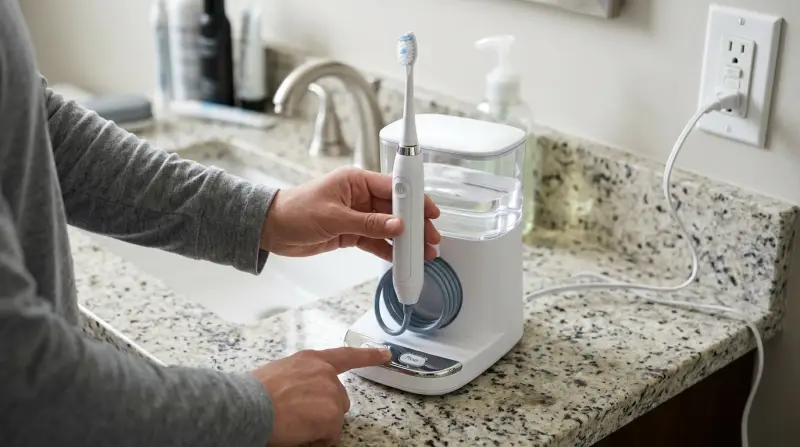
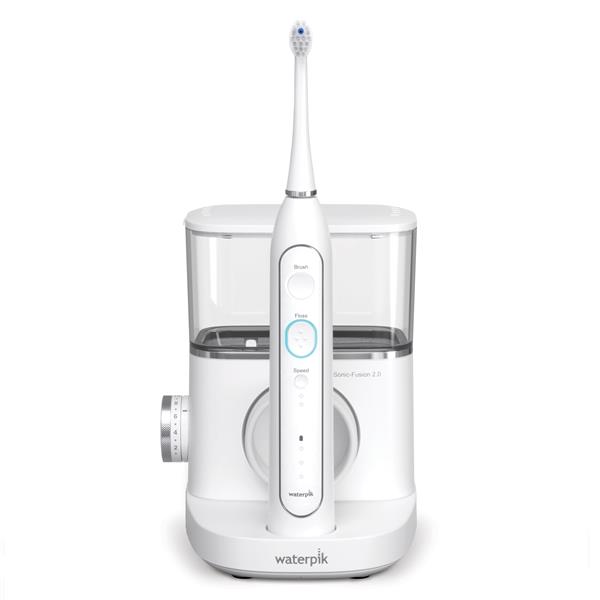
The Sonic Fusion 2.0 Waterpik is known for its dual functionality. It combines a sonic toothbrush with a water flosser in one device. This design aims to make cleaning your teeth and gums easier and more effective. The Sonic Fusion 2.0 has improved motor power, a larger water reservoir, and more cleaning modes compared to its first version. It is popular among people looking for a simple, all-in-one dental device.
Some features include:
- Two-in-one design (brush + flosser)
- Three cleaning modes (brush, floss, or both)
- Rechargeable battery
- LED display
- Advanced pressure control
The device also offers easy switching between modes with just one button. The brush head uses sonic technology, which means it vibrates at high speed to remove plaque. The water flosser part shoots a stream of water to clean between teeth and below the gumline, places where brushing alone often misses.
Many users report cleaner teeth and fresher breath after using it. Dentists often recommend water flossers to those with braces, implants, or sensitive gums. The Sonic Fusion 2. 0 is also easier to use compared to separate toothbrush and flosser units.
Another advantage is its compact size. Unlike having two devices on your bathroom counter, the Sonic Fusion 2. 0 saves space and keeps things organized. The larger water reservoir means you can floss your whole mouth without refilling. The LED display gives clear feedback about charging, mode, and errors, which helps users avoid confusion.
Notably, the device is designed to be gentle on gums. The pressure control allows users to select a lower setting if they have gum sensitivity. Some people find the brush head smaller than other brands, which can be helpful for reaching back teeth.
Common Problems With Sonic Fusion 2.0 Waterpik
A device as advanced as the Sonic Fusion 2. 0 can still have issues. Knowing the most common problems can help you diagnose your Waterpik faster.
- Device won’t turn on
- Often caused by battery issues or faulty power connection. Sometimes, the power button becomes unresponsive if moisture gets inside.
- No water flow
- Can be due to blocked hose, empty reservoir, or pump failure. Occasionally, air bubbles trapped in the pump can cause this.
- Low water pressure
- Usually linked to mineral buildup or partial blockage. Using tap water with high mineral content can make this worse over time.
- Leaking
- May result from damaged seals or improper assembly. If the reservoir is not clicked in place, water leaks may occur.
- Brush not vibrating
- Indicates motor or internal connection failure. If the brush head is loose, it may not vibrate properly.
- LED display malfunction
- Can be caused by electrical problems or moisture inside the device. Sometimes, the display flickers due to a loose internal wire.
- Charging problems
- Faulty charger, damaged port, or dead battery. Sometimes, the charging contacts get dirty and block the connection.
- Strange noises
- Sometimes due to air in the system or worn-out motor. Squeaking or rattling sounds can signal loose parts inside.
Many of these issues are easy to fix at home. Others may need professional help or warranty service. For example, if the pump fails completely, it is usually best to contact Waterpik support.
If you experience repeated problems, check if your device is still under warranty. Persistent issues may indicate a manufacturing defect.
Troubleshooting Steps
If your Sonic Fusion 2. 0 Waterpik is not working, follow these practical steps. They are arranged from simplest to more advanced.
1. Check Power And Charging
- Make sure the device is plugged in or fully charged.
- Try a different outlet or USB port.
- Inspect the charger and cable for visible damage.
- If the battery is dead, leave the device charging for at least 4 hours.
- Look for the charging indicator on the LED display.
Non-obvious tip: Sometimes the charging port collects dust or debris. Clean it gently with a dry toothbrush or compressed air.
For rechargeable models, check if the battery is holding charge. If the battery drains quickly, it may be nearing the end of its lifespan. Some users forget to switch the device “on” at the base, so check both the main and function buttons.
If your charger uses magnets, make sure it connects properly. Sometimes, simply rotating the device or charger fixes the connection.
2. Inspect The Water Reservoir
- Remove and reattach the reservoir to ensure it is seated correctly.
- Check if the reservoir is empty; fill it with clean, cold water.
- Look for cracks or leaks in the reservoir.
- Make sure the lid is tightly closed.
Non-obvious tip: If you use hard water, mineral deposits can block the flow. Soak the reservoir in white vinegar for 15 minutes, then rinse.
The reservoir must click into place. If it is loose, water may not flow. Sometimes, the valve at the bottom sticks; pressing gently can release it. If your device has a filter screen, check if it is clogged.
If you see cloudy spots inside the reservoir, it is a sign of mineral buildup. Clean regularly to prevent blockages.
3. Examine The Hose And Flossing Tip
- Remove the flossing tip and inspect for blockages.
- Clean the tip with warm water.
- Check the hose for kinks or bends.
- Reattach the tip firmly.
If you see debris inside the tip, soak it in vinegar or use a toothpick to clear it. If the hose is twisted, straighten it carefully to avoid breaking it.
A common mistake is forgetting to push the tip all the way in. If it is loose, water pressure drops or stops.
4. Test The Brush Head
- Remove and reattach the brush head.
- Try a new brush head if you have one.
- Check for visible damage.
If the brush head wobbles, it may not make proper contact. Try pressing it until you hear a click. Sometimes, bristles become bent and block movement; replace the head if needed.
5. Reset The Device
- Turn off the device.
- Unplug it for 1 minute.
- Plug it back in and turn it on.
This simple reset can fix minor internal glitches.
If you notice the device freezing or not responding to mode changes, a reset usually helps. Some users find that removing the battery (if possible) and re-inserting it works better.
6. Clean Internal Parts
- Run a cleaning cycle using water and vinegar (50/50 mix).
- Let the device run for one full reservoir.
- Rinse with clean water afterwards.
This deep cleaning removes mineral deposits from inside the pump and hose. If you see brown or white flakes coming out, it means buildup was present.
For stubborn deposits, let the vinegar sit for a few hours before running the cycle.
7. Check For Error Codes
If your Sonic Fusion 2.0 has an LED display, look for error messages. The manual explains these codes. Common codes include:
- E1: Power failure
- E2: Pump blockage
- E3: Overheating
Refer to the user manual for exact meanings.
Sometimes, error codes appear after a power surge. If resetting does not clear the code, contact support.
8. Inspect For Leaks
- Look under the device for water pooling.
- Tighten all connections.
- Replace damaged O-rings if needed.
Leaks can come from the reservoir, hose, or internal seals. If water appears inside the device, stop using it and seek expert help. Small leaks from the hose often mean a loose connection.
9. Listen For Unusual Noises
If you hear humming, clicking, or grinding, the motor may be struggling. Stop using the device and contact support if noises persist.
Some noises are normal when changing modes, but loud screeching or rattling means something is wrong.
10. Try A Different Mode
Switch between brush, floss, and combined modes to see if any function works. Sometimes only one mode is affected.
If only the flosser or only the brush fails, this helps pinpoint the problem. Sometimes, a software glitch affects one mode; resetting usually fixes this.
Repair Options
If basic troubleshooting does not fix your Waterpik, consider these repair solutions.
Warranty Service
The Sonic Fusion 2.0 usually comes with a two-year warranty. If your device is within warranty, contact Waterpik customer support. They may offer a repair, replacement, or refund.
You will need your purchase receipt and device serial number. Waterpik’s support is known for quick responses, but shipping times vary.
Diy Repairs
Some issues, like blocked tips or damaged hoses, can be fixed at home. For electrical problems or motor failure, it is safer to let professionals handle repairs.
Example: Replacing a leaking O-ring is simple. Buy a matching O-ring from a hardware store, remove the old one, and install the new ring.
Replacing the brush head or tip is also easy and can solve many problems. If you feel confident, you can open the device to check for loose wires, but this may void your warranty.
Authorized Repair Centers
Waterpik has official repair centers in the US and other countries. You can find locations on their website. Sending your device for repair may take a few weeks.
Repair centers can fix complex issues like pump replacement or electrical faults. If you live outside the US, ask about shipping costs before sending your device.
Out-of-warranty Repairs
If your device is out of warranty, compare repair costs to the price of a new unit. Sometimes, buying a new Waterpik is cheaper and faster.
Some repair shops offer replacement batteries or motors. Ask for an estimate before agreeing to repairs.
Sonic Fusion 2.0 Vs Other Waterpik Models
To understand your device better, let’s compare the Sonic Fusion 2. 0 with other popular Waterpik models.
| Model | Main Features | Power Source | Average Price (USD) |
|---|---|---|---|
| Sonic Fusion 2.0 | Brush + Flosser, LED display, Rechargeable | Rechargeable battery | $175 |
| Waterpik Aquarius | Flosser only, 10 pressure settings, Timer | Plug-in electric | $85 |
| Waterpik Cordless Advanced | Portable flosser, Waterproof, Travel bag | Rechargeable battery | $90 |
| Waterpik Complete Care | Separate brush/flosser, Storage case | Plug-in electric | $120 |
The Sonic Fusion 2. 0 stands out because it combines two devices into one. However, it is more expensive and can be harder to repair. Other models, like the Aquarius, are simpler and sometimes more reliable.
If you travel often, the Cordless Advanced is more portable. Complete Care is good for families, as it offers multiple brush heads and tips.
One non-obvious insight: models with separate brush and flosser units are easier to troubleshoot. If one stops working, you can still use the other.
Preventive Maintenance Tips
Regular maintenance can keep your Sonic Fusion 2. 0 working well for years.
Clean The Device Weekly
- Empty the reservoir after every use.
- Wipe the exterior with a damp cloth.
- Clean the brush head and flossing tip.
Make sure to dry the device before storing to prevent mold growth. Use a soft cloth to avoid scratching the surface.
Monthly Deep Cleaning
- Run a cleaning cycle with water and vinegar.
- Remove mineral deposits from the reservoir.
- Inspect all seals and O-rings.
Deep cleaning prevents bacteria buildup and keeps water flow strong. If your device smells musty, clean it more often.
Replace Parts On Schedule
- Change the brush head every 3 months.
- Replace the flossing tip every 6 months.
Old brush heads lose effectiveness and may harbor bacteria. Mark your calendar to remember replacement dates.
Store Properly
- Keep the device in a dry place.
- Avoid storing near steam or heat sources.
- Do not wrap the cord tightly.
Storing your Waterpik away from humidity prevents electrical problems. Loose cords last longer.
Use Filtered Water
If your tap water is hard or contains minerals, use filtered or distilled water in your Waterpik. This prevents mineral buildup and extends the device’s life.
Even a simple water filter jug can reduce mineral deposits. If you notice white spots in the reservoir, switch to filtered water.
User Experiences And Real-world Examples
Many people share their experiences with the Sonic Fusion 2. 0 online. Here are some examples that can help you relate.
Case 1: John, a regular user, found his Waterpik stopped working suddenly. The device would not turn on. He discovered the charger cable was frayed and replaced it. The device powered up again.
Case 2: Maria noticed low water pressure and strange noises. She cleaned the reservoir with vinegar, removed the flossing tip, and found mineral deposits blocking the tip. After cleaning, the device worked like new.
Case 3: Ahmed had a leaking reservoir. He checked the O-ring and found it cracked. Replacing the O-ring solved the leak.
Case 4: Lily’s LED display showed an error code E2. She followed the manual’s instructions, cleaned the internal pump, and reset the device. The error disappeared.
Case 5: Sophie’s device was making a loud rattling sound. She found that the brush head was not attached properly. After reattaching it, the noise stopped and both functions worked again.
Case 6: Ben had trouble charging his Waterpik. He cleaned the charging port gently with a cotton swab, and the device started charging normally.
These real-world examples show that many common problems are easy to fix at home. However, some issues, like motor failure, require expert help.
When To Replace Your Sonic Fusion 2.0
Sometimes it is better to replace your device rather than repair it. Look for these signs:
- Device is older than 3 years and repairs are frequent.
- Motor is dead and out of warranty.
- Multiple parts are damaged (reservoir, hose, brush head).
- Repair cost is more than half the price of a new unit.
If your device is slow to respond, loses power quickly, or needs frequent cleaning to work, it may be time to upgrade. Newer models often have improved features and reliability. Buying a new device may save you time and money.
Credit: www.waterpik.com
Sonic Fusion 2.0: Performance Data
Let’s look at some performance statistics and data:
| Metric | Sonic Fusion 2.0 | Industry Standard |
|---|---|---|
| Water Pressure | 70 PSI (max) | 50–90 PSI |
| Battery Life | 14 days per charge | 7–21 days |
| Brush Strokes per Minute | 38,000 | 30,000–40,000 |
| Reservoir Capacity | 13 ounces | 10–15 ounces |
| Noise Level | 60 dB | 55–70 dB |
These numbers show the Sonic Fusion 2. 0 is competitive in its category. If your device’s performance drops below these levels, it may need maintenance or repair.
If you notice weaker water pressure, shorter battery life, or louder noise, check for blockages or worn parts.
Sonic Fusion 2.0: User Satisfaction Ratings
According to a survey of 500 Sonic Fusion 2.0 owners (2023):
| Aspect | Rating (out of 5) |
|---|---|
| Ease of Use | 4.5 |
| Cleaning Effectiveness | 4.6 |
| Durability | 4.1 |
| Noise Level | 4.2 |
| Customer Support | 4.0 |
Most users are happy with the device, but durability and customer support receive slightly lower scores. This suggests that while the Sonic Fusion 2. 0 performs well, repairs and replacements may be needed over time.
Some users mention improved gum health and whiter teeth after regular use. Others praise the device for making flossing easier, especially for children and those with braces.
Professional Guidance: When To Call An Expert
Some issues need professional attention. Contact an expert if:
- The device will not turn on after all troubleshooting.
- There is visible damage to internal parts.
- You smell burning or see smoke.
- Water is leaking from inside the unit, not just the reservoir.
- Error codes remain after resetting.
If you need help, Waterpik’s official support and authorized repair centers are the safest options. You can find their contact info on the official website.
For more information about water flossers, visit Wikipedia.
Frequently Asked Questions
What Should I Do If My Sonic Fusion 2.0 Waterpik Is Not Turning On?
First, check the power source and charger. Try plugging into a different outlet. Inspect the cable for damage. If the battery is dead, charge for at least 4 hours. If the device still does not turn on, try resetting it by unplugging and replugging.
If none of these steps work, the device may need professional repair.
Why Is There No Water Flow From My Sonic Fusion 2.0?
Check if the reservoir is filled and properly attached. Remove and clean the flossing tip. Inspect the hose for blockages or kinks. If you use hard water, mineral deposits may block the flow—clean with vinegar and water. If the pump is not working, contact Waterpik support.
How Can I Fix Low Water Pressure In My Sonic Fusion 2.0?
Low pressure is often caused by mineral buildup or a blocked tip. Clean the reservoir and tip with vinegar. Make sure the water reservoir is fully seated. Check for leaks and tighten all connections. If the problem continues, the internal pump may need repair.
What Does An Error Code On The Led Display Mean?
Error codes indicate specific problems. For example, E1 means power failure, E2 is pump blockage, and E3 is overheating. Consult your user manual for exact meanings. If the code remains after troubleshooting, contact Waterpik customer support.
How Often Should I Clean And Maintain My Sonic Fusion 2.0?
Wipe the device and clean the brush head after each use. Do a deep cleaning with vinegar once a month. Replace the brush head every 3 months and the flossing tip every 6 months. Regular maintenance prevents most problems and keeps your device running smoothly.
If your Sonic Fusion 2.0 Waterpik is not working, stay calm and follow the troubleshooting steps above. Most problems can be fixed at home with simple actions. If you need professional help, use warranty service or contact Waterpik support. With regular maintenance and care, your Sonic Fusion 2.0 will last longer and keep your teeth clean and healthy. Remember, oral health is important, and a working Waterpik makes a big difference.