
When you buy a modern LG washing machine, you expect smart features and a smooth user experience. One small but important feature is the chime—the sound that plays when a cycle is done, or when you press buttons. It seems like a simple thing, but when the chime stops working, it can be annoying and even cause you to miss laundry cycles. If you’ve noticed your LG washing machine chime not working, you’re not alone. Many users face this issue, and it can happen for several reasons.
This article will help you understand why your LG washing machine chime is silent, how to fix it, and what to do if simple solutions don’t work. You’ll learn step-by-step troubleshooting, find out about possible technical faults, and get tips to keep your appliance running smoothly.
Whether you’re a new owner or have had your LG washer for years, these insights will save you time and frustration.
What Is The Lg Washing Machine Chime For?
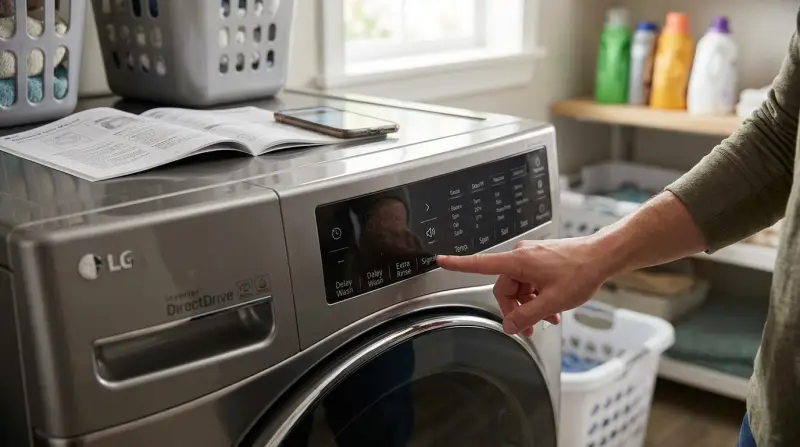
The chime on an LG washing machine is more than just a pleasant sound. It serves as an alert system. You’ll hear it when:
- A cycle finishes (so you know to remove clothes)
- There’s an error or warning
- You press or hold certain buttons
- The machine is powered on or off
A working chime helps prevent clothes from sitting too long in the washer, which can cause smells and wrinkles. It also notifies you of problems, like an unbalanced load or a door left open.
Common Reasons The Lg Washing Machine Chime Stops Working
When the chime doesn’t sound, it’s rarely a sign of a serious failure, but it can be inconvenient. Here are the most common causes:
- Chime Setting Is Turned Off: Most LG models let you mute the chime. Sometimes, it’s turned off by mistake.
- Volume Is Too Low: On some models, you can adjust the volume. If it’s set to minimum, you might not hear it.
- Control Panel Issues: A problem with the control panel or software can silence the chime.
- Speaker Malfunction: The tiny speaker inside the washer can fail or get disconnected.
- Firmware Updates: After a firmware update, some settings might reset, including the chime.
- Power Supply Problems: A surge or loose connection might affect electronic sounds.
- Child Lock Activated: Some LG machines mute sounds when child lock is on.
Many users overlook these simple issues and worry about expensive repairs. But often, the fix is quick and easy.
How To Troubleshoot The Chime On Lg Washing Machines
Before calling a technician, try these steps to solve the problem yourself. You don’t need special tools or technical skills.
1. Check The Chime Setting
Most LG washers have a dedicated chime button or setting in the menu. Here’s how to check:
- Turn on the washing machine.
- Look for a button labeled “Signal,” “Chime,” “Sound,” or a small music note icon.
- Press the button. On many models, each press toggles the chime on or off.
- Some machines show “On” or “Off” on the display.
If you have a touch screen or a more advanced model:
- Press the “Settings” or “Options” button.
- Navigate to “Sound” or “Chime.”
- Adjust as needed.
If you hear a beep when changing settings, the speaker is working.
2. Adjust Chime Volume
Some LG washers let you set the volume level:
- Find the volume setting in the control panel.
- Use the up/down arrows to increase the sound.
- Test by starting or stopping a cycle.
If the volume is already at maximum and you still hear nothing, move to the next step.
3. Test Other Sounds
Try different actions:
- Press different buttons.
- Open and close the door.
- Start and stop a cycle.
If you hear any beep or sound, the speaker works, and the problem is likely a setting. If it’s silent for all actions, the issue may be hardware.
4. Power Cycle The Washer
A simple reset can solve minor glitches:
- Turn off the washer and unplug it from the wall.
- Wait one minute.
- Plug it back in and turn it on.
- Test the chime again.
This clears temporary software errors.
5. Check For Child Lock
When child lock is activated, many LG washers mute sounds to avoid attracting children. Look for a lock or key icon on the display. To turn off child lock:
- Hold the “Child Lock” button (often a combination of two buttons) for 3 seconds.
Now test the chime again.
6. Inspect Power Supply
A weak or interrupted power supply can affect electronic features. Make sure:
- The washer is plugged into a working outlet.
- There are no extension cords or surge protectors that could cause problems.
- The plug fits tightly.
If the washer works but the chime doesn’t, the power supply is usually not the cause, but it’s worth checking.
7. Try A Firmware Update (if Available)
Some smart LG washers receive firmware updates. If you have Wi-Fi features:
- Open the LG ThinQ app.
- Check for updates in the “Settings” or “Support” section.
- Install any new updates.
After updating, recheck the chime settings.
When To Call A Technician
If you’ve tried all steps above and the chime is still silent, the issue may be hardware-related. Common hardware problems include:
- Faulty speaker or buzzer
- Loose speaker connection inside the control panel
- Damaged control board
These problems require opening the washer and should be handled by a qualified technician.
Signs You Need Professional Help
- No sound at all, even after resets and setting checks
- The display is blank or shows error codes
- Other features (like buttons or cycles) also don’t work
Contact LG support or a licensed repair service. If your washer is under warranty, repairs may be free.

Credit: www.youtube.com
Lg Washing Machine Chime Features By Model
Different LG models have different chime functions. Here is a quick comparison of three popular models:
| Model | Chime Volume Control | Mute Option | Firmware Updates |
|---|---|---|---|
| WM3900H | Yes | Yes | Yes (Wi-Fi) |
| WM3400CW | No | Yes | No |
| WM4200HBA | Yes | Yes | Yes (Wi-Fi) |
Always check your user manual or the LG website for model-specific instructions.
Common Mistakes When Fixing Chime Problems
Many users make small mistakes that can slow down the process or cause more confusion. Here are some to avoid:
- Not checking the mute setting first: Jumping to hardware solutions before checking the settings can waste time.
- Ignoring firmware updates: Outdated software can cause audio glitches.
- Trying to open the machine without proper tools: This can void your warranty and damage the washer.
- Not reading the user manual: Each model is different; instructions vary.
- Assuming a silent chime means a major fault: Usually, the fix is simple.
Real User Experiences
A quick look at online forums shows that chime problems are common, but most users solve them without calling for repairs. For example:
- Case 1: A user found the chime silent after a power outage. Resetting the washer restored the sound.
- Case 2: Another user muted the chime to avoid waking a baby, then forgot. The issue was fixed by pressing the chime button.
- Case 3: One customer had a faulty speaker that was replaced under warranty.
These examples show that the problem can range from easy-to-fix settings to rare hardware faults.
How To Prevent Chime Problems In The Future
While some causes are outside your control, you can avoid most chime issues with these tips:
- Don’t overload power outlets used by your washing machine.
- Update firmware when available.
- Check chime settings if you share the washer with others.
- Read the manual for your specific model.
- Keep the control panel dry and clean to avoid electrical faults.
Following these steps can help your LG washer run smoothly for years.
Cost Of Repair Vs. Diy Fixes
Most chime problems cost nothing to fix if they’re caused by settings or software. For hardware issues, here’s what you might expect:
| Issue | DIY Fix Possible? | Average Repair Cost |
|---|---|---|
| Chime muted or volume low | Yes | $0 |
| Firmware update | Yes | $0 |
| Speaker replacement | No | $80–$150 |
| Control board repair | No | $150–$300 |
DIY fixes are safe and free for settings and software. For hardware, always use a professional.
When Silence Is Golden (or Not)
Some users prefer the chime off, especially for late-night laundry or sleeping babies. If you want to silence your washer, use the mute or volume controls. But remember, you’ll lose important alerts like cycle completion or error warnings.
If you live in a busy house, consider keeping the chime on at low volume. It helps you stay on top of laundry and avoid problems.
Credit: www.lg.com
Why The Chime Matters For Everyday Laundry
You might think the chime is a small detail, but it impacts daily life:
- Reminds you to take out wet laundry quickly (prevents smells)
- Alerts you to errors before they become bigger problems
- Helps busy families manage laundry efficiently
When the chime stops working, you might forget a load in the washer or miss a warning about a blocked drain.

Frequently Asked Questions
Why Did My Lg Washing Machine Chime Suddenly Stop Working?
The most common reason is that the chime was muted or the volume was turned down accidentally. Other possible causes are software glitches, power issues, or a faulty speaker.
How Do I Turn The Chime Back On?
Find the chime or “Signal” button on your control panel. Press it to toggle the sound on. For touch screen models, check the settings menu for a sound or chime option.
Can A Firmware Update Fix The Chime?
Yes, sometimes a firmware update can solve audio bugs or restore missing sounds. Update your washer using the LG ThinQ app or follow instructions in your manual.
Is It Safe To Repair The Speaker Myself?
Replacing the speaker inside a washing machine is not recommended unless you have electrical repair experience. You could void your warranty or damage other parts. Call a professional if needed.
Will A Silent Chime Affect Washing Performance?
No, a silent chime does not change how well your washer cleans clothes. But you may miss cycle completion or error alerts, which can be inconvenient.
If you need more details, check the LG official support page for your model.
If your LG washing machine chime is not working, start with the simple steps above. Most problems are quick to fix and don’t require expensive repairs. Taking care of small features like the chime keeps your laundry routine smooth and your washer working for years.