
If your Biddeford blanket controller stops working, it can disrupt your comfort and your sleep. These heated blankets are popular for their warmth and adjustable temperature, but problems with the controller are not rare. Understanding why your controller isn’t working, how to fix it, and when to seek help can save you time and money. This article explains common issues, troubleshooting steps, and practical solutions. Whether your blanket won’t turn on, the lights blink, or it heats unevenly, you’ll find clear answers here.
How The Biddeford Blanket Controller Works
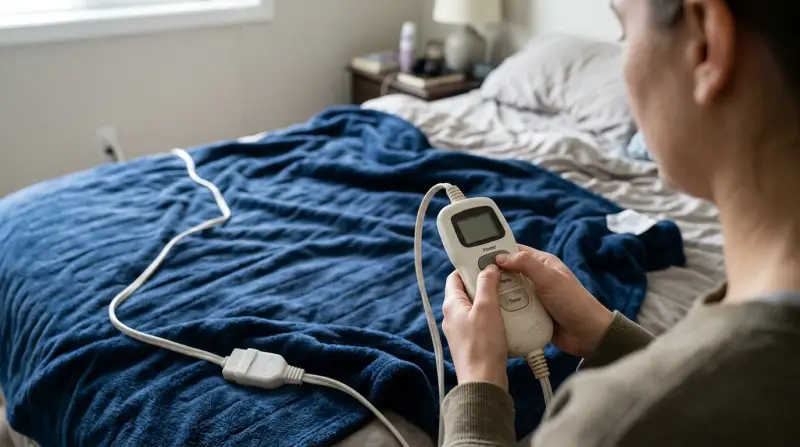
The Biddeford blanket controller is the heart of your heated blanket. It manages the flow of electricity to the heating wires inside the blanket. You use it to set the temperature, turn the blanket on and off, and sometimes set a timer. Controllers usually have a digital or dial interface with indicator lights. Some models allow for dual controls, letting two people set different temperatures on each side of the blanket.
Inside, the controller uses a small circuit board to process your settings and send the right amount of power to the blanket. It also includes safety features like auto-shutoff and overheating protection. If the controller fails, the blanket won’t function, or it might behave unpredictably.
Common Signs Your Controller Is Not Working
You may notice several symptoms if your controller is faulty. Identifying these signs helps you troubleshoot the problem faster:
- The blanket doesn’t heat up at all.
- The power light on the controller won’t turn on.
- The controller lights blink or flash repeatedly.
- The controller gets unusually hot to the touch.
- Temperature settings don’t change the blanket’s heat.
- The blanket heats only partway or unevenly.
- The blanket shuts off before the timer ends.
Some of these signs can also point to issues with the blanket or the power supply, not just the controller. It’s important to check all possible causes before replacing parts.

Credit: www.youtube.com
Quick Troubleshooting Steps
Before you call for repair or look for a replacement, try these basic troubleshooting steps:
- Unplug and Replug: Disconnect the controller from both the wall and the blanket. Wait at least 30 seconds. Plug it back in firmly.
- Check the Power Source: Plug another device (like a lamp) into the same outlet. If that doesn’t work, the outlet may be the problem.
- Inspect Connections: Make sure the connector between the controller and blanket is clean and fully seated. Dust or loose connections can stop the blanket from working.
- Examine the Controller: Look for signs of damage, such as cracks, burnt smells, or melted plastic.
- Try a Different Blanket (if possible): If you have another Biddeford blanket, test your controller with it. This can help you tell if the issue is with the controller or the blanket.
- Reset the Controller: Some controllers can be reset by unplugging for a few minutes. Check your manual for instructions.
- Look for Error Codes: Digital controllers may flash error codes. Note the pattern or code and check your manual for its meaning.
Many problems can be solved through these steps. If the controller still doesn’t work, you need a deeper look.
Common Causes Of Controller Failure
Understanding why controllers stop working helps prevent future issues. Here are the most frequent causes:
Loose Or Dirty Connections
The plug connecting the controller to the blanket can get loose or dirty. This interrupts the flow of electricity. Always check that the plug is clean and clicks firmly into place.
Power Surges
A sudden spike in electricity from storms or faulty wiring can damage the internal circuit board. Using a surge protector can reduce this risk.
Worn-out Internal Components
Like all electronics, the parts inside the controller can wear out over time. Older controllers are more likely to fail, especially after many heating cycles.
Moisture Or Liquid Damage
Water or spilled drinks can ruin the controller’s circuit board. Never use the blanket if the controller is wet, and always keep it dry.
Overheating
If the controller or blanket overheats, the auto-shutoff will trigger to prevent fire hazards. Repeated overheating can permanently damage the controller.
Manufacturing Defects
Occasionally, controllers have factory defects that appear after a few uses. If your controller is new, check for recalls or warranty options.

Specific Problems And Solutions
Let’s break down the most common problems and how you can fix them.
The Blanket Does Not Heat Up
If the blanket stays cold:
- Confirm the blanket and controller are plugged in correctly.
- Try the controller on another compatible blanket, if possible.
- Test the outlet with another device.
- Look for a blinking light or error code.
If all these steps fail, the controller’s internal fuse or circuit board may be damaged. Replacement is likely needed.
Blinking Or Flashing Lights
A blinking or flashing light is usually an error warning. Each pattern means something different. Common causes:
- Poor connection at the controller-blanket joint
- Faulty controller or wiring
- Blanket wires are broken or damaged
Unplug everything for five minutes. Reconnect and see if the lights stay solid. If not, check your manual or the Biddeford support site for the meaning of the blink pattern.
Controller Gets Very Hot
A warm controller is normal, but if it’s uncomfortably hot or smells burnt, unplug it immediately. Overheating can mean:
- Internal short circuit
- Blocked airflow
- Faulty thermostat
Never use an overheating controller. Replace it to prevent fire risks.
Controller Won’t Turn On
Check the outlet, plug, and connections. If all are fine and the controller still won’t power up, it likely has an internal failure.
Blanket Only Heats Partway
If only part of the blanket heats, the issue might be the wires inside the blanket, not the controller. But sometimes, a faulty controller cannot send enough power. Test your controller with another blanket if you can.
Safety Tips When Troubleshooting
Working with electric blankets has risks. Always unplug the blanket before checking connections. Never try to open the controller—it contains sensitive parts and can be dangerous. If you see smoke, smell burning, or notice melted parts, stop using the blanket immediately.
Using a damaged controller can cause electric shock or fire. If you’re unsure, ask a qualified technician or contact Biddeford support.
When To Replace The Controller
Not every problem needs a new controller. But you should replace it if:
- The controller has obvious physical damage.
- It heats up too much or smells burnt.
- Blinking lights remain after all troubleshooting.
- The controller is over five years old and fails repeatedly.
Replacement controllers are sold online and through Biddeford’s customer service. Always buy the correct model for your blanket.
How To Replace A Biddeford Blanket Controller
If you need a new controller, follow these steps:
- Find Your Model Number: Check the label on your blanket or controller for the model number.
- Buy a Compatible Controller: Only use controllers designed for your blanket model. Using the wrong one can be unsafe.
- Unplug Everything: Make sure the blanket and old controller are fully disconnected from power before replacing.
- Attach the New Controller: Line up the plug and press it in firmly.
- Test the Blanket: Plug in and turn on the blanket. Try all settings to confirm it works.
If the replacement doesn’t solve the problem, the blanket itself may be at fault.
Warranty And Customer Support
Biddeford blankets often come with a 5-year warranty. If your controller stops working within this period, contact Biddeford customer service. Have your model number, purchase date, and a description of the problem ready.
You may need proof of purchase. Sometimes, the company will send a replacement controller or blanket. If your warranty has expired, you can still buy a new controller, but you’ll pay for it.
For more details, visit the official Biddeford Blankets site.
Preventing Future Controller Problems
A few simple habits can extend your controller’s life:
- Unplug the blanket when not in use.
- Avoid pulling on the cord or plug.
- Keep the controller dry and away from liquids.
- Use a surge protector.
- Don’t fold or crimp the cord tightly.
- Store the blanket flat when not in use.
These steps help prevent both controller and blanket failures.
Comparing Biddeford Blanket Controllers To Other Brands
Biddeford is popular, but other brands make electric blankets too. Here’s how Biddeford compares to some competitors:
| Brand | Controller Features | Price Range | Warranty |
|---|---|---|---|
| Biddeford | Digital & Dial, Auto Shutoff, Dual Controls | $50–$120 | 5 years |
| Sunbeam | Digital, Preheat, Multiple Heat Settings | $60–$150 | 5 years |
| Pure Warmth | Simple Dial, Single Control | $40–$100 | 5 years |
Biddeford controllers are known for simple operation and long warranties, but some users report more blinking light errors compared to brands like Sunbeam.
Biddeford Controller Error Codes: What They Mean
Digital Biddeford controllers may flash different codes or lights. Here’s what the most common signals mean:
| Light/Code | Possible Meaning | Suggested Action |
|---|---|---|
| Flashing All Lights | Loose connection or internal error | Unplug and reconnect, check plugs |
| Solid Red Light | Normal operation | No action needed |
| Flashing One Light | Blanket wire break or short | Try another blanket or controller |
| No Lights | Power issue or failed controller | Check outlet and replace if needed |
Check your manual for codes specific to your model.
Real-world Example: Diagnosing A Blinking Controller
Consider Jane, who used her Biddeford blanket daily. One morning, she found the controller’s lights blinking and the blanket cold. She:
- Unplugged the controller and blanket.
- Tested the outlet with a lamp (it worked).
- Cleaned and reconnected the controller plug.
- Waited five minutes, then plugged everything back in.
The lights still blinked. She borrowed a friend’s controller, and her blanket worked again. The problem was the controller, not the blanket. Jane ordered a replacement and disposed of the faulty one safely.
This example shows why testing with another controller or blanket can save time.
Cost Of Repair Vs. Replacement
Repairing a controller is rarely worth it. Most are sealed and not designed for user repair. Professional repair can cost $30–$50, while a new controller usually costs $20–$40. For older blankets, buying a new unit is often cheaper and safer.
Environmental Impact: What To Do With A Broken Controller
Do not throw broken controllers in regular trash. They contain electronics that can harm the environment. Check local rules for recycling small electronics. Some stores and recycling centers accept them. Always cut the cord short before disposal to prevent future use.
Non-obvious Insights Most Users Miss
Many people think the blanket itself is the problem when the controller fails. But more than half of electric blanket issues come from the controller or its connection, not the blanket wires. Always test the controller first.
Another common mistake: storing the blanket with the controller attached. The controller is fragile and can be damaged by pressure or bending. Detach it before folding or putting away your blanket.

Credit: emausasturias.org
How To Care For Your Biddeford Blanket And Controller
Maintaining your blanket and controller isn’t hard, but it’s often skipped. Key tips:
- Wash the blanket only as directed—never submerge the controller.
- Let the blanket dry completely before reconnecting the controller.
- Store the controller in a dry, cool place, away from sunlight and heat.
- Check the cord and controller for damage before each season.
These steps can help your blanket and controller last longer.
Key Safety Features In Biddeford Controllers
Biddeford controllers include built-in safety systems:
- Auto-Shutoff: Turns the blanket off after 10 hours (some models) to prevent overheating.
- Overheat Sensors: Detect if the blanket is too hot and cut off power.
- Thermal Fuses: Break the circuit if a dangerous fault happens.
Never try to bypass or repair these safety features. They are there to protect you.
User Experiences: Common Complaints And Praises
Online reviews reveal that most users like the simple controls and comfort. However, complaints include:
- Blinking or flashing lights after a year or two
- Controller stops working after washing the blanket (with controller attached)
- Hard-to-find replacement parts for older models
Many users praise quick heating and a good warranty response from Biddeford.
Alternatives To Replacing The Controller
If you can’t find a replacement controller, consider:
- Using the blanket as a regular blanket (no heat)
- Buying a universal controller (only if it matches specs exactly)
- Upgrading to a new electric blanket
Never try to “repair” internal wires unless you’re a qualified technician. It’s not worth the risk.
Table: Troubleshooting At A Glance
For a quick reference, here’s a summary of the main problems and actions:
| Problem | First Step | Next Step | When to Replace |
|---|---|---|---|
| Blanket cold | Check plugs | Test outlet, try another controller | If no change |
| Lights flashing | Unplug, wait, reconnect | Clean connectors | If still flashing |
| Controller hot | Unplug immediately | Inspect for damage | Always replace |
| No power | Test outlet | Check connections | If still dead |
Frequently Asked Questions
Why Do Biddeford Blanket Controllers Blink?
Blinking lights on Biddeford controllers usually mean there’s a connection problem or a safety fault. It might be a loose plug, a damaged controller, or an issue with the blanket’s wires. Try unplugging everything and reconnecting. If the blinking continues, check for error codes in your manual.
Can I Use A Different Brand’s Controller With My Biddeford Blanket?
No, you should only use a Biddeford controller designed for your specific blanket model. Different brands use different wiring and safety standards. Using the wrong controller can cause malfunction or safety risks.
How Do I Reset My Biddeford Blanket Controller?
To reset, unplug both the controller and blanket from the wall and each other. Wait at least 30 seconds. Plug the controller back into the blanket, then into the wall. Turn on and test. Some digital models may need a longer reset—check your manual.
Is It Safe To Repair A Biddeford Controller Myself?
No, repairing controllers yourself is not recommended. The internal parts are sensitive and can be dangerous. Opening the controller can void your warranty and create fire or shock hazards. It’s safer to buy a new controller or contact customer service.
What’s The Average Lifespan Of A Biddeford Blanket Controller?
With normal use and care, a Biddeford controller typically lasts 3–5 years. Factors like power surges, moisture, or rough handling can shorten this time. Using surge protectors and following care tips will help it last longer.
If your Biddeford blanket controller is not working, don’t panic. Most issues can be fixed with careful troubleshooting. When in doubt, choose safety and replace the controller or contact Biddeford support. With the right steps, you can enjoy a cozy, warm bed for many winters to come.