
The most likely reason your Microwave Turntable is Not Turning is a simple misalignment between the glass tray and the plastic support ring or the drive coupler beneath it. In most cases, this issue happens because the tray wasn’t seated correctly after cleaning or because small food debris has blocked the wheels. You can confirm this by removing the glass tray and the plastic ring to inspect the area for buildup or broken parts. If the tray is clean and the coupler is intact, the problem may involve the motor or an electrical fault.
Why your microwave turntable isn’t turning
| Cause | How common | How to confirm it | Fix it yourself? |
|---|---|---|---|
| Misaligned tray | Very common | Check ring fit | Yes |
| Food debris | Very common | Inspect under ring | Yes |
| Damaged coupler | Common | Look for cracks | Yes |
| Broken ring wheels | Occasional | Spin ring manually | Yes |
| Motor failure | Rare | Listen for humming | No |
| Control board fault | Rare | Check error codes | No |
Tray and support ring misalignment
The most frequent cause of a stopped turntable is a simple failure of the moving parts to lock together correctly. The glass tray sits on top of a plastic support ring with wheels, which is in turn driven by a small plastic coupler at the center of the microwave floor. If the glass tray doesn’t rest flush on the rollers, or if the ring isn’t centered on the drive coupler, the motor will spin beneath the tray without actually moving it.
To confirm this, lift the glass tray out of the unit. Inspect the plastic support ring to ensure none of the wheels are jammed or broken. Once the floor is clean, place the support ring back in the center, ensuring the wheels are inside the circular track. Finally, place the glass tray back down, rotating it slightly until you feel it drop into the grooves of the drive coupler.
If the tray still doesn’t move, look at the plastic coupler at the very center of the microwave floor. If this piece is cracked or stripped, it can’t grip the support ring to rotate the tray. You can often order a replacement coupler from the manufacturer’s official parts website to snap into place. This is a simple fix that takes only a few minutes. If you find the coupler is loose or the motor shaft itself isn’t turning, stop and consider that you have reached the limit of what you should attempt at home. Never attempt to remove the microwave casing or touch internal components, as a capacitor can hold a lethal charge even when the unit is unplugged.
Obstructions in the track
Food buildup is a major cause of turntable issues because it creates physical resistance that the small motor can’t overcome. When liquids spill or crumbs fall into the track where the support ring wheels roll, they create a sticky or uneven surface. This forces the motor to strain, which can lead to the turntable stuttering, stopping, or the motor gear teeth wearing down over time.
You can identify this by removing the glass tray and the support ring completely. Run your fingers along the circular track on the microwave floor to feel for hardened food or debris. If the track is dirty, wipe it clean with a damp cloth and mild soap. If the ring itself has sticky residue on its wheels, clean those thoroughly as well.
This is a common mistake that costs homeowners the price of a new motor if left ignored. If the motor continues to struggle against an obstruction, the internal gears may strip, turning a simple cleaning job into a repair that requires a service technician. If you notice a grinding noise during operation even after cleaning, the motor may already be damaged. A motor that hums but doesn’t rotate despite a clear track is a sign of internal failure. If the unit is under warranty, contact the manufacturer; if not, you must decide if the cost of a professional repair is worth more than the remaining lifespan of the appliance.
Damaged drive components
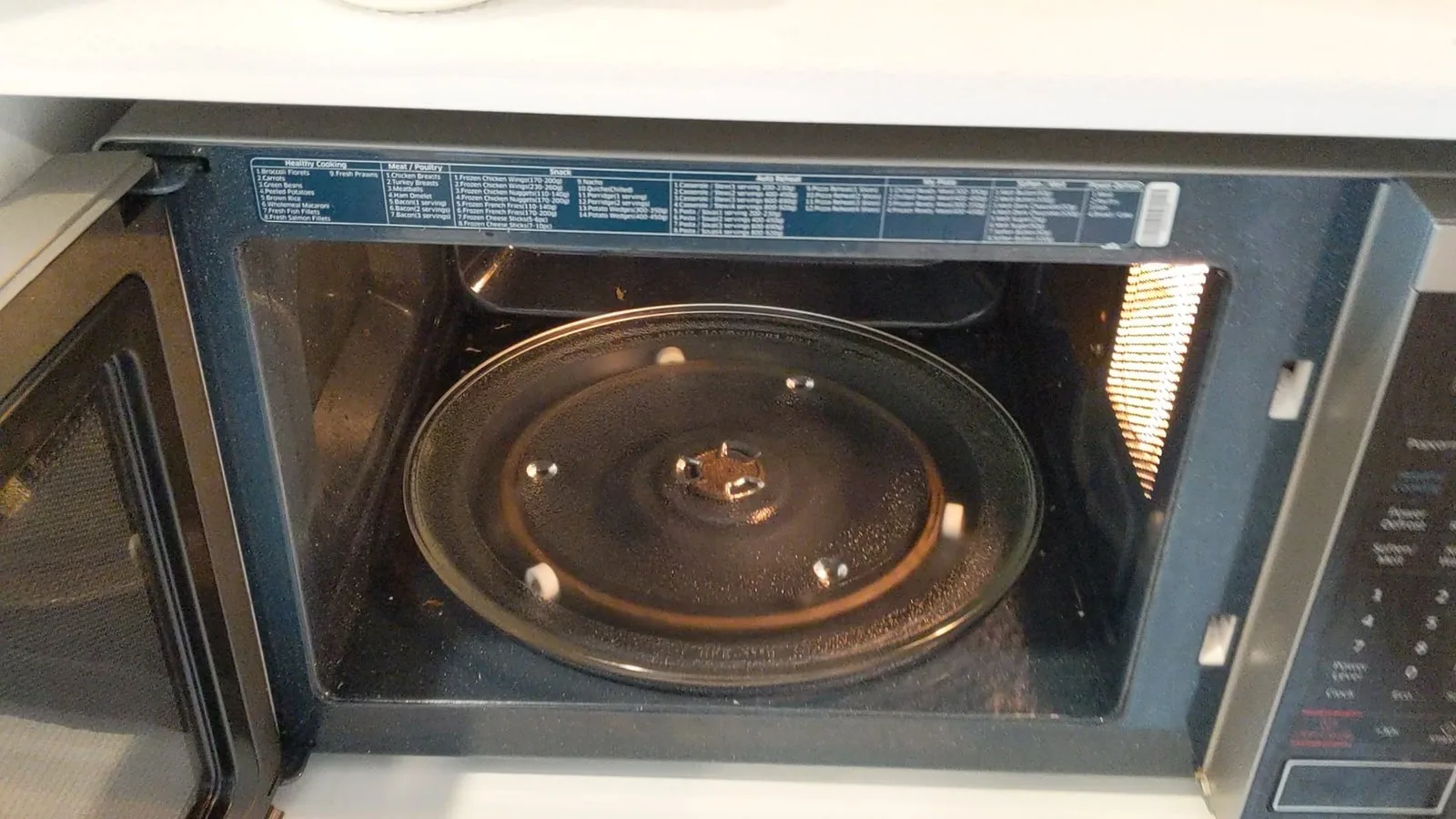
A damaged drive coupler or a broken support ring wheel acts as a mechanical disconnect between the motor and the tray. The coupler is the star-shaped plastic piece in the center of the floor that connects the motor shaft to the support ring. Over time, the plastic can become brittle from heat or wear down, causing it to slip rather than turn. Similarly, if one of the three wheels on the support ring snaps off, the tray will tilt and lose traction, causing it to wobble or stop entirely.
To check for this, inspect the drive coupler for visible cracks or rounded edges where it should be square. If you see damage, it’s a simple matter of pulling the old piece out and pushing a new one in. For the support ring, place it on a flat kitchen counter and see if it wobbles or if any wheels are seized.
This varies by model—check the label on the door frame for your specific microwave model number before buying parts. If the ring or coupler is visibly damaged, replacing these parts is inexpensive and usually resolves the issue. However, if the motor shaft itself is bent or the motor makes a loud rattling sound, the problem is deeper. If you have replaced the external parts and the turntable still doesn’t move, the motor likely has an internal electrical fault. At this stage, professional repair is the only safe path, as the motor is located behind the sealed interior housing.
The less likely causes
- Defective turntable motor: If the coupler is fine but the motor shaft doesn’t rotate when the microwave is running, the motor itself has failed and requires a technician to replace it.
- Worn motor gears: If the motor hums but the shaft moves very slowly or skips, the internal plastic gears inside the motor housing are likely stripped.
- Control board malfunction: An electronic failure in the microwave’s main circuit board may prevent it from sending power to the turntable motor, which is a job for a qualified electrician.
- Door interlock issues: If the microwave doesn’t start at all, the door switch may be faulty, which is a safety-critical component that must only be handled by a professional.
What a fix usually involves
Fixing a turntable that doesn’t turn depends entirely on which part has failed. Most of the time, the fix involves cleaning the track or replacing a small, inexpensive plastic part like the support ring or the drive coupler. These parts are widely available and usually cost a small fraction of the price of a new microwave. You can find these parts by searching your microwave’s model number on the manufacturer’s website.
If the motor has failed, the repair becomes more complex. Replacing a motor requires access to the interior of the microwave, which involves removing the outer casing. Because of the risk of electrical shock from high-voltage components, this isn’t a do-it-yourself task. A professional repair service will charge for labor and the cost of the motor, which might approach the cost of a new, basic microwave. Before paying for a repair, always compare the technician’s quote against the price of a new unit. If the microwave is old, putting money into a motor replacement is rarely the most cost-effective choice.
Frequently asked questions
Can I run the microwave if the turntable doesn’t turn?
Yes, you can run the microwave, but your food will likely heat unevenly. Because the food remains in one spot, the microwave energy will create “hot spots” and “cold spots” in the dish. To compensate, you must manually rotate the dish every 30 to 60 seconds during the cooking cycle to ensure the food reaches a safe internal temperature throughout.
Why does my turntable make a grinding noise?
The noise usually comes from food debris stuck in the track or a broken wheel on the support ring. When the wheels can’t roll smoothly, they drag across the floor, creating a grinding or clicking sound. Stop the microwave immediately and inspect the track and the wheels for damage or obstructions to prevent further wear on the motor.
Is it safe to replace the plastic coupler myself?
How long should the turntable motor last?
The lifespan of a turntable motor varies by model. While there’s no set date for failure, motors often last as long as the microwave itself if they’re kept clean. If you regularly clean the track and don’t overload the tray, you can prevent the strain that typically leads to motor failure.
What happens if I keep using it with a broken motor?
If you continue to use the microwave with a broken motor, you risk damaging the drive coupler or the floor of the unit. The coupler may continue to spin against the stationary support ring, which can melt the plastic or score the glass tray. Additionally, the uneven heating can lead to food safety issues if the center of your meal remains cold.
Does it matter if I use a generic replacement part?
It doesn’t matter as long as the part is listed as compatible with your specific microwave model number. Always check the official parts list on the manufacturer’s website to ensure the dimensions and the drive connection match your original part. A generic part that’s slightly the wrong size can cause the tray to jam, which eventually puts unnecessary strain on the turntable motor.
Final Thoughts
If the tray still won’t budge after you’ve cleared the debris, it’s time to consider a professional repair. Don’t try to open the microwave’s casing yourself, as internal electrical components can be dangerous. It’s safer to contact a local technician who’ll quickly figure out if you just need a new motor.
Related guides
- Fan Hums But Doesn’t Turn: Easy Fixes for a Silent Fan
- LG Microwave Not Heating: Top Fixes and Troubleshooting Tips
- Microwave Turn on by Itself: Causes and Easy Fixes