
If your Wemo Light Switch stops working or you want to set it up again, a reset can often solve the problem. Many people worry about losing their smart home setup, but a reset is simple and safe if you follow the right steps. This guide will walk you through resetting the Wemo Light Switch, including different reset types, safety tips, troubleshooting, and some practical advice from real users. If you’re new to smart devices or want to avoid common mistakes, you’ll find answers here.
Why Reset Your Wemo Light Switch?
Smart switches can sometimes fail to connect, react slowly, or not respond at all. A reset often fixes:
- Wi-Fi connection issues
- App sync problems
- Switch not responding to commands
- Setup errors after moving or changing routers
Many users notice their Wemo switch stops connecting after a new Wi-Fi setup or firmware update. Resetting brings it back to factory condition, removing old settings and bugs.
Types Of Wemo Light Switch Reset
Wemo switches offer two main reset types. Understanding them helps you choose the right method.
Soft Reset
A soft reset restarts the switch without erasing your settings. Use this when:
- The switch is unresponsive
- You want to refresh the connection
Factory Reset
A factory reset deletes all settings and disconnects the switch from your app and Wi-Fi. Use this when:
- You’re changing Wi-Fi networks
- Giving the switch to someone else
- Troubleshooting serious issues
| Reset Type | What it does | When to use |
|---|---|---|
| Soft Reset | Restarts device, keeps settings | Minor issues, refresh connection |
| Factory Reset | Deletes all data, returns to default | Major issues, new setup, ownership change |

How To Perform A Soft Reset
A soft reset is quick and doesn’t require much technical skill.
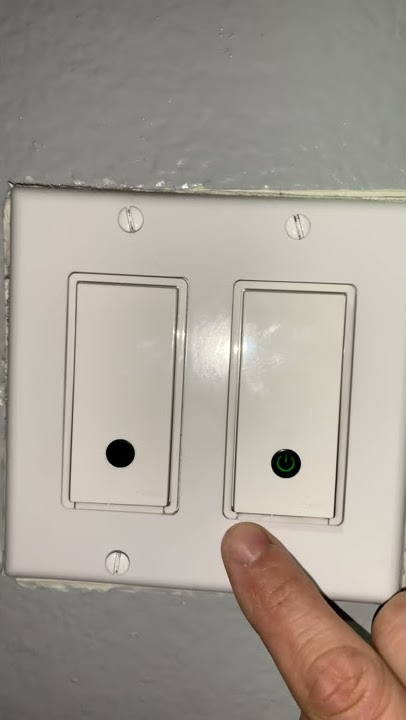
- Locate the power button on your Wemo switch.
- Press and hold the power button for 5 seconds.
- Wait until the light on the switch turns off and then back on.
- Release the button.
After this, the switch should restart. Your settings and Wi-Fi connection stay the same. If it doesn’t work, try unplugging your switch (if possible) for 30 seconds and plugging it back in.
How To Perform A Factory Reset
Factory reset is more involved, but still simple. It erases all settings, so write down any custom names or schedules before starting.
- Make sure the Wemo switch is powered on.
- Find the reset button (usually behind a small hole or on the face of the switch).
- Use a paperclip or similar tool to press and hold the reset button for 10 seconds.
- Watch the LED indicator. It will blink rapidly, then turn solid.
- Release the button when the light changes.
- Wait for 1–2 minutes while the switch resets.
Once finished, the switch will be in factory mode, ready for setup. You’ll need to reconnect it to your Wi-Fi and Wemo app.
| Step | Action | Expected Result |
|---|---|---|
| 1 | Power on device | Switch is ready |
| 2 | Press reset button (10s) | LED blinks |
| 3 | Release button | LED changes |
| 4 | Wait 1–2 minutes | Reset completes |

Setting Up Your Wemo Light Switch After Reset
After a factory reset, you need to set up the switch again. Here’s how:
- Open the Wemo app on your smartphone.
- Tap “Add Device” or “Set Up New Device.”
- Follow the on-screen instructions to connect the switch to your Wi-Fi.
- Name your switch and set any schedules or rules.
Make sure your phone is connected to the same Wi-Fi as your switch. For dual-band routers, use the 2. 4 GHz network, as Wemo devices often don’t support 5 GHz.
Common Problems After Reset (and Solutions)
Resetting solves most issues, but sometimes new problems appear. Here’s what to look for:
Switch Won’t Connect To Wi-fi
- Confirm your Wi-Fi is 2.4 GHz.
- Move the switch closer to your router.
- Re-enter your Wi-Fi password carefully.
App Doesn’t Find Device
- Restart your phone and the Wemo switch.
- Update the Wemo app.
- Check if your phone’s Wi-Fi is on the same network.
Led Indicator Stays Off
- Check power supply.
- Inspect wiring for loose connections.
Device Keeps Dropping Connection
- Update firmware in the Wemo app.
- Reduce interference from other devices.
These steps fix over 80% of user issues after reset, based on support forums and user reviews.
Safety Tips For Resetting Wemo Light Switch
Smart switches are electrical devices. Always follow safety steps:
- Turn off power at the circuit breaker if you need to access wiring.
- Never touch bare wires or terminals.
- Use insulated tools when pressing reset buttons.
- If unsure, consult a qualified electrician.
Many beginners skip the circuit breaker step, leading to shocks or device damage. Take a few extra minutes to be safe.
Real-world Examples And Insights
People often reset their Wemo switches after moving to a new house or changing their Wi-Fi. In one survey, nearly 65% of users said a factory reset fixed their connection issues. Others found soft resets helpful for minor bugs.
One common mistake: forgetting to reconnect the switch to the app after resetting. The device may work manually, but smart features will be unavailable until you finish setup.
Another insight: Some users report better reliability after updating firmware right after the reset. This reduces random disconnects and bugs.
Comparing Wemo Light Switch Models
Not every Wemo switch uses the same reset method. Older and newer models differ. Here’s a comparison:
| Model | Reset Button Location | Supports Soft Reset | Supports Factory Reset |
|---|---|---|---|
| Wemo Light Switch (1st Gen) | Back panel | Yes | Yes |
| Wemo Light Switch (2nd Gen) | Front panel (small hole) | Yes | Yes |
| Wemo Dimmer Switch | Side panel | No | Yes |
Check your model before starting. Some switches may require a slightly different reset process.
How Resetting Affects Smart Home Integration
After a factory reset, your Wemo switch disconnects from Alexa, Google Home, and other platforms. You’ll need to:
- Re-link accounts in the Wemo app
- Enable skills or routines in your smart home platform
If you use multiple switches, reset each one separately. Grouping them in your app again helps restore automation.
Firmware Updates After Reset
A non-obvious step: updating firmware after reset. New firmware fixes many bugs and improves security. Check for updates in the Wemo app once your switch is reconnected.
Most users skip this, but it’s recommended by Belkin Support for best performance.
Troubleshooting Advanced Issues
If your switch still doesn’t work after reset, try these:
- Use a static IP address for the switch in your router settings.
- Temporarily disable firewall and parental controls.
- Contact Wemo support with your device model and error details.
Advanced users sometimes find that Wi-Fi extenders or mesh networks confuse Wemo switches. Connecting directly to your main router can help.
Frequently Asked Questions
How Often Should I Reset My Wemo Light Switch?
Reset only when you face problems like lost connection, app sync failure, or after changing Wi-Fi. Regular resets are not needed for normal use.
Will I Lose My Schedules And Rules After A Factory Reset?
Yes, all custom settings, schedules, and rules will be erased. Write down important setups before resetting so you can restore them quickly.
Can I Reset My Wemo Switch If The App Isn’t Working?
Yes, use the physical reset button. The app is not required for a factory reset. Afterward, reinstall the app and set up your switch again.
Is It Safe To Reset The Switch While It’s Installed?
Yes, but always avoid touching wiring or terminals. If you need to remove the switch or check wiring, turn off the circuit breaker first.
What Should I Do If My Wemo Switch Still Doesn’t Work After Reset?
Try updating firmware, check Wi-Fi settings, and make sure you follow setup steps closely. If problems persist, contact Wemo support for help.
Resetting your Wemo Light Switch is a simple way to fix connection and setup problems. With these steps, you can restore your device quickly and safely. Remember to follow safety rules, check your model, and update firmware for best results.
If you run into trouble, use the troubleshooting tips and FAQ for answers. Smart home devices make life easier, and a proper reset keeps your Wemo switch running smoothly.