
If your Dyson vacuum suddenly stops working or shows an error, it can feel frustrating. Many people think they need to buy a new machine or call for repairs, but often, a simple reset can solve the problem. Learning how to reset your Dyson vacuum is a valuable skill that can save you time and money. In this article, you’ll learn exactly how to reset different Dyson models, why a reset works, and what to do if your vacuum still has problems afterward.
Why Resetting Your Dyson Vacuum Matters
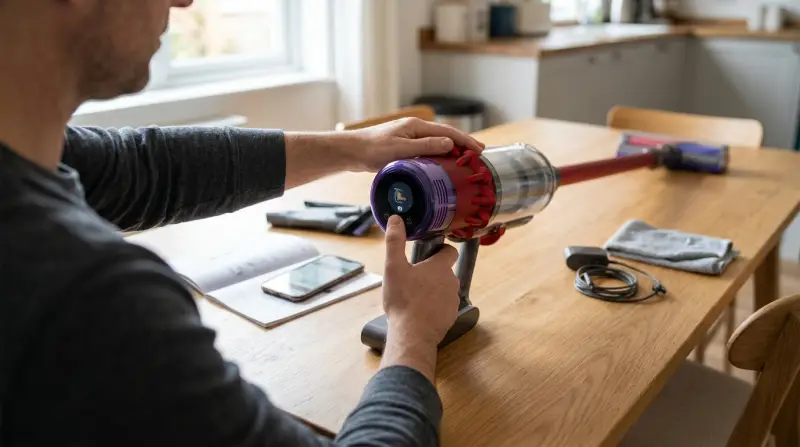
Sometimes, Dyson vacuums stop working for small reasons: a clogged filter, a blocked brush bar, or overheating. The good news is that many of these problems can be fixed with a reset. Resetting your vacuum helps the machine “forget” any errors and start fresh. It’s similar to restarting a computer when it freezes.
A study by the Association of Home Appliance Manufacturers found that nearly 30% of vacuum issues reported to customer support are solved by simple troubleshooting, including resets. If you know how to reset your vacuum, you can quickly get back to cleaning without waiting for help.
Common Reasons Dyson Vacuums Need A Reset
Before you reset your Dyson, it helps to know why it might need one. Here are the most common causes:
- Overheating – If the vacuum gets too hot, it will shut itself off for safety.
- Clogs – Blockages in the hose, filter, or brush bar can stop the machine.
- Full dust bin – When the bin is full, sensors may shut off the vacuum.
- Battery issues – Cordless models may need a battery reset.
- Motor error – Sometimes, an internal error can cause a shutdown.
Knowing these reasons helps you identify if a reset will help, or if you need to clear a blockage or change a filter first.
How To Reset Different Dyson Vacuum Models
Resetting a Dyson vacuum is not the same for every model. Below are steps for the most common types: corded upright, cordless, and cylinder vacuums. Always check your user manual for model-specific steps.
Resetting Corded Upright Dyson Vacuums
Corded upright models, like the Dyson Ball series, sometimes shut down if they overheat or sense a blockage. Here’s what to do:
- Turn off and unplug the vacuum from the wall.
- Check for blockages in the hose, wand, and brush bar.
- Empty the dust bin if it’s full.
- Let the vacuum cool down for at least 60 minutes. This allows any overheating safety features to reset.
- After cooling, plug the vacuum back in and turn it on.
If the vacuum still doesn’t work, press the reset button (if your model has one). On most upright Dysons, the reset button is a small red button near the brush bar or motor head.
Resetting Dyson Cordless Vacuums
Cordless models like the V6, V7, V8, V10, V11, and V15 are popular for their flexibility. If a cordless Dyson won’t start or stops suddenly, try these steps:
- Turn off the vacuum and remove the battery (if removable).
- Wait for 5–10 minutes for the electronics to fully reset.
- Check for blockages and clean the filter.
- Reinstall the battery (make sure it clicks into place).
- Press the power button to see if the vacuum starts.
Some models have a trigger reset: hold the power button down for 10 seconds to reset the electronics. If your vacuum still won’t work, try charging it fully before the next attempt.
Resetting Dyson Cylinder Vacuums
Cylinder vacuums, like the Dyson Big Ball, have a similar process:
- Unplug the vacuum from the wall.
- Clear any blockages and empty the bin.
- Let it cool for at least 30 minutes.
- Plug it back in and try turning it on.
Cylinder models rarely have a reset button, so most resets are done by unplugging and cooling.
How To Reset The Brush Bar
One common issue is a stuck brush bar. If your Dyson’s brush bar stops spinning, follow these steps:
- Turn off and unplug the vacuum.
- Remove the brush bar cover (check your model’s manual for instructions).
- Clear any hair or debris from the brush.
- Look for a reset button near the brush head. Press it if available.
- Reassemble the vacuum and test it.
Sometimes, simply clearing the brush bar will trigger an automatic reset.
Quick Reference: Reset Methods By Dyson Model
To help you see how resets differ across Dyson models, here’s a comparison:
| Dyson Model | Reset Method | Reset Button | Typical Wait Time |
|---|---|---|---|
| Dyson Ball Animal 2 | Unplug, clear blockages, cool down | Yes (red button) | 60 min |
| Dyson V11 | Remove battery, hold trigger | No | 10 min |
| Dyson Big Ball | Unplug, clear blockages, cool down | No | 30 min |
| Dyson V8 | Remove battery, hold trigger | No | 10 min |
What To Do If A Reset Doesn’t Work
If your vacuum still won’t start after a reset, don’t panic. Here are the next steps:
- Double-check for blockages – Even a small clog can cause issues.
- Clean or replace the filter – Dirty filters can stop airflow.
- Test the power outlet – Plug another device in to see if the outlet works.
- Check the battery – For cordless models, make sure the battery is charged and installed correctly.
- Inspect for damage – Look for broken wires, cracks, or burnt smells.
If none of these solve the problem, you may need professional help or a new part.
How To Reset The Battery On Dyson Cordless Models
Sometimes, the battery itself needs a reset, especially if the vacuum does not charge or turns off quickly. Here’s how to do a battery reset:
- Remove the battery from the vacuum.
- Leave it out for at least 5 minutes.
- Reinsert the battery firmly.
- Charge the vacuum fully before use.
If the vacuum still will not hold a charge, the battery may need replacement. Dyson batteries typically last 2–4 years with normal use.

Credit: www.youtube.com
How Often Should You Reset Your Dyson Vacuum?
You should only reset your Dyson if you notice a problem—like the vacuum won’t start, shuts off suddenly, or gives an error light. Frequent resets are not normal and may signal a bigger issue. If you need to reset often, check for hidden blockages, or consider a professional service.
Preventing Issues That Require A Reset
To avoid needing a reset, follow some simple care tips:
- Empty the dust bin regularly—don’t wait until it’s full.
- Clean the filter every 1–3 months (depending on model).
- Check the brush bar for hair and debris weekly.
- Store cordless vacuums in a cool, dry place.
- Charge the battery only when needed—don’t leave it plugged in all the time.
According to Dyson, regular maintenance can reduce breakdowns by up to 40%.
Dyson Vacuum Error Lights And What They Mean
Modern Dyson models use LED lights to show problems. Here’s a quick guide:
| Light Color | Meaning | Action Needed |
|---|---|---|
| Blue flashing | Low battery | Charge the vacuum |
| Red flashing | Motor or filter problem | Check for blockages, reset |
| Amber flashing | Temporary fault or overheating | Let cool, reset |
| No light | Battery or power issue | Check battery, outlet |
Understanding these lights helps you know when a reset is the right step.
Tips For A Successful Reset
A few extra tips can make your reset process smoother:
- Always unplug or turn off the vacuum before starting any reset.
- Give the vacuum enough time to cool—this is crucial for overheating issues.
- Use only Dyson-approved batteries and parts.
- Read your user manual for model-specific advice.
- Don’t force the reset button—press gently to avoid damage.
Many beginners forget to check the brush bar or filter before resetting. These steps are easy to miss but often solve the problem.
When To Contact Dyson Support
If you’ve tried all the steps above and your vacuum still doesn’t work, it’s time to contact Dyson customer support. Most Dyson vacuums have a 2–5 year warranty. Have your model and serial number ready when you call or use their online help. For more details on Dyson support, check the official Dyson support site.
Frequently Asked Questions
How Do I Know If My Dyson Vacuum Needs A Reset?
If your Dyson stops suddenly, shows a flashing red or amber light, or won’t turn on even after charging, it may need a reset. Also, if you notice a burning smell or strange noise, stop and check for blockages first.
Where Is The Reset Button On My Dyson Vacuum?
Not all Dyson vacuums have a reset button. On corded upright models, the button is usually near the brush bar or motor head. Cordless models often use a trigger reset (holding the power button) instead.
Can Resetting My Dyson Fix All Problems?
No, a reset can only solve some issues, like overheating, minor errors, or after clearing a blockage. If the vacuum has a broken part, battery failure, or serious motor problem, a reset won’t help.
How Long Should I Wait Before Plugging My Dyson Back In After A Reset?
Wait at least 30–60 minutes for overheating issues, depending on your model. This cooling period is important for the safety sensors to reset.
What Should I Do If My Dyson Still Doesn’t Work After A Reset?
Double-check for clogs, clean the filter, test the battery or power cord, and make sure the outlet works. If the problem continues, contact Dyson support for help or consider a professional repair.
If you follow these steps, your Dyson vacuum should be back to normal in no time. A reset is a simple but powerful tool to keep your vacuum running smoothly, saving you both time and money. Remember, regular maintenance helps prevent most issues before they start.