
Whirlpool’s Load & Go feature changed how people use washing machines. It lets you fill detergent and softener once, and the machine automatically dispenses the right amount for each load. This saves time and prevents overdosing. But many users face problems with Load & Go—sometimes it doesn’t dispense, leaks, or gives error codes.
If you’re having trouble, you’re not alone. This article covers the most common Whirlpool Load & Go problems, practical solutions, and tips to get your washer running smoothly again.
What Is Whirlpool Load & Go?
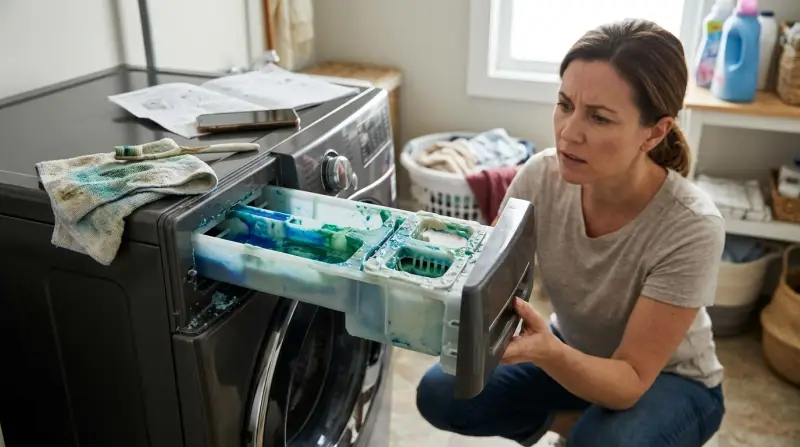
The Load & Go system is a smart dispenser found in many Whirlpool front-load washers. Instead of adding detergent and softener for every wash, you fill special cartridges. The machine measures and dispenses the right amount for each cycle. This technology aims to make laundry easier and more efficient.
- Automatic dispensing: It saves detergent and ensures the right amount is used. You don’t have to guess how much detergent to add or worry about pouring too much. This also helps protect clothes from detergent residue.
- Cartridge storage: Holds enough detergent for up to 20–40 loads, depending on the model. For families or busy people, this means fewer interruptions and more consistent results.
- Smart sensors: Adjust the dose based on load size, soil level, and cycle. The sensors check how dirty the clothes are, how big the load is, and select the proper amount of detergent. This is especially useful for mixed loads or heavily soiled items.
But while Load & Go is convenient, it’s not perfect. Many users report issues that need attention. Even small mistakes—like using the wrong detergent or skipping cleaning—can lead to bigger problems.
Common Whirlpool Load & Go Problems
Many Whirlpool users experience trouble with Load & Go. Below are the most frequent problems, their causes, and how to spot them. Understanding these issues can help you prevent them or solve them faster.
1. Detergent Not Dispensing
One of the most reported issues is detergent not dispensing. You fill the cartridge, but the washer doesn’t release detergent.
- Possible causes:
- Cartridge not installed properly. Sometimes, even a small misalignment can stop the system from working.
- Cartridge is empty or clogged. Detergent buildup or dried residue can block the flow.
- Dispenser sensor failure. If the sensor doesn’t detect the cartridge, it won’t dispense.
- Wrong detergent type (too thick or concentrated). Some detergents are not compatible and can block the mechanism.
- Washer software glitch. Sometimes, the electronics fail and need a reset.
Signs to look for:
- Clothes come out less clean or still smell dirty.
- No detergent smell in wash water or on clothes.
- Error codes on the panel, often related to the dispenser.
If you notice these signs, act quickly before residue builds up inside the machine.
2. Error Codes Related To Load & Go
Whirlpool washers display error codes when they detect problems. Some common Load & Go related codes include:
- F8 E2: Dispenser issue detected. This could mean the cartridge is missing, clogged, or the sensor is dirty.
- F0 E2: Over-sudsing (too much detergent). This happens if settings are wrong or you use high-sudsing detergent.
- F9 E1: Drain problem, sometimes linked to dispenser leaks. If detergent leaks into the drain area, it can cause blockages.
If you see these codes, check the manual or Whirlpool’s website for explanations. Error codes can look confusing, but they usually point to specific areas that need checking.
3. Cartridge Leaks
Sometimes, detergent or softener leaks from the cartridge area. This can cause sticky residue, odors, or puddles.
- Why it happens:
- Damaged or cracked cartridge. Over time, plastic can weaken or crack.
- Cartridge not sealed properly. If the seal is loose, detergent escapes during cycles.
- Debris blocking the seal. Even small pieces of lint or dried detergent can stop the seal from working.
Leaking cartridges are not just messy—they can damage other parts of the machine if not fixed.
4. Incorrect Detergent Levels
The Load & Go system relies on sensors to measure detergent. If sensors fail, the washer may use too much or too little detergent.
- Too much detergent: Leads to excess suds, longer rinse cycles, and residue. This can also cause skin irritation or fabric damage.
- Too little detergent: Clothes may not get clean, especially with larger or dirtier loads.
Incorrect dosing is often a sensor or software problem, but can also result from using a detergent with the wrong concentration setting.
5. Softener Not Dispensing
Many models have a Load & Go softener cartridge. Sometimes, it doesn’t dispense.
- Common causes:
- Softener cartridge empty or clogged. Dried softener is sticky and can block the system.
- Incorrect installation. The cartridge may look installed but isn’t fully engaged.
- Valve failure. Sometimes, the valve controlling softener flow gets stuck.
If you notice rough or stiff clothes after washing, check the softener cartridge.
6. Cartridge Not Recognized
Your washer might display “Cartridge not installed” or similar messages—even when the cartridge is in place.
- Possible reasons:
- Cartridge not fully seated. You must push until you hear a click.
- Electrical contact issue. Dirt or corrosion on the contacts prevents detection.
- Software glitch. A reset may help, or the washer may need an update.
This is a common frustration for new owners, but usually easy to fix.
7. Residue Or Build-up In Dispenser
If detergent or softener builds up in the dispenser area, it can clog the system.
- Signs:
- Visible gunk or residue, often around seals or edges.
- Reduced dispensing, even with full cartridges.
- Unpleasant odors from the dispenser or machine.
Ignoring residue leads to bigger problems, including leaks and sensor errors.
8. Settings Not Saving
Some users report that their Load & Go settings (like detergent concentration or amount) don’t save between washes.
- Why?
- Software bugs. Sometimes, updates fix this.
- Control panel malfunction. Buttons or touchscreens can fail.
- Power interruptions. Losing power during a cycle can reset settings.
Settings issues are annoying but usually not dangerous. However, they can affect wash quality.
9. Noisy Dispenser Operation
The Load & Go system makes some noise when dispensing. But excessive noise may signal a problem.
- Causes:
- Air trapped in cartridge. This causes bubbles and loud gurgling.
- Faulty pump or motor. Mechanical parts can wear out.
- Loose parts. Screws or clips inside can come loose over time.
If you hear new noises, investigate before they become worse.
10. Cartridge Difficult To Remove
Sometimes, the cartridge gets stuck and is hard to remove.
- Possible causes:
- Dried detergent build-up. Sticky detergent acts like glue.
- Misaligned cartridge. If not installed straight, it jams.
- Broken locking mechanism. Plastic clips can snap.
Never force the cartridge—gentle cleaning usually solves the problem.

Credit: www.lowes.com
Diagnosing Load & Go Issues
Fixing Load & Go problems starts with proper diagnosis. Here’s how to troubleshoot. Clear diagnosis saves time and money, and prevents bigger repairs later.
Step 1: Check Cartridge Installation
Make sure the cartridge is seated firmly. Remove and reinsert it. Listen for a click. If it feels loose, check for damage or wear. Sometimes, gently cleaning the contacts with a dry cloth helps.
Step 2: Inspect Cartridge And Dispenser
- Remove the cartridge and check for cracks or leaks. Hold it up to light to see small cracks.
- Look for dried detergent or softener around the seal. Sticky residue is a sign of build-up.
- Clean with warm water and a soft cloth. Avoid using sharp tools, as they can damage the cartridge.
Step 3: Test Dispensing Function
Run a short cycle and observe if detergent or softener dispenses. If not, try a manual cycle with the Load & Go feature off. Compare results—if manual works, the problem is with Load & Go.
Step 4: Review Washer Settings
Check if Load & Go is enabled in the control panel. Some models let you turn it off or adjust detergent concentration. If you changed settings recently, make sure they saved correctly.
Step 5: Look For Error Codes
Note any error codes. Use Whirlpool’s online resources or manual to decode them. Don’t ignore codes—they help pinpoint issues.
Step 6: Check Detergent Type
Use only HE (High Efficiency) liquid detergents. Powder, gel, or thick detergents may clog the system. If in doubt, check the detergent label.
Step 7: Inspect For Electrical Issues
If the washer doesn’t recognize the cartridge, check for visible wiring problems. If you see frayed wires, contact service. Never try to fix electrical issues yourself unless trained.
Fixing Whirlpool Load & Go Problems
Here are practical solutions for each problem. Try these before calling for repair. These steps solve most issues for users.
Detergent Not Dispensing
- Remove and reinstall the cartridge. Make sure it’s clicked in. Sometimes, simply reseating solves the problem.
- Clean the dispenser area with warm water. If residue is heavy, use a mix of water and vinegar.
- Use only HE liquid detergents. Avoid thick or scented varieties that may block the dispenser.
- Restart the washer (power off, wait 60 seconds, power on). This resets the software.
- Check if Load & Go is enabled. Sometimes, settings change after updates or power outages.
Error Codes
- For F8 E2, remove the cartridge, clean, and reinstall. Check for debris under the cartridge.
- For F0 E2, reduce detergent concentration in settings. Use the minimum recommended level for your detergent.
- For F9 E1, check for leaks or drain blockages. Inspect hoses and drains for clogs.
Cartridge Leaks
- Inspect for cracks or damage. Replace if needed.
- Clean the seal area. Use a damp cloth and make sure the seal is smooth.
- Replace the cartridge if damaged. Don’t try to repair cracks with glue—it won’t hold.
Incorrect Detergent Levels
- Adjust detergent concentration in settings. Increase for larger or dirtier loads.
- Clean sensor area. Sensors are usually near the cartridge slot.
- Update washer firmware if available. Updates fix bugs and improve dosing accuracy.
Softener Not Dispensing
- Clean softener cartridge and dispenser. Run warm water through the cartridge.
- Use only recommended softeners. Thick or sticky varieties block the flow.
- Check for valve blockages. Sometimes, a small piece of lint or dried softener jams the valve.
Cartridge Not Recognized
- Remove and reinstall cartridge. Clean contacts with a dry cloth.
- Inspect contacts for dirt. Sometimes, a cotton swab helps.
- Reset washer. Unplug for 60 seconds, then restart.
Residue Build-up
- Remove cartridge. Clean all visible residue.
- Clean dispenser with warm water and vinegar. Let it soak for 10 minutes if build-up is heavy.
- Run a cleaning cycle with the cartridge removed. Many models have a “clean washer” cycle.
Settings Not Saving
- Update washer software if possible. Check Whirlpool’s website.
- Reset to factory settings. This clears old bugs.
- Contact Whirlpool support if persistent. Sometimes, the control panel needs replacement.
Noisy Dispenser
- Remove air from cartridge by shaking gently. Air bubbles cause gurgling noises.
- Check for loose parts. Tighten screws if visible.
- Clean pump area. Access from the back panel if comfortable.
Cartridge Difficult To Remove
- Gently wiggle cartridge while pulling. Don’t force—this avoids breaking the mechanism.
- Clean dried detergent from edges. Warm water loosens sticky buildup.
- Avoid forcing—check for broken parts. If the cartridge won’t budge, call service.

Credit: ejappliance.com
Preventing Load & Go Problems
Regular maintenance helps avoid issues. Here are tips to keep your Load & Go working well.
- Clean cartridges and dispenser monthly. Routine cleaning keeps everything flowing smoothly.
- Use only HE liquid detergent and recommended softener. Avoid bargain brands not made for high-efficiency washers.
- Avoid overfilling cartridges. Fill to the line marked inside the cartridge.
- Keep washer firmware updated. Software updates fix bugs and improve performance.
- Check seals for leaks or cracks. Replace if needed.
- Don’t use powder or thick gel detergents. These clog the system and void the warranty.
Proactive Maintenance Checklist
- Inspect cartridges before every refill. Look for cracks or leaks.
- Wipe dispenser area after each month. Prevents buildup.
- Run a cleaning cycle every 3 months. Many washers have this option.
- Update software yearly. Check Whirlpool’s website for updates.
- Watch for unusual error codes. Early detection prevents bigger repairs.
Many users skip routine cleaning, but it’s the easiest way to keep your washer running smoothly.
Comparing Load & Go With Other Dispensing Systems
How does Whirlpool’s Load & Go compare to other brands? Here’s a look at key differences.
| Feature | Whirlpool Load & Go | LG Auto Dispense | Samsung Auto Dispense |
|---|---|---|---|
| Detergent Capacity | Up to 40 loads | Up to 20 loads | Up to 24 loads |
| Softener Support | Yes | Yes | Yes |
| Adjustment Settings | Multiple levels | Limited levels | Multiple levels |
| Common Problems | Sensor errors, leaks | Cartridge jams | Sensor errors, noise |
| Ease of Maintenance | Easy | Moderate | Easy |
Whirlpool stands out for its high capacity and easy maintenance. LG’s system is smaller and more prone to cartridge jams. Samsung is similar to Whirlpool but sometimes has more noise issues. Whirlpool’s flexible settings are especially helpful for different detergent types.
Whirlpool Load & Go Error Codes Reference
Here’s a summary of the most common error codes and what they mean.
| Error Code | Meaning | Recommended Action |
|---|---|---|
| F8 E2 | Dispenser issue | Clean cartridge, reinstall |
| F0 E2 | Too much detergent | Adjust concentration |
| F9 E1 | Drain problem | Check for leaks, clear drain |
| F0 E4 | Cartridge not recognized | Reseat cartridge, check contacts |
| F8 E1 | Low detergent level | Refill cartridge |
If you see a code not listed, check the Whirlpool website or manual. Some codes are specific to certain models.
Real-world Example: Solving Load & Go Problems
Let’s look at a typical scenario. Imagine you have a Whirlpool washer with Load & Go, and you notice your clothes are not coming out clean. You check and see the cartridge is full, but there’s no detergent smell.
Step-by-step solution:
- Remove the cartridge and check for clogs. Look for dried detergent around the nozzle.
- Clean the dispenser area. Use warm water and a soft brush if needed.
- Reseat the cartridge and listen for a click. Make sure it’s fully seated.
- Run a test cycle. Watch for detergent being dispensed.
- If the problem continues, check the settings and error codes. Adjust concentration if needed.
Many users report that simply cleaning the cartridge and dispenser solves the issue. If not, updating the software or resetting the washer often helps. Also, check if you’re using the right detergent—some brands are not compatible.
Advanced Troubleshooting Tips
Some Load & Go problems need deeper fixes. Here’s what advanced users and technicians do.
- Check for firmware updates: New software can fix bugs or improve dispensing accuracy. Download updates from Whirlpool’s site.
- Inspect electrical contacts: Look for corrosion or loose wires. Clean with a dry cloth or contact cleaner.
- Replace cartridges regularly: Old cartridges can crack or clog. Don’t wait for visible leaks.
- Reset machine to factory settings: Clears software glitches. Usually done from the control panel.
If you’re comfortable, unplug the washer and open the dispenser area to check for hidden blockages. But only do this if your warranty allows. For advanced repairs, always follow safety instructions.
Load & Go Cartridge Care
Taking care of cartridges is key to avoiding problems.
- Clean with warm water every refill. Don’t let detergent dry inside.
- Don’t use abrasive cleaners—they damage seals. Soft cloths are best.
- Replace if you see cracks or leaks. Don’t try to fix with tape.
- Store cartridges upright when not in use. This prevents leaks and keeps seals tight.
Cartridge Lifespan
Most cartridges last for 6–12 months, depending on use. If you notice leaks or reduced performance, replace sooner. Don’t wait for visible cracks—old cartridges can cause hidden leaks.

Credit: www.lowes.com
When To Call Whirlpool Service
Some issues need professional help. Call Whirlpool service when:
- Error codes don’t clear after troubleshooting. Persistent errors may signal deeper problems.
- Cartridge area is visibly damaged. Cracks or broken clips need replacement.
- Washer won’t recognize any cartridge. This is often an electrical issue.
- Leaks cause electrical problems. Water and electricity are dangerous together.
Whirlpool’s service team can diagnose and fix dispenser problems. For warranty repairs, always use authorized technicians. Keep your receipts and warranty information handy.
Data: User Satisfaction And Reported Issues
According to a 2023 consumer survey, about 28% of Whirlpool Load & Go users reported at least one problem in the first year. The most common complaints were:
- Cartridge leaks (10%)
- Sensor errors (8%)
- Detergent not dispensing (6%)
- Settings not saving (4%)
However, 72% of users were satisfied with the system after resolving initial issues. Most problems were minor and fixed with simple cleaning or resetting.
An additional insight: Users who followed the monthly cleaning routine reported fewer problems and higher satisfaction. Ignoring regular care led to more frequent issues.
Practical Load & Go Tips Most Beginners Miss
- Always use HE liquid detergent. Many beginners use powder or thick gels, which clog the system. This is the most frequent beginner mistake.
- Regular cleaning is essential. Even if the washer works, monthly cleaning prevents buildup. Don’t skip this step.
- Check concentration settings. If clothes are not clean, increase detergent concentration in the menu. Many users leave it at default, which may be too low.
- Firmware updates matter. Whirlpool releases updates that fix bugs—check yearly. Updates can solve stubborn error codes.
- Don’t overfill cartridges. Fill to the recommended line, not above. Overfilling causes leaks and error codes.
Beginners often ignore these tips, leading to avoidable problems. Another tip: When cleaning, always dry the cartridge fully before reinserting.
Expert Recommendations For Load & Go Users
- Use only recommended products for best performance. Don’t try to save money with off-brand detergents.
- Clean cartridges and dispenser monthly. Set a reminder on your phone.
- Update washer software annually. This keeps your machine running smoothly.
- If you see persistent errors, contact Whirlpool quickly. Don’t wait for problems to get worse.
For more detailed guidance, Whirlpool’s official website offers troubleshooting guides. You can also find firmware updates and parts for your model.
Frequently Asked Questions
How Do I Know If My Load & Go Cartridge Is Empty?
Your Whirlpool washer will show a low detergent message on the display when the cartridge is nearly empty. You can also check the cartridge visually—if you can’t see liquid inside, it’s time to refill. Some cartridges have a clear window for easy viewing.
Can I Use Powder Detergent In Load & Go?
No. Load & Go is designed for HE liquid detergents only. Powder, gel, or thick detergents can block the dispenser and cause errors. Using powder may void your warranty.
What Should I Do If My Washer Says “cartridge Not Installed” But It Is?
First, remove the cartridge and clean the contacts. Reinsert and make sure it clicks into place. If the error persists, try resetting the washer. If that doesn’t help, call Whirlpool service. Sometimes, a control panel update is needed.
How Often Should I Clean The Load & Go Dispenser?
Clean the dispenser and cartridge once a month. This prevents residue buildup, clogs, and odors. Use warm water and a soft cloth—avoid harsh chemicals. If you wash heavily soiled clothes often, consider cleaning every two weeks.
Where Can I Find Official Whirlpool Troubleshooting Guides?
Visit the official Whirlpool website at Whirlpool Service Support for detailed guides, FAQs, and firmware updates.
Whirlpool’s Load & Go system makes laundry easier, but problems can happen. With proper care, regular cleaning, and the tips above, you can solve most issues yourself. If not, Whirlpool’s support team can help. Remember, using the right detergent and maintaining your machine is the best way to keep Load & Go working for years.
By following these steps, you’ll enjoy cleaner clothes, fewer repairs, and a smoother laundry routine.