
If you own a Cat CJ1000DXT jump starter and notice the AC power is not working, it can be frustrating—especially when you rely on it for emergencies. The Cat CJ1000DXT is a popular portable power station, jump starter, and air compressor, known for its versatility. When the AC outlet fails, the device loses a major function, which can impact charging laptops, running small appliances, or powering tools on the go. Let’s dig into why the AC power might not work, how to troubleshoot the problem, and what you can do to fix it or get reliable help.
Understanding The Cat Cj1000dxt Ac Power Feature
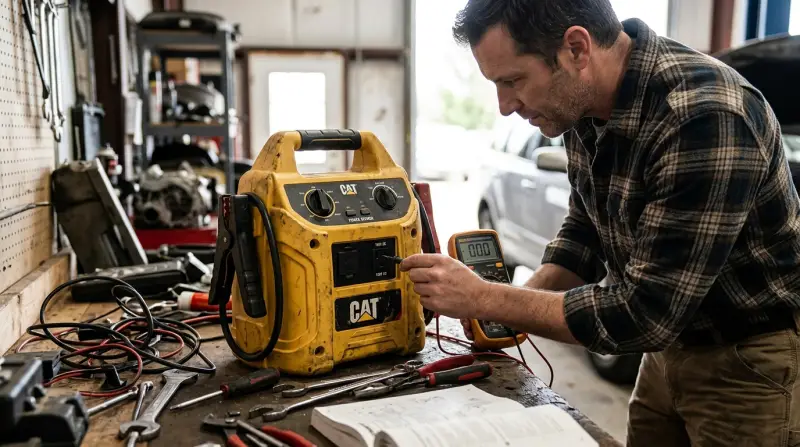
The Cat CJ1000DXT is more than just a jump starter. It includes a 120V AC outlet, USB ports, and a 12V DC socket. The AC outlet is useful for powering small devices up to 100 watts, such as lights, fans, or chargers.
Key Features At A Glance
| Feature | Details |
|---|---|
| Jump Start Output | 1000 peak amps |
| AC Outlet | 120V, 100W max |
| USB Ports | 2 (2.1A shared) |
| Compressor | 120 PSI |
| Work Light | LED, built-in |
The AC outlet is powered by an internal inverter, which converts the battery’s 12V DC to 120V AC. This system is complex and has more points of possible failure than the simpler DC or USB outputs.
Common Reasons Why Ac Power Is Not Working
Before you panic, realize that AC power issues are not rare with compact jump starters. Below are the most typical causes:
- Battery Charge Is Too Low: The AC inverter needs a strong battery. If the internal battery drops below a certain voltage, the AC outlet will shut off or never turn on.
- Overload or Overheat Protection: Plugging in a device that draws more than 100 watts can trigger the overload protection. The inverter may shut down to protect itself.
- Faulty AC Inverter: The inverter circuit can fail due to age, poor connections, or manufacturing defects.
- Tripped Reset/Breaker: Some models have a resettable breaker. If tripped, the AC outlet stops working.
- Damaged Socket or Plug: Physical damage or debris in the outlet can block power.
- Internal Fuse Blown: There is often a fuse inside the unit specifically for the AC inverter.
- Incorrect Operation: Not pressing the AC power button, or not waiting for the device to power up, can lead to “dead” outlets.
Quick Troubleshooting Steps
Let’s go through step-by-step actions you can take before seeking professional repair. Take safety precautions—never open the unit if you’re not sure what you’re doing.
1. Check The Battery Charge
- Press the battery indicator button.
- If the charge is below 50%, recharge the unit fully.
- Try the AC outlet only after a full charge.
2. Test With A Small Device
- Plug in a device that draws less than 50 watts (like a phone charger).
- If this works, but larger devices do not, the inverter may be weak or the protection circuit is sensitive.
3. Press The Ac Power Button
- Some users forget to press the dedicated AC power switch.
- The AC outlet will not work unless this button is activated.
4. Wait For Power-up
- After pressing the AC button, wait 5–10 seconds.
- Some units take time to initialize the inverter.
5. Inspect The Ac Outlet
- Look for visible damage, dirt, or corrosion.
- If dirty, clean gently with a dry cloth (unplugged).
6. Reset The Unit
- Check for a small reset button or breaker near the outlet.
- Press to reset if present.
7. Try A Different Device And Cable
- Sometimes, the problem is with the device or cable you’re using.
8. Let The Unit Cool
- If you have used the AC outlet for a long time, the inverter can overheat.
- Turn off the unit and let it rest for 30 minutes, then try again.
Deeper Diagnostic: Is It The Inverter Or The Battery?
If the AC power still does not work after basic checks, you may need to determine if the inverter or the battery is the problem. Here’s a simple way to tell:
| Test | Result: Likely Problem |
|---|---|
| All other outputs (USB, 12V) work, only AC outlet dead | Inverter/fuse issue |
| No outputs work, unit does not turn on | Battery or main board failure |
| AC outlet flickers or cuts out with small loads | Weak battery or overheating inverter |
A failed inverter usually means the USB and DC ports still work, but the AC outlet does not. If nothing works, the battery or internal connections are likely at fault.

Credit: www.youtube.com
How To Fix Cat Cj1000dxt Ac Power Issues
Charging And Maintenance
- Always keep the device fully charged when not in use.
- Recharge after every use, especially after jump starting or running the compressor.
Replacing Internal Fuses
The AC inverter is usually protected by an internal fuse. If you are comfortable opening small electronics:
- Unplug and power off the unit.
- Remove the screws and carefully open the case.
- Locate the fuse near the inverter board (usually a glass tube fuse).
- Replace with an identical rating fuse.
Opening the case may void the warranty. If unsure, seek professional repair.
Addressing Overload And Overheating
- Never plug in devices that require more than 100 watts.
- Allow the device to cool between uses.
Resetting The Unit
- If the Cat CJ1000DXT has a reset button, use it after fixing any overload or after replacing a fuse.
Professional Repair Or Warranty
If the above steps do not work, it’s best to:
- Contact Cat support or the retailer.
- If under warranty, do not open the unit yourself.
- Keep proof of purchase for warranty claims.
When To Replace The Unit
- If the inverter is damaged and the device is out of warranty, repair may cost as much as a new unit.
- Consider replacement if the battery no longer holds a charge.
Common Mistakes To Avoid
- Using High-Power Devices: Plugging in devices over 100 watts can burn the inverter.
- Ignoring Low Battery Warnings: Running the AC outlet on a nearly empty battery shortens battery life and can damage the inverter.
- Not Charging Regularly: Lead-acid batteries degrade quickly if left discharged.
- Improper Storage: Storing in hot cars or damp areas accelerates failure.

Credit: www.reddit.com
Preventive Care Tips
- Charge the Cat CJ1000DXT every 30–60 days, even if unused.
- Keep away from extreme temperatures.
- Unplug devices before turning off the AC inverter.
- Store in a dry, cool place.
Real-world Example
A user plugged a small mini-fridge (drawing 120 watts) into the Cat CJ1000DXT. The inverter instantly shut down and never worked again, even after a reset. When they opened the unit (out of warranty), the inverter fuse was blown. After replacing the fuse with the correct type, AC power was restored. This example shows how easy it is to overload the device and how a simple fix can work—if done carefully.
How The Cat Cj1000dxt Compares To Other Jump Starters
The Cat CJ1000DXT’s AC power feature is convenient, but similar models from other brands have their own strengths and weaknesses. Here’s a brief comparison:
| Model | AC Output | Battery Type | Compressor |
|---|---|---|---|
| Cat CJ1000DXT | 120V, 100W | Lead-acid | Yes, 120 PSI |
| NOCO GB70 | None | Lithium-ion | No |
| Stanley J5C09 | None | Lead-acid | Yes, 120 PSI |
| DeWalt DXAEJ14 | 120V, 500W | Lead-acid | Yes, 120 PSI |
The Cat CJ1000DXT’s AC output is lower than the DeWalt, but it’s still useful for light-duty tasks. If you need more power, consider a higher-wattage model.
When To Seek Professional Help
If you’ve followed all troubleshooting steps and the AC power still does not work, it’s time to get help. Reasons to contact a professional:
- You are not comfortable opening the unit.
- The warranty is still valid.
- There are signs of battery swelling or leaking.
- You hear buzzing, smell burning, or see smoke.
Professional repair ensures safety and avoids making the problem worse.

Non-obvious Insights Most Owners Miss
- Lead-Acid Battery Needs Maintenance: The Cat CJ1000DXT uses a sealed lead-acid battery, which slowly loses capacity if not charged regularly—even when not in use. Owners often forget this, leading to battery failure and AC problems.
- Inverter Is Sensitive to Battery Health: Even if the battery can jump start a car, it may not support the inverter. The AC outlet needs a battery in excellent condition—not just “working.”
- Temperature Affects AC Performance: Cold or hot environments reduce inverter efficiency. If the device is cold-soaked or overheated, AC power may not work until the temperature returns to normal.
- Not All Fuses Are the Same: Replacing an internal fuse with the wrong type or rating can cause more damage. Always match the original fuse exactly.
- AC Power Is Not for High-Drain Tools: The 100W limit means you cannot use most power tools, heaters, or appliances. Exceeding this can destroy the inverter.
Frequently Asked Questions
Why Does My Cat Cj1000dxt Ac Outlet Have A Red Light?
A red light usually means overload or fault. Unplug the device, turn off the AC outlet, let it cool, then try again. If the light stays red, the inverter may need service.
Can I Replace The Cat Cj1000dxt Battery Myself?
Yes, but it requires opening the unit and buying a compatible sealed lead-acid battery. This can void the warranty and may be challenging for beginners. If the device is still covered, contact Cat for authorized service.
What Kind Of Devices Can I Safely Plug Into The Ac Outlet?
Use devices that draw less than 100 watts. Examples: phone chargers, LED lamps, small fans. Avoid larger appliances, power tools, or anything with a heating element.
How Often Should I Charge My Cat Cj1000dxt To Keep Ac Power Working?
Charge every 30–60 days, or after every use. If left discharged, the battery can lose capacity, causing the AC outlet (and other features) to fail.
Where Can I Find The Official Cat Cj1000dxt User Manual?
You can download the latest manual from the official Cat website. This helps with troubleshooting, maintenance, and warranty information.
The Cat CJ1000DXT is a robust, versatile jump starter, but the AC power feature can be tricky. With the right care, regular charging, and following the steps above, you can maximize its life and utility. If problems continue, don’t hesitate to seek expert help—safety first.