
A coffee maker is one of those kitchen tools many people rely on every day. But when the buttons on your Cuisinart coffee maker stop working, your morning routine can quickly turn into frustration. This guide will help you understand why buttons may fail, how to fix them, and what to do if repairs are not possible. If you follow these steps, you can often solve the problem without needing professional help. Let’s dive in and get your coffee maker back to brewing.
Why Cuisinart Coffee Maker Buttons Stop Working
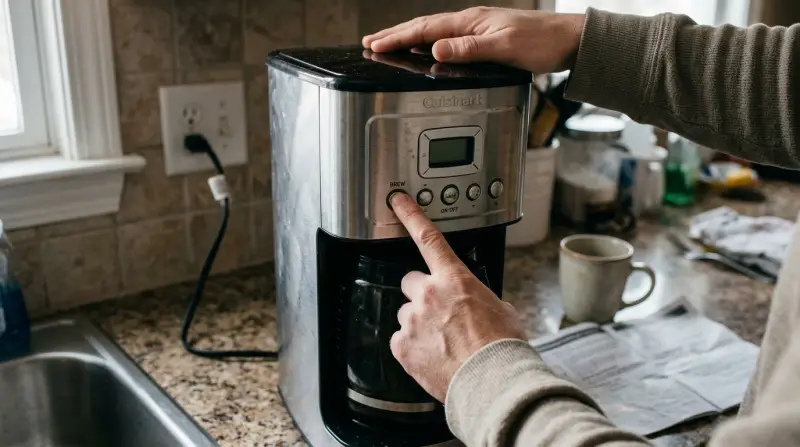
When the buttons on your Cuisinart coffee maker are not responding, several things could be wrong. Some issues are simple, while others may need more attention. Knowing the possible causes helps you find the right solution.
Common Causes
1. Electrical Issues
If your coffee maker is not getting power, none of the buttons will work. This can be caused by a faulty outlet, power cord, or an internal fuse.
2. Moisture Or Spills
Coffee makers can get wet from spills or condensation. Moisture can seep inside the machine and affect the electronics, leading to button failure.
3. Worn Out Buttons
Over time, the plastic or rubber on buttons can wear down. This can make them less responsive or stuck.
4. Control Board Failure
The control board inside the coffee maker manages all functions. If it is damaged, the buttons may stop working even if they look fine on the outside.
5. Dirt Or Residue
Coffee, sugar, or cleaning chemicals can build up around the buttons. This can block movement or cause sticky buttons.
6. Software Glitch
Modern Cuisinart coffee makers use simple software to control settings. Sometimes, a glitch can freeze the buttons.
Less Obvious Causes
- Voltage fluctuations:
Power spikes or drops can affect sensitive electronics and cause temporary button failure.
- Incorrect assembly after cleaning:
If you recently cleaned your machine and reassembled it incorrectly, buttons may not connect properly.
Many users overlook these less obvious causes. Checking these can save time and prevent unnecessary repairs.
Quick Troubleshooting Steps
Before you call for repairs, try these simple steps. Most button problems can be fixed quickly.
1. Unplug And Reset
Unplug the coffee maker for 10–15 minutes. This often clears software glitches and resets the electronics.
2. Check The Power Source
Plug the coffee maker into a different outlet. Sometimes, the outlet is the problem, not the machine.
3. Inspect The Buttons
Press each button gently. If some buttons work and others don’t, the issue is likely physical.
4. Clean Around The Buttons
Use a soft cloth and a little rubbing alcohol. Gently wipe the area around each button to remove dirt or sticky residue.
5. Dry The Machine
If you suspect moisture, leave the coffee maker in a dry, warm area for several hours. Do not use a hair dryer, as it can damage the plastic.
6. Check For Error Messages
Some Cuisinart models display an error code when there’s a problem. Look in your manual or online for what these codes mean.
7. Test With Minimum Setup
Remove accessories like water filters or carafes. Sometimes, missing or misplaced parts stop the buttons from working.
These steps often solve basic problems. If the buttons still don’t respond, deeper repair may be needed.

Credit: lifeboostcoffee.com
How To Fix Common Button Issues
Let’s go through practical solutions based on the cause. These fixes are safe for most Cuisinart coffee makers.
Fixing Electrical Problems
- Replace the power cord:
If the cord is damaged or frayed, buy a new one from Cuisinart or a trusted electronics store.
- Check the fuse:
Some models have a small fuse inside. If you’re comfortable, open the bottom panel (after unplugging) and look for a blown fuse. Replace it with the same type.
Removing Moisture And Residue
- Dry the machine thoroughly:
Leave it in a dry room for 24 hours. For heavy spills, open panels if possible and air dry.
- Clean sticky buttons:
Use cotton swabs dipped in rubbing alcohol to clean around each button.
Repairing Worn Or Stuck Buttons
- Press and release:
Sometimes buttons get stuck. Gently press and release several times to loosen them.
- Lubricate if needed:
A tiny drop of silicone lubricant can help, but avoid spraying directly. Use a cotton swab.
Resetting Software Glitches
- Factory reset:
Some models allow a factory reset. Check your manual for steps. Usually, you hold down a certain button or combination for several seconds.
- Update firmware:
If your model connects to Wi-Fi or has a digital display, check the Cuisinart site for updates.
Control Board Replacement
If none of the above work, the control board may be faulty. Replacing it is complex and best done by a professional. If your machine is under warranty, contact Cuisinart support.
Comparing Repair Options
Here’s a quick comparison of DIY fixes, professional repair, and replacement:
| Repair Option | Cost | Time Needed | Success Rate |
|---|---|---|---|
| DIY Cleaning | $0–$10 | 10–30 min | High |
| Replacing Cord/Fuse | $5–$20 | 30–60 min | Medium |
| Control Board Repair | $50–$120 | 1–2 hrs | Low |
| Professional Service | $80–$150 | 1–5 days | Medium |
| Buying New Machine | $100–$250 | Instant | Very High |
DIY solutions are often fastest and cheapest. Professional repair is only worth it for expensive models or under warranty.
When To Replace Your Cuisinart Coffee Maker
Sometimes, fixing a broken button is not worth the trouble. Here’s when you should consider buying a new machine:
1. Age:
If your coffee maker is over 5–7 years old, parts may be hard to find and repairs less reliable.
2. Multiple Failures:
If more than one button or function is broken, it often means deeper electrical issues.
3. Repair Cost:
If repairs cost more than half the price of a new machine, replacement is smarter.
4. Warranty Expired:
If your warranty is gone and repair is expensive, choose a new model.
5. Better Features:
Modern Cuisinart machines offer better brewing, Wi-Fi, and cleaning. Upgrading may improve your coffee experience.
Preventing Future Button Issues
You can reduce the chance of button problems with simple habits.
- Keep machine dry:
Always wipe spills right away.
- Clean regularly:
Every week, wipe the buttons and control panel with a soft, dry cloth.
- Avoid harsh chemicals:
Never use strong cleaners or sprays near the buttons.
- Use gentle touch:
Press buttons lightly. Heavy pressure speeds up wear.
- Store safely:
Keep your coffee maker away from sinks and steam sources.
Most people overlook regular cleaning. But this simple step keeps buttons working longer.

Credit: www.youtube.com
Cuisinart Coffee Maker Models With Reliable Buttons
Some models are known for lasting button performance. Here’s a comparison of three popular Cuisinart machines:
| Model | Button Type | Average Lifespan | Extra Features |
|---|---|---|---|
| SS-10P1 | Soft-touch | 6+ years | Single serve, programmable |
| DCC-3200 | Plastic tactile | 5+ years | 12-cup, brew strength control |
| CHW-12 | Rubber membrane | 7+ years | Hot water system |
Models with soft-touch or rubber membrane buttons often last longer. If you replace your machine, look for these features.
Example: Real-life Button Fix
Anna, a coffee lover from Ohio, noticed her Cuisinart DCC-3200 buttons stopped working after a kitchen spill. She unplugged the machine, wiped the buttons with rubbing alcohol, and left it to dry overnight. The next morning, the buttons worked again. Anna learned the importance of keeping her machine dry and cleaning regularly.
Many users face similar problems. In most cases, basic cleaning and drying solve the issue.

What If Your Coffee Maker Still Doesn’t Work?
If you’ve tried all the above and your coffee maker is still unresponsive:
- Contact Cuisinart support:
They may offer tips, replacement parts, or service options.
- Check your warranty:
If you bought your machine recently, repairs may be free.
- Visit an appliance repair shop:
Sometimes, local shops can fix button issues for less than the manufacturer.
If you need more guidance, the official Cuisinart site offers troubleshooting help. For extra information, visit Cuisinart Help Center.
Frequently Asked Questions
Why Do Only Some Buttons On My Cuisinart Coffee Maker Work?
Often, this means physical damage or dirt is blocking certain buttons. Try cleaning around each button. If only one button is unresponsive, it may be worn out and need replacement.
Can I Fix Stuck Buttons Myself?
Yes. Gently press the stuck button several times. Clean with rubbing alcohol and a cotton swab. If the button is still stuck, it may need professional repair.
Is It Safe To Open My Coffee Maker To Fix The Buttons?
Only open the machine if you are comfortable and the warranty is expired. Always unplug first. Inside, avoid touching the circuit board or wires unless you know what you’re doing.
How Do I Know If Moisture Is Causing Button Failure?
If your coffee maker got wet recently, or you see condensation inside, moisture is likely the cause. Dry the machine in a warm place for 24 hours before testing.
What Is The Best Cuisinart Coffee Maker For Reliable Buttons?
Models with soft-touch or rubber membrane buttons, like SS-10P1 or CHW-12, are known to last longer and resist wear. Choose these if you want fewer button problems.
Getting your Cuisinart coffee maker’s buttons working again is often simple. With careful troubleshooting, regular cleaning, and smart habits, you can keep your machine brewing for years. And if all else fails, sometimes a new coffee maker is the best option.
Remember, a good cup of coffee starts with a reliable machine.
1 thought on “Cuisinart Coffee Maker Buttons Not Working? Easy Fixes Inside”