
When you buy a Dyson Airwrap, you expect a premium styling tool that works smoothly every time. But what if, one day, you press the power button and nothing happens? For many users, the Airwrap not turning on is a stressful surprise, especially given its price tag. If you’re facing this issue, you’re not alone—and you might not need to panic or rush to buy a new device.
In this guide, you’ll learn why the Dyson Airwrap may not turn on, what you can do before calling customer service, and how to avoid common mistakes that lead to this problem. We’ll look at troubleshooting steps, real-world examples, and the differences between simple fixes and serious faults.
Whether you’re a first-time user or a seasoned Airwrap fan, you’ll find practical advice to get your device working again.
Understanding The Dyson Airwrap
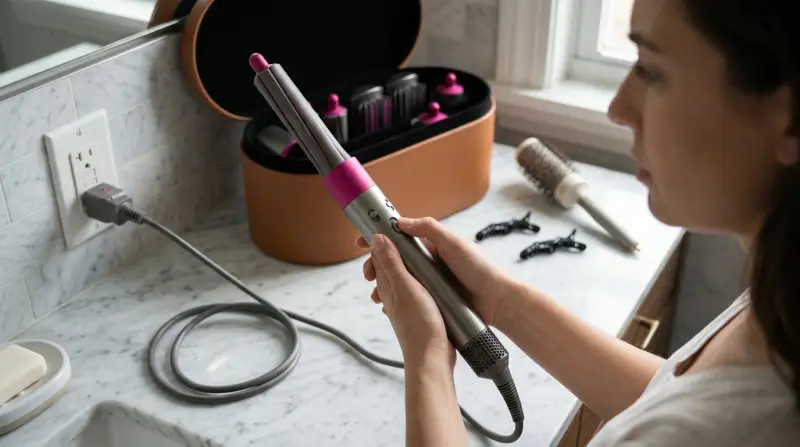
Before diving into troubleshooting, it helps to know a bit about how the Dyson Airwrap works. This styling tool uses a digital motor to create a powerful airflow. Instead of high heat, it uses the Coanda effect to style hair, making it safer for your hair health. The Airwrap is built with safety features, including thermal cut-off switches and surge protection. While these add protection, they can also be the reason your device won’t turn on if something goes wrong.
Dyson has released several models of the Airwrap since 2018. Each version may have small differences, but their basic operation is similar. Knowing your model can help when searching for specific solutions or when contacting support.
Common Causes: Why Your Dyson Airwrap Won’t Turn On
When your Airwrap refuses to power up, the cause can range from something simple, like a loose plug, to complex internal problems. Here are the most common reasons:
- Power supply issues (outlet, adapter, fuse)
- Faulty power button
- Damaged power cord
- Overheating safety shut-off
- Blocked air filter
- Internal motor or electronic failure
- User errors (incorrect assembly, attachments not locked)
- Moisture or water damage
- Manufacturing defects
- Age and wear
Let’s break down each cause with practical examples and tips.

Credit: www.youtube.com
Quick Checks: The First Steps
Always start with basic checks before you try advanced fixes. Sometimes, the answer is easier than you think.
1. Check The Power Source
- Plug another device (like a lamp or phone charger) into the same outlet. If it doesn’t work, the problem is the power outlet.
- Try a different outlet in another room.
- If you use a power strip, plug the Airwrap directly into the wall.
2. Inspect The Power Cord And Plug
- Look for visible cuts, kinks, or fraying.
- Wiggle the cord gently while trying to turn on the device. If it flickers, the cord may have an internal break.
3. Reset The Airwrap
Some models have a reset button on the plug (especially UK or US GFCI versions). Press the button firmly and try again.
4. Attachments And Assembly
- Remove all attachments and reattach them securely.
- Make sure the main body clicks with the barrel or brush.
- Some models will not turn on if the attachment is loose.
5. Check For Overheating
If the Airwrap gets too hot, it automatically shuts off for safety. Wait at least 30 minutes and try again.
6. Clean The Air Filter
A blocked filter can cause the device to overheat or not start.
- Twist off the filter cage at the bottom.
- Remove any lint, dust, or hair.
- Rinse the filter cage if needed, and let it dry completely before reattaching.
Troubleshooting Table: At-a-glance Solutions
To help you quickly match symptoms with possible fixes, see the comparison below.
| Problem | Possible Cause | Quick Solution |
|---|---|---|
| No power at all | Outlet or cord issue | Try another outlet, inspect cord |
| Sudden shut-off | Overheating or blocked filter | Let it cool, clean filter |
| Won’t turn on after cleaning | Attachment not secure | Reattach all pieces, check for clicks |
| Switch feels loose | Faulty power button | Contact Dyson support |
| Works in some outlets only | Fuse or plug issue | Check fuse, try multiple outlets |
Step-by-step: How To Fix A Dyson Airwrap That Won’t Turn On
Let’s walk through each step in more detail. These methods cover 90% of non-working Airwraps. Always unplug the device before inspecting or cleaning.
Step 1: Confirm The Power Supply
- Try at least two different outlets.
- Avoid extension cords or power strips.
- If you’re overseas, check if you’re using the correct voltage (Airwraps are not dual voltage).
Non-obvious insight: In some countries, plugs have a built-in fuse. If your plug has a small panel, open it and check the fuse. Replace with the same rating if blown.
Step 2: Inspect The Power Cord And Plug
- Look for dark marks or a burnt smell—these are signs of electrical damage.
- Gently feel the cord for soft spots or cracks.
- If you find damage, stop using the device. A broken cord is a fire hazard.
Step 3: Check The Filter And Clean It
- Unscrew and remove the filter cage at the base.
- Use the cleaning brush (included in the box) or a soft toothbrush.
- Rinse under water only if the manual allows, and let it dry fully.
- Reattach the filter cage and test the device.
Beginner mistake: Some users forget to lock the filter cage back in place. If it’s loose, the Airwrap may not turn on.
Step 4: Reset The Device
- For GFCI plugs (common in the US), press the “Reset” button.
- Wait 10 seconds, then try turning the Airwrap on.
- If there’s a “Test” button, press it to check the circuit, then reset again.
Step 5: Check Attachments
- Remove all attachments. Turn on the device with no attachment. If it works, one of your barrels or brushes may be faulty.
- Add one attachment at a time and test. If one causes the device to stop, replace it.
Non-obvious insight: The Airwrap will not power on if the attachment isn’t locked, for safety reasons. Listen for a “click.”
Step 6: Let The Device Cool Down
- If the Airwrap feels hot, let it rest unplugged for 30 minutes.
- Do not try to speed up cooling by placing it in a fridge or near water.
Step 7: Inspect For Water Damage
- If your Airwrap got wet (from bathroom steam or accidental splashes), do not turn it on.
- Let it air dry in a warm, dry room for 24 hours.
- If the device was fully submerged, contact Dyson support. Water inside the motor can cause permanent damage.
Step 8: Check For Internal Faults
If none of the above steps work, the problem may be inside the device:
- Faulty power button
- Damaged motor
- Broken wiring
These require professional repair. Do not open the Airwrap yourself, as this can void your warranty.
When To Contact Dyson Support
If your Airwrap is still not working after all troubleshooting steps, it’s time to reach out to Dyson customer service. Here’s what you should have ready:
- Model number (found on the handle or near the plug)
- Date and place of purchase
- Description of the problem and steps you’ve tried
Dyson often offers repairs or replacements if your device is under warranty (usually 2 years). In some cases, they may send a pre-paid shipping label for you to return the device.
Take a photo of your receipt and device label before calling. This speeds up the process.
Comparing Dyson Airwrap Models: Are Some More Prone To Not Powering On?
Over the years, Dyson has released updates to the Airwrap. Some models have improved safety features, while others may be more sensitive to issues. Here’s a quick comparison.
| Model | Release Year | Common Power Issues | Special Features |
|---|---|---|---|
| Airwrap Complete (1st Gen) | 2018 | Filter blockage, plug fuse | Basic attachments |
| Airwrap Complete Long | 2019 | Filter cage misalignment | Longer barrels |
| Airwrap Multi-Styler (Latest) | 2022 | Attachment sensor errors | Enhanced airflow, smart sensors |
The latest models have more sensors, which can sometimes prevent the device from turning on if an attachment is not recognized. Older models are more likely to suffer from basic power cord or filter issues.
Real-world User Stories
To understand this problem better, let’s look at a few real-life cases.
Case 1: The Hidden Fuse
A user in the UK found her Airwrap dead after a power surge. After checking the plug, she discovered a blown fuse inside. Replacing the fuse brought the device back to life—a simple fix, but not well-known.
Case 2: The Forgotten Filter
Another user noticed her Airwrap smelled hot, then stopped working. She had never cleaned the filter in two years. After a deep clean and 30 minutes of cooling, the Airwrap turned on again.
Case 3: The Attachment Error
A new Airwrap stopped turning on when a specific curling barrel was attached. When the user tried the brush, it worked fine. The barrel had a broken sensor tab, preventing safe operation.
These cases show the importance of checking plugs, cleaning filters, and testing attachments before assuming your device is broken.
Common Mistakes To Avoid
Many Airwrap owners make the same errors when their device won’t turn on. Avoid these pitfalls:
- Skipping simple checks – Don’t assume the worst before checking the outlet, plug, and filter.
- Forcing the power button – Pressing too hard can break the switch.
- Using wet attachments – Moisture can cause short circuits.
- Opening the device – DIY repairs void the warranty and can be dangerous.
- Ignoring the warranty – Many users forget their device is still under warranty.
How To Prevent Power Problems In The Future
Prevention is better than repair. Here’s how to keep your Airwrap running smoothly:
- Clean the filter monthly – Regular cleaning prevents overheating.
- Use the correct voltage – Never use a US Airwrap in Europe or Asia without a proper transformer.
- Store in a dry place – Avoid bathrooms or humid areas.
- Avoid bending the cord – Coil it loosely to prevent internal breaks.
- Check attachments – Only use original Dyson parts.

How Long Should A Dyson Airwrap Last?
With proper care, a Dyson Airwrap can last 5–8 years. The motor is designed for thousands of hours of use. The most common failure points are the power cord, filter, and attachments—not the motor itself.
Repair Costs: Is It Worth Fixing?
If your Airwrap is out of warranty, you might wonder if repair is worth it. Here’s a rough guide to common costs:
| Repair Type | Estimated Cost (USD) | Notes |
|---|---|---|
| Power cord replacement | $50–$80 | Includes parts and labor |
| Motor repair | $120–$180 | May not be available for all models |
| Attachment replacement | $30–$60 per piece | Original Dyson parts recommended |
If the cost of repair is over half the price of a new Airwrap, consider upgrading to the latest model. Dyson often offers trade-in discounts.
Warranty And Support: What’s Covered?
Dyson Airwraps come with a 2-year warranty covering defects and some electrical issues. The warranty does not cover:
- Damage from drops or misuse
- Water damage
- Use of non-Dyson attachments
- Damage from using wrong voltage
If you register your device on the Dyson website, you may get faster service and support. Always keep your receipt and register as soon as possible.
For official warranty details, see the Dyson Warranty Information.
Is It Safe To Use A Faulty Airwrap?
Never try to operate a device with a damaged cord, burnt smell, or signs of electrical failure. Fire and electric shock are serious risks. If you hear strange noises, see sparks, or smell burning, unplug the device immediately.
Alternatives To The Dyson Airwrap
If your Airwrap cannot be fixed, there are other styling tools, but they may not offer the same technology. Brands like Revlon and Shark offer similar tools, but with higher heat and fewer safety features. Always consider safety, warranty, and user reviews before buying alternatives.
Frequently Asked Questions
Why Does My Dyson Airwrap Have A Red Light And Won’t Turn On?
A red light usually means the filter is blocked or the device has overheated. Clean the filter and let the device cool down for 30 minutes before trying again.
Can I Use My Dyson Airwrap In Another Country?
No. Dyson Airwraps are not dual voltage. Using them in countries with different voltage without a proper transformer can damage the device. Always check the voltage printed on your Airwrap.
What Should I Do If My Airwrap Gets Wet?
Unplug it immediately. Let the device dry in a warm, dry place for at least 24 hours. Do not try to turn it on while wet. If water entered the motor, contact Dyson support.
How Often Should I Clean The Airwrap Filter?
You should clean the filter at least once a month, or more often if you use styling products. A blocked filter is a common reason for the Airwrap not turning on.
Is There A Way To Reset My Dyson Airwrap?
Some models have a reset button on the plug. Press it firmly and try again. If your model does not have a reset button, unplugging for a few minutes can sometimes help.
If your Dyson Airwrap is not turning on, don’t give up hope. Most problems are caused by simple issues like power supply, filters, or attachments. With careful checks and regular maintenance, you can keep your Airwrap working for years. And if you need help, Dyson’s support team is known for helpful service.
Remember, safety comes first—never force a device to work if you suspect serious damage. Happy styling!