
If your Fanimation fan suddenly stops working, it can be frustrating—especially on a hot day or when you rely on it for comfort. Many homeowners worry they’ll need to buy a new fan or call an electrician right away. But the truth is, most fan problems are simple and can be fixed with a little know-how. Whether your fan won’t turn on, is making strange noises, or the lights aren’t working, this guide will walk you through the most common issues and how to solve them. By the end, you’ll understand what to check, when to repair, and when it’s time to call for help.
Common Reasons Your Fanimation Fan Isn’t Working
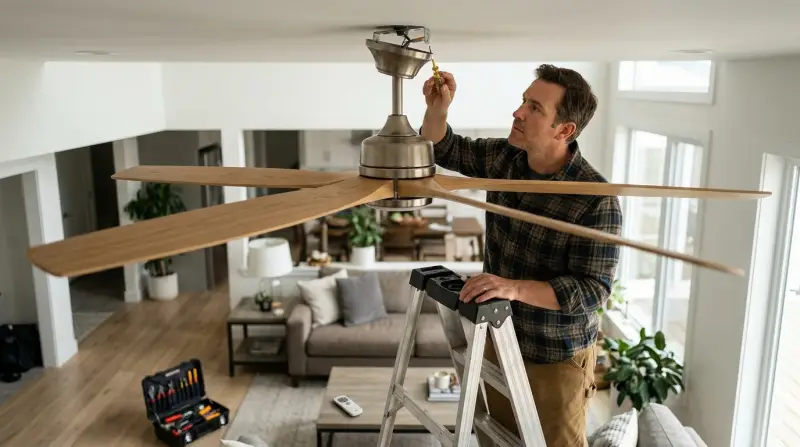
Several things can cause a ceiling fan to stop working. Understanding the most frequent problems helps you troubleshoot quickly.
1. Power Issues
If your fan doesn’t respond at all, power problems are usually the cause. This could mean a tripped breaker, a blown fuse, a loose wire, or a bad wall switch. Always check the basics first before moving to more complex fixes.
2. Remote Control Problems
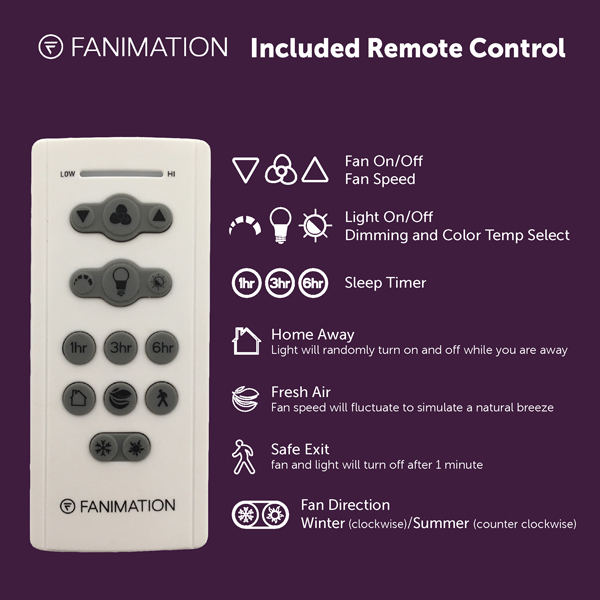
Many Fanimation fans use a remote control for operation. If the remote isn’t working, the fan won’t run. Dead batteries, a lost connection, or interference can all cause remote issues.
3. Faulty Capacitor Or Motor
If your fan hums but doesn’t spin, or spins very slowly, the capacitor or motor could be failing. The capacitor helps start the motor, and without it, your fan can’t run properly.
4. Wiring Issues
Loose, damaged, or disconnected wiring inside the fan or at the switch can cause the fan to stop working. Sometimes, incorrect wiring during installation is the culprit.
5. Broken Pull Chain
For fans with a pull chain, a broken or jammed chain can stop the fan from turning on or changing speeds.
6. Light Kit Malfunctions
If the fan runs but the light doesn’t work (or vice versa), the problem might be in the light kit. This could be a faulty bulb, a loose wire, or a bad light socket.
Step-by-step Troubleshooting Guide
Let’s break down how to diagnose and fix a Fanimation fan that isn’t working. Start with the simplest solutions and move to more complex ones.
Step 1: Check Power Supply
- Make sure the fan is plugged in (for portable models) or that the wall switch is ON.
- Check your home’s circuit breaker or fuse box. Reset any tripped breakers.
- Test the wall outlet or switch by plugging in another device or using a voltage tester.
Some fans have a separate switch for the light and the fan. Test both.
Step 2: Inspect The Remote Control
- Replace the remote’s batteries with fresh ones.
- Make sure you’re within range and pointing the remote directly at the fan’s receiver.
- Reset the remote by turning the fan’s power off and on after a few minutes.
- If the remote still doesn’t work, try using the fan’s wall switch or pull chain (if available).
Step 3: Examine The Fan Blades And Motor
- Turn off power at the breaker.
- Gently spin the fan blades by hand. They should move smoothly.
- Listen for grinding or scraping noises—these can mean the motor bearings are worn.
- If the blades are hard to turn, the motor may be seized.
Step 4: Check For Loose Or Damaged Wiring
- With the power off, remove the fan’s canopy (the cover near the ceiling).
- Look for any loose, burned, or disconnected wires.
- Tighten wire nuts and check that all connections are secure.
- Inspect the wires for damage—if you see melted insulation, call a professional.
Step 5: Test The Capacitor
- The capacitor is usually a small, black or silver cylinder inside the fan housing.
- If the fan hums but won’t spin, the capacitor may need to be replaced.
- Capacitors can be tested with a multimeter, but if you’re unsure, it’s best to replace it or call an expert.
Step 6: Examine The Pull Chain Or Switch
- If your fan uses a pull chain, gently pull it. If it feels stuck or doesn’t click, it may be broken.
- Replacement pull chains are inexpensive and easy to install.
Step 7: Inspect The Light Kit
- If the lights don’t work, check the bulbs first.
- Make sure the bulb sockets are clean and that the bulbs are screwed in tightly.
- If only the light is out, and the fan works, the issue is likely in the light kit wiring.
Quick Comparison: Common Issues And Solutions
Here’s a fast overview to help you match symptoms to causes and fixes.
| Problem | Likely Cause | Solution |
|---|---|---|
| Fan won’t turn on | No power, remote/battery issue | Check breaker, replace batteries |
| Blades don’t spin | Bad capacitor, motor fault | Replace capacitor or motor |
| Lights don’t work | Burned bulb, bad wiring | Replace bulb, check wiring |
| Remote not working | Battery, signal loss | Replace battery, reset remote |
| Pull chain stuck | Broken chain or switch | Replace pull chain switch |
What To Do If Your Fan Still Doesn’t Work
If you’ve tried the steps above and your Fanimation fan still isn’t working, it’s time to look deeper or call for help. Some issues require special tools or knowledge. Here’s when to take the next step:
- Warranty: Many Fanimation fans have a limited warranty. Check your paperwork or the company’s website.
- Professional Help: If you see damaged wires, burned parts, or if you’re uncomfortable working with electricity, contact a licensed electrician.
- Replacement Parts: You can order new remotes, capacitors, or light kits directly from Fanimation or trusted retailers.
Credit: fanimation.com
Fanimation Fan Vs. Other Brands: Reliability And Common Problems
How does Fanimation stack up against other popular ceiling fan brands? Here’s a quick look at reliability and frequent issues.
| Brand | Average Lifespan (Years) | Most Common Problem | Ease of Repair |
|---|---|---|---|
| Fanimation | 10-15 | Remote/Receiver failure | Moderate |
| Hunter | 12-15 | Capacitor failure | Easy |
| Hampton Bay | 8-12 | Light kit wiring | Easy |
| Emerson | 10-14 | Wall switch issues | Moderate |
Fanimation fans are known for their style and quiet performance, but remote control issues are more common than with some other brands. However, their motors are reliable and rarely fail within the first decade.
Non-obvious Insights For Troubleshooting
Some fan problems are easy to miss, especially for beginners. Here are two common pitfalls:
- Dual Power Switches: Some homes have one wall switch for the fan and another for the light. If only one works, check both switches before taking the fan apart.
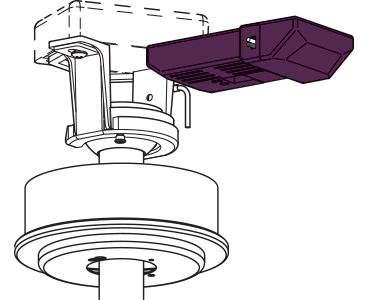
- Resetting Remote Frequency: Many remotes can lose their frequency pairing after a power outage. Inside the remote and receiver, there are small DIP switches. Make sure these match exactly; otherwise, the remote won’t control the fan.
Credit: fanimation.com
How To Maintain Your Fanimation Fan For Fewer Problems
Regular care can prevent most problems with your Fanimation fan. Here’s what to do:
- Dust the blades monthly to prevent build-up, which can stress the motor.
- Check and tighten screws on the blade arms and housing every 6 months.
- Test the remote and change batteries yearly.
- Inspect wiring if the fan wobbles or makes unusual noises.
- Lubricate motor bearings if recommended in your fan’s manual.
By following these steps, you can extend your fan’s life and catch small problems before they become big ones.
When To Replace Instead Of Repair
Sometimes, fixing your fan isn’t worth the cost or effort. Consider replacement if:
- The motor is burned out and the fan is over 10 years old.
- The fan has frequent electrical issues, even after repairs.
- Replacement parts cost more than half the price of a new fan.
- The fan is noisy or wobbles, and repairs don’t help.
A new fan will be more energy-efficient and quieter, and may have more features like smart controls or LED lighting.

Cost Of Repair Vs. Replacement
Before you decide, compare the costs. Here’s an example:
| Repair/Replacement | Average Cost (USD) | Pros | Cons |
|---|---|---|---|
| Replace capacitor | $15–$40 | Cheap, quick fix | May not solve all issues |
| Replace remote/receiver | $25–$70 | Restores control | May require rewiring |
| Professional repair | $80–$200 | Safe, expert work | Costs add up |
| Buy new fan | $100–$400 | New warranty, modern features | Higher upfront cost |
For many, a simple DIY repair is the best first step. But if costs start to climb, replacing the fan may save money in the long run.
Frequently Asked Questions
Why Does My Fanimation Fan Hum But Not Spin?
This usually means the capacitor is bad or the motor is stuck. Try replacing the capacitor first. If the problem continues, the motor may need repair or replacement.
Can I Use A Universal Remote With My Fanimation Fan?
Most Fanimation fans work with universal remotes, but it’s important to check compatibility. Some models need a specific receiver or remote to function correctly. Always match the remote and receiver frequencies.
How Often Should I Clean My Ceiling Fan?
Dust your ceiling fan blades at least once a month. This keeps the fan balanced, prevents motor stress, and helps maintain good air quality in your home.
What Should I Do If My Fan’s Light Works But The Fan Doesn’t?
This often points to a problem with the fan motor or capacitor, not the power supply. Double-check all wiring, and consider replacing the capacitor if the fan still doesn’t spin.
Where Can I Find Replacement Parts For Fanimation Fans?
You can buy replacement parts directly from the Fanimation website or from authorized retailers. For more guidance, visit the official Fanimation support page.
A non-working fan can be a hassle, but most issues are fixable with a bit of patience and some basic tools. By following these steps, you’ll save money, extend your fan’s life, and enjoy a cooler, more comfortable home.