
The Pentair SuperFlo VST is a popular variable speed pool pump known for its efficiency and smart controls. If you’ve just bought one or want to get the most out of your existing unit, understanding how to program it is essential.
Proper programming can save you money on energy bills, extend the life of your equipment, and keep your pool water sparkling clean. But for many pool owners, the digital interface and advanced options may feel overwhelming at first.
This guide is designed to walk you through every step of programming the Pentair SuperFlo VST. We’ll cover everything from initial setup to advanced scheduling, share tips for optimizing performance, and address common mistakes. Whether you’re a first-time user or looking to fine-tune your settings, you’ll find practical advice and clear explanations here.
By the end, you’ll have the confidence to take full control of your SuperFlo VST and enjoy a more efficient pool system.
Understanding The Pentair Superflo Vst
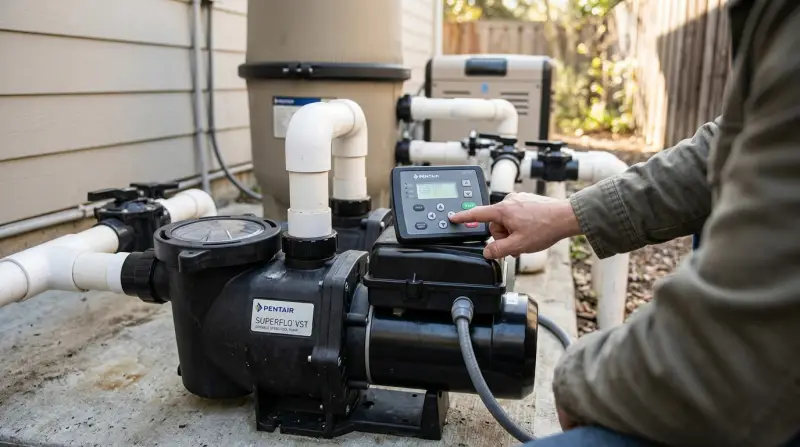
Before diving into programming, it’s important to understand what makes the SuperFlo VST different from standard pool pumps. Unlike single-speed pumps that run at a constant speed, the SuperFlo VST lets you adjust the motor speed for different tasks. This flexibility means you can run the pump slower for regular circulation and faster for cleaning or heating, using only the energy you need.
Key Features
- Variable speed technology: Allows precise control over pump speed (RPM).
- Digital control panel: Easy-to-read display for programming and monitoring.
- Energy efficiency: Can save up to 80% on energy costs compared to single-speed pumps.
- Quiet operation: Lower speeds result in less noise.
- Built-in timer and scheduling: Automates daily operation.
Why Programming Matters
Proper programming maximizes the energy savings and performance of your pump. Running at lower speeds for longer periods is more efficient than short, high-speed bursts. Custom schedules also mean less manual work for you, and better water quality for your pool.
Getting Started: Installation And Safety
Setting up the SuperFlo VST should always begin with safety and correct installation.
Electrical Setup
The pump is compatible with both 115V and 230V power supplies. It’s vital to have a licensed electrician perform or verify the wiring, as incorrect wiring can damage the unit or void the warranty. Always ensure the power is off before opening the control panel.
Initial Checks
- Inspect the pump for any visible damage.
- Ensure all plumbing connections are tight and leak-free.
- Make sure the pump basket is clean and correctly seated.
- Fill the pump with water before starting (priming).
Powering On
Once connected, turn on the breaker. The control panel will light up, showing the default home screen. If you see error codes or the screen stays blank, refer to the troubleshooting section in your owner’s manual.

Navigating The Control Panel
The SuperFlo VST uses a simple digital control interface. Familiarize yourself with the layout before programming.
Main Buttons
- Start/Stop: Turns the pump on or off.
- Up/Down Arrows: Adjusts values (e.g., speed, time).
- Program: Accesses programming menus.
- Enter: Confirms selections.
- Reset: Restores factory settings (use with caution).
Display Screen
The screen shows current speed (RPM), status (running/stopped), and menu options. When programming, prompts will guide you through each step.
Example Home Screen
SPEED: 2500 RPM
TIME: 12:00 PM
MODE: RUN
Setting The Clock
Accurate timekeeping is essential for scheduling.
- Press the Program button until the display shows “Set Clock.”
- Use the Up/Down Arrows to select the correct hour (AM/PM format).
- Press Enter to confirm.
- Repeat for minutes.
- Press Program again to exit.
If you lose power, the clock may need to be reset. The pump’s battery backup usually preserves settings for a short period.
Basic Programming: Schedules And Speeds
The main function of programming is to set up daily operation schedules. The SuperFlo VST supports up to three custom programs, each with its own start time, run duration, and speed.
Understanding The Three Program Slots
- Program 1: Often used for regular filtration.
- Program 2: Ideal for running pool cleaners.
- Program 3: Useful for boosting speed for heating or special events.
You don’t have to use all three, but having multiple schedules can improve efficiency.
How To Program A Schedule
Let’s walk through setting Program 1 as an example.
- Press Program until “Program 1” appears.
- Press Enter to edit.
- Use the arrows to set the Start Time (e.g., 8: 00 AM).
- Press Enter to confirm.
- Set the Duration (e.g., 8 hours).
- Press Enter to confirm.
- Choose the Speed (in RPM, e.g., 2100 RPM).
- Press Enter to save.
Repeat these steps for Program 2 and Program 3 if needed.
Typical Schedule Example
- Program 1: 8:00 AM, 8 hours, 2100 RPM (filtration)
- Program 2: 4:00 PM, 1 hour, 3000 RPM (cleaning)
- Program 3: 5:30 PM, 1 hour, 2500 RPM (heating)
Advanced Programming Features
The SuperFlo VST offers features that help you fine-tune performance and adapt to special situations.
Override Mode
If you need the pump to run at a different speed temporarily (for parties, shock treatments, or quick cleaning), use Override Mode.
- Press the Up/Down Arrows while the pump is running to change speed instantly.
- The pump will return to its programmed schedule after the next start cycle.
Manual Mode
Manual mode lets you run the pump at a chosen speed indefinitely.
- Press Start/Stop to turn off programmed cycles.
- Set the speed using arrows.
- Press Start/Stop again to return to scheduled operation.
Restoring Factory Settings
If your schedule gets confusing, you can reset to factory defaults.
- Press and hold Reset for 5 seconds.
- Confirm with Enter.
All custom schedules and clock settings will be erased.
Optimizing Speeds For Energy Efficiency
Programming the right speeds is key to saving money and maintaining water quality.
How To Choose The Best Speeds
- Filtration: 1500–2200 RPM is usually enough for daily circulation.
- Vacuuming/Cleaning: 2500–3100 RPM for powerful suction.
- Heating: 2200–2700 RPM, depending on heater flow requirements.
Running at lower speeds for longer periods is more efficient than high-speed, short cycles. For example, eight hours at 1800 RPM uses less energy than four hours at 3000 RPM and usually cleans water just as well.
Energy Use Example
| Speed (RPM) | Watts Used | Typical Use |
|---|---|---|
| 1500 | 100 | Filtration |
| 2200 | 270 | General Cleaning |
| 3100 | 1200 | Vacuuming |
Practical Tip
Test different speeds and durations over a week. If your pool stays clear at a lower speed, you’re saving money. If not, bump the speed up slightly until water clarity improves.
Integrating With Automation Systems
The SuperFlo VST is often used with pool automation systems for even greater control.
Compatible Controllers
The pump can connect to Pentair automation systems (like EasyTouch or IntelliTouch) using relay or digital control. Some third-party systems are also compatible.
Setting Up Automation
- Follow the controller’s manual to connect control wires.
- In the SuperFlo VST menu, enable external control mode.
- Assign speeds to the automation system’s relay triggers.
Example Integration Setup
| Automation Event | Pump Speed (RPM) |
|---|---|
| Normal Operation | 1900 |
| Cleaner On | 2800 |
| Heater On | 2600 |
This setup allows the automation system to tell your pump what speed to use when each device is running.

Maintenance Reminders And Alerts
The SuperFlo VST can display alerts for maintenance needs or operational issues.
Common Alerts
- Low Flow: Check for clogged baskets or blocked pipes.
- Overheat: Ensure proper ventilation and that the pump is not running at maximum speed for too long.
- Power Loss: Reset the clock and schedules if needed.
Setting Maintenance Reminders
The pump doesn’t have a built-in reminder system, but you can use the manual override to schedule occasional high-speed runs for filter cleaning. Some users set Program 3 to run at max speed once a week.
Troubleshooting Programming Issues
Even experienced users can run into problems. Here’s how to solve the most common programming challenges.
Problem: Pump Won’t Start At Scheduled Time
- Check if the clock is set correctly.
- Make sure the Start/Stop button is in the “Run” position.
- Confirm that the duration and speed are not set to zero.
Problem: Can’t Save Schedule
- Hold Enter for 2 seconds to confirm.
- If the display flashes or beeps, re-enter the value.
- Make sure no overlapping schedules are set.
Problem: Error Codes
Refer to your owner’s manual for code meanings. Common codes include low voltage, overheat, or communication errors. Most can be cleared by resetting the pump.
When To Call Support
If you continue to have issues, contact Pentair customer service or a licensed pool technician. Never open the motor housing yourself.
Real-world Programming Scenarios
Let’s look at how typical pool owners set up their SuperFlo VST for different needs.
Scenario 1: Energy Savings Focus
- Program 1: 7:00 AM, 10 hours, 1800 RPM (filtration)
- Program 2: 5:00 PM, 1 hour, 2600 RPM (cleaning)
- Program 3: Not used
This setup maximizes filtration at low cost and gives a daily boost for cleaning.
Scenario 2: Heavy Debris Pool
- Program 1: 6:00 AM, 6 hours, 2200 RPM (filtration)
- Program 2: 12:00 PM, 2 hours, 3000 RPM (vacuuming after storms)
- Program 3: 8:00 PM, 1 hour, 2500 RPM (evening sweep)
Higher speeds are used to manage leaves and dirt.
Scenario 3: Heated Pool
- Program 1: 8:00 AM, 8 hours, 2000 RPM (filtration)
- Program 2: 4:00 PM, 2 hours, 2700 RPM (heating)
- Program 3: Not used
A higher speed is programmed during heating cycles to ensure proper water flow.
Maximizing Water Quality With Smart Scheduling
Programming isn’t just about energy savings. It’s also your best tool for maintaining healthy, clear water.
Matching Schedules To Pool Size
A larger pool may need longer run times or higher speeds. Start with the manufacturer’s recommendation of one pool turnover per day (all water filtered once). For most pools, 6–8 hours at a moderate speed is enough.
Adapting For Weather And Usage
- Hot weather or heavy pool use: Increase run time or add a high-speed cleaning cycle.
- Storms: Use manual override to run the pump at max speed after debris falls in.
Example Water Quality Schedule
| Condition | Schedule Adjustment |
|---|---|
| Normal | 8 hours at 2000 RPM |
| After Storm | 2 extra hours at 2800 RPM |
| High Use | 10 hours at 2100 RPM |
Non-obvious Insight
Running your pump overnight can take advantage of off-peak electricity rates in some areas. Check with your utility company for details.

Common Programming Mistakes To Avoid
Many pool owners make similar errors when setting up their SuperFlo VST. Avoid these pitfalls for best results.
- Using only high speeds: It’s tempting to run the pump at max RPM, but this wastes energy and doesn’t improve water quality.
- Overlapping schedules: Program slots should not have overlapping times, or the pump may become confused.
- Forgetting to adjust for seasonal changes: Pools need less filtration in cooler months.
- Not resetting after power outages: Always check the clock and schedules after a blackout.
- Ignoring filter maintenance: Dirty filters reduce flow and make the pump work harder.
Extra Tips For Getting The Most From Your Superflo Vst
- Clean your pump basket and filter regularly to maintain efficiency.
- Keep the pump area well-ventilated to prevent overheating.
- Use a pool cover to reduce debris and evaporation, saving energy.
- If you have a saltwater system, run the pump long enough for proper chlorine generation.
Smart Pool Integration
For tech-savvy users, consider integrating your pump with smart home systems. Some third-party controllers allow you to adjust speeds from your phone or automate schedules based on weather forecasts.
Monitoring Performance
Check the display occasionally to ensure the pump is running as expected. If you notice unusual sounds or error messages, investigate right away.
Understanding The Cost Savings
Switching from a single-speed to a variable speed pump like the SuperFlo VST can cut energy use dramatically.
Example Savings
The average single-speed pool pump uses about 2000–2500 kWh per year. At $0. 15 per kWh, that’s $300–$375 in energy costs. The SuperFlo VST, running at optimized speeds, may use as little as 500–700 kWh per year, saving $225–$300 annually.
Payback Period
Most users recoup the extra cost of the variable speed pump in 2–3 years through lower electric bills. For more information, see the ENERGY STAR pool pump guide.
Frequently Asked Questions
How Do I Reset The Superflo Vst To Factory Settings?
Hold the Reset button for 5 seconds until the display shows “RESET.” Confirm by pressing Enter. This will erase all schedules and clock settings.
What Speed Should I Use For Regular Pool Filtration?
Most pools filter well at 1500–2200 RPM. Start at 1800 RPM and adjust based on water clarity and debris. Lower speeds save more energy.
Can I Connect The Superflo Vst To A Pool Automation System?
Yes, the SuperFlo VST can be integrated with Pentair and many third-party pool automation systems. Use the relay or digital input options for external control.
What Do I Do If The Display Shows An Error Code?
Refer to the owner’s manual for error code meanings. Common causes include low voltage, overheating, or blocked pipes. Try resetting the pump and check for obvious problems before calling support.
How Often Should I Update My Pump’s Schedule?
Check your schedule at least twice a year (before and after pool season). Adjust for changes in pool use, weather, or when adding new equipment like a heater or cleaner.
The Pentair SuperFlo VST makes it possible to enjoy a clean, healthy pool with less work and lower costs. By learning to program your pump confidently, you can take full advantage of its powerful features and make pool ownership more enjoyable.
With the clear steps and practical tips in this guide, you’re ready to master your SuperFlo VST and keep your pool in top shape for years to come.