
If your GE dishwasher stops working, won’t start, or acts strange, a reset can often solve the problem. Many people feel worried when their dishwasher has issues, but most GE dishwashers are designed so you can reset them at home without calling a technician.
Learning how to reset a GE dishwasher can save you time, money, and stress.
In this guide, you’ll learn the exact steps to reset your GE dishwasher, understand why resets work, and discover what to do if a reset doesn’t fix the issue. We’ll also look at common error codes, different GE models, and practical tips for preventing future problems.
Even if you’re not a technical person, you’ll find clear, simple instructions here to help get your machine running again.
Why You Might Need To Reset A Ge Dishwasher
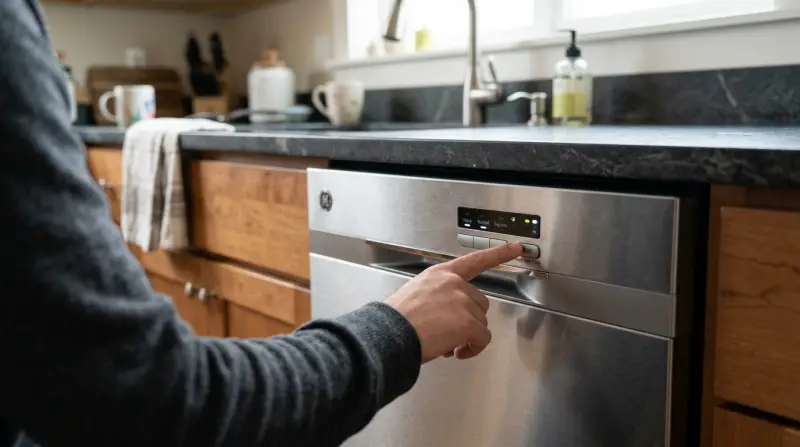
A reset often solves problems that make your dishwasher stop working. For example, it can help if:
- The dishwasher won’t start or respond to buttons
- Wash cycles stop in the middle or won’t finish
- The display shows error codes or blinking lights
- The door won’t lock, or the machine won’t drain
Modern dishwashers use computer boards, so sometimes the electronics get confused. A reset clears the memory and lets the dishwasher start fresh. In many cases, this easy step brings your machine back to life.
Quick Reset Vs. Hard Reset: What’s The Difference?
There are two main ways to reset a GE dishwasher:
- Quick Reset (Control Panel Reset): This restarts the electronic controls without turning off power at the circuit breaker.
- Hard Reset (Power Reset): This cuts all power to the dishwasher, clearing deeper errors.
Here’s a side-by-side comparison for clarity:
| Reset Type | When to Use | How Long It Takes | Problems It Solves |
|---|---|---|---|
| Quick Reset | Minor glitches, frozen controls | 1-2 minutes | Most simple issues |
| Hard Reset | Stuck cycles, deep errors | 5-10 minutes | Serious or repeated problems |
Most of the time, a quick reset is enough. If that doesn’t work, try a hard reset.

Credit: www.youtube.com
How To Do A Quick Reset On A Ge Dishwasher
This is the most common and easiest way to reset your machine.
- Open the dishwasher door slightly to pause the cycle.
- Press and hold the “Start/Reset” button for 3 seconds. On most models, the button is on the top edge or front of the control panel.
- Wait for the lights to blink or change. Some models will beep or show a blinking light to confirm the reset.
- Close the door and wait 2 minutes. This gives the dishwasher time to clear the memory and drain any water.
- Try starting a new cycle. If the machine works normally, your reset is complete.
If your model has a “Cycle Select” or “Cancel” button, try pressing and holding that instead of “Start/Reset.” Always check your owner’s manual for exact button names.
How To Do A Hard Reset (power Cycle)
If the quick reset doesn’t solve your problem, a hard reset gives a deeper reboot.
- Turn off the dishwasher. Open the door and make sure it’s not running.
- Go to your home’s breaker box. Find the breaker labeled “Dishwasher.”
- Switch off the breaker for at least 30 seconds (up to 5 minutes if possible). This cuts all power to the machine.
- Switch the breaker back on. The dishwasher’s electronics will restart from zero.
- Wait 2-5 minutes. Let the system reset fully.
- Try running the dishwasher. If it works, the hard reset was successful.
Some newer GE models plug into a wall outlet. In that case, simply unplug it for a minute and then plug it back in.
Resetting Specific Ge Dishwasher Models
While most GE dishwashers reset the same way, a few models have unique steps or buttons. Here’s a quick guide to some popular GE series:
| Model Series | Reset Method | Special Notes |
|---|---|---|
| GE Profile | Press and hold “Start/Reset” | Wait for blinking “Start” light to stop |
| GE Café | Press “Cycle Select” and “Start” together | Release when panel beeps |
| GE Adora | Hold “Start/Reset” for 3 seconds | Door must be closed |
| Older GE models | Flip breaker or unplug | No electronic reset button |
Non-obvious tip: For models with touch-sensitive controls, make sure your hands are dry. Moisture can stop the reset from working.
Understanding Ge Dishwasher Error Codes
Sometimes, your dishwasher’s control panel shows a code instead of working. Understanding these codes helps you know if a reset will solve the problem or if you need further help.
Common error codes include:
- C1: Dishwasher takes too long to drain
- C2: Machine not draining
- C3: Dishwasher won’t stop draining
- C4: Water level too high
- C5: Slow water fill
- FTD: Door not closed properly
If you see one of these codes, try a reset. But if the code returns after resetting, there may be a deeper mechanical issue.
Beginner insight: Some error codes (like C1 or C2) can be caused by a clogged filter or blocked drain. Cleaning the filter before you reset sometimes solves the problem for good.
What To Check Before Resetting
Before jumping into a reset, a few simple checks can save time:
- Make sure the dishwasher door is fully closed and latched.
- Check that the control panel is not locked (look for a “Lock” or “Control Lock” light).
- Confirm that the machine is getting power (lights should turn on).
- Look for obvious blockages in the spray arms or bottom filter.
- Make sure your home’s water supply to the dishwasher is turned on.
If any of these are off, fixing them might solve the problem without a reset.
What To Do If A Reset Doesn’t Work
If you’ve tried both quick and hard resets but your dishwasher still doesn’t work, there may be a larger problem. Here’s what you can do next:
- Check for error codes again. If the same code comes back, look it up in your user manual or on the GE Appliances website.
- Inspect the dishwasher filter and drain. A blocked filter can stop cycles or cause error codes. Remove and rinse the filter under running water.
- Test the door latch. If the door doesn’t close fully, the dishwasher won’t run.
- Listen for unusual sounds. Clicking, humming, or silence can signal what’s wrong.
- Contact GE support or a technician. If you’re not comfortable opening up the machine, it’s safer to get expert help.
Key insight: Sometimes, repeated resets can hide a real hardware problem. If you need to reset your dishwasher often, have it checked by a professional.

Credit: www.wikihow.com
Preventing Future Dishwasher Problems
A few good habits can keep your GE dishwasher running smoothly and reduce the need for resets.
- Clean the filter every month to prevent clogs.
- Wipe down the door seals to keep them sealing tight.
- Run hot water at your sink before starting a wash—this helps the dishwasher fill with hot water.
- Don’t overload the racks. Crowding can block spray arms and leave dishes dirty.
- Use the right detergent for your water hardness.
Here’s a quick maintenance schedule for busy families:
| Task | Frequency | Why It Matters |
|---|---|---|
| Clean filter | Monthly | Stops clogs and drainage errors |
| Wipe seals | Weekly | Prevents leaks and odors |
| Check spray arms | Every 2 months | Keeps washing strong |
| Run empty with cleaner | Every 3 months | Removes buildup and keeps fresh |
When To Call A Professional
Not every dishwasher problem can be fixed with a reset. If you notice:
- Water leaking on the floor
- Burning smells or sparks
- Repeated error codes that won’t clear
- No power at all after checking the breaker
It’s best to call a trained technician. Working with water and electricity can be dangerous if you’re not sure what you’re doing.

Credit: www.wikihow.com
Additional Resources
If you want more details about your specific GE dishwasher, you can find manuals, troubleshooting guides, and support at the GE Appliances Official Site. They offer model-specific instructions and tips for advanced problems.
Frequently Asked Questions
How Do I Know If My Ge Dishwasher Needs A Reset?
If your dishwasher won’t start, is stuck in a cycle, or shows blinking lights or error codes, a reset can often help. If it’s working normally, no reset is needed.
Will Resetting My Dishwasher Erase Any Settings?
A reset clears the current cycle and error codes, but it does not erase saved settings like wash preferences or delay start times.
Why Does My Ge Dishwasher Need Frequent Resets?
Frequent resets may mean a deeper problem, such as a failing control board, sensor issue, or mechanical fault. If this happens often, call a service technician.
What If My Dishwasher Has No Power After Resetting?
Check your home’s circuit breaker and make sure the outlet works. If there’s still no power, the dishwasher’s internal fuse or wiring may be damaged.
Can I Reset My Ge Dishwasher During A Cycle?
Yes, you can reset during a cycle by pressing and holding the “Start/Reset” button. The dishwasher will drain and return to standby mode.
Taking these steps can keep your GE dishwasher running smoothly and help you avoid bigger problems down the line. With regular care and the right reset steps, your dishwasher can serve your kitchen for many years.