
If your Instax Mini 9 camera shows a red light and isn’t working, it’s easy to feel frustrated. Many users face this issue, and not knowing the cause can ruin your instant photography experience. But the good news is: most red light problems can be fixed at home. By understanding what the red light means and how to troubleshoot, you can get your camera working again without wasting money or time.
This article explains the nine most common reasons your Instax Mini 9 won’t work with a red light, and how to solve each one. You’ll find practical advice, simple steps, and clear explanations. Whether you’re a beginner or have used instant cameras for years, you’ll learn how to get your Instax Mini 9 back to normal.
What Does The Red Light Mean?
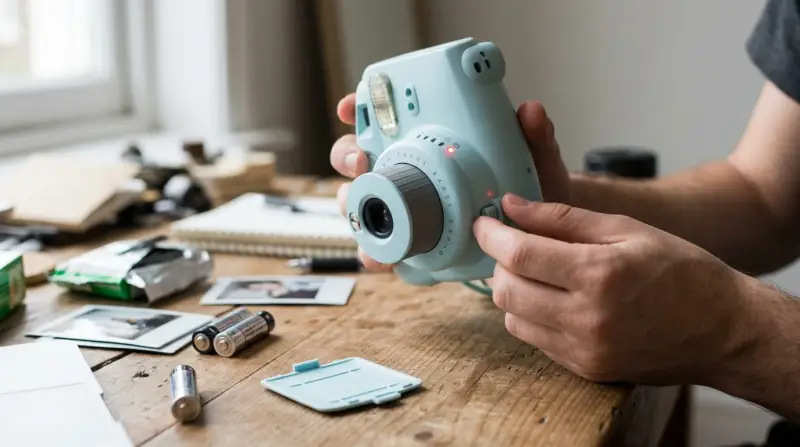
The red light on your Instax Mini 9 is usually a warning. It tells you something is wrong—most often with the battery, lens, or film. Unlike other cameras, the Mini 9 uses a simple LED system. When the red light stays on or blinks, it’s a signal to check your camera. Ignoring it may cause permanent damage or waste film.
Dead Or Low Battery
The most frequent cause of the red light is a dead or weak battery. The Instax Mini 9 uses two AA batteries. If the batteries don’t have enough power, the camera can’t operate.
How To Fix It
- Replace both batteries with new, high-quality AA batteries.
- Avoid mixing old and new batteries.
- Check the battery contacts for dirt or rust. Clean if needed.
Example
Many users report that cheap or generic batteries cause red light errors. Brand-name batteries like Duracell or Energizer last longer and reduce issues.
Data Table: Battery Performance
| Battery Type | Average Shots (per set) | Red Light Issues |
|---|---|---|
| Duracell AA | 90 | Rare |
| Energizer AA | 88 | Rare |
| Generic AA | 60 | Common |

Incorrect Battery Placement
Sometimes, even new batteries won’t work if they’re not placed correctly. The camera requires batteries in a specific orientation.
How To Fix It
- Open the battery compartment.
- Check the positive (+) and negative (–) ends.
- Put batteries in the correct direction.
Common Mistake
Placing batteries backward is easy to do, especially in poor lighting. Always double-check before closing the compartment.
Dirty Battery Contacts
Over time, battery contacts can get dirty, rusty, or corroded. This blocks power from reaching the camera, leading to the red light.
How To Fix It
- Remove batteries.
- Use a dry cloth or cotton swab to clean contacts.
- For tough rust, use a little rubbing alcohol (never water).
Practical Tip
If you store your camera in humid places, clean the contacts every few months. This prevents corrosion.
Faulty Film Cartridge
The Instax Mini 9 won’t work if the film cartridge isn’t installed right, is damaged, or is empty. The camera checks for film before taking a photo.
How To Fix It
- Open the back and check the film cartridge.
- Make sure it’s properly inserted and not empty.
- Replace damaged film with a new cartridge.
Data Table: Film Cartridge Problems
| Problem | Red Light? | Solution |
|---|---|---|
| Empty cartridge | Yes | Replace film |
| Misaligned cartridge | Yes | Reinsert correctly |
| Damaged cartridge | Yes | Use new cartridge |
Jammed Film
A jammed film can trigger the red light and stop the camera from working. This usually happens if you load film incorrectly or force the cartridge inside.
How To Fix It
- Open the back gently.
- Check for jammed film.
- Remove jammed film carefully. Do not use sharp tools.
- Load a new cartridge following instructions.
Non-obvious Insight
If you see black marks or bent film, this means the cartridge was forced or mishandled. Always handle film gently.

Lens Not Extended
The Instax Mini 9 won’t start unless the lens is fully extended. If the lens is stuck or not pulled out, the camera will show a red light.
How To Fix It
- Press the lens button until it pops out completely.
- Make sure the lens is not blocked by dust or debris.
Example
Many beginners forget to extend the lens before turning on the camera. This is a simple step but critical for operation.
Lens Mechanism Jammed
Even if you extend the lens, sometimes the mechanism inside jams. This can happen if the camera is dropped or handled roughly.
How To Fix It
- Gently twist the lens. Never force it.
- If stuck, try turning the camera off and on.
- If still jammed, visit a repair shop.
Practical Advisor Tip
Avoid storing your camera in bags with heavy items. Pressure on the lens can cause jams.
Overheated Camera
Instax Mini 9 cameras are sensitive to temperature. If the camera is too hot, the electronics may fail, and the red light will turn on.
How To Fix It
- Let the camera cool down for 30–60 minutes in a shaded place.
- Never use the camera in direct sunlight for long periods.
Example
During summer, many users report red light errors after leaving their camera in a hot car. Always store your camera in cool places.
Internal Circuit Failure
If none of the above fixes work, the issue may be inside the camera’s circuitry. This is rare, but possible after drops or water damage.
How To Fix It
- If your camera is under warranty, contact Fujifilm for service.
- If not, take it to a professional repair shop.
- Never try to fix circuits yourself; it can be dangerous.
Non-obvious Insight
Sometimes, circuit failures start as random red light flashes before becoming permanent. Early signs should not be ignored.
Comparing Instax Mini 9 Red Light Issues
To help you understand which problem is most likely, here’s a comparison of the nine issues:
| Issue | Frequency | Easy to Fix? |
|---|---|---|
| Dead battery | Very common | Yes |
| Incorrect battery placement | Common | Yes |
| Dirty contacts | Moderate | Yes |
| Faulty film cartridge | Common | Yes |
| Jammed film | Rare | Yes |
| Lens not extended | Common | Yes |
| Lens jam | Rare | No |
| Overheated camera | Rare | Yes |
| Internal circuit failure | Very rare | No |
Key Prevention Tips
You can avoid most red light issues with simple habits:
- Use quality batteries and replace them regularly.
- Store your camera in a dry, cool place.
- Handle film cartridges gently.
- Extend the lens fully before use.
- Clean battery contacts every few months.
- Avoid exposing your camera to heat or water.

When To Seek Professional Help
If you’ve tried all nine solutions and the red light still shows, it’s time to get expert help. Most minor issues can be fixed at home, but circuit failures or severe jams need professional repair. Fujifilm offers support and warranties for the Instax Mini 9. For more information, visit the official Fujifilm Support page.
Frequently Asked Questions
Why Does The Instax Mini 9 Show A Red Light When I Turn It On?
The red light usually means low battery, incorrect battery placement, or an issue with the film cartridge. Check these first before trying other solutions.
Can I Use Rechargeable Batteries In My Instax Mini 9?
Yes, but choose high-quality rechargeable batteries. Some cheap rechargeables may not provide enough power, causing red light errors.
Is It Safe To Clean Battery Contacts With Alcohol?
It’s safe to use a small amount of rubbing alcohol on a cloth. Never use water or soak the contacts, as this can damage the camera.
What Should I Do If My Film Is Jammed And Won’t Come Out?
Open the camera gently and remove the jammed film without using sharp tools. If the jam is severe, visit a repair shop to avoid breaking the camera.
Does The Red Light Mean My Camera Is Broken?
Not always. The red light is a warning. Most issues can be fixed at home. If the camera won’t work after trying all nine solutions, it may need professional repair.
Solving the Instax Mini 9 red light problem is usually simple if you know where to look. By checking batteries, film, and lens mechanisms, most users can fix their camera in minutes. Remember to maintain your camera and use quality parts for long-lasting performance. Instant photography should be fun, not stressful—so don’t let a red light ruin your memories.