
The Kenmore Washer Code F11 indicates that the main control board is failing to communicate with the motor control unit. This error message is a signal that your machine has stopped mid-cycle because the electronic signals required to turn the drum aren’t reaching their destination. If you see this code, the first step is to perform a hard reset by unplugging the unit from the wall outlet for at least five minutes. This allows the capacitors on the control boards to fully discharge, which often clears temporary communication glitches that mimic a hardware failure.
Why your Kenmore washer shows Kenmore Washer Code F11
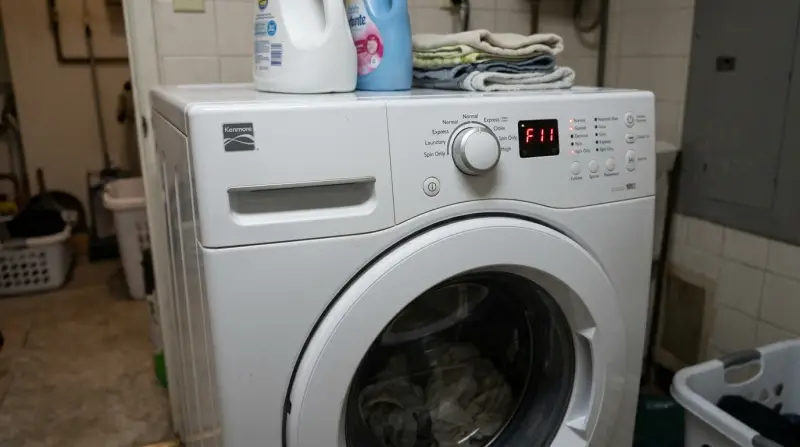
The F11 code appears when the central computer, known as the Central Control Unit (CCU), sends a signal to the Motor Control Unit (MCU) but receives no response. This is essentially a “lost connection” error. It happens most often because of a loose or corroded wire harness between these two boards. Over time, the constant vibration of the wash cycle can cause the plastic connectors to wiggle just enough to break the electrical contact.
Another common cause is a surge in power. If your home experiences a sudden voltage spike, the sensitive circuitry on the MCU can be damaged. When the board is damaged, it can no longer “talk” to the CCU, triggering the F11 fault. In some cases, the problem isn’t the wiring but a software “hang” within the control board itself. This is why a hard reset is the first recommended action. If the board is physically burnt or has a cracked trace, no amount of resetting will fix it. You can find specific guidance on identifying electrical risks and safe handling of appliance electronics through the Consumer Product Safety Commission resources.
Check the wire harness
This fix is for you if the machine seems physically sound but the code persists after a reset. You need to inspect the wiring between the CCU and the MCU. Before you start, turn off the breaker for the washer to ensure no power is flowing to the unit. A capacitor can hold a lethal charge even when the machine is unplugged, so don’t touch the internal components of the boards themselves.
Locate the MCU, which is typically mounted near the drive motor at the bottom of the cabinet. Look for the wire harness—a bundle of colored wires with a plastic clip—that connects the MCU to the CCU. Unplug the connector carefully, inspect the pins for signs of black soot or green corrosion, and plug it back in firmly. If the pins look clean, ensure the wires aren’t pinched or frayed along the path. If you find a broken wire, you can sometimes repair it with a simple crimp connector. If the pins are burnt, the board likely needs replacement. This varies by model—check the label on the back of your machine for the specific wiring diagram. If you aren’t comfortable working near electrical components, call a qualified appliance repair technician.
Reset the communication path
If the wiring is secure, the next step is to clear the error state through the diagnostic mode. This process forces the CCU to re-establish a handshake with the MCU. To enter this mode, ensure the washer is empty and the door is closed. Press and hold the “Drain/Spin” button, then press “Power” while keeping the other button held. Release both when the lights flash.
Once in the diagnostic menu, look for the “Test” or “Start” option to run a communication check. If the machine performs the test and doesn’t return the F11 code, the software was simply stuck. If the code returns immediately, you have a hardware failure.
This fix isn’t for people who are uncomfortable with button sequences; one wrong step can trigger a factory test that runs for an hour. If you don’t have the manual for your specific Kenmore model, you can often find the diagnostic sheet taped to the inside of the bottom front panel.
The decision rule is simple: if the F11 code clears after the reset, the issue was a temporary logic glitch. If the code persists, the CCU or MCU has suffered a physical component failure. Most users make the mistake of cycling the power at the wall instead of the diagnostic reset. This doesn’t clear the error code from the machine’s non-volatile memory. If you’re unsure about the sequence, stop and consult a professional.
Replace the motor control unit
Replacing the MCU is the final option when a reset and wiring check fail to clear the F11 error. This is a significant repair requiring a new board specific to your model. It’s worth the effort if your machine is in good condition, but it isn’t a good investment if the unit is older.
Before ordering the part, check the serial number on your unit’s data plate. A common mistake is buying a board based on visual similarity alone; even a one-digit difference in the revision code can prevent the unit from communicating with your control panel, rendering the new part useless.
To perform this, disconnect the power and remove the existing MCU by unscrewing the mounting bracket. Take a photo of the wire connections before you unplug them to replicate the setup exactly. Ensure the new board is firmly seated in the mounting clips before reconnecting the wires.
If the machine is under three years old, check your manufacturer warranty first. Replacing the board yourself will void any remaining coverage. If you lack the proper tools to reach the bottom of the machine, hire a professional. Attempting this repair incorrectly can lead to a short circuit or permanent damage to the main control board.
What not to do
Don’t spray water or cleaning solvents near the control boards or the wire harness to “clean” the connections. Moisture causes permanent corrosion on delicate pins, which is impossible to reverse. If the connections look dirty, use only a dry, soft-bristled brush to clear away dust.
Don’t attempt to open the casing of the control board itself to fix internal chips. These are factory-sealed units. Opening them creates a fire hazard and voids all safety certifications.
Don’t ignore the code if the washer is making a burning smell. This indicates a component is actively melting. If you smell ozone or plastic, pull the plug immediately. The decision rule is simple: if the machine smells, stop using it until a professional replaces the damaged harness.
How to stop it happening again
Consistent maintenance prevents the vibration-related loose connections that trigger this error.
| If you’re doing this | Do this instead | Why |
|---|---|---|
| Overloading the washer | Wash smaller, balanced loads | Prevents excessive vibration |
| Placing the washer on uneven floors | Use anti-vibration rubber pads | Reduces mechanical stress on wires |
| Ignoring a “thumping” sound | Level the washer legs | Stops internal parts from shifting |
| Running cycles while away | Start loads only when home | Allows you to catch errors early |
A common mistake is assuming the machine is level simply because it sits flush against the floor. Use a spirit level on the top frame; if the bubble is off-center, the internal drum will strike the chassis during high-speed spins. This repeated impact eventually shears electrical connectors.
If your floor is tile or concrete, install rubber pads immediately. These pads absorb the kinetic energy that otherwise travels directly into the wiring harness. If you notice the machine “walking” across the room, stop it instantly. Check the tension on the wire harnesses regularly; ensure all connectors are firmly seated.
Frequently asked questions

Can I fix a Kenmore F11 error without parts?
You can often fix this error without parts by addressing a loose wire harness or a software glitch. Performing a hard reset or reseating the MCU connectors typically resolves the issue. If these steps fail, the hardware is likely faulty and requires a replacement board.
How long does a Kenmore washer control board last?
Most control boards are designed to last the life of the machine. This lifespan varies significantly based on factors like laundry room humidity, power surges, and constant vibration. If your machine is in a damp basement, using a dehumidifier can help protect the sensitive circuitry.
Is it safe to use the washer with an F11 code?
No, it isn’t safe to use the washer while displaying the F11 error code. This code indicates the machine can’t safely regulate motor speed and drum rotation. If the code persists after a hard reset, keep the machine unplugged until it’s repaired.
What happens if I ignore the F11 error?
Ignoring the F11 error will likely keep the machine in a locked state, preventing it from starting any cycles. A damaged MCU may continue drawing power, potentially causing further electrical damage to the central control unit. Address communication errors early to avoid replacing multiple boards.
Why does my washer show F11 only on certain cycles?
If the F11 code appears only during high-speed spin cycles, the problem is likely a loose connection vibrating open. Wires may maintain contact during slow cycles but lose the signal path during intense movement. Check the wire harness at the bottom of the machine to ensure all plugs are snapped tightly.
Final Thoughts
If the error persists after you’ve tried the reset, it’s time to inspect the wire harnesses connecting the two control boards for any loose or corroded plugs. You shouldn’t hesitate to contact a professional if the wiring looks secure, as you’ll likely need a technician to replace the faulty hardware.