
If your Maytag washing machine’s control panel suddenly stops working, it can turn a simple laundry day into a frustrating puzzle. Many owners face confusing blinking lights, unresponsive buttons, or error codes that seem impossible to solve. The good news is, most control panel problems are fixable, even without deep technical skills. Understanding the reasons behind these issues can save you money and help you avoid unnecessary service calls. This article explains the most common Maytag washing machine control panel problems, how to troubleshoot them, and when it’s time to call a professional.
How The Maytag Washing Machine Control Panel Works
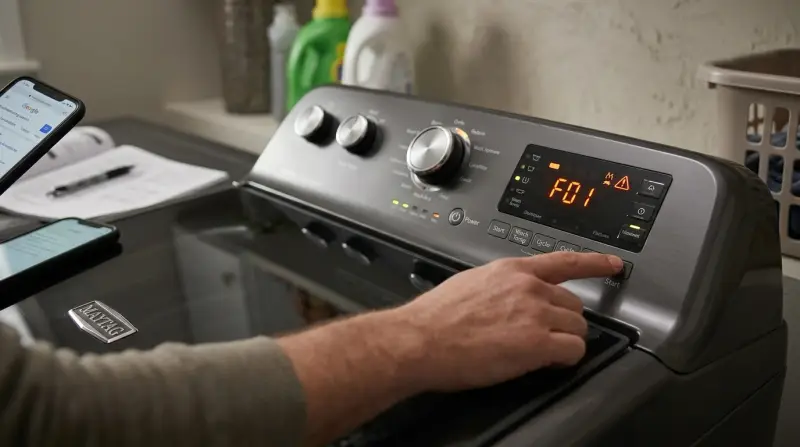
The control panel is like the brain of your washing machine. It lets you choose cycles, change water temperatures, set spin speeds, and start or stop the washer. On modern Maytag models, the control panel may use a digital touchpad, while older machines often rely on buttons or dials. When you press a button, an electronic signal is sent to the machine’s control board, which then tells different parts of the washer what to do.
Knowing how the panel communicates with the washer is important. For example, if the display is blank but the rest of the machine has power, the problem may be isolated to the panel itself rather than the entire washer. Small issues like a loose wire or dirty contact can disrupt this communication.
Common Symptoms Of Control Panel Problems
You may notice one or more of these issues when the control panel is not working properly:
- The display does not light up
- Buttons are unresponsive or only work sometimes
- Error codes appear, especially codes like F01, F02, or F28
- The cycle won’t start or gets stuck
- Lights blink rapidly for no clear reason
Some problems are minor, such as a child lock being activated, while others point to deeper electrical or electronic faults.
Main Causes Of Maytag Control Panel Issues
Control panel problems usually fall into a few main categories. Understanding the source will help you fix the issue faster.
1. Power Supply Problems
A surprising number of control panel issues are caused by power supply problems. If your washer is not getting steady power, the control panel can go blank or act strangely. Common causes include:
- Loose or unplugged power cord
- Tripped circuit breaker
- Faulty wall outlet
- Power surges
Always check the power source before moving to more complex troubleshooting. You can test the outlet with a small lamp or another device to see if it’s working.
2. Control Lock Or Child Lock Activated
Many Maytag washers have a control lock or child lock function to prevent children from changing settings or starting the washer. If this feature is on, the panel may appear unresponsive. Usually, holding a button like “Control Lock” or “End of Cycle Signal” for 3 seconds will turn it off. Always check your user manual for the correct method.
3. Faulty User Interface Board
The user interface board is the part you touch (buttons, dials, or touchscreen). If this board fails, some or all controls may stop working. Problems here can be caused by:
- Moisture or detergent leaks inside the panel
- Wear and tear from frequent use
- Manufacturing defects
4. Main Control Board Failure
The main control board is a circuit board inside the washer that interprets your commands. If it fails, the control panel may give error codes, freeze, or not respond at all. Board failures are less common but more serious, often needing replacement.
5. Wiring And Connector Issues
Loose wires, corroded connectors, or broken harnesses between the control panel and main board can cause odd behavior. Moving the washer or a long period of vibration can sometimes loosen a connection.
6. Software Glitches
Maytag washers now use software to manage wash cycles. A glitch or bug in the system can freeze the panel or make it behave unpredictably. These can sometimes be fixed with a simple reset.
How To Troubleshoot Maytag Control Panel Problems
Before calling a repair technician, try these troubleshooting steps. Many problems can be fixed with simple actions.
Step 1: Check Power And Reset
- Make sure the washer is plugged into a working outlet.
- Reset the washer by unplugging it for 60 seconds, then plugging it back in. This clears minor glitches.
- If there was a power surge, reset your home’s circuit breaker.
Step 2: Look For Error Codes
If your washer shows an error code, check your manual or look up the code online. Common codes like F01 (main control board fault), F02 (drain problem), or F28 (communication error) can point you to the cause.
Step 3: Disable Control Lock
If the panel is unresponsive, try holding the “Control Lock” or similar button for 3 seconds. Look for a small lock icon on the display.
Step 4: Inspect Buttons And Touchpad
Gently press each button. If some work and others don’t, the user interface board may be faulty. For touchscreens, wipe away moisture or detergent with a soft, dry cloth.
Step 5: Examine For Moisture Or Damage
Check for visible signs of water, detergent leaks, or burn marks inside the control panel area. If you see these, the board or connectors may be damaged.
Step 6: Test With A Multimeter
If you are comfortable, use a multimeter to check for voltage at the control board terminals. No voltage likely means a power supply issue.
Step 7: Check Wiring Connections
Unplug the washer and remove the control panel cover. Look for loose, disconnected, or corroded wires. Reconnect any that have come loose.
Step 8: Software Reset
Some Maytag models let you reset the control board by pressing certain button combinations. Check your manual for instructions.
Comparing Common Maytag Error Codes
Here’s a quick comparison of what the most common error codes mean for your control panel:
| Error Code | Likely Cause | What to Do |
|---|---|---|
| F01 | Main Control Board Fault | Reset machine; replace board if needed |
| F02 | Drain Problem | Check drain hose and pump |
| F28 | Communication Error | Check wiring; reset control panel |
| LOC or LC | Control Lock Active | Disable lock using panel |
When To Call A Professional
Some control panel problems are easy to fix at home. But there are times when you should call a certified technician:
- You smell burning or see scorch marks
- The display flickers or goes dark after a reset
- Error codes won’t clear with normal steps
- You have tried all troubleshooting steps with no success
A professional has special tools to test the main control board and diagnose complex wiring problems. Attempting repairs on these parts without experience can make things worse.

Credit: justintimeappliance.com
Cost Comparison: Diy Vs. Professional Repair
Many owners wonder if they should fix the control panel themselves or pay for a service call. Here’s a side-by-side look at potential costs:
| Repair Option | Average Cost | Pros | Cons |
|---|---|---|---|
| DIY Reset/Check | $0 – $10 | Free or cheap; quick | Limited to simple issues |
| Replace User Interface Board | $90 – $250 (part only) | Restores full function | Requires basic tools and care |
| Professional Service Call | $150 – $400 | Expert diagnosis and warranty | More expensive |
Preventing Control Panel Problems
Simple habits can keep your control panel working longer:
- Wipe the panel with a dry cloth after each use to prevent moisture buildup.
- Avoid using wet hands on the touchpad or buttons.
- Do not spray cleaners directly on the panel—apply cleaner to a cloth first.
- Check your home’s electrical system for steady voltage.
- Do not overload the washer, as vibration can shake connections loose over time.
Many people forget that power surges from nearby lightning or large appliances can damage a washing machine’s electronics. Using a surge protector can offer extra protection.

Credit: www.spinchill.com
Non-obvious Insights Most Owners Miss
Many beginners focus only on the control panel itself, not realizing that problems may start elsewhere. For example:
- Door latch issues: If the door latch is faulty, the control panel may not respond, as the washer thinks the door is open.
- Hidden moisture: Detergent spills or high humidity can slowly corrode the panel’s contacts, even if nothing looks wet on the surface.
Also, some error codes can be misleading. A code that points to the user interface board may actually result from a failing wire harness or dirty connector. Always check connections before buying expensive parts.
Firmware And Software Updates
Some newer Maytag washers support firmware updates to fix bugs in the control panel software. These updates are usually done by a technician but can sometimes be performed by the owner using a USB port or Wi-Fi connection. Keeping your washer’s software up to date can solve strange glitches and improve performance. Check Maytag’s official support site or contact customer service for details.

Credit: www.youtube.com
Practical Tips For Long-term Reliability
- Register your washer with Maytag. This makes it easier to get technical support and recall notices.
- Keep the user manual in a safe place. Many troubleshooting steps and error code explanations are found there.
- Take a photo of any error codes before resetting the machine. This helps technicians diagnose the problem faster.
If your washer is still under warranty, never open the control panel or make repairs yourself unless the manual says it’s safe. Doing so may void your warranty.
How Different Maytag Models Compare
Maytag offers several washer series, and their control panels can differ:
| Model Series | Panel Type | Common Issue |
|---|---|---|
| MVW Series (Top Load) | Button and Dial | Unresponsive buttons |
| MHW Series (Front Load) | Touchpad/LED | F01, F28 errors |
| Commercial Series | Basic Dial | Loose connectors |
Knowing your model series helps you find the right manual and parts. You can usually find the model number on a sticker inside the door or behind the control panel.
Useful Resources
For more information on error codes, user manuals, and DIY tips, the official Maytag support site is a reliable resource: Maytag Official Support.
Frequently Asked Questions
Why Does My Maytag Washer Control Panel Keep Beeping?
A beeping control panel often means a button is stuck, the control lock is on, or there’s a minor error. Try resetting the washer and checking for any error messages. If the beeping continues, the user interface board or a stuck button may need service.
How Do I Reset The Control Panel On My Maytag Washer?
The simplest way is to unplug the washer for 60 seconds, then plug it back in. Some models let you reset by pressing and holding the “Start/Pause” button for 3–5 seconds. Always check your manual for model-specific instructions.
Can A Power Surge Damage The Control Panel?
Yes, power surges are a common cause of control board and panel failures. Using a surge protector can help prevent this. If your washer won’t power up after a storm, check your home’s circuit breakers and outlets.
Is It Safe To Replace The Control Panel Myself?
If you have basic electrical skills and the washer is unplugged, simple replacements are possible. However, replacing the main control board or user interface board should be done carefully. If your washer is under warranty or you are unsure, call a professional.
What Do I Do If My Control Panel Still Doesn’t Work After Troubleshooting?
If all basic steps fail like resetting, checking power, and inspecting connections—it’s likely the control board or user interface board needs professional diagnosis or replacement. Avoid using the washer until it’s repaired to prevent further damage.
A working control panel is essential for smooth laundry days. By understanding the causes, symptoms, and solutions for Maytag washing machine control panel problems, you can keep your washer running longer and know when to get expert help. Taking care of small issues early prevents bigger, more expensive repairs later.
1 thought on “Maytag Washing Machine Control Panel Problems: Quick Fix Guide”