
If you own a Speed Queen washer, you probably expect tough performance and reliable cleaning. But sometimes, unexpected error codes show up and stop your laundry plans. One of the most confusing is the Speed Queen washer code Ld. If you see this code, your washer is telling you there is a problem with draining. For many, this warning feels mysterious and frustrating. But with the right approach, you can solve it quickly, prevent future issues, and get your laundry back on track. This article will help you understand what the Ld code means, how to fix it, and how to avoid it in the future.
What Does Speed Queen Washer Code Ld Mean?
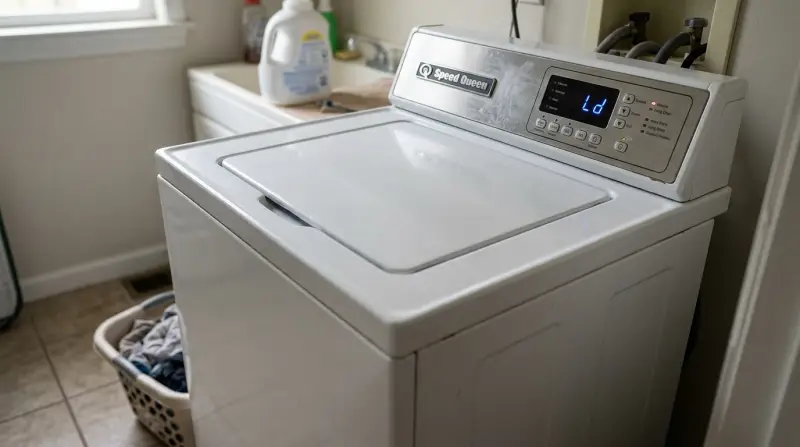
The Ld error code stands for “Long Drain.” Your Speed Queen washer uses sensors to monitor how fast water leaves the machine during the spin cycle. If it takes too long to drain, the machine stops and shows the Ld code. Usually, a healthy washer finishes draining in less than a minute. But when the process is much slower, the washer suspects a blockage or problem.
Here’s what triggers the Ld code:
- Water stays in the drum for too long after the spin cycle starts.
- The drain pump works, but water doesn’t move out.
- The washer senses the drain process is over 2–3 minutes longer than normal.
This code is common in Speed Queen top loaders and front loaders, especially after heavy loads or repeated use. It’s not a sign of a total breakdown, but ignoring it can lead to bigger problems like leaks or motor damage.
Common Causes Of Ld Error
Understanding why the Ld code appears is the first step to fixing it. Several issues can trigger this warning:
1. Clogged Drain Hose
Lint, coins, small socks, and other debris can block the drain hose. If water can’t move through, the washer gets stuck.
2. Blocked Pump Filter
Many Speed Queen washers have a filter before the drain pump. If this filter is dirty or full of objects, water flow slows down.
3. Faulty Drain Pump
The pump moves water out of the drum. If it’s worn out or broken, it can’t keep up.
4. Bent Or Kinked Drain Hose
If the hose behind your washer is twisted or bent, water can’t flow freely.
5. Drain Standpipe Too High Or Low
If the pipe your hose connects to is not at the right height (usually 30–48 inches from the floor), draining slows down.
6. Too Much Detergent Or Suds
Excess soap creates foam that blocks water flow, especially in high-efficiency washers.
7. Electrical Issues
Rare, but sometimes wiring or control boards malfunction and confuse the drain signals.
Most homeowners find that the problem is simple—a clogged hose or filter. But sometimes, the issue is deeper and needs expert help.
Credit: www.youtube.com
How To Fix Speed Queen Washer Code Ld
You can solve the Ld code yourself in many cases. Here is a step-by-step guide for troubleshooting:
1. Pause And Unplug
First, stop the washer. Unplug it from the wall. This keeps you safe and resets the control board.
2. Check The Drain Hose
Move your washer away from the wall. Look at the hose connecting it to the drain pipe. Is it bent, twisted, or crushed? Straighten it. If it’s blocked, detach it and flush it with water. A garden hose works well for this.
3. Inspect And Clean The Pump Filter
Some Speed Queen models have a filter at the front or near the bottom. Look for a small door or access panel. Open it and remove the filter. Rinse it under running water. Remove any hair, lint, or debris.
4. Examine The Drain Pump
If the hose and filter are clean, the pump may be the problem. Listen for a humming or grinding sound during draining. If the pump is noisy or silent, it could be broken. Replacing a pump is tricky—call a technician if you’re unsure.
5. Adjust The Standpipe
Check the height of the drain pipe. It should be between 30–48 inches from the floor. If it’s too low, water may flow back. If it’s too high, draining slows.
6. Reduce Detergent Use
Too much soap is a hidden cause. Use only the recommended amount for your load size and machine type. High-efficiency washers need HE detergent.
7. Run A Test Cycle
After cleaning and fixing, plug the washer back in. Run a short cycle with no laundry to see if water drains properly.
Practical Tips
- Keep a towel handy—water may spill when you detach hoses or filters.
- Wear gloves to protect your hands from sharp objects or dirty water.
- If your washer is under warranty, check before opening panels or ordering parts.
Below is a comparison of the most common Ld causes and their solutions:
| Cause | How to Fix | Difficulty |
|---|---|---|
| Clogged hose | Remove, flush with water | Easy |
| Blocked filter | Open panel, clean filter | Medium |
| Faulty pump | Replace pump | Hard |
| Too much detergent | Use less soap | Easy |
| Standpipe height | Adjust pipe position | Medium |
When To Call A Professional
Many Ld problems are simple to fix. But some cases need expert help:
- Water still does not drain after cleaning hoses and filters.
- The pump makes loud noises or doesn’t work.
- Error codes keep coming back after every load.
- You find leaks or electrical problems.
A professional technician can test pumps, replace faulty parts, and check wiring. If your washer is still under warranty, a certified repair person may be required.
Non-obvious insight: Sometimes, the Ld code appears because the washer is overloaded. Heavy blankets or too many towels can weigh down the drum and slow draining. Try smaller loads to see if the error disappears.
Preventing Ld Code In The Future
To avoid the Ld error, regular maintenance is key. Here’s how to keep your Speed Queen washer running smoothly:
- Clean The Drain Hose Every 3–6 Months: Detaching and flushing the hose removes buildup before it gets serious.
- Check And Rinse The Pump Filter Monthly: Even small objects can cause big problems.
- Don’t Overload The Washer: Stick to the recommended load size. Large items can block water flow.
- Use The Right Detergent: High-efficiency washers need HE soap. Too much regular detergent creates suds and clogs.
- Inspect The Drain Pipe Height: Make sure the standpipe is at the correct height, especially after moving the washer.
- Watch For Early Signs: Slow draining, leftover water, or odd noises are warning signs. Fix problems early.
Most people skip these steps until a problem appears. But a few minutes of maintenance saves hours of frustration.
Comparing Speed Queen Washer Ld Code With Other Brands
The Ld code is unique to Speed Queen, but other brands have similar warnings. Here’s a comparison:
| Brand | Error Code | Description |
|---|---|---|
| Speed Queen | Ld | Long drain time detected |
| Whirlpool | F9E1 | Drain time too long |
| Maytag | F02 | Drain problem |
| LG | OE | Drain error |
| Samsung | ND | Not draining |
While the codes differ, the meaning is almost the same. If you switch brands in the future, knowing these codes helps you troubleshoot faster.
Speed Queen Washer Ld Code: Real-life Example
Let’s look at a practical example. Maria owns a Speed Queen top loader. One day, her washer shows the Ld code. She tries to restart it, but the error comes back. After reading her manual, Maria decides to check the drain hose.
She finds a sock stuck inside. After removing it, the washer drains perfectly again.
Maria’s experience shows two important lessons:
- Small objects can cause big problems.
- Reading the manual and basic maintenance can save time and money.
Another insight: Some people report the Ld code after washing pet beds or mats. These items often shed fur, which clogs filters and hoses. If you wash such items, clean the filter afterward.
Data: How Common Is The Ld Error?
Speed Queen washers are famous for durability, but no washer is perfect. According to recent user surveys and repair data:
- About 7–10% of Speed Queen owners report seeing the Ld code at least once a year.
- Most Ld errors are fixed in under 30 minutes with basic cleaning.
- Less than 2% require pump replacement or professional help.
These numbers show the Ld code is annoying but not dangerous. With simple steps, most users solve it themselves.
Frequently Asked Questions
What Does Speed Queen Washer Code Ld Mean?
The Ld code means your washer is taking too long to drain water. Usually, this is caused by a clog in the hose or filter, a faulty drain pump, or too many suds from excess detergent.
How Do I Clear The Ld Code On My Speed Queen Washer?
First, pause and unplug the washer. Check and clean the drain hose and pump filter. Make sure the hose isn’t bent or blocked. Use less detergent next time. Run a test cycle to see if the error is gone.
Can I Fix The Ld Code Myself, Or Do I Need A Technician?
Most Ld errors can be fixed by homeowners—cleaning hoses, filters, and adjusting detergent use. If the pump is broken or error codes keep coming back, call a professional.
Is The Ld Code Dangerous For My Washer?
No, the Ld code is not dangerous if you fix it quickly. But ignoring it can lead to leaks, motor problems, or permanent damage. Always solve the problem before using the washer again.
Where Can I Find More Details Or Official Support?
Visit the official Speed Queen website or check your user manual. For more expert advice, see Speed Queen Support.
Final Thoughts
The Speed Queen washer code Ld is a common warning that tells you water isn’t draining fast enough. Most of the time, the fix is simple—a clean hose, a quick filter rinse, or less detergent. Regular maintenance prevents the error from appearing and keeps your washer running smoothly. If you see the Ld code, don’t panic. Follow the steps in this article, and you’ll solve the problem in no time. If you need more help, professionals and official support are always available. Taking care of your washer now saves you time, money, and stress later.