
If you own the Waterpik Sonic Fusion 2.0, you expect a simple, effective dental routine. But what happens when your device suddenly stops working? Many users face this problem, and it can feel frustrating—especially if you rely on it for oral health. This guide helps you diagnose, fix, and understand common issues with the Sonic Fusion 2.0. With clear steps and practical advice, you’ll learn what causes these problems, how to solve them, and when to seek help. Whether you’re a beginner or have used the device for years, this article covers everything you need to get your Waterpik Sonic Fusion 2.0 working again.
Understanding The Waterpik Sonic Fusion 2.0
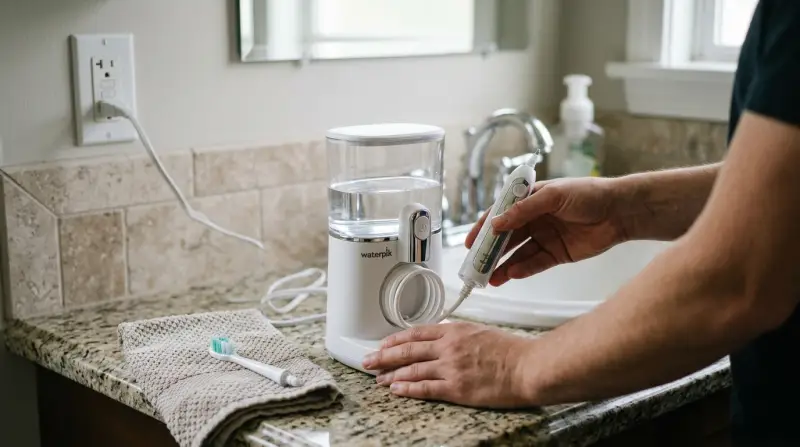
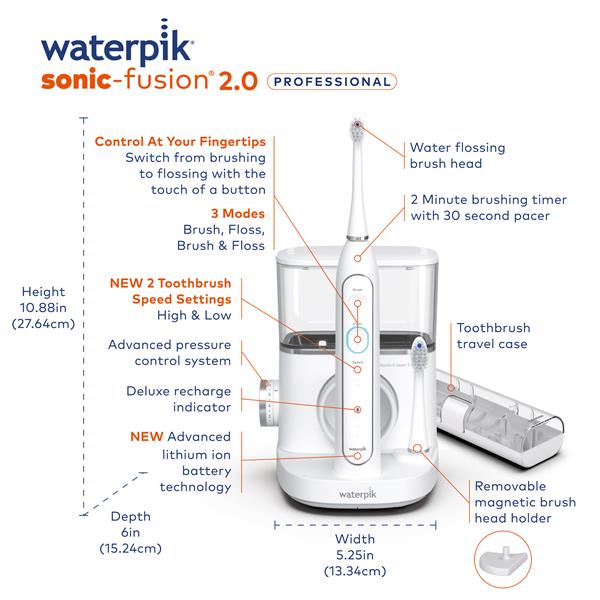
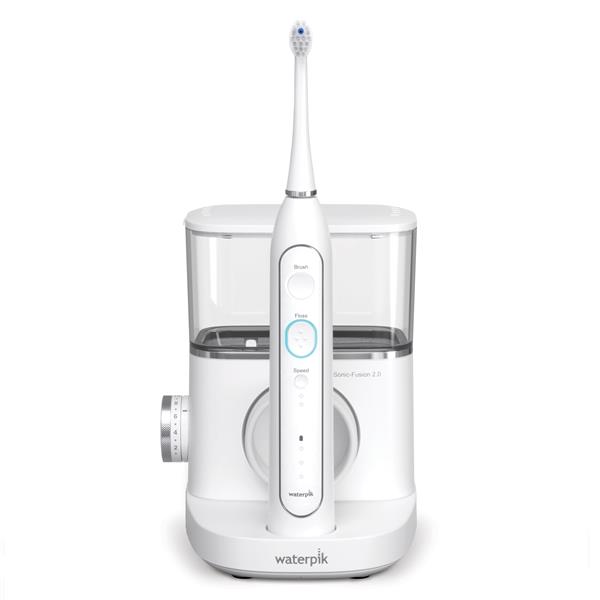
The Waterpik Sonic Fusion 2.0 combines a toothbrush and a water flosser in one device. It’s popular for its convenience, but its dual technology can make troubleshooting harder than a regular toothbrush. Let’s look at its main features and why they matter:
- Two-in-one design: You can brush and floss at the same time.
- Multiple modes: Choose between brush, floss, or both.
- Rechargeable battery: Offers long-lasting power with proper care.
- Water reservoir: Holds enough water for one session.
Its advanced features mean more parts can fail—making it important to understand how each works.
| Feature | Function | Common Issue |
|---|---|---|
| Brush Head | Cleans teeth | Does not spin/vibrate |
| Water Flosser | Jets water between teeth | No water flow |
| Battery | Powers device | Won’t charge or power on |
| Control Panel | Mode selection | Buttons not responding |
Common Reasons Why The Waterpik Sonic Fusion 2.0 Stops Working
Before you panic, most issues have simple causes. Here are the most frequent problems users face:
- Battery failure: The device doesn’t turn on or only works for a short time.
- Charging issues: The charger or cable is faulty, or the charging port is blocked.
- Water flow problems: Water does not come out, or pressure is weak.
- Brush head malfunction: The brush doesn’t move, or feels weak.
- Button problems: The controls don’t work, or modes won’t change.
- Clogged reservoir: Mineral buildup or debris blocks water flow.
- Software glitches: Rare, but can cause device to freeze or behave strangely.
Most problems are easy to fix at home. Only a few need professional repair.
Step-by-step Troubleshooting Guide
Let’s break down each issue and give you clear steps to solve them.
Battery And Charging Problems
- Check the charger: Make sure you’re using the original charger. Avoid third-party chargers; they can cause voltage problems.
- Inspect the port: Look for dust or debris in the charging port. Clean gently with a dry cotton swab.
- Test the outlet: Plug another device into the same outlet to check if it’s working.
- Charge fully: Leave the Waterpik on the charger for at least 4 hours. Sometimes the battery needs extra time.
- Battery reset: If nothing works, try holding the power button for 10 seconds to reset the device.
Water Flow Issues
- Check the reservoir: Remove and clean the water reservoir. Look for mineral buildup or debris.
- Flush the unit: Fill the reservoir with warm water and run the flosser for a few cycles.
- Inspect the tip: Make sure the flosser tip is not blocked.
- Pressure settings: Confirm the pressure setting is not too low.
Brush Head Malfunctions
- Replace the brush head: Old brush heads lose power. Change it every 3 months.
- Check the connection: Make sure the brush head clicks firmly into place.
- Clean the area: Remove any toothpaste residue from the brush connector.
Control Panel And Button Issues
- Dry hands: Wet fingers can cause buttons to misfire.
- Reset the device: Hold the power button for 10 seconds.
- Check for damage: If buttons are stuck, gently clean around them.
Software Glitches
While rare, the Waterpik Sonic Fusion 2.0 can sometimes freeze or not respond. To fix:
- Power cycle: Turn off the device, unplug the charger, wait 30 seconds, and restart.
- Factory reset: Consult the manual for reset instructions.
Dealing With Clogs And Mineral Buildup
If you live in an area with hard water, mineral buildup can block your device. To clean:
- Remove the reservoir and fill it with equal parts white vinegar and warm water.
- Run the device for a few cycles with the cleaning solution.
- Rinse well with clean water to remove any vinegar taste.
| Cleaning Solution | Effectiveness | Recommended Frequency |
|---|---|---|
| White Vinegar | High | Monthly |
| Baking Soda | Moderate | Quarterly |
| Commercial Cleaner | Varies | As needed |
When To Contact Waterpik Support
If your device is still not working after these steps, it may have a deeper problem. Waterpik offers a warranty and customer support. Before you contact them:
- Locate your serial number: Usually found on the bottom or back.
- Gather your purchase details: Receipt or online order confirmation.
- Explain the issue clearly: List the steps you’ve tried.
Waterpik support can guide you through advanced troubleshooting or provide a replacement if your device is under warranty.
Credit: www.waterpik.com
Preventing Future Problems
Keeping your Waterpik Sonic Fusion 2.0 in top shape is easier than you think. Here are some practical tips:
- Charge regularly: Avoid letting the battery drain completely.
- Clean after each use: Rinse the reservoir and brush head with warm water.
- Use filtered water: Reduces mineral buildup and clogs.
- Replace parts: Change brush heads and flosser tips every 3 months.
- Store safely: Keep away from direct sunlight and moisture.
Non-obvious insight: Many users forget to dry the charging port. Moisture here can cause corrosion and prevent charging. Always wipe it after cleaning.
Another overlooked tip: If you share the device, clean the brush head connector more often. Shared use increases the risk of debris buildup.
Comparing Sonic Fusion 2.0 With Other Waterpik Models
If your Sonic Fusion 2.0 keeps failing, you might wonder if another Waterpik model is more reliable. Here’s a quick comparison:
| Model | Features | Typical Issues | Ease of Repair |
|---|---|---|---|
| Sonic Fusion 2.0 | Brush + Floss, Rechargeable | Battery, Water flow, Software | Moderate |
| Waterpik Aquarius | Floss only, Corded | Clogs, Motor | Easy |
| Waterpik Cordless Advanced | Floss only, Rechargeable | Battery, Clogs | Moderate |
Experience-based insight: Sonic Fusion’s combined technology means more parts can fail. Simpler models are easier to fix but lack dual functionality.

Credit: www.waterpik.com
Signs Your Waterpik Needs Professional Repair
Sometimes, home fixes are not enough. Watch for these signs:
- Strange noises: Grinding or buzzing sounds signal motor problems.
- Leaking water: Cracks or broken seals.
- Persistent errors: Device resets itself or won’t stay on.
- Burning smell: Electrical issues—unplug immediately.
If you notice these, stop using the device and contact Waterpik support. Attempting to fix electrical problems yourself is dangerous.
Warranty And Replacement Options
The Sonic Fusion 2.0 usually comes with a two-year limited warranty. Waterpik will repair or replace your device if it fails due to manufacturing defects. Here’s what to know:
- Warranty covers: Battery, motor, and electronic failures—not damage from misuse.
- Replacement process: Contact Waterpik, provide proof of purchase, and ship the device.
- Out-of-warranty: Repairs may cost more than a new unit.
You can check warranty details at the official Waterpik website: Waterpik Sonic Fusion 2.0.
Credit: www.waterpik.ca
Frequently Asked Questions
Why Won’t My Waterpik Sonic Fusion 2.0 Charge?
This is often caused by battery failure, a faulty charger, or dirt in the charging port. Use the original charger, check for debris, and try a different outlet. If it still won’t charge, the battery may need replacement.
How Do I Fix Weak Water Pressure?
Weak water pressure is usually a sign of clogs or mineral buildup. Clean the reservoir and flosser tip, use warm water or vinegar, and check the pressure setting. If the problem continues, the pump may be failing.
Can I Use Tap Water In My Waterpik?
Yes, but filtered water is better for the device. Tap water can cause mineral buildup, especially in hard water areas. Using filtered water reduces clogs and extends the life of your Waterpik.
What Should I Do If The Brush Head Stops Moving?
Replace the brush head every 3 months. If it still doesn’t work, check the connection and clean the area. If the motor fails, contact Waterpik support for repair or replacement.
Is My Waterpik Sonic Fusion 2.0 Covered By Warranty?
Most units come with a two-year limited warranty. Save your purchase receipt and register your device online. Warranty covers manufacturing defects, not accidental damage.
Getting your Waterpik Sonic Fusion 2. 0 back in action can be simple with the right steps. Regular care and smart troubleshooting solve most problems. If you need help, Waterpik support offers reliable guidance. Remember, a healthy device means a healthier smile.