
If your Liftmaster remote 893LM is not working as it should, you may need to reset it. Resetting the remote can fix problems like unresponsive buttons, lost pairing, or accidental changes. Many people face these issues, but the solution is often simple. In this article, you will learn step-by-step how to reset your Liftmaster 893LM remote. You will also find practical tips, common mistakes, and answers to questions that beginners often have. By the end, you will feel confident handling your remote, even if you are not a technical person.
What Is The Liftmaster Remote 893lm?
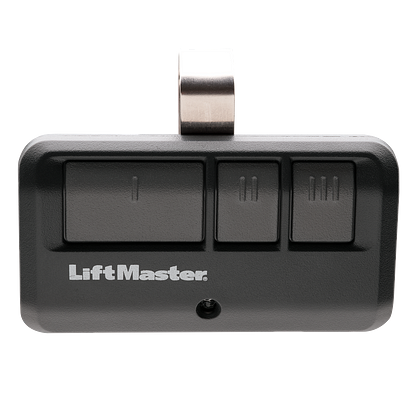
The Liftmaster 893LM is a three-button garage door remote. It works with Liftmaster Security+ 2.0 systems. You can use it to open garage doors, gates, or turn on lights. The remote is popular because it is reliable and easy to use. However, like any electronic device, it may need a reset if it stops working or you want to change its settings.
Key Features
- Controls up to three devices
- Uses Security+ 2.0 technology for safe operation
- Compatible with most Liftmaster garage door openers made after 2011
- Compact, durable design
Common Problems That Require A Reset
- Remote does not open the garage door
- Buttons do not respond
- You bought a used remote and want to clear old settings
- Remote is paired with the wrong opener
Preparing To Reset Your Liftmaster 893lm Remote
Before you start, make sure you have everything you need. Preparation helps avoid mistakes and saves time.
What You Need
- The Liftmaster 893LM remote
- Access to your garage door opener (usually mounted on the ceiling)
- A sturdy ladder (if your opener is out of reach)
- Fresh batteries (if your remote battery is weak)
Safety Tips
- Always disconnect power to the garage door opener if you need to open its cover.
- Keep children and pets away while working.
- Use a secure ladder if you need to reach the opener.
Step-by-step Guide: How To Reset Liftmaster Remote 893lm
Resetting the Liftmaster 893LM remote involves two main steps: clearing old codes and reprogramming the remote.
Step 1: Clearing The Remote’s Memory
This step removes all paired devices from the remote. If you bought a used remote or want to start fresh, clearing memory is important.
- Hold down the button(s) you want to reset for about 10 seconds.
- Release the button when the LED light turns off or stops blinking.
- The remote is now cleared of previous codes.
Insight: Many beginners only clear the remote, but forget to clear the opener’s memory. If you want to fully reset, clear both the remote and opener.
Step 2: Clearing The Garage Door Opener’s Memory
If you want to remove all remote codes from the opener, do this step.
- Find the Learn button on your opener. It is often yellow, red, orange, or purple.
- Press and hold the Learn button for 6 seconds. The LED will turn off.
- All remote codes are erased from the opener.
If you have other remotes, you will need to reprogram them after this.
Step 3: Reprogramming The Remote
Once you have cleared the codes, you need to pair the remote with your opener again.
- Press and release the Learn button on the opener. The LED will light up for 30 seconds.
- On the remote, press the button you want to use for your garage door (button 1, 2, or 3).
- Hold the button for a few seconds until the opener’s light blinks or clicks.
- Release the button. Test the remote.
Non-obvious Insight: If your opener’s light does not blink, wait a few seconds and try again. Sometimes the timing is off.
Step 4: Testing The Remote
After reprogramming, check if your remote works.
- Stand a few feet from the garage door.
- Press the programmed button.
- The door should open or close.
If it does not work:
- Check battery strength
- Repeat the pairing steps
- Make sure you pressed the correct button
Comparison: Liftmaster 893lm Vs Other Liftmaster Remotes
To help you understand how the 893LM compares to other remotes, here is a quick overview:
| Remote Model | Number of Buttons | Security Technology | Year Released | Reset Process |
|---|---|---|---|---|
| 893LM | 3 | Security+ 2.0 | 2011 | Easy |
| 890MAX | 3 | Security+ 2.0 | 2013 | Easy |
| 371LM | 1 | Security+ | 2005 | Moderate |
| 893MAX | 3 | Security+ 2.0 | 2014 | Easy |
Troubleshooting Common Problems
Sometimes, resetting does not fix the issue. Here are practical ways to handle common problems.
Remote Still Not Working
- Check battery: Replace with a fresh CR2032 battery.
- Distance: Move closer to the opener.
- Interference: Remove any devices causing signal interference (Wi-Fi routers, metal objects).
- Opener age: If your opener is very old, it may not support the 893LM remote.
Led Light Does Not Blink
- Button press: Make sure you press and release the Learn button, not hold it too long.
- Remote compatibility: Check that your remote is Security+ 2.0 (look for the logo on the back).
Multiple Doors Or Devices
If you want to control more than one garage door:
- Repeat the programming process for each button on the remote.
- Pair button 1 with door 1, button 2 with door 2, etc.
Practical Tip: Label your remote buttons with stickers to avoid confusion.
Data: How Often Do Users Need To Reset Their Remotes?
Liftmaster estimates that about 30% of remote users need to reset or reprogram their remotes each year. Most issues are due to battery failure, accidental button presses, or lost pairing after power outages.
| Reason for Reset | Percentage of Users |
|---|---|
| Battery Change | 45% |
| Accidental Button Press | 25% |
| Lost Pairing | 20% |
| Bought Used Remote | 10% |
Credit: www.liftmaster.com
Practical Tips For Beginners
Resetting a remote may seem easy, but beginners often make mistakes that cause frustration. Here are some tips:
- Always check the battery first. A weak battery can mimic pairing problems.
- Do not press and hold the Learn button for too long. Doing so erases all codes.
- Write down which button controls which device.
- If you have multiple remotes, reset and reprogram all at the same time.
- If your remote is not compatible, check the opener’s serial number and model before buying.
Comparing Reset Steps: 893lm Vs. 893max
Many people confuse the 893LM with the 893MAX. Here is a quick comparison of their reset steps:
| Step | 893LM | 893MAX |
|---|---|---|
| Clear Memory | Hold button 10s | Hold button 10s |
| Clear Opener | Hold Learn 6s | Hold Learn 6s |
| Reprogram | Press Learn, then remote | Press Learn, then remote |
| LED Indicator | Blink/click | Blink/click |
Non-obvious insight: The process is almost identical, but the 893MAX has a slightly different button layout. Always check the manual for your specific model.

Credit: www.youtube.com
When To Replace Instead Of Reset
Sometimes, resetting will not solve the issue. Consider replacement if:
- The remote does not work after several resets.
- Buttons are physically damaged.
- The remote is more than 5 years old and shows signs of wear.
Liftmaster recommends changing remotes every 5–7 years for best performance.
Where To Find Official Liftmaster Support
If you still have trouble, visit the official Liftmaster support site for manuals and videos. You can also find authorized dealers for replacement parts. Here is a helpful link: liftmaster Customer Support
Frequently Asked Questions
Can I Reset The Liftmaster 893lm Remote Without Erasing Other Remotes?
No, if you only clear the remote’s memory, other remotes stay paired. But if you clear the opener’s memory, all remotes must be reprogrammed.
How Do I Know My Remote Is Security+ 2.0 Compatible?
Check for the Security+ 2.0 logo on the back or in the manual. The 893LM is made for openers from 2011 onward.
Is It Safe To Reset My Remote Myself?
Yes, as long as you follow basic safety rules. Disconnect power if needed and keep children away while working.
How Long Does It Take To Reset The Liftmaster 893lm Remote?
Most resets take 2–5 minutes. If you have several devices, it may take longer.
What Should I Do If My Remote Still Does Not Work After A Reset?
Check batteries, repeat pairing steps, and check compatibility. If it still fails, consider replacing the remote or contacting Liftmaster support.
Resetting your Liftmaster 893LM remote is a straightforward process once you know the steps. Always check batteries first, clear memory when needed, and reprogram carefully. Avoid common mistakes like holding the Learn button too long or forgetting to test after pairing.
With this guide, you can fix most issues yourself and save time. If you run into persistent problems, official support is just a click away. Remember, a well-working remote keeps your garage secure and your daily routine smooth.