
If you own an LG refrigerator with a water dispenser or ice maker, you know how important clean, fresh water is for your family. Over time, the water filter inside your fridge removes impurities, chlorine, and even some bacteria, ensuring your drinks and ice taste their best. But like any filter, it needs to be changed regularly. Many people feel unsure about this process or forget the final, crucial step—resetting the filter indicator. Let’s walk through everything you need to know to change and reset the water filter in your LG refrigerator, with practical tips and advice to avoid common mistakes.
Why Changing Your Lg Water Filter Matters

A clean water filter is essential for both health and taste. Overused filters become less effective, letting contaminants slip through. According to the NSF International, unchanged fridge filters can even become breeding grounds for bacteria. LG recommends changing the water filter every 6 months or after about 200 gallons (757 liters) of water use—whichever comes first.
You might notice warning signs when it’s time to replace:
- Strange taste or odor in water or ice
- Slow water flow from the dispenser
- The filter indicator light turns on or changes color
Ignoring these can affect your refrigerator’s performance and your family’s health.
Types Of Lg Refrigerator Water Filters
Before buying a replacement, you need to know which filter your LG refrigerator uses. LG uses several models, but the most common are LT500P, LT600P, and LT700P. Each fits specific refrigerator designs.
Here’s a handy comparison:
| Filter Model | Compatible Refrigerator Series | Filter Location | Typical Price (USD) |
|---|---|---|---|
| LT500P | LRSC, LSC, GR-L, GR-T | Upper left, inside fridge | $40-50 |
| LT600P | LFX, LFD, LFXS | Upper right, inside fridge | $45-55 |
| LT700P | LFX, LSXS, LMXC | Upper left, inside fridge | $45-60 |
Always check your refrigerator’s manual or inside the fridge for the correct filter code. Using the wrong filter can cause leaks or poor filtration.
Tools And Supplies Needed
Replacing your LG water filter is simple and requires no special tools. Here’s what you’ll need:
- Replacement LG water filter (authentic or certified compatible)
- Towel (to catch any water drips)
- Pitcher or large glass (for flushing the new filter)
Some people use generic filters to save money. While these can work, they may not fit perfectly or have the same certifications. For best results and warranty protection, use an official LG filter.
How To Change The Water Filter In An Lg Refrigerator
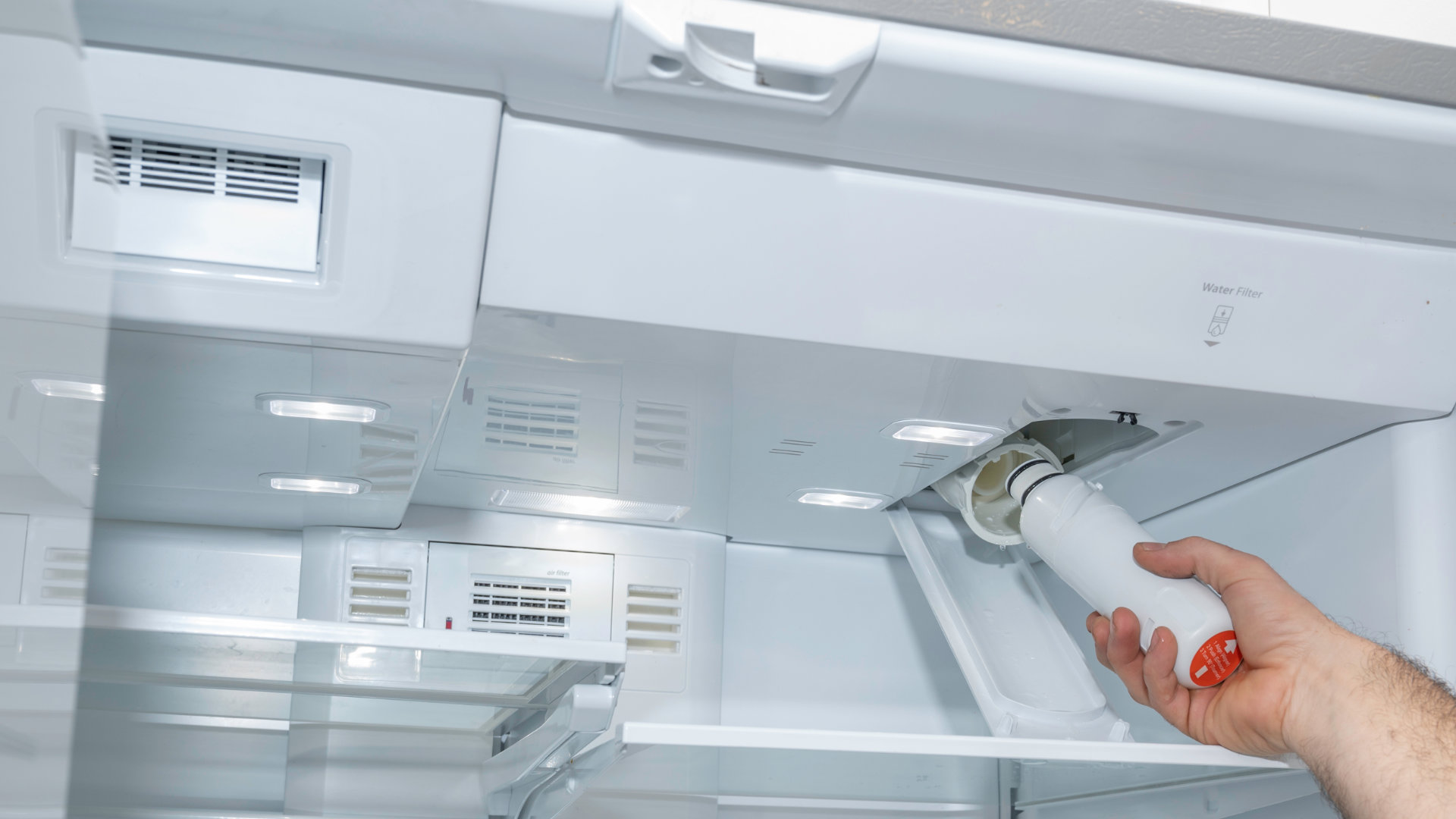
Let’s break the process into clear steps. The most common LG filter location is inside the upper left or right corner of the fridge compartment. However, a few models have the filter in the base grille (bottom front panel). Check your user manual if unsure.
Step 1: Prepare The Area
Open the refrigerator door wide. Remove any items from the shelf below the filter area to avoid spills. Place a towel under the filter housing to catch small amounts of water that may leak during removal.
Step 2: Remove The Old Filter
For most LG models:
- Open the filter cover by gently pulling or pushing the tab.
- Turn the filter counterclockwise (left) about a quarter turn until it releases.
- Pull the filter straight out. A small amount of water may drip—this is normal.
For base grille filters, push the release button or twist as instructed in your manual.
Step 3: Install The New Filter
- Unwrap the new filter and remove any protective caps.
- Align the filter with the housing. Insert it straight in.
- Turn the filter clockwise (right) until it stops. Do not overtighten.
- Close the filter cover.
If you feel resistance, double-check the alignment. Forcing the filter can damage the housing. Some beginners forget to remove the cap, which will prevent installation.
Step 4: Flush The New Filter
This is a step many skip, but it’s vital. New filters contain loose carbon dust and air. Flushing cleans the filter and prevents cloudy water or strange taste.
- Dispense and discard at least 2.5 gallons (about 10-15 large glasses) of water through the dispenser.
- Do this in short bursts, letting the water run for 30 seconds and pausing for 60 seconds. This protects the water line and filter.
Skipping this step can cause gray or cloudy water and may damage the dispenser pump.
Step 5: Check For Leaks
Look for drips around the filter area and under the fridge. If you see leaks, remove and reinstall the filter, ensuring it’s seated properly. Persistent leaks may mean you have the wrong filter model or a damaged filter head.
How To Reset The Lg Refrigerator Water Filter Indicator
After replacing the filter, you need to reset the filter change indicator light. If you skip this, the fridge won’t know a new filter is installed, and you’ll get unnecessary warnings.
The reset process varies by model but usually involves holding a button for a few seconds. Here are the most common methods:
| Button Name | Location | Reset Method |
|---|---|---|
| Filter Reset | Control panel, front of fridge | Press and hold for 3-5 seconds |
| Water Filter | Touchscreen or button panel | Press and hold until indicator light turns off |
| Ice & Water | Touchpad or display | Press and hold for 3 seconds |
If you’re unsure which button to press, check your refrigerator’s manual or the LG support page. After resetting, the indicator will turn off or change back to green.
How Often Should You Change The Filter?
Most LG fridge owners should replace the water filter every 6 months. But your usage might mean you need to change it more often. Here are some factors:
- Large families or heavy water use: Every 3–4 months
- Hard water areas: Filter can clog faster
- Unusual taste or odor: Change immediately, even if it’s before 6 months
Your filter change light is a helpful guide, but it’s based on time, not water quality. Don’t ignore taste or flow issues just because the light hasn’t turned on yet.
Credit: www.lg.com
Common Mistakes To Avoid
Changing your refrigerator water filter isn’t complicated, but some easy mistakes can cause problems:
- Forgetting to flush the new filter: This leaves carbon dust in your drinking water.
- Using the wrong filter model: Leads to leaks, poor fit, or no filtration.
- Not resetting the filter indicator: Causes confusion later.
- Overtightening the new filter: Can break the filter head or housing.
- Ignoring leaks after installation: Even a small leak can lead to water damage.
One less obvious mistake: storing an extra filter in a hot or humid place. Extreme temperatures can damage the filter material before you even install it.
Tips For Buying Replacement Lg Water Filters
With so many options online, it’s tempting to buy the cheapest filter. But this isn’t always wise. Here’s how to choose:
- Buy genuine LG filters from authorized dealers for best results.
- If using third-party filters, look for NSF/ANSI 42 and 53 certifications. These ensure basic safety and contaminant reduction.
- Check for a return policy in case the filter doesn’t fit.
- Be wary of very low prices and unknown brands—some are counterfeit.
For more guidance on water filter safety standards, visit the NSF International website.
When To Call A Professional
Most LG refrigerator owners can change and reset the water filter themselves. But there are times when it’s best to get help:
- Persistent leaks after changing the filter
- Filter won’t lock in place
- Error codes on the display after resetting
A professional can check for damage to the filter housing or water lines. If you have an older fridge or hard-to-reach filter, hiring a technician may save time and hassle.

Real-world Example: How Long Does It Take?
Changing the filter and resetting the indicator should take about 10–15 minutes for most people. Flushing the filter adds another 5 minutes. Planning ahead (having the right filter, a towel, and a pitcher ready) makes the process smoother.
Some LG refrigerator owners say that using a calendar reminder or phone alarm helps them remember the 6-month schedule. This is a simple trick that avoids missing filter changes, especially for busy families.
Frequently Asked Questions
How Do I Know Which Water Filter Fits My Lg Refrigerator?
Check your fridge’s user manual or look inside the fridge compartment for a sticker with the filter model number. You can also visit the LG support website and enter your model number to find compatible filters.
Is It Safe To Use Non-lg Brand Filters?
Yes, but only if the filter has proper NSF/ANSI certification. Using uncertified filters can lead to leaks, poor filtration, or even damage your fridge. Genuine LG filters are safest, but some reputable third-party brands meet the necessary safety standards.
What Happens If I Don’t Reset The Water Filter Indicator?
The indicator will continue to signal “replace filter,” even if you already installed a new one. This can be confusing and may cause you to replace the filter too soon or too late. Resetting the indicator ensures you follow the correct schedule.
Why Is My Water Cloudy After Changing The Filter?
This is usually caused by air trapped inside the new filter or loose carbon dust. Flushing at least 2.5 gallons of water through the system should clear it up. If the problem continues, check that the filter is installed correctly.
How Do I Dispose Of The Old Water Filter?
Most refrigerator water filters are made of plastic and can be thrown away with regular trash. Some local recycling programs accept used filters—check with your city’s waste management service for options.
Changing and resetting the water filter in your LG refrigerator is simple with the right steps and a little preparation. Not only does it keep your water tasting fresh, but it also protects your health and your appliance. Stay on schedule, use the correct filter, and never skip flushing or resetting.
With regular maintenance, your LG fridge will keep serving clean, safe water for years to come.
1 thought on “How to Change Reset Water Filter in LG Refrigerator Easily”