
If your GE refrigerator has a water filter, you probably know how important it is for fresh, clean drinking water. But simply changing the filter isn’t enough—you also need to reset the water filter indicator so your fridge knows the new filter is installed. Many people miss this step or struggle with it, but it’s actually quite easy once you know how. This guide will show you exactly how to reset your GE refrigerator water filter, step-by-step, and help you avoid common mistakes.
Why Resetting The Water Filter Is Essential
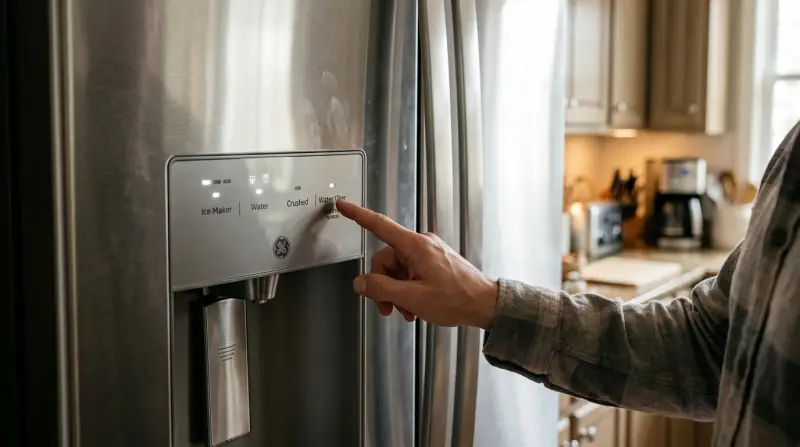
When you install a new water filter, the refrigerator’s system doesn’t automatically recognize it. The filter indicator light will keep reminding you to change the filter, even though you already did. If you don’t reset this indicator, you might think there’s a problem, or forget when your next filter change is actually due.
Resetting helps:
- Keep track of filter life accurately
- Ensure the indicator alerts you only when necessary
- Prevent confusion with filter performance
According to GE Appliances, most water filters need replacing every six months or after filtering 200-300 gallons of water, depending on your model. If you ignore the reset, you risk using a filter past its optimal lifespan, which can reduce water quality.
Understanding Your Ge Refrigerator Water Filter System
Before you reset, it’s helpful to know the basics about your refrigerator’s water filter system. GE refrigerators use several filter types, including RPWF, MWF, and XWF. The filter is usually installed inside the fridge, either in the upper right corner or behind a small panel.
Most GE refrigerators have a filter indicator light—often labeled as “Water Filter” or “Replace Filter”—on the control panel. When it turns red or flashes, it’s time to change the filter and reset the indicator.
Common Filter Indicator Locations
- French door models: Control panel above ice dispenser
- Side-by-side models: Panel inside the fridge or on the dispenser
- Top-freezer models: Manual reset button inside
Not all models look the same, so check your user manual if you’re unsure.
How To Reset Ge Refrigerator Water Filter: Step-by-step
Resetting is quick. You just need to find the right button or sequence for your model.
Step 1: Change The Water Filter
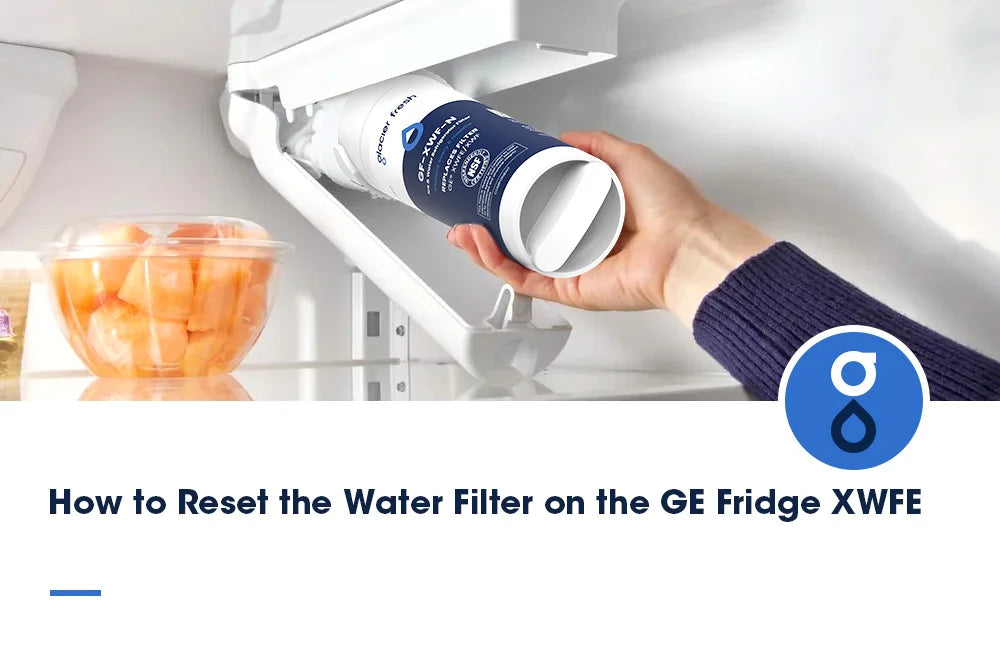
- Open the filter compartment (usually in the fridge’s upper right).
- Turn the old filter counterclockwise and pull it out.
- Remove protective cover from the new filter.
- Insert the new filter and turn clockwise until it locks.
- Run about 2-3 gallons of water through the dispenser to flush air and carbon residue.
Step 2: Locate The Filter Reset Button
Most GE refrigerators have a reset button. It’s often marked as “Reset”, “Water Filter”, or has an icon.
- French door models: Look for the button near the dispenser display.
- Side-by-side models: The button may be inside, near the filter.
- Older models: Sometimes, you must hold two buttons at once (like “Ice & Water” and “Reset”).
Step 3: Press And Hold The Reset Button
- Press and hold the reset button for 3–5 seconds.
- The indicator light should turn green or stop blinking.
- If the light doesn’t change, try holding the button longer or check your manual.
Step 4: Confirm The Reset
- The indicator light should be off or green.
- If it remains red, check for:
- Incorrect filter installation
- Needing to press a different button combination
Some newer models have touch screens. On these, select “Settings,” then “Water Filter,” and tap “Reset. ”
Step 5: Record The Date
Write down the filter change date. This helps track when the next change is due, especially if your indicator malfunctions.
Data: Ge Refrigerator Filter Types And Reset Methods
Here’s a quick comparison of common GE filter types and their reset methods:
| Filter Type | Common Location | Reset Method |
|---|---|---|
| MWF | Upper right, inside fridge | Press and hold “Reset” for 3 seconds |
| RPWF | Upper right, inside fridge | Press “Water Filter” button for 3 seconds |
| XWF | Inside panel, side-by-side | Hold two buttons (“Ice & Water” + “Reset”) |
| GSWF | Behind panel, top-freezer | Manual switch inside fridge |
Credit: glacierfreshfilter.com
Practical Tips For A Smooth Filter Reset
Resetting is simple, but a few practical tips can make it easier:
- Unplug before replacing: For extra safety, unplug your fridge when changing filters.
- Flush water after install: Always flush 2–3 gallons to clear air and carbon.
- Don’t force filter: If the filter doesn’t fit, double-check the model number.
- Check indicator light: Wait a few seconds after pressing reset; some lights don’t change instantly.
- Keep spare filters: Stock up so you’re ready for the next change.
One non-obvious tip: If your indicator doesn’t reset, try power cycling the fridge. Unplug it for 30 seconds, plug back in, and retry the reset.
Common Mistakes When Resetting Ge Refrigerator Water Filter
Even experienced users make mistakes. Watch out for these:
- Skipping the reset: Many people change the filter but forget to reset the indicator. This leads to confusion later.
- Using the wrong filter: GE refrigerators are picky. Using a non-GE filter can cause the indicator not to reset properly.
- Pressing the wrong button: Some models require a button combo, not just one button.
- Not flushing the system: Failing to flush can leave air or carbon residue, affecting water taste.
- Ignoring blinking lights: If the reset doesn’t work, don’t just ignore the indicator. It usually signals a problem.
A common beginner mistake is not checking the filter’s model number. GE has several similar-looking filters, but only the right one fits and works with the reset system.

Troubleshooting: What To Do If The Reset Fails
Sometimes the reset doesn’t work as expected. Here’s how to troubleshoot:
1. Check Filter Installation
- Make sure the filter is installed firmly and locked in place.
- Remove and reinsert if needed.
2. Try A Manual Reset
Some models require manual resets:
- Hold the reset button longer (up to 10 seconds).
- Try different button combinations (refer to your fridge’s manual).
3. Power Cycle The Refrigerator
- Unplug for 30–60 seconds.
- Plug back in and retry the reset.
4. Inspect The Control Panel
- Look for sticky buttons or dirt.
- Clean gently with a soft cloth.
5. Contact Ge Support
If all else fails, reach out to GE customer support or check the official GE Appliances website for help.
Comparison: Reset Methods For Different Refrigerator Brands
While GE uses a simple button reset, other brands do things differently. Here’s a quick comparison:
| Brand | Reset Method | Indicator Type |
|---|---|---|
| GE | Press/hold reset button | Light or display panel |
| Samsung | Hold “Water Filter” for 3 sec | Digital display |
| LG | Press “Reset” for 5 sec | LED indicator |
| Whirlpool | Press “Reset” or unplug | Light or display |
| Frigidaire | Hold “Reset” for 3 sec | Green/red LED |
This shows GE’s process is similar to other leading brands, but the button location and combinations may vary.
How Often Should You Reset The Water Filter Indicator?
You should reset the indicator every time you replace the filter. For most GE refrigerators, this is every six months or sooner if you notice:
- Reduced water flow
- Unusual taste or odor
- Indicator light turns red
The actual filter lifespan depends on your household’s water usage. If you use the water dispenser often, change the filter more frequently.
Real-world Example: Resetting A Ge French Door Refrigerator
Let’s look at a real example. Sarah owns a GE French door refrigerator. Her filter indicator turned red after six months. She bought a new MWF filter, installed it, and needed to reset the light.
Steps Sarah followed:
- Removed the old filter by twisting counterclockwise.
- Inserted the new filter and locked it in place.
- Flushed water for two minutes.
- Located the “Reset” button above the dispenser.
- Pressed and held for four seconds. The light turned green.
Sarah wrote the change date on a sticker inside her fridge. She avoided the mistake of skipping the reset, which she had done previously.

Credit: www.youtube.com
Data: Filter Lifespan And Replacement Frequency
According to GE, the average filter lasts six months. But water quality and usage matter. Here’s a quick data table:
| Filter Type | Average Lifespan | Gallons Filtered |
|---|---|---|
| MWF | 6 months | 200 gallons |
| RPWF | 6 months | 250 gallons |
| XWF | 6 months | 300 gallons |
If your household uses more water, consider replacing filters more often.
Benefits Of Keeping Your Filter Indicator Reset
Many people don’t realize the full benefits of keeping the indicator properly reset:
- Better water quality: Fresh filters remove more contaminants.
- Peace of mind: You always know when to change filters.
- Longer appliance life: Clean filters protect your fridge’s water system.
One insight: Resetting the indicator also helps with warranty claims. If GE asks for filter change dates, you’ll have accurate records.
Frequently Asked Questions
How Do I Know If My Ge Refrigerator Filter Needs Resetting?
If the indicator light is red or blinking after installing a new filter, you need to reset. It should turn green or off when properly reset.
What If The Reset Button Doesn’t Work?
Try holding the button longer (up to 10 seconds). If it still doesn’t work, unplug the fridge for one minute, then try again. Check your user manual for specific instructions.
Can I Use Non-ge Filters?
It’s possible, but not recommended. Non-GE filters may not fit properly, and the indicator may not reset. Always use compatible filters listed in your fridge manual.
How Long Should I Flush Water After Changing The Filter?
Flush 2–3 gallons or run the dispenser for about two minutes. This clears air and any carbon residue from the new filter.
Is It Safe To Reset The Indicator Without Changing The Filter?
No, only reset after changing the filter. Resetting without a new filter can trick the fridge into thinking the filter is clean, which could reduce water quality.
Resetting your GE refrigerator water filter is simple and quick when you know the right steps. By following this guide, you’ll keep your water fresh, your fridge running smoothly, and avoid confusion with the filter indicator. Remember to always use the correct filter, flush the system, and record your change dates.
If you ever get stuck, the GE Appliances website has more detailed support. With these tips, your fridge will give you clean water every time.