
Unlocking a locked GE Profile dishwasher control panel can feel frustrating, especially if you need clean dishes quickly. Many owners worry something is broken or that they’ll need a costly repair. But in most cases, the solution is simpler than it seems. This guide will walk you step-by-step through the process, explain why the panel locks, and share solutions for common problems. By the end, you’ll have the confidence to unlock your dishwasher safely and know what to do if problems happen again.
Understanding The Ge Profile Dishwasher Control Lock
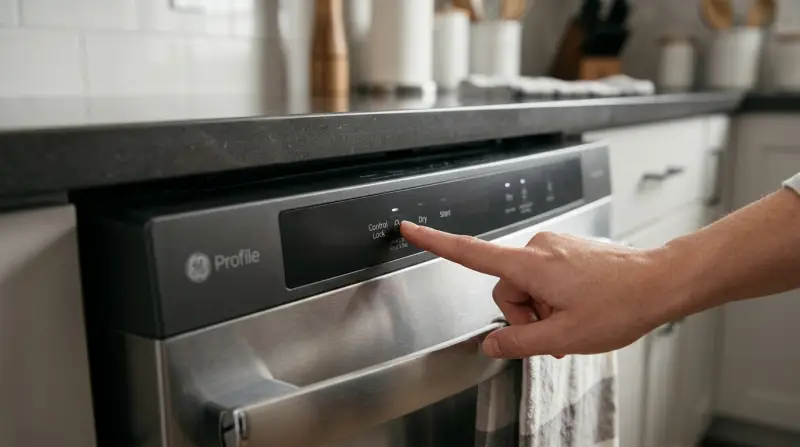
The control lock feature is designed to prevent accidental button presses. This is especially useful if you have children or want to avoid someone changing the settings during a wash. When the control panel is locked, none of the buttons will work—even the Start button. Instead, you might see a light or a small lock symbol on the display.
Not all dishwashers have the same lock symbols or buttons. GE Profile models can vary, so it’s important to know your exact model. In most cases, the lock is activated and deactivated in similar ways, but small differences exist.
Why Does The Control Panel Lock?
- Child Safety: Keeps children from starting or stopping a cycle.
- Cleaning Prevention: Stops settings from changing if you wipe the panel.
- Accidental Touches: Avoids changes when loading or unloading dishes.
If you see your control panel is unresponsive, the lock feature is often the cause—not a malfunction.
How To Identify A Locked Control Panel
The first step is making sure your GE Profile dishwasher is actually locked, not just off or in sleep mode. Look for these signs:
- Lock symbol lit up on the control panel
- Control Lock or Locked text showing on the display
- Buttons not responding when pressed
- Beeping sound when you try to press buttons
Some models use a small padlock icon, while others use words. If you’re unsure, check your user manual or look up your model on the official GE Appliances website.
Credit: www.reddit.com
Unlocking The Control Panel: Step-by-step
Unlocking the control panel is usually easy, but it depends on your model. Here are the most common methods.
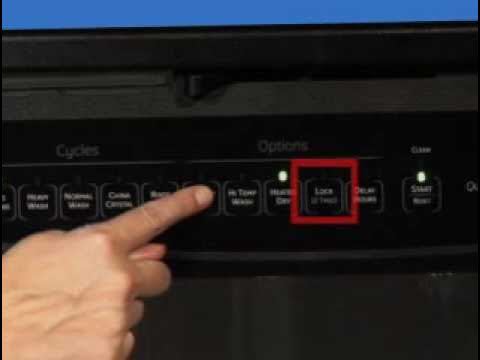
Method 1: Press And Hold The Lock Button
- Find the “Lock” or “Control Lock” button. This is often near the Start button or marked with a lock symbol.
- Press and hold the button for 3 seconds.
- Watch for lights or symbols to turn off. The lock icon should disappear or the “Locked” text should vanish.
- Test the panel. Try pressing another button to see if it works.
If your dishwasher has a “Heated Dry” or “Dry Boost” button, this sometimes doubles as the lock button.
Method 2: Use A Button Combination
On some models, you unlock the panel by pressing two buttons at the same time. Common combinations include:
- Heated Dry + Start
- Dry Boost + Steam
- Cycle + Start
Steps:
- Press and hold both buttons for 3 seconds.
- Wait for the lock light to turn off.
- Try starting a cycle to check if it’s unlocked.
Method 3: Power Reset
If the above steps don’t work, try resetting the dishwasher:
- Turn off power at the circuit breaker for 1 minute.
- Turn the power back on.
- Wait for the dishwasher to reboot. This can clear temporary software glitches.
- Try unlocking again using the methods above.
Method 4: Consult The User Manual
If you’re still stuck, check the specific instructions in your user manual. Search for your exact model number at the official GE Appliances support page for tailored guidance.
Common Mistakes And How To Avoid Them
Unlocking the control panel is simple, but a few common errors can waste time or lead to confusion.
- Pressing the wrong button: Not all buttons will unlock the panel. Look for the specific lock symbol or check your manual.
- Not holding long enough: Many models require you to hold the button for a full 3 seconds. If you release too soon, the lock won’t turn off.
- Power supply issues: If the dishwasher has no power, the panel will also be unresponsive. Check your outlet and breaker.
- Misreading display lights: Sometimes, other warning lights can look like a lock. Double-check the symbols.
What To Do If The Control Panel Still Won’t Unlock
If you’ve tried all methods and your GE Profile dishwasher control panel still won’t unlock, there may be a deeper issue. Here’s what to check next.
1. Inspect For Electrical Problems
- Check if the dishwasher is plugged in.
- Inspect the circuit breaker for tripped switches.
- Look for obvious damage to cords or outlets.
2. Examine For Moisture Or Debris
Moisture can get behind the control panel during cleaning. Wait a few hours and try again. Sometimes, sticky residue from cleaning products can interfere with buttons.
3. Test For Control Board Failure
If your dishwasher is getting power, but the control panel stays locked, the main control board might be faulty. Signs include:
- No response to any buttons, even after reset
- Lights flashing in an unusual pattern
- Dishwasher starts then stops immediately
A qualified technician can test or replace the control board.
4. Call For Professional Help
If all else fails, contact GE Appliances support or a certified repair technician. Describe the steps you’ve taken—they may walk you through advanced troubleshooting or schedule a service visit.
Comparing Different Ge Profile Models
GE Profile dishwashers come in several types. The way you unlock the control panel can differ. Here’s a quick comparison of common models and their unlock methods.
| Model | Lock Symbol Location | Unlock Method |
|---|---|---|
| GE Profile PDT715SYNFS | Above Heated Dry Button | Press & Hold Heated Dry (3 sec) |
| GE Profile PDT785SYNFS | Near Start Button | Press & Hold Start (3 sec) |
| GE Profile PDT775SYNFS | On Display Panel | Press & Hold Lock (3 sec) |
Non-obvious insight: Some models have a “hidden” control panel at the top of the door. You need to open the door slightly to see the lock symbol or access the buttons.
Preventing Future Control Lock Issues
To avoid accidental locking in the future, use these practical tips:
- Educate family members on what the lock button does.
- Wipe the control panel gently. Don’t press buttons while cleaning.
- Activate lock only when needed, such as during a party or with small children around.
- Use a sticky note near the dishwasher as a reminder of the unlock steps.
If you have frequent accidental locks, consider using a dishwasher model with a physical key lock or childproof cover.
Troubleshooting Other Common Dishwasher Problems
Sometimes, other issues can look like a locked control panel. Here’s how to tell the difference and fix them.
Dishwasher Won’t Start But Is Not Locked
- Door not fully closed: The dishwasher will not start if the door isn’t latched.
- Cycle already in progress: Opening the door pauses the cycle. Close and press Start again.
- Delayed start setting: If the delay is active, the dishwasher waits before starting.
Error Codes Or Flashing Lights
- Error codes like “C4” or “C6” may show up if there’s a water or sensor problem.
- Check your user manual or GE Appliances support page for explanations.
Buttons Are Stuck Or Not Working
- Debris under buttons: Clean gently with a soft, damp cloth.
- Moisture inside panel: Let the dishwasher dry out before trying again.
Credit: www.youtube.com
Table: Control Lock Vs. Other Common Problems
Here’s a quick way to compare lock issues with other common problems.
| Symptom | Likely Cause | How to Fix |
|---|---|---|
| Buttons unresponsive, lock symbol on | Control lock active | Hold lock button for 3 seconds |
| No lights, no sound | No power supply | Check outlet/circuit breaker |
| Flashing error code | System error | Consult manual or support |
| Buttons sticky | Moisture or debris | Clean panel, let dry |
Table: Quick Reference—unlocking Steps By Model Type
| Panel Type | Unlock Button(s) | Time to Hold |
|---|---|---|
| Top Control | Heated Dry | 3 seconds |
| Front Control | Lock or Control Lock | 3 seconds |
| Hidden Control | Start + Cycle | 3 seconds |
Safety Tips When Troubleshooting
Always keep safety in mind when working with any electrical appliance.
- Unplug or turn off power before handling wires or opening the panel.
- Do not spray water directly on the control panel.
- Wear dry gloves if you need to touch electrical parts.
- If you smell burning or see sparks, call a professional immediately.
When To Replace The Control Panel
In rare cases, the control panel or touchpad may be damaged. Signs you may need a replacement:
- Buttons do not work even after reset and cleaning.
- Physical cracks or water inside the panel.
- Control panel works sometimes, then stops.
A replacement part can cost between $80 and $250 plus labor. Compare the cost to the price of a new dishwasher, especially if your model is over 8 years old.
Maintaining Your Ge Profile Dishwasher
Regular care can prevent many problems, including lock issues.
- Clean the control panel with a damp (not wet) cloth.
- Check for software updates if your model supports Wi-Fi.
- Inspect door seals and hinges for wear.
- Run a dishwasher cleaner monthly to prevent buildup.
Non-obvious insight: If you live in a humid climate, moisture can build up inside the panel more easily. Leave the door slightly open after cycles to help dry out the inside.
Frequently Asked Questions
How Do I Know If My Ge Profile Dishwasher Control Panel Is Locked?
If you see a lock symbol or the word “Locked” on the panel, and the buttons do not respond, your control panel is locked. Some models also beep when you try to press buttons.
What If I Lost My User Manual?
You can search for your model number at the official GE Appliances website and download the manual for free. This will show the exact unlock steps for your model.
Does Unplugging The Dishwasher Unlock The Control Panel?
Unplugging or turning off power may reset the system, but it does not always unlock the control panel. You will still need to use the correct button combination after restoring power.
Can A Child Accidentally Lock The Dishwasher?
Yes, children can accidentally activate the control lock by pressing and holding the right button. That’s why the feature is designed for safety, but it can be confusing if you don’t know how to unlock it.
Is It Safe To Repair The Control Panel Myself?
Simple resets and cleaning are safe, but opening the control panel or replacing parts should be done by a professional. There is a risk of electric shock if you don’t turn off the power.
Unlocking your GE Profile dishwasher control panel is a quick process once you know what to do. By following the steps in this guide and using the comparison tables, you can solve most problems in minutes. With regular care and a little knowledge, you can keep your dishwasher running smoothly for years. If you ever feel unsure, don’t hesitate to reach out to a professional for help.