
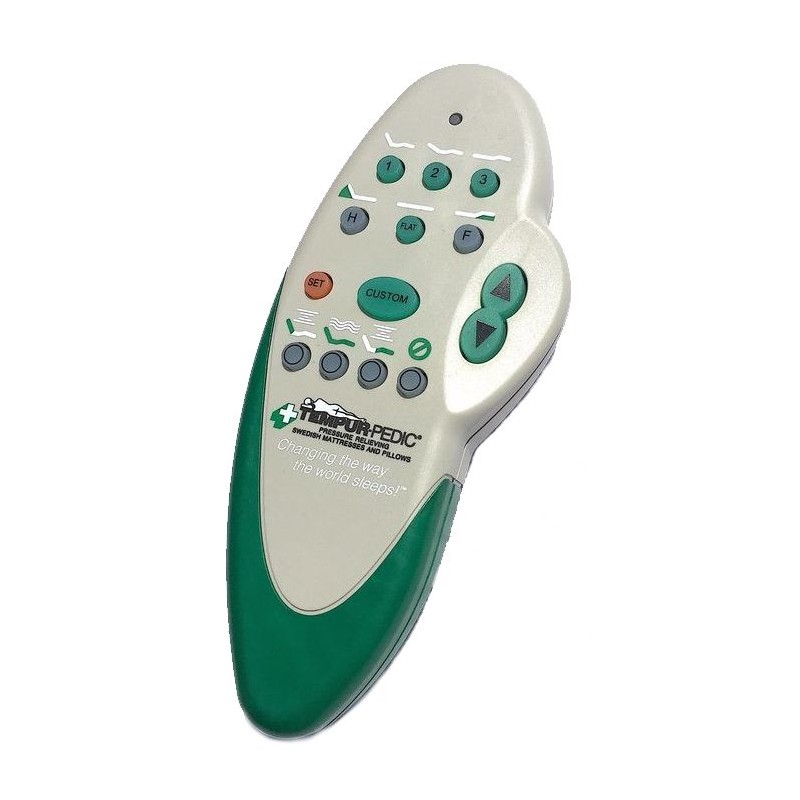
Many people rely on Tempurpedic adjustable beds for comfortable sleep. These beds use a remote to change positions, but older Tempurpedic remotes sometimes stop working or refuse to reset. This problem can be frustrating, especially if you wake up and cannot adjust your bed.
With more adjustable beds in homes, understanding how to fix remote problems has become important.
If your older Tempurpedic remote reset is not working, you’re not alone. This article covers why these remotes fail, how to troubleshoot, and practical solutions. We’ll also explain when you should call for help and how to avoid common mistakes.
Whether your remote is stuck, won’t pair, or just won’t respond, you’ll find clear advice here.
Common Reasons Older Tempurpedic Remotes Fail
Older Tempurpedic remotes are not as advanced as new models. They can fail for many reasons. Understanding the cause is the first step.
- Battery issues: Weak batteries are the most frequent cause. Tempurpedic remotes often use AAA or coin cell batteries. If the battery is low, the remote may work only sometimes or not at all.
- Signal interference: Wireless remotes send signals to the bed’s receiver. WiFi routers, cordless phones, or even thick walls can block or weaken the signal.
- Wear and tear: Buttons lose sensitivity over time. Internal parts can get dirty or worn out.
- Lost pairing: Sometimes the remote and the bed lose their connection. This can happen after a power outage or if you unplug the bed.
- Firmware or software glitches: Older models can freeze or lock up if there’s a glitch.
- Physical damage: Dropping the remote can damage the circuit board or loosen internal parts.
Troubleshooting Steps For Remote Reset Problems
Before buying a new remote or calling for service, try these steps. Many users solve their issues with simple checks.
Step 1: Check The Batteries
Remove the battery cover and replace the batteries with new ones. Make sure they are installed with the correct polarity. Even if the remote lights up, weak batteries can cause problems.
Step 2: Inspect The Remote
Look for visible damage. Sticky buttons, cracks, or signs of water can cause trouble. Clean the remote gently with a dry cloth.
Step 3: Power Cycle The Bed
Unplug the bed from the wall for 60 seconds. Plug it back in. This resets the bed’s receiver. Sometimes, this step alone restores remote function.
Step 4: Re-pair The Remote
Most Tempurpedic beds have a pairing button on the receiver box under the bed. Press this button, then hold a button on your remote (usually “flat” or “stop”) until the bed moves or a light blinks. If your model has a pairing sequence, follow it from the user manual.
Step 5: Test For Signal Interference
Move any electronics away from the bed. Try the remote at different angles or distances.
Step 6: Try A Hard Reset
If pairing does not work, perform a hard reset:
- Unplug the bed for at least 5 minutes.
- Remove batteries from the remote.
- Plug in the bed.
- Insert batteries and try pairing again.
Step 7: Check The Receiver Box
Sometimes, the receiver box under the bed comes loose. Make sure all cables are firmly connected. Look for blinking lights; steady lights often mean the receiver is ready.
Comparing Older Vs Newer Tempurpedic Remotes
Understanding differences between old and new models can help you troubleshoot better. Here’s a comparison:
| Feature | Older Remotes | Newer Remotes |
|---|---|---|
| Battery Type | AAA or coin cell | Rechargeable or AAA |
| Pairing Method | Manual button press | Automatic or app-based |
| Display | No screen | LCD or touch screen |
| Reset Options | Physical reset only | Remote/app/software |
| Signal Range | Limited (10–15 ft) | Wider (20–30 ft) |
| Common Issues | Pairing loss, battery drain | Software bugs, app sync |
As you can see, older remotes depend more on physical buttons and manual resets. They lack software-based solutions found in newer models.
Practical Solutions For Common Remote Reset Problems
Most users can fix remote reset issues themselves. Here are practical solutions:
- Replace batteries: Use fresh batteries. Don’t mix old and new.
- Clean contacts: Sometimes battery contacts get dirty. Use a cotton swab to gently clean them.
- Remove signal blockers: Move electronic devices away from the bed.
- Re-pair the remote: Try the pairing button on the receiver box.
- Hard reset: Unplug the bed for longer, then retry.
- Check cables: Make sure every cable under the bed is tight.
- Try another remote: If you have a second Tempurpedic remote, test it. If the second remote works, your original may be faulty.
- Contact support: If all else fails, contact Tempurpedic customer support. They can walk you through advanced steps or tell you if a part needs replacement.
Common Mistakes When Resetting Older Remotes
Many people make simple mistakes. Avoid these to save time and prevent damage.
- Ignoring battery quality: Cheap or old batteries often cause problems.
- Skipping receiver checks: Most users forget to check cables and lights under the bed.
- Wrong pairing sequence: Each model has its own pairing steps. Always check the manual.
- Rushing the reset: Unplugging for only a few seconds is not enough. Wait at least 60 seconds.
- Overusing force: Pressing buttons too hard can damage the remote.
Signs You Need Professional Help
Some problems need expert service. Here’s how to know:
- Remote won’t pair after multiple resets
- Bed does not respond to any remote
- Receiver box shows error lights
- Physical damage: Circuit board cracks or battery leaks
- Repeated failures: If issues return after fixes
If you see these signs, call Tempurpedic support or a qualified technician. Older beds sometimes need new parts that only professionals can install.
How To Prevent Remote Problems In The Future
Preventing problems is easier than fixing them. Here are steps to keep your remote working:
- Change batteries every 6–12 months
- Keep remote clean and dry
- Avoid dropping the remote
- Check cables under the bed regularly
- Use surge protectors: Power surges can cause pairing loss.
- Store remote in a safe place: Avoid leaving it on the bed or floor.
Data: Remote Failure Rates And Service Calls
Tempurpedic beds are popular in the US, with thousands of service calls each year. Older remotes are a frequent cause of trouble.
| Remote Age | Failure Rate (%) | Service Calls (per year) |
|---|---|---|
| Less than 2 years | 5% | 2,000 |
| 2–5 years | 12% | 4,500 |
| 5+ years | 24% | 7,900 |
Remote issues increase as the device ages. Most calls are for pairing or battery problems.
Example: A Real-world Remote Reset Problem
Maria, age 62, had a Tempurpedic adjustable bed for 7 years. Her remote stopped working after a power outage. She changed the batteries, but the reset failed. After unplugging the bed for 5 minutes and re-pairing the remote, she still had no luck.
She discovered that the receiver box cable was loose. After reconnecting the cable and repeating the pairing steps, her remote worked again. This example shows how simple checks can solve tough problems.
When To Consider Upgrading Your Remote
Older remotes may stop working even after repairs. Upgrading can be a smart choice. New remotes offer:
- Better signal range
- More reliable pairing
- LCD screens for easier use
- Smartphone app control
However, not all beds accept new remotes. Check compatibility before buying. If your bed is more than 10 years old, ask Tempurpedic support about upgrade options.
Tips For Finding Replacement Remotes
Finding a replacement can be tricky. Here’s how to do it safely:
- Check your bed’s model number: This is usually on a sticker under the bed.
- Contact Tempurpedic: They can recommend the correct remote.
- Avoid third-party sellers: Some remotes online do not work with Tempurpedic beds.
- Look for warranty coverage: If your bed is still under warranty, replacement may be free.
- Buy from authorized dealers: This ensures compatibility and support.
For more details on Tempurpedic products and support, you can visit the official Tempurpedic Support page.
Frequently Asked Questions
Why Does My Tempurpedic Remote Not Respond After A Reset?
Usually, battery issues or lost pairing cause this. Change the batteries and follow the correct pairing steps. Check for signal interference and make sure cables are tight.
Can I Use A New Tempurpedic Remote With My Old Bed?
Not always. Compatibility depends on your bed’s model. Contact Tempurpedic support with your model number to confirm if new remotes or app controls will work.
What Should I Do If My Remote Is Physically Damaged?
If the remote is cracked or buttons don’t work, replace it. Don’t use damaged remotes, as they can cause further problems or even harm the receiver.
How Often Should I Change Batteries In My Tempurpedic Remote?
Change batteries every 6–12 months. If you use the remote often, replace them sooner. Weak batteries cause most remote failures.
Can Power Outages Cause Remote Pairing Loss?
Yes. After a power outage, the bed’s receiver may lose connection with the remote. Unplug the bed for at least 1 minute, then re-pair the remote.
Solving older Tempurpedic remote reset problems often needs patience and a step-by-step approach. Most issues can be fixed at home with simple checks. If your remote continues to fail, professional help or a replacement may be the best option. By following the advice above, you can restore your adjustable bed’s comfort and avoid future troubles.