
A treadmill is more than just a piece of fitness equipment. For many, it’s a daily companion for health, stress relief, and even tracking progress. NordicTrack treadmills are especially popular for their advanced features and reliability. But even the best machines can run into problems: frozen screens, unresponsive consoles, or confusing error messages. When this happens, knowing how to reset your NordicTrack treadmill can save you time, money, and frustration.
Resetting can fix many common issues, from software bugs to connection errors. This guide will walk you through every method, from simple restarts to advanced factory resets. Whether your treadmill is brand new or several years old, you’ll find step-by-step instructions, expert tips, and answers to questions most owners ask.
Let’s get started and get your treadmill running smoothly again.
Why Resetting A Nordictrack Treadmill Matters
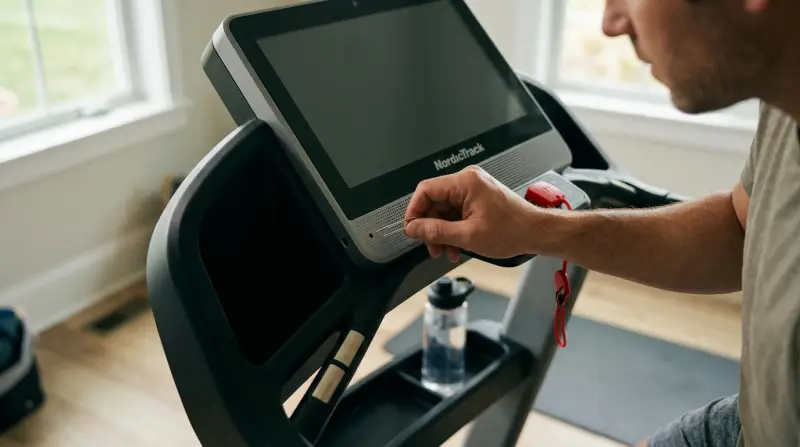
A reset can do more than just fix a frozen screen. It can resolve connectivity issues, clear minor software glitches, and restore lost settings. Sometimes, after a power outage or failed update, the console might not respond as expected. In these cases, a reset is often the fastest solution.
It’s also safer than trying to fix problems by unplugging random wires or opening the motor cover.
Many treadmill owners are surprised to learn that regular resets can help keep the system running smoothly. Think of it like restarting your smartphone when it slows down. It’s a simple step with big benefits for your workouts and the life of your equipment.
Types Of Resets For Nordictrack Treadmills
Not all resets are the same. NordicTrack models use different software and hardware, so the best method depends on your treadmill.
| Reset Type | What It Does | When to Use |
|---|---|---|
| Basic Power Cycle | Restarts the console | Minor glitches, slow response |
| Console Reset | Reboots the display system | Frozen or blank screens |
| Factory Reset | Restores all original settings | Major errors, forgotten passwords |
Some resets only take a minute, while others will erase your saved data and settings. Always start with the simplest option before moving to more advanced steps.
How To Perform A Basic Power Cycle
The power cycle is the first thing you should try if your treadmill isn’t working properly. It’s safe and doesn’t erase any saved workouts.
- Turn off the treadmill using the power switch (usually found near the power cord at the base).
- Unplug the treadmill from the wall outlet. Wait at least 30 seconds. This allows any built-up electrical charge to clear.
- Plug the treadmill back in and switch the power back on.
- Wait for the console to reboot fully.
This simple reset fixes many issues, such as a frozen touchscreen or minor software bugs. If your treadmill works after this, you’re done.
Power Cycle Pro Tips
- If your treadmill is plugged into a surge protector, unplug both the surge protector and treadmill.
- Make sure to wait the full 30 seconds. This gives the internal memory time to clear.
- If you have Wi-Fi issues, reconnect your treadmill after the power cycle.
Console Reset: Step-by-step For Most Nordictrack Models
If a power cycle doesn’t help, the next step is a console reset. This method varies by model, but most NordicTrack treadmills follow similar steps.
- Locate the reset hole or button. It’s usually a small hole on the side or back of the console. Some models have a visible button, while others require a paperclip.
- Insert a paperclip or press the button. Hold for about 10–15 seconds until the screen goes black or restarts.
- Release the button and wait for the console to reboot.
Always check your user manual for the exact location, as it can vary even within the same brand.
Console Reset: What To Watch For
- If the console doesn’t restart, try holding the button for a bit longer.
- Some newer models display a message before restarting.
- Avoid pressing too hard with a paperclip to prevent damage.

How To Perform A Factory Reset On Nordictrack Treadmills
A factory reset erases all user data, custom settings, and saved workouts. Use this only if nothing else works or if you’re selling or giving away your treadmill.
- Power off the treadmill completely.
- Locate the factory reset pinhole (usually at the back or bottom of the console).
- Press and hold the reset button with a paperclip.
- While holding the reset button, turn the treadmill power back on.
- Continue holding until the screen lights up, then release.
After a successful factory reset, your treadmill will reboot as if it’s brand new. You’ll need to set up your Wi-Fi, log into iFit, and adjust any settings.
Factory Reset: What You Lose
| Data | Erased? |
|---|---|
| Workout History | Yes |
| Wi-Fi Settings | Yes |
| iFit Login | Yes |
| Software Updates | No (remains updated) |
Always back up any data you want to keep, such as favorite workouts or custom profiles, before doing a factory reset.
Nordictrack Treadmill Reset By Model
NordicTrack offers several treadmill series, each with its own reset process. Here are the most popular ones:
Commercial Series (2450, 1750, Etc.)
- Most have a reset hole on the side or back of the console.
- Follow the console reset steps above.
Exp Series
- Some models use a combination of buttons (like “Stop” and “Speed +”) instead of a reset hole.
- Hold both buttons together while turning on the treadmill.
C Series
- Similar to the Commercial Series, but some older models require holding the “Incline” and “Speed” buttons at the same time.
Incline Trainers
- Often have a reset button under the console near the safety key slot.
If you don’t have your manual, many are available for free on the NordicTrack support page.
Common Issues Fixed By Resetting
Resetting a NordicTrack treadmill can resolve more than you might expect. Here are some problems a reset can solve:
- Frozen touchscreens
- Bluetooth or Wi-Fi connection failures
- Unresponsive buttons
- Random shutdowns
- App crashes or loading errors
If your treadmill still doesn’t work after a reset, you may have a hardware problem, such as a faulty console or motor. In these cases, contact NordicTrack customer support.
What If Resetting Doesn’t Work?
Sometimes, a reset is not enough. Here’s what to check next:
- Power Supply: Make sure the outlet works by plugging in another device.
- Safety Key: Without the safety key inserted, most treadmills won’t start.
- Cables and Connections: Inspect for loose or damaged cables.
- Software Updates: Outdated firmware can cause problems. Check for updates after resetting.
- Error Codes: Note any error numbers on the screen and look them up in your manual or online.
If you’ve tried all these and your treadmill still isn’t working, professional repair may be needed.
Preventing Future Problems
Most users only think about resets when something goes wrong. But with a few habits, you can avoid many issues:
- Keep your treadmill’s software updated. Updates often fix bugs and add new features.
- Use a surge protector to protect against power spikes.
- Clean the console regularly with a soft, dry cloth to avoid dust buildup.
- Don’t store your treadmill in damp or very hot areas.
- Unplug your treadmill during thunderstorms.
These simple steps can extend the life of your treadmill and reduce the need for resets.
Special Tips For Ifit And Connected Features
Many NordicTrack treadmills come with iFit integration. After resetting, you may need to log in again and re-download any purchased workouts.
- Use a strong, stable Wi-Fi connection for updates and streaming.
- If you forget your iFit password, reset it on the iFit website before trying again on your treadmill.
- Download key workouts for offline use, so you’re not stuck if Wi-Fi fails.
Some users miss that after a factory reset, iFit subscriptions are not lost, but you must log in again.

Safety And Data Privacy
A reset not only fixes technical issues but also protects your privacy when selling or giving away your treadmill. Always perform a factory reset before passing your machine to someone else. This erases personal data, workout history, and any saved credit card info in the iFit app.
Table: Nordictrack Reset Methods At A Glance
Here’s a summary comparing the three main reset methods:
| Method | Time to Perform | Data Loss | Best For |
|---|---|---|---|
| Power Cycle | 1–2 minutes | None | Quick fixes |
| Console Reset | 2–3 minutes | Minimal | Frozen screens |
| Factory Reset | 5–10 minutes | All personal data | Serious errors or reselling |

Frequently Asked Questions
How Often Should I Reset My Nordictrack Treadmill?
You don’t need to reset your treadmill regularly unless you notice slow performance or recurring errors. For most users, a reset every few months or after a major update is enough.
Will Resetting My Treadmill Erase My Ifit Subscription?
No, your iFit subscription stays active. However, you’ll need to log in again after a factory reset. Your workout history may be lost unless it’s saved to the cloud.
What Should I Do If My Treadmill Won’t Power On After Resetting?
First, check the power cord and outlet. If the treadmill still won’t turn on, try a different outlet or check the circuit breaker. If nothing works, there may be a hardware issue.
Can I Reset My Treadmill Without A Manual?
Yes, most reset steps are similar for all NordicTrack models. However, if you’re unsure, you can find user manuals on the NordicTrack website or contact support for help.
What’s The Difference Between A Reset And A Software Update?
A reset restarts the system and clears errors, while a software update installs new features and fixes bugs. Both are helpful, but they serve different purposes.
Getting your NordicTrack treadmill back to full working order doesn’t have to be stressful. With the right reset method, you can solve most common problems in minutes, protect your data, and keep your workouts on track. A little maintenance and quick troubleshooting go a long way in keeping your investment working for years.
1 thought on “How to Reset a Nordictrack Treadmill: Quick and Easy Steps”