
If you own a Shark vacuum, you’ve probably noticed the bright indicator lights on the device. These lights aren’t just for show—they communicate important information about the vacuum’s performance and any problems it might have. But what do those flashing lights really mean? Are they telling you to empty the dustbin, check for a blockage, or something more serious? Understanding these signals is key to keeping your Shark vacuum working at its best. This article will help you decode those flashing lights, explain what different patterns mean, and give you practical steps to solve common issues. Whether you’re a new Shark owner or just want to be prepared, this guide will make things much clearer.
What Do The Lights On A Shark Vacuum Mean?
Many Shark vacuums use colored lights to communicate status, errors, or maintenance needs. The most common light indicators are:
- Solid lights (green, blue, red, or orange)
- Flashing lights (blinking in different colors or patterns)
- No lights (all indicators off)
Each color and pattern has a different meaning, which can vary by Shark model. For example, a solid green light usually means everything is working normally. A flashing red light often signals a blockage or overheating. Some models show a blue or amber light for brushroll status, while others use icons.
Below is a basic comparison of what different lights often mean across popular Shark vacuum models:
| Light Color | Pattern | Common Meaning |
|---|---|---|
| Green | Solid | Normal operation |
| Red | Flashing | Blockage or overheating |
| Blue | Flashing | Brushroll issue |
| Orange | Flashing | Battery low (cordless models) |
| No light | Off | Vacuum not powered or deep fault |
Always check your user manual for model-specific meanings. But the table above covers what most Shark owners will see.
Common Shark Vacuum Flashing Light Patterns
Flashing Red Light
A flashing red light is the most common warning signal on a Shark vacuum. It usually means there’s a problem that needs your attention right away.
Typical causes:
- Blockage: Dirt, hair, or debris stuck in the brushroll, hose, or air path.
- Overheating: The motor is too hot, often due to blockages or a full dustbin.
- Brushroll jam: Hair or string wrapped around the brushroll.
If you see a flashing red light, turn off the vacuum immediately and check for obstructions. Continuing to use the vacuum can cause permanent damage.
Flashing Blue Or Amber Light
Some Shark models have a flashing blue or amber light to indicate issues with the brushroll or floor head.
- Flashing blue: Brushroll is jammed, not spinning, or the floor mode is incorrect.
- Flashing amber/orange: For cordless models, this usually means the battery is low or charging.
Flashing Green Light
A flashing green light is less common. It can mean the vacuum is in a standby mode or the dustbin isn’t seated properly. Sometimes it signals a minor sensor issue.
No Lights
If all lights are off but the vacuum is plugged in, it might be a power issue, a blown fuse, or a serious internal problem.
How To Troubleshoot Flashing Lights On A Shark Vacuum
When a light starts flashing, don’t panic. Here’s a step-by-step troubleshooting guide to get your vacuum running again:
Turn Off And Unplug The Vacuum
Always power off and unplug your Shark vacuum before checking for problems. This keeps you safe and prevents accidental damage.
Check For Blockages
- Dustbin: Empty the bin if it’s full. Even if it looks only half full, sensors might trigger if the max fill line is crossed.
- Hose and wand: Detach and look through the hose for clogs.
- Brushroll: Remove the floor head and check for hair, string, or large debris wrapped around the brush.
Inspect The Filters
Dirty or clogged filters can reduce airflow, causing the motor to overheat and lights to flash.
- Wash or replace filters as recommended (usually every 3 months).
- Make sure all filters are dry before reinstalling.
Check The Brushroll
Some Shark vacuums have a removable brushroll. Take it out and clear any obstructions. If your vacuum has a self-cleaning brushroll, check that the feature is working (you should see hair moving toward the dustbin during use).
Reset The Vacuum
Many Shark vacuums have a reset switch or button (often near the brushroll or motor).
- After clearing blockages and cooling down the vacuum for at least 45 minutes, press the reset button.
- Plug the vacuum back in and power on.
For Cordless Models: Check The Battery
If you see a flashing orange or amber light, the battery might be low.
- Charge the vacuum fully (this may take 3–4 hours).
- If the light keeps flashing, try removing and reseating the battery.
Consult The User Manual
If the problem persists, check your Shark model’s manual or the official Shark support site. Some error codes or light patterns are unique to specific models.
Real-world Examples And Case Studies
Many Shark users face flashing light issues, but simple solutions often work.
- Case 1: A Shark NV356E owner saw a flashing red light after vacuuming a thick rug. After unplugging the vacuum, they found a sock stuck in the hose. Removing it solved the problem.
- Case 2: A Shark Rocket cordless user noticed a flashing amber light. The battery was not fully clicked in. After reseating the battery, the light turned solid green.
- Case 3: An owner of a Shark Navigator Lift-Away saw the blue brushroll indicator flashing. They found long hair wrapped around the brush, removed it, and the light stopped blinking.
These stories show that flashing lights usually mean a fixable issue, not a broken vacuum.
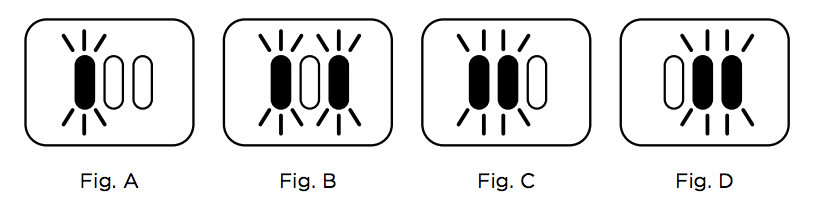
Model-specific Light Meanings
Not all Shark vacuums use the same light codes. Let’s compare three popular models:
| Model | Flashing Light | Meaning | Quick Fix |
|---|---|---|---|
| Shark NV752 | Flashing red | Blockage/overheating | Remove clogs, reset |
| Shark Rocket Cordless | Flashing amber | Low battery | Recharge battery |
| Shark DuoClean | Flashing blue | Brushroll jam | Clear brush, reset |
Always refer to your manual for your exact model, but the table above covers the basics for most Shark vacuums.
Preventing Flashing Light Issues
Many light warnings can be avoided with regular maintenance. Here’s how:
- Empty the dustbin after each use: A full bin can quickly lead to blockages.
- Clean filters every 3 months: Wash or replace as needed.
- Cut away hair from the brushroll weekly: Especially if you have pets or long hair.
- Inspect hoses and airways monthly: Remove any buildup before it becomes a problem.
- Charge cordless models fully: Avoid running the battery to zero.
These habits can prevent many common light warnings and extend the life of your Shark vacuum.
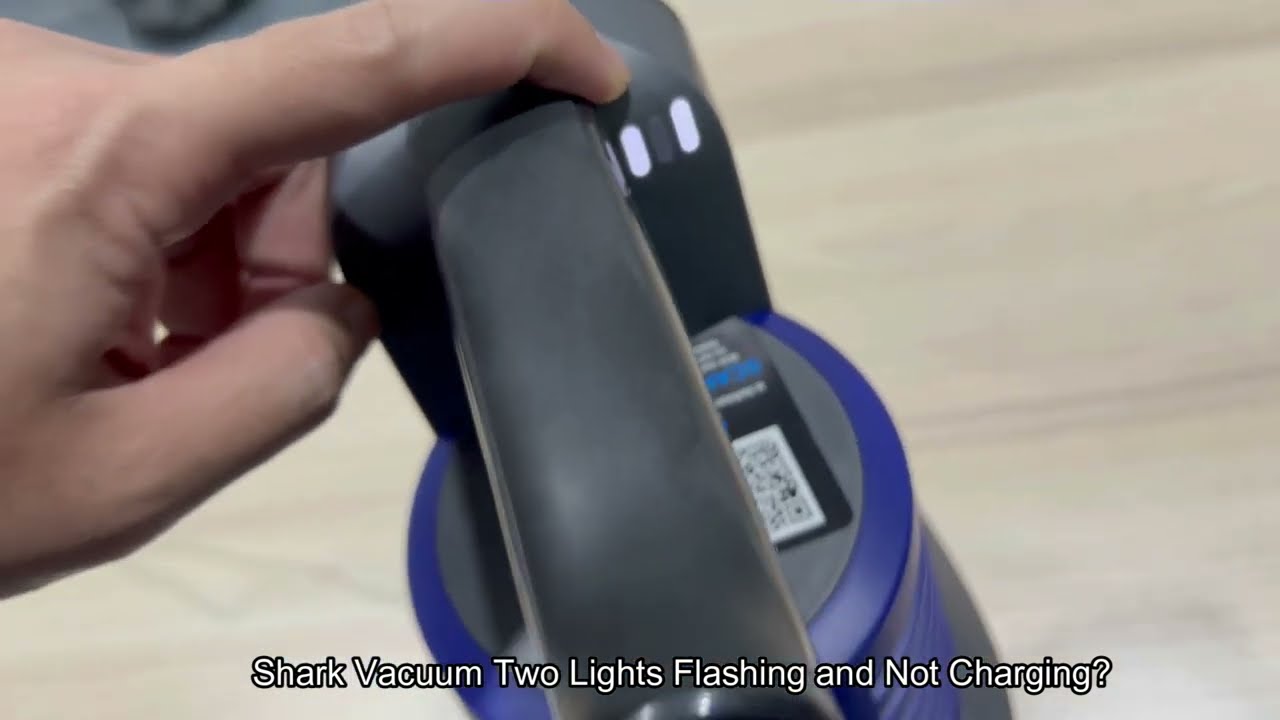
Advanced Tips And Non-obvious Insights
New Shark users often overlook a few key points:
- Sensor sensitivity: Some Shark vacuums have sensitive dust and airflow sensors. Even a small amount of fine dust can trigger a flashing light. Try cleaning sensor areas with a dry cloth.
- Proper assembly: If any part of the vacuum isn’t clicked in perfectly (like the dustbin or wand), the vacuum may flash a warning light and refuse to start.
- Cool-down period: After overheating, some models need a longer cool-down—up to an hour—before they reset.
- Battery age: For cordless models, old batteries can show error lights even when fully charged. Replacement batteries may solve persistent flashing.
When To Call For Professional Help
If you’ve tried all the steps above and the lights keep flashing, it may be time to contact Shark customer support or visit an authorized repair center. Warning signs that need expert attention:
- Burning smell or smoke
- Lights flash immediately after reset
- Vacuum powers off randomly
- Physical damage to cords or battery
Attempting repairs yourself on electrical parts can be risky and may void your warranty.
For more in-depth troubleshooting, visit the official Shark support site.

Frequently Asked Questions
Why Does My Shark Vacuum Have A Flashing Red Light?
A flashing red light usually means there’s a blockage or the vacuum is overheating. Turn off and unplug the vacuum, check the brushroll, hose, and dustbin for clogs, and let the vacuum cool down before restarting.
How Do I Reset My Shark Vacuum After A Flashing Light Warning?
First, unplug the vacuum and let it cool for at least 45 minutes. Clear any blockages, clean the filters, then press the reset button (if your model has one). Plug back in and check if the lights return to normal.
What Does A Flashing Blue Or Amber Light Mean On A Shark Cordless Vacuum?
A flashing blue light often signals a brushroll jam, while a flashing amber or orange light usually means the battery is low or needs charging. Fully charge the vacuum and check for brushroll obstructions.
Can I Keep Using My Shark Vacuum If The Light Is Flashing But It Still Works?
It’s not recommended. A flashing light means something needs attention. Using the vacuum with a warning light can cause overheating, motor damage, or safety risks. Always fix the issue before continuing use.
How Do I Know If A Flashing Light Is A Sensor Issue Or A Real Mechanical Problem?
If you’ve checked for blockages, cleaned filters, and the vacuum is correctly assembled, the problem may be a sensor error. Try gently cleaning sensor areas with a dry cloth. If the problem continues, contact Shark support for further guidance.
Dealing with flashing lights on your Shark vacuum can be frustrating, but most issues are simple to fix. Knowing what the lights mean and following the right steps can save you time, money, and stress. Regular maintenance and attention to the warning signals will keep your Shark vacuum running smoothly for years.