
A Cuisinart grinder not working is usually caused by an improperly seated lid or a jammed burr set, which prevents the safety lock from engaging. In most cases, this is a simple user error requiring no tools. Check that the hopper lid is locked and no beans are blocking the mechanism. If the unit remains silent, inspect the power source and the internal reset switch, as noted in the Cuisinart product support documentation for your model.
Why your Cuisinart grinder not working
| Cause | How common | How to confirm it | Fix it yourself? |
|---|---|---|---|
| Lid sensor | Extremely common | Check locking tab alignment | Yes |
| Jammed burrs | Very common | Listen for motor hum | Yes |
| Power supply | Common | Test outlet with lamp | Yes |
| Internal fuse | Occasional | Unit shows no lights | No |
| Motor failure | Rare | Smell burning plastic | No |
| Board failure | Very rare | Buttons unresponsive | No |
Most users mistake a jammed burr for a dead motor. If you hear a low, strained hum but the blades don’t spin, unplug the unit immediately. This indicates a physical obstruction, usually a rogue stone or unroasted bean. Clearing it saves the motor from overheating.
If the unit is silent, check the lid sensor first. Even a one-millimeter misalignment prevents the circuit from closing.
Distinguish between a fuse and a board failure by observing the display. If the lights are on but the buttons don’t respond, the control board is faulty. Never attempt to bypass a fuse; it’s a critical fire safety component.
Lid sensor misalignment
The most common reason for a grinder to stay silent is that the safety interlock switch on the lid isn’t fully engaged. Cuisinart designs these units so that the motor can’t start unless the hopper lid is pushed down and locked into the precise “on” position. If the plastic tab on the lid is slightly off-center or if there’s ground coffee debris in the locking groove, the machine acts as if the lid is missing and cuts power to the motor as a safety measure.
To confirm this, remove the lid and inspect the small plastic nub or tab that fits into the housing. Look for any coffee dust or oil buildup that might keep the lid from sitting flush against the body. If you see debris, wipe the contact area with a dry cloth. Once clean, place the lid back on the hopper and apply firm, even pressure while turning it clockwise until you feel it click into the locked position. If the machine starts, the issue was simply a lack of contact.
If the lid appears clean and locks firmly but the motor still doesn’t run, check if the hopper itself is seated correctly. Many models have a secondary safety switch at the base of the hopper. If the hopper isn’t pushed all the way down, the interlock won’t trigger. This fix typically takes less than two minutes and costs nothing, as it only requires a bit of cleaning. This isn’t for you if you can’t apply firm pressure to the lid or if you have limited hand strength.
Jammed grinding burrs
Burrs can become stuck if you try to grind beans that are too oily or if you have set the grind size too fine for the current batch of beans. When the burrs are blocked, the motor tries to spin but cannot, which sometimes causes a low humming sound or a complete lack of movement if the internal protection circuit trips. You can tell this apart from a lid sensor issue because a lid sensor issue provides no sound at all, whereas a jam often produces a faint electrical hum or a clicking noise.
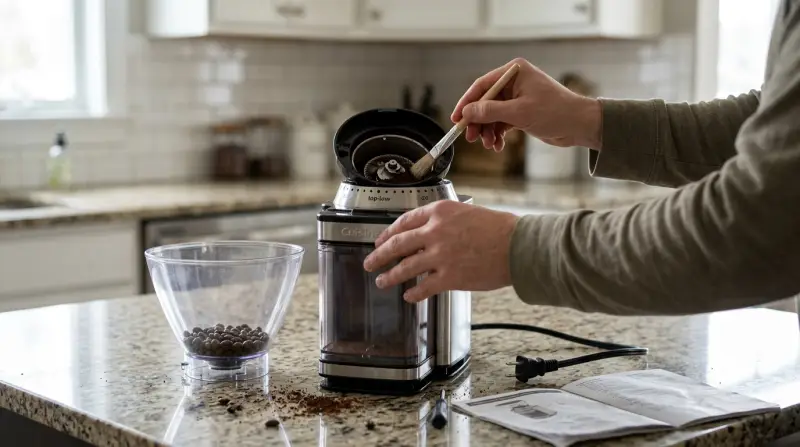
To address this, unplug the device and remove the hopper to expose the upper burr. Most Cuisinart models allow you to lift the upper burr out by turning it slightly to unlock it. Use a small, stiff brush to clear out any compacted coffee grounds or whole beans that are stuck between the teeth of the burrs. If you find a hard object like a stone or a piece of plastic from the coffee bag, remove it carefully.
After cleaning the burrs, replace the upper burr and ensure it’s locked into place. Reattach the hopper and try to run the grinder on the coarsest setting first. If it runs, you can gradually adjust it back to your preferred grind size. This process varies by model — check the label or manual for your specific series to see if the burr is removable. If the burr remains stuck even after cleaning, don’t force it, as you risk breaking the plastic mounting points.
Power and reset issues

A grinder that suddenly stops often has a tripped internal thermal fuse or a simple power interruption. If the machine was running for a long time or grinding a large amount of coffee, the motor may have overheated, triggering a safety shutoff. This is different from a lid issue because the machine usually runs fine until it suddenly dies in the middle of a cycle.
Start by testing the wall outlet with a different appliance to ensure the power source is active. If the outlet works, unplug the grinder and let it sit for at least thirty minutes. This allows the internal motor and thermal fuse to cool down. Some models have a reset button on the bottom of the base; check the underside for a small pinhole or a recessed button. If you find one, gently press it with a paperclip.
If you suspect a tripped fuse, check the power cord for any visible signs of damage or fraying. If the cord looks perfect and the unit still refuses to power on after cooling, you have reached the limit of what you can safely do at home. Attempting to open the base will void your warranty and exposes you to live electrical components. If the unit remains dead after the cooling period, it’s time to contact the manufacturer or a repair center, as the internal electronics may have failed.
The less likely causes
-
Worn motor brushes: If the motor emits a high-pitched screeching or grinding noise before cutting out, the carbon brushes have likely worn down to the springs. You can verify this by checking if the motor smells of ozone or burning plastic. If the brushes are shorter than 1/8 inch, they no longer make consistent contact with the armature.
-
Failed control board: If the digital interface is completely dark despite a verified power supply, the main control board has likely shorted. A common mistake is assuming a fuse has blown; however, most units lack a user-serviceable fuse. If you see scorched capacitors on the board, don’t attempt a repair.
-
Internal wiring break:
-
Broken drive gear: If the motor spins freely but the burrs remain stationary, the internal plastic drive gear has stripped its teeth. This usually occurs when a foreign object, like a stone in the beans, jams the burrs. If you hear a rhythmic clicking, stop immediately to prevent motor burnout.
What a fix usually involves
Fixing a Cuisinart grinder is usually a matter of cleaning or simple mechanical adjustment. If the issue is just debris in the lid sensor or a jam in the burrs, the cost is nothing more than the time it takes to brush out the coffee grounds. These repairs rely on simple maintenance that you can perform with household tools like a soft-bristled brush or a dry cloth.
If the motor or the internal control board has failed, the fix becomes more complex. You’ll likely need to send the unit to an authorized service center. Depending on whether your machine is still under warranty, this could be covered by the manufacturer, or it may involve a cost that approaches a significant portion of the price of a new unit. To get a real quote for a professional repair, check the official support page for your model’s warranty status. Never attempt to replace internal electronic parts yourself, as the risk of fire or electrical shock is high once the housing is opened.
Frequently asked questions

Can I fix a motor that won’t turn?
Yes, if the motor is stuck because of a physical jam in the burrs, you can fix it by cleaning out the coffee grounds. If the motor is dead due to an internal electrical failure, it can’t be fixed at home. Check the burrs first, and if they’re clear, the issue is likely a failed motor or fuse.
How long should a grinder run before it overheats?
Most grinders are designed to run for no more than one to two minutes at a time. If you run it longer, the motor can get hot and trigger the thermal safety shutoff. Always allow the machine to rest for at least ten minutes between long cycles to prevent this safety mechanism from engaging.
Is it safe to open the base of the grinder?
No, it isn’t safe to open the base of your grinder. The housing contains sensitive electrical components and high-voltage parts that pose a risk of shock. Opening the unit also voids your manufacturer warranty. If the problem isn’t with the lid or the burrs, take the machine to a professional technician.
What happens if I use the grinder without the hopper?
The grinder won’t work if the hopper isn’t attached because of the built-in safety interlock switch. This switch is there to prevent you from touching the spinning burrs while the machine is powered. Never try to bypass or trick this switch, as it’s a critical safety feature for preventing injury.
Does it matter what type of beans I use?
Yes, using beans that are very oily can lead to faster buildup in the burrs and more frequent jams. If you prefer dark, oily roasts, you should clean the burrs more often to prevent clogs. If the grinder stops working, check the burrs for excess oil and residue before looking for other causes.
Final Thoughts
If you’ve tried these fixes and the motor still won’t hum, don’t hesitate to contact the manufacturer’s service team directly. They’ll help you determine if your machine needs a professional repair or a simple parts replacement. You’ll be back to brewing your favorite morning coffee in no time at all.