
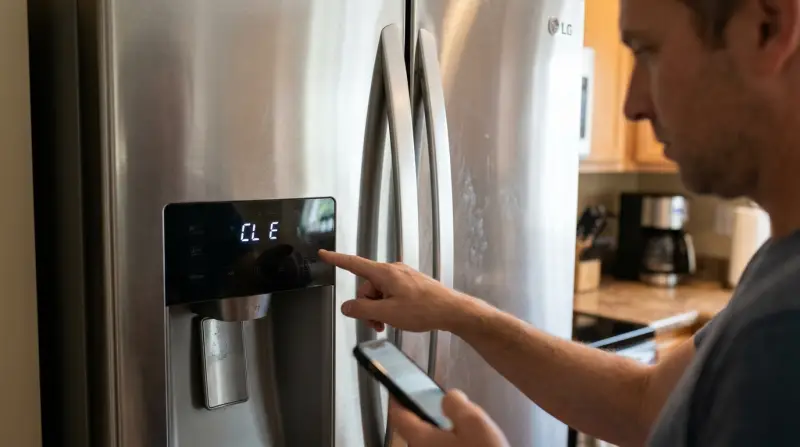
An active child lock feature is the reason you see the Lg Refrigerator Error Code Cl E on your display panel. This isn’t a mechanical failure or a sign of a broken component, so your refrigerator is perfectly safe to keep using. You can confirm this by checking if the control panel buttons are unresponsive when you press them. To clear the code, you simply need to disable the lock mode by holding the dedicated button on your display for the required amount of time.
What the sign is telling you
| What you notice | What it usually means | What to do first |
|---|---|---|
| Display shows Cl E | Child lock is active | Hold Lock button 3 seconds |
| Buttons don’t beep | Control panel is locked | Press Lock button longer |
| Water dispenser won’t run | Child lock is on | Unlock the control panel |
| Panel lights are dim | Child lock is active | Check the lock indicator |
| Settings can’t change | Child lock is on | Hold Lock for 3 seconds |
Most users mistake a locked panel for a blown fuse or a power surge. If you see the “Cl E” code but the lights remain active, the unit is simply in safety mode. Don’t unplug the appliance to reset it.
The decision rule is simple: if the display responds to touch but ignores commands, you’re in lock mode. If the display is completely dark, you have a power delivery issue.
A common mistake is tapping the button repeatedly. The internal sensor requires a sustained, firm press. If you hold for three seconds and nothing happens, verify that the “Lock” icon is illuminated. If the icon is off but the panel remains unresponsive, check for moisture on the glass. Water droplets can cause the sensor to register false inputs or become unresponsive. Wipe the panel dry with a microfiber cloth before attempting to unlock it again.
Child lock mode is enabled
The control panel shows this code because the child lock feature is intentionally keeping the settings from changing. This prevents accidental adjustments to your temperature or ice settings. You can confirm this is the only cause if the refrigerator is cooling normally but the buttons refuse to respond to your touch.
To fix this, locate the button labeled “Lock” or “Child Lock” on your display panel. Press and hold this button firmly for three seconds. On most current LG models, the “Cl” or “CL” text will disappear from the screen, and you’ll hear a beep to signal that the buttons are active again. If you have a different model, the button might need to be held for up to five seconds to disengage the lock. This varies by model — check the label on your specific panel for the exact duration.
A common mistake is assuming the panel is broken when the lock is active. If the display remains unresponsive after the hold duration, verify the control panel isn’t covered in a layer of grease or moisture. These substances interfere with capacitive touch sensors, causing the system to ignore your input.
If you’re unsure if your specific unit is in lock mode, consult the LG Refrigerator owner’s manual to verify the button sequence for your serial number. If the code disappears after this action, the system is working as intended. If you try to change a setting and the code immediately reappears, you’re likely pressing the button too briefly for the software to register the command. Always ensure your finger is clean and dry to ensure the touch sensor registers the press correctly. If the code persists after a successful unlock, unplug the unit for sixty seconds to reset the internal board.
Accidental control panel input
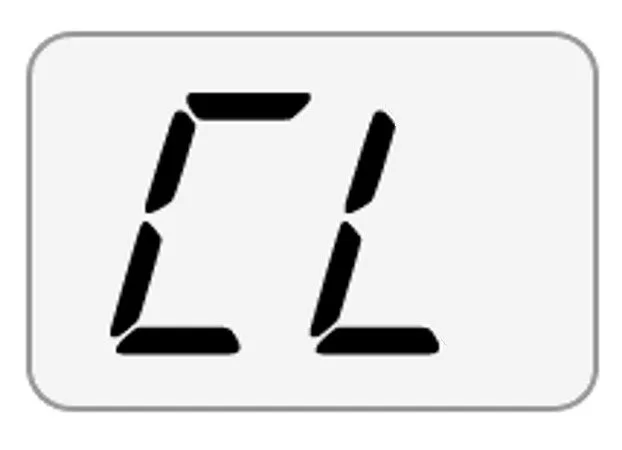
Sometimes the refrigerator enters lock mode because of external pressure or moisture on the touch-sensitive surface. If you lean against the door or if water splashes onto the panel while you’re cleaning, the electronics can interpret those signals as a request to lock the system. This is a common mistake that costs users time when they assume a service call is necessary for a simple software state.
You can tell this apart from the child lock feature because the unit might beep repeatedly or flash the display when this happens. To resolve this, wipe the entire control panel with a soft, dry microfiber cloth to remove any moisture, grease, or debris that might be tricking the sensors. Once the surface is clean, attempt to unlock the panel by holding the Lock button for three seconds.
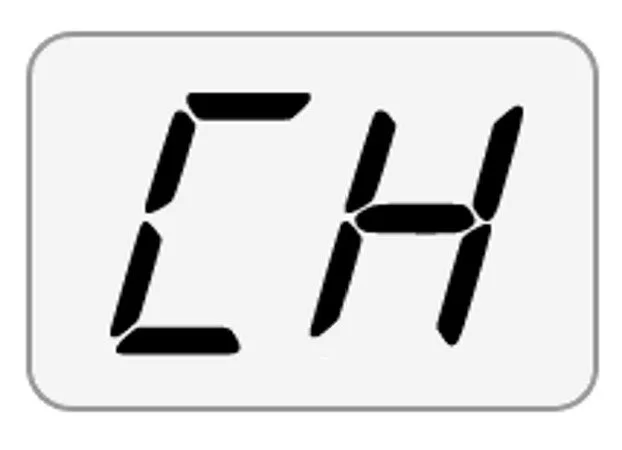
If you’re unsure if the panel is locked or merely dirty, look for a “Cl” or “LC” indicator on the screen.
This isn’t for someone who uses high-pressure water sprayers or harsh chemical cleaners on the display, as these can permanently damage the touch sensors. If the panel remains unresponsive after cleaning and attempting the unlock sequence, the issue may be a stuck sensor rather than an active lock. If the display is unresponsive to your touch even after the code is gone, you should stop attempting to force it. Instead, cycle the power at the circuit breaker for sixty seconds to reset the controller.
Internal software communication error
In rare instances, the display panel shows the code because of a minor communication glitch between the main control board and the display interface. This happens if there’s a voltage fluctuation or a brief power surge that causes the system to reboot into a default safety state.
You can distinguish this from the standard child lock because the code might persist even after you hold the Lock button for the required time. If the lock icon is blinking or unresponsive to your touch, the software has likely hung during a background process.
To address this, perform a hard power reset. Unplug the refrigerator from the wall outlet or flip the circuit breaker off for exactly 60 seconds. This allows the control board to reset. After 60 seconds, restore power and wait for the display to initialize.
If the “Cl” code is still present after the power cycle, don’t attempt to disassemble the door or the panel housing. The internal components, including the capacitors, can hold a lethal charge even when the unit is unplugged.
Many users mistakenly try to force the panel open with a flathead screwdriver, which often cracks the plastic housing and permanently damages the delicate ribbon cables behind the screen. This error turns a simple software reset into a costly hardware replacement.
If the display continues to show the code despite a full power reset, the issue is likely a faulty display PCB. This requires a professional technician to diagnose and replace the part safely. If your unit is under warranty, document the failed reset before calling support to expedite your claim.
When to stop and get help
If the display remains locked after a 60-second power reset, you must contact a qualified technician. Persistent locking indicates a corrupted firmware state that can’t be cleared by the user.
If you see visible burning or smell melting plastic near the control panel, unplug the unit immediately and call for service. This indicates a short circuit that could lead to a fire if power is maintained.
If the touch panel shows broken segments or distorted characters, the screen is physically damaged and requires replacement. Don’t attempt to clean or recalibrate these; the underlying hardware is compromised.
If you notice the refrigerator isn’t cooling at all, the “Cl” code is a secondary symptom of a larger board failure that needs professional repair. In this case, the cooling system has likely entered a safety shutdown mode.
Any work involving the removal of the door panel or the internal wiring is for a licensed technician only. Attempting to bypass wiring or open the housing yourself risks voiding your warranty and poses a severe shock hazard. If the unit is under two years old, always check your warranty status before paying for private service.
Frequently asked questions
Can I use the dispenser while the lock is on?
No, the water and ice dispenser are disabled whenever the child lock is active. This is a safety feature designed to prevent children from dispensing ice or water unintentionally. You must hold the Lock button for three seconds to deactivate the feature before the dispenser will function again. Once the light on the panel turns off, you can use the dispenser normally.
Why does the code come back after I unlock it?
The code usually returns if the Lock button is being pressed by a stuck sensor or if something is leaning against the panel. Check that the panel is clean and dry. If you have confirmed the panel is clean and it still locks itself, there may be a fault in the touch sensor membrane that requires a professional inspection.
Is it safe to leave the refrigerator on with this code?
Yes, it’s perfectly safe to keep the refrigerator running while the code is displayed. The child lock only affects the control panel interface and doesn’t interfere with the cooling system or the compressor. Your food will remain at the correct temperature even while the display shows the lock code, so you don’t need to worry about spoilage.
How long should I hold the button to unlock it?
You should hold the button for three seconds for most models, though some variations require up to five seconds. If you’re unsure, look at the text directly below or above the button on your display panel. It often lists the specific duration required for that model. If you hold it for five seconds and nothing happens, the panel may have a hardware fault.
Does it matter if the door is open while unlocking?
No, the status of the door doesn’t affect the child lock function. You can engage or disengage the lock regardless of whether the refrigerator doors are open or closed. It’s usually easier to perform the reset with the doors closed so you can clearly see the indicator lights on the front of the display panel.
What happens if the power goes out?
The refrigerator is designed to remember its last state, so the child lock will likely remain active after power is restored. If the unit was locked before the power outage, it will still be locked when the power comes back on. Simply follow the standard procedure of holding the Lock button for three seconds to return to normal operation.
Final Thoughts
If the display doesn’t return to normal after you’ve tried these adjustments, there might be a minor glitch in the control board. It’s a good idea to unplug the unit for a few minutes to reset the system. If the issue persists, don’t hesitate to reach out for professional support.